Page 2 - FEATURES; Detachable outlet grilles
FEATURES 4. Real-time air purification display Four colored indicators provide visible notice of current air quality in real time . 5. Detachable outlet grilles Detachable outlet grilles are installed on top/front of the product for easier, more effective cleaning than in other products with fixed c...
Page 3 - DEAR CUSTOMERS; CONTENTS; ONTENT; Co; - Keep your user manual in a readily accessible or visible place. -
2 1 DEAR CUSTOMERS Thank you for using the Coway air purifier. Please be sure to read this user manual to use and maintain your air purifier correctly.If you experience any problems during use, you can refer to this user manual to resolve them.This user manual contains the product warranty, so pleas...
Page 4 - SAFETY INFORMATION; This is safety information. Be sure to follow it!; DANGER : Failing to follow the precautions below may result; force to bend the power cord or put heavy objects on top of it.
SAFETY INFORMATION This is safety information. Be sure to follow it! The warnings are to keep users safe and avoid damage to the product.Please read them carefully and use the product correctly. DANGER : Failing to follow the precautions below may result in serious injury or even death. • Do not use...
Page 5 - • If there is any strange sound, burning smell or smoke from the
4 3 Co w ay • Do not install in places with a lot of humidity or dust or places where water (rainwater) splashes. • Do not use or store combustible gases or flammable materials near this product. • If there is any strange sound, burning smell or smoke from the purifier, immediately unplug the power ...
Page 6 - purifier may be in direct contact with water.; CAUTION : Failing to follow the precautions below may result; unplug the power and call our service center.
WARNING : Failing to follow the precautions below may result in considerable physical injury or property damage. • Do not unplug by pulling on the power cord.• Do not use in baths, showers, swimming pools, or other areas where the purifier may be in direct contact with water. • Children shall not pl...
Page 7 - READ AND SAVE THESE INSTRUCTIONS; SAFE
6 5 • Do not push or lean on the purifier. The purifier may fall over.• Do not use the product for any purpose other than air purification.• Do not let a person be exposed to breeze expelled from the front of purifier for a long time. • Do not allow breeze expelled from the purifier front near your ...
Page 8 - PARTS NAME; Top
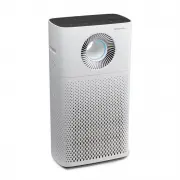
PARTS NAME Top Rear / Front Power cord Top outlet Particle sensor Front cover Pollution indicator Inlet Detachable front outlet grille Detachable Top outlet grille Indicators / Buttons
Page 9 - Components
Page 10 - AIR PURIFICATION PROCESS; Fine Dust filter
AIR PURIFICATION PROCESS ■ Pre-filter Removes relatively large dust and mold, hair, pet fur, etc. The superfine fiber net decreases pressure damage to the filter and increases dust collection efficiency. ■ Fine Dust filter The fine dust filter effectively captures not only large dusts but also fine ...
Page 11 - BEFORE USE; ATION; Please check before use; Take out the filter and remove
10 9 BEFORE USE H ow to Use AIR PURIFIC ATION PROCESS / BEFORE USE 3. Reattach the front cover. Push to reattach the front cover into the two slots on the sides of the purifier. ∗ If the front cover is not properly attached, the product will not operate. FRONT/전면/前 ▶ How to install filter Please che...
Page 12 - Indicators; INDICATORS AND BUTTONS
Indicators INDICATORS AND BUTTONS 1 Auto mode indicator This indicator is illuminated if auto mode is on. 3 Turbo mode indicator This indicator is illuminated if turbo mode is on. 5 Surround mode indicator This indicator is illuminated if Surround mode is on. 7 Filter replacement indicator This indi...
Page 13 - Buttons
12 11 H ow to Use INDIC AT ORS AND BUT TONS Buttons 1 Power button Use when turning the purifier on and off. ∗ When you first start the purifier, it runs in auto mode, and if you turn it off and then on again while it is operating, it restarts in the mode operating before it was turned off (however,...
Page 14 - To operate manually; To use mode operation; Normal flow; HOW TO USE
■ To operate manually Press the power button to turn on the purifier and press the air cleaning level button to select your desired air cleaning level. (Low → Mid → High) ∗ Press the air cleaning level button during mode operation (Auto/Silent/Turbo) to immediately convert to manual operation. ■ To ...
Page 15 - USE; To select air cleaning level
14 13 ■ To select air cleaning level Select Air Jet mode and press the air cleaning level button to select your desired air cleaning level. (Low → Mid → High) ∗ Press the mode button or Rapid Circulation mode button while in Air Jet mode to turn off the flow mode. ∗ When using Air Jet mode, the poll...
Page 16 - Rapid Circulation
▶ ▶ HOW TO USE ∗ Rapid Circulation only operates with Turbo air cleaning level. ∗ Rapid Circulation operates the pollution indicator and air direction to match the mode at each stage. Only the Rapid Circulation indicator is on regardless of mode at each stage . ∗ When all three stages of Rapid Circu...
Page 17 - ADJUST PARTICLE SENSOR; TICLE SENSOR; How to adjust the sensitivity of the particle sensor
16 15 ADJUST PARTICLE SENSOR HOW TO USE / ADJUST P AR TICLE SENSOR H ow to Use 1. Press the air cleaning level and mode buttons simultaneously for at least 1 second while the purifier is operating. 2. The air cleaning level indicator flashes at intervals of about 0.5 second. 4. Press the air cleanin...
Page 18 - CLEANING METHOD; Cleaning the outlet and; Cleaning the detachable front grille
▶ ▶ CLEANING METHOD [Cleaning the grille] [While grille is opened] [While grille is closed] [Cleaning the interior] When reassembling after cleaning the front grille, line up the front grille with the display. Turn the front grille clockwise to fix it in place. Tips - Always unplug the power cord be...
Page 19 - Cleaning the particle sensor; Cleaning the front cover; Cleaning the purifier; CLEANING ME
18 17 ■ Cleaning the particle sensor (clean every 2 months) 1. Clean the particle sensor air inlet and outlet with a soft brush or vacuum cleaner. ∗ Take care that dust does not fall inside the purifier while cleaning. 2. Open the particle sensor cover on the upper side of the purifier. (Use the par...
Page 21 - FILTER REPLACEMENT
20 19 ■ How to replace - Refer to the filter installation method specified on page 10 to replace the filters.- During filter assembly, be sure to check the front.- Only use genuine Coway filters to keep the purifier at its optimal performance.- Always unplug the power plug before replacing filters. ...
Page 22 - How to replace Fine Dust filter (replace every 4 months)
■ How to replace Deodorization/HEPA filters (replace every 12 months) 1. Open the front cover and remove the pre-filter and fine dust filter from the purifier, then take out the deodorization filter and HEPA filter. ▶ ▶ ▶ ▶ ▶ ▶ FILTER REPLACEMENT ■ How to replace Fine Dust filter (replace every 4 mo...
Page 23 - TROUBLE SHOOTING; TER REPL; ther
22 21 TROUBLE SHOOTING FIL TER REPL A CEMENT / TROUBLE SHOO TING O ther The product may not operate correctly due to trivial reasons or inexperienced usage, although these are not product malfunctions. In such cases, the problem can be solved easily without the help of a service center if the follow...
Page 24 - SPECIFICATION
SPECIFICATION Product name Air purifier Model name AP-1516D Dust collection method Mechanical dust collection method(HEPA filter) Safety equipment Power is shut down when the front cover is opened Installation location For indoor use Maximum air cleaning level 6.1 ㎡ /Min Product size 410 mm (width) ...
Page 25 - MEMO
Page 26 - WARRANTY DETAILS; The Guarantee
WARRANTY DETAILS Congratulations on your purchase! It is our aim to provide you with quality products that you can trust. Our products come with guarantees that cannot be excluded under the Australian Consumer Law. You are entitled to a replacement or a refund for a major failure and for compensatio...
Page 27 - Exclusions; Y DE
26 25 O ther Exclusions This warranty does not cover:• Any defect caused by an accident, misuse, abuse, improper operation, lack of reasonable care, unauthorised modification, loss of parts, tampering or attempted repair by a person not authorised by the distributor. • Any product that has been damag...