Page 3 - Multimedia functions; PrSc; 2 Types of backlights (includes 3 custom backlight); Technical specifications
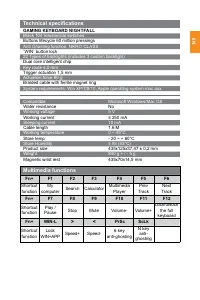
EN Multimedia functions Fn+ F1 F2 F3 F4 F5 F6 Shortcut function My computer Search Calculator Multimedia Player Prev Track Next Track Fn+ F7 F8 F9 F10 F11 F12 Shortcut function Play / Pause Stop Mute Volume- Volume+ Lock/unlock the full keyboard Fn+ WIN-L > < PrSc ScLk Shortcut function Lock W...
Page 4 - Record and storage custom mode key; ● Custom mode button recording storage:; Gaming modes of backlight; Long press the multifunctional knob to switch mode: game mode (knob
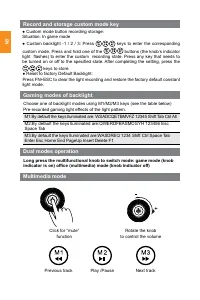
EN Record and storage custom mode key ● Custom mode button recording storage: Situation: In game mode ● Custom backlight -1 / 2 / 3: Press keys to enter the corresponding custom mode, Press and hold one of the buttons (the knob’s indicator light flashes) to enter the custom recording state. Press an...
Page 6 - Warranty liabilities; warranty is available on website:
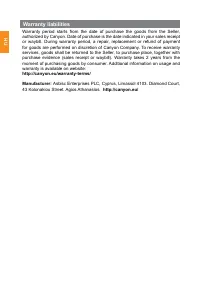
EN Warranty liabilities Warranty period starts from the date of purchase the goods from the Seller, authorized by Canyon. Date of purchase is the date indicated in your sales receipt or waybill. During warranty period, a repair, replacement or refund of payment for goods are performed on discretion ...
Page 7 - BA; Konekcija / Fizičke karakteristike; Tipke za način rada
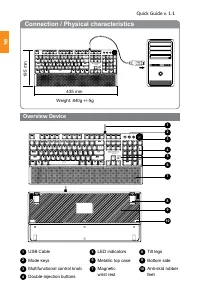
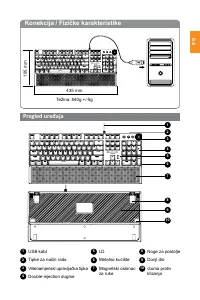
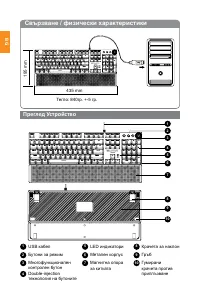
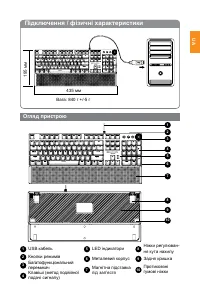
BA Konekcija / Fizičke karakteristike 435 mm Težina: 840g +/-5g 195 mm Pregled uređaja 1 123 45 6 7 8 9 10 5 2 6 3 7 4 USB kabl LD Tipke za način rada Metalno kućište 9 10 Donji dioGuma protiv klizanja Višenamjenski upravljačka tipka Magnetski oslonac za ruke 8 Noge za postolje Double-injection dugm...
Page 8 - Vlažnost u radnom okruženju; GAMING TASTATURA NIGHTFALL; 04 crnih mehaničkih prekidača; Tehničke specifikacije
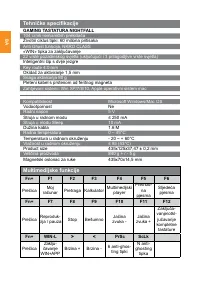
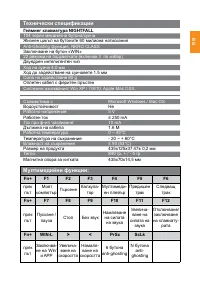
BA Multimedijske funkcije Fn+ F1 F2 F3 F4 F5 F6 Prečica Moj računar Pretraga Kalkulator Multimedijski player Prethod- na pjesma Sljedeća pjesma Fn+ F7 F8 F9 F10 F11 F12 Prečica Reproduk- cija / pauza Stop Bešumno Jačina zvuka - Jačina zvuka + Zaključa - vanje/otkl- jučavanje kompletne tastature Fn+ ...
Page 10 - naredbi putem dodatnog softvera.
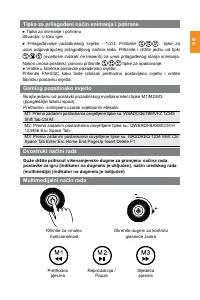
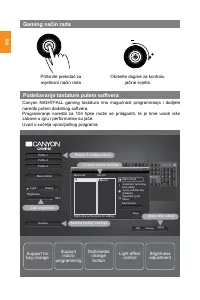
BA Gaming način rada Podešavanje tastature putem softvera Canyon NIGHTFALL gaming tastatura ima mogućnost programiranja i dodjele naredbi putem dodatnog softvera. Programiranje naredbi za 104 tipke može se prilagoditi, te je time uvodi više zabave u igru i performanse su jače. Uvod u sučelja upravlj...
Page 13 - Мултимедийни функции:; ghosting; Гейминг клавиатура NIGHTFALL; Технически спецификации
BG Мултимедийни функции: Fn+ F1 F2 F3 F4 F5 F6 пряк път Моят компютър Търсене Калкула - тор Мултимеди - ен плейър Предишен трак Следващ трак Fn+ F7 F8 F9 F10 F11 F12 пряк път Пускане / пауза Стоп Без звук Намляване на силата на звука Увелича - ване на силата на звука Отключване/ заключване на клавиа...
Page 14 - Дълго натискане на многофункционалния бутон за превключване; Ctrl Alt
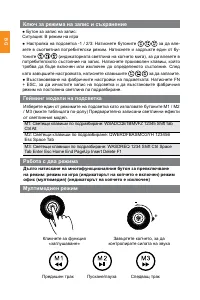
BG Ключ за режима на запис и съхранение ● Бутон за запис на запис: Ситуация: В режим на игра● Настройка на подсветка -1 / 2/3: Натиснете бутоните за да вле - зете в съответния потребителски режим. Натиснете и задръжте един от бу - тоните (индикаторната светлина на копчето мига), за да влезете в потр...
Page 15 - Кликнете, за да превклю
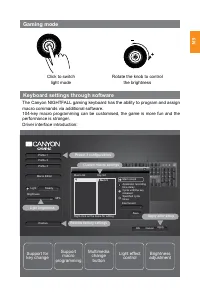
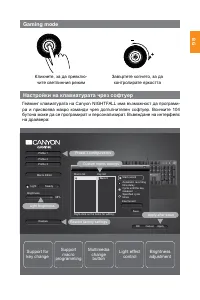
BG Gaming mode Настройки на клавиатурата чрез софтуер Гейминг клавиатурата на Canyon NIGHTFALL има възможност да програми - ра и присвоява макро команди чрез допълнителен софтуер. Всичките 104 бутона може да се програмират и персонализират. Въвеждане на интерфейс на драйвера: Кликнете, за да превклю...
Page 16 - ГАРАНЦИЯ; ционните условия посетете
BG ГАРАНЦИЯ Гаранционният срок на този продукт е 2 години.Той започва да тече от датата на закупуването му от оторизиран партньор на CANYON. Датата, посочена във фактурата или касовата бележка е датата на закупуване. По време на га - ранционния период всеки ремонт, замяна или възстановяване на стойн...
Page 17 - USB kabel
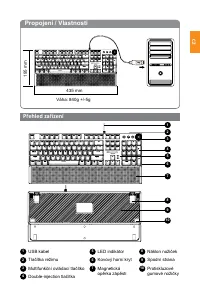
CZ Propojení / Vlastnosti 435 mm Váha: 840g +/-5g 195 mm Přehled zařízení 1 123 45 6 7 8 9 10 5 2 6 3 7 4 USB kabel LED indikátor Tlačítka režimu Kovový horní kryt 9 10 Spodní strana Protiskluzové gumové nožičky Multifunkční ovládací tlačítko Magnetická opěrka zápěstí 8 Náklon nožiček Double-injecti...
Page 18 - Multimediální funkce; Kompatibilita; Herní klávesnice NIGHTFALL; Rozestup mezi klávesami 4,0 mm; Technické specifikace
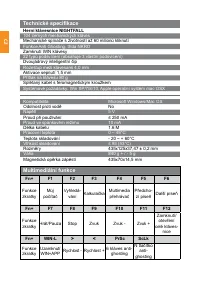
CZ Multimediální funkce Fn+ F1 F2 F3 F4 F5 F6 Funkce zkratky Můj počítač Vyhledá- vání Kalkulačka Multimedia přehrávač Předcho - zí píseň Další píseň Fn+ F7 F8 F9 F10 F11 F12 Funkce zkratky Hrát/Pauza Stop Zvuk Zvuk - Zvuk + Zamknutí/ otevření celé kláves- nice Fn+ WIN-L > < PrSc ScLk Funkce z...
Page 20 - makro příkazy pomocí dalšího softwaru.
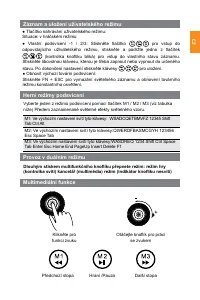
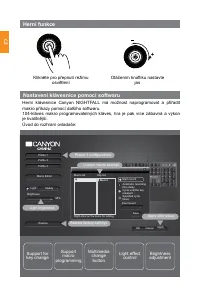
CZ Herní funkce Nastavení klávesnice pomocí softwaru Herní klávesnice Canyon NIGHTFALL má možnost naprogramovat a přiřadit makro příkazy pomocí dalšího softwaru. 104-kláves makro programovatelných kláves, hra je pak více zábavná a výkon je kvalitnější. Úvod do rozhraní ovladače: Klikněte pro přepnut...
Page 21 - Záruční podmínky; Výrobce
CZ Záruční podmínky Záruční doma začíná dnem nákupu produktu od CANYON autorizovaného prodejce. Datum nákupu je datum uvedené na prodejním dokladu nebo na dodacím listu. Záruční doba, oprava, výměna nebo náhrada za nákup se řídí dle pravidel společnosti CANYON. Pro reklamaci produktu je potřeba vrát...
Page 22 - USB Kábel
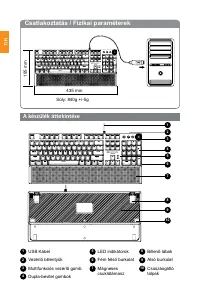
HU Csatlakoztatás / Fizikai paraméterek 435 mm Súly: 840g +/-5g 195 mm A készülék áttekintése 1 123 45 6 7 8 9 10 5 2 6 3 7 4 USB Kábel LED indikátorok Vezérlő billentyűk Fém felső burkolat 9 10 Alsó burkolatCsúszásgátló talpak Multifunkciós vezérlő gomb Mágneses csuklótámasz 8 Billenő lábak Dupla-b...
Page 23 - Multimédiás funkciók; Üzemi hőmérséklet; NIGHTFALL GAMING BILLENTYŰZET; Fekete, 104 mechanikus billentyű; Technikai specifikáció
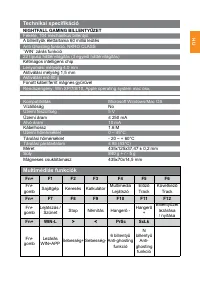
HU Multimédiás funkciók Fn+ F1 F2 F3 F4 F5 F6 Fn+ gomb Sajátgép Keresés Kalkulátor Multimedia Lejátszó Előző Track Következő Track Fn+ F7 F8 F9 F10 F11 F12 Fn+ gomb Lejátszás / Szünet Stop Némítás Hangerő - Hangerő + Billentyűzet lezárása / nyitása Fn+ WIN-L > < PrSc ScLk Fn+ gomb Lezárás WIN+...
Page 24 - Nyomja meg hosszan a multifunkciós gombot a háttérvilágítás mód
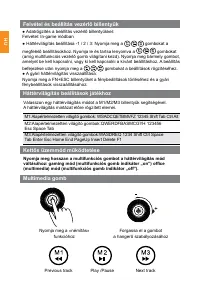
HU Felvétel és beállítás vezérlő billentyűk ● Adatrögzítés a beállítás vezérlő billentyűkkel: Felvétel: In-game módban ● Háttérvilágítás beállítása -1 / 2 / 3: Nyomja meg a gombokat a megfelelő beállításokhoz. Nyomja le és tartsa lenyomva a gombokat (amíg multifunkciós vezérlő gomb világítani kezd)....
Page 25 - A Canyon NIGHTFALL gaming billentyűzet képes macro parancsok
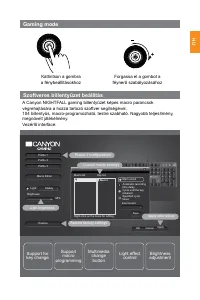
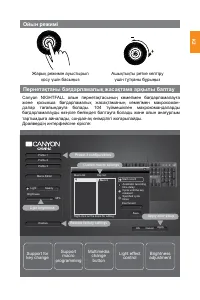
HU Gaming mode Szoftveres billentyűzet beállítás A Canyon NIGHTFALL gaming billentyűzet képes macro parancsok végrehajtására a hozzá tartozó szoftver segítségével. 104 billentyűs, macro-programozható, testre szabható. Nagyobb teljesítmény, megnövelt játékélmény. Vezérlő interface: Kattintson a gombr...
Page 28 - Functii multimedia; deblocați; 2 Tipuri iluminiare din spate (include 3 iluminari customizate); Specificatii tehnice
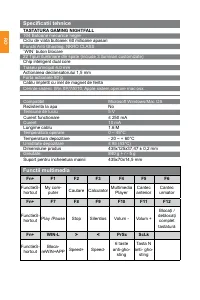
RO Functii multimedia Fn+ F1 F2 F3 F4 F5 F6 FunctieS- hortcut My com- puter Cautare Calculator Multimedia Player Cantec anterior Cantec urmator Fn+ F7 F8 F9 F10 F11 F12 FunctieS- hortcut Play /Pause Stop Silentios Volum - Volum + Blocați / deblocați complet tastatură Fn+ WIN-L > < PrSc ScLk Fu...
Page 29 - Înregistrați și stocați tasta personalizată; ● Buton personalizat inregistare memorie:; Modurile de jocuri de iluminare din spate; Apăsați lung butonul multifuncțional pentru a comuta: mod de joc; Rotiți butonul
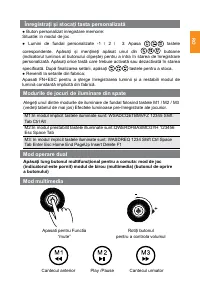
RO Înregistrați și stocați tasta personalizată ● Buton personalizat inregistare memorie: Situatie: in modul de joc ● Lumini de fundal personalizate -1 / 2 / 3: Apasa tastele corespondente. Apăsați și mențineți apăsat unul din butoane (indicatorul luminos al butonului clipește) pentru a intra în star...
Page 30 - atribui comenzi macro prin programe software suplimentare.
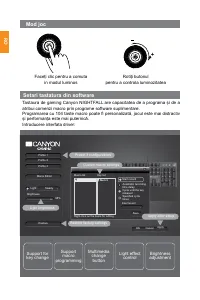
RO Mod joc Setari tastatura din software Tastaura de gaming Canyon NIGHTFALL are capacitatea de a programa și de a atribui comenzi macro prin programe software suplimentare. Programarea cu 104 taste macro poate fi personalizată, jocul este mai distractiv și performanța este mai puternică. Introducer...
Page 31 - Garantie
RO Garantie Perioada de garanție începe de la data achiziționării bunurilor de la vânzător, autorizate de Canyon. Data achiziționării este data indicată în chitanța sau factura. În timpul perioadei de garanție, reparatia, înlocuirea sau rambursarea plății se efectuează numai cu acordul Canyon. Pentr...
Page 33 - Функции мультимедии; Start; Игровая клавиатура NIGHTFALL; Технические характеристики
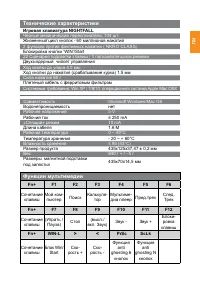
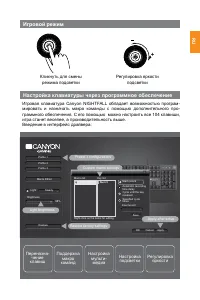
RU Функции мультимедии Fn+ F1 F2 F3 F4 F5 F6 Сочетание клавиш Мой ком - пьютер Поиск Калькуля - тор Мультиме - диа плеер Пред.трек След. Трек Fn+ F7 F8 F9 F10 F11 F12 Сочетание клавиш (Играть / Пауза) Стоп (выкл./ вкл. Звук) Звук - Звук + Блоки - ровка клавиш Fn+ WIN-L > < PrSc ScLk Сочетание ...
Page 34 - Tab Ctrl Alt
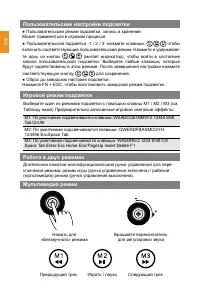
RU Пользовательские настройки подсветки ● Пользовательский режим подсветки, запись и хранение. Может применяться в игровом процессе● Пользовательская подсветка -1 / 2 / 3: нажмите клавиши, чтобы включить соответствующий пользовательский режим. Нажмите и удерживай - те одну из кнопок (мигает индикато...
Page 36 - Гарантийные обязательства; Импортер в Российской Федерации:
RU Гарантийные обязательства Гарантийный срок исчисляется со дня покупки товара у авторизованного Продавца Canyon. За дату покупки принимается дата, указанная на Вашем товарном чеке илиже на транспортной накладной. В течение гарантийного периода ремонт, замена либо возврат средств за покупку произво...
Page 37 - RS; Konekcija / fizičke karakteristike; Metalni deo kućišta
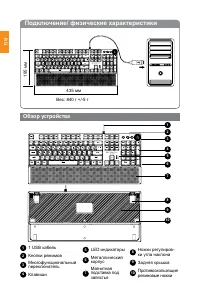
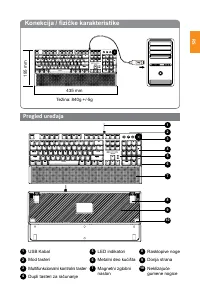
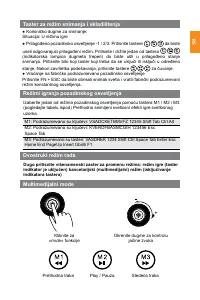
RS Konekcija / fizičke karakteristike 435 mm Težina: 840g +/-5g 195 mm Pregled uređaja 1 123 45 6 7 8 9 10 5 2 6 3 7 4 USB Kabal LED indikatori Mod tasteri Metalni deo kućišta 9 10 Donja strana Neklizajuće gumene nogice Multifunkcionalni kontrolni taster Magnetni zglobni naslon 8 Rasklopive noge Dup...
Page 38 - Kompatibilnost; Gejmerska tastatura NIGHTFALL; Anti Ghosting funkcija, NKRO klasa; Tehnička specifikacija
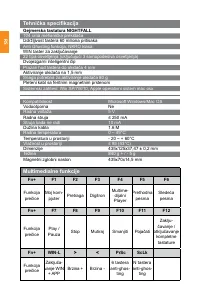
RS Multimedialne funkcije Fn+ F1 F2 F3 F4 F5 F6 Funkcija prečice Moj kom- pjuter Pretraga Digitron Multime- dijalni Player Prethodna pesma Sledeća pesma Fn+ F7 F8 F9 F10 F11 F12 Funkcija prečice Play / Pauza Stop Mutiraj Smanjiti Pojačati Zaklju- čavanje / otključavanje kompletne tastature Fn+ WIN-L...
Page 40 - dodjeljivanja makro naredbi putem dodatnog softvera.
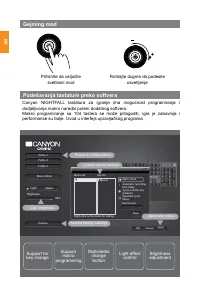
RS Gejming mod Podešavanja tastature preko softvera Canyon NIGHTFALL tastatura za igranje ima mogućnost programiranja i dodjeljivanja makro naredbi putem dodatnog softvera. Makro programiranje sa 104 tastera se može prilagoditi, igra je zabavnija i performanse su bolje. Uvod u interfejs upravljačkog...
Page 42 - Tlačidlá voľby režimu
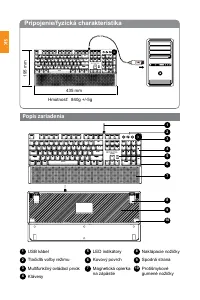
Pripojenie/fyzická charakteristika 435 mm Hmotnosť: 840g +/-5g 195 mm Popis zariadenia 1 123 45 6 7 8 9 10 5 2 6 3 7 4 USB kábel LED indikátory Tlačidlá voľby režimu Kovový povrch 9 10 Spodná strana Protišmykové gumené nožičky Multifunkčný ovládací prvok Magnetická opierka na zápästie 8 Naklápacie n...
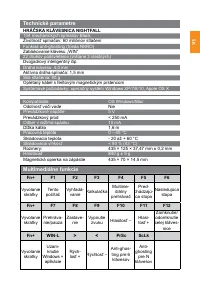
Page 43 - Multimediálne funkcie; HRÁČSKA KLÁVESNICA NIGHTFALL; 04 mechanických spínačov Black; Technické parametre
Multimediálne funkcie Fn+ F1 F2 F3 F4 F5 F6 Vyvolanie skratky Tento počítač Vyhľadá - vanie Kalkulačka Multime- diálny prehrávač Pred- chádzajú- ca stopa Nasledujúca stopa Fn+ F7 F8 F9 F10 F11 F12 Vyvolanie skratky Prehráva- nie/pauza Zastave- nie Vypnutie zvuku Hlasitosť – Hlasi- tosť + Zamknutie/ ...
Page 44 - Záznam a uloženie vlastného režimu klávesu; ● Obnovenie pôvodného podsvietenia:; Hráčske režimy podsvietenia; Stlačením
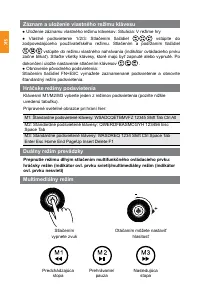
SK Záznam a uloženie vlastného režimu klávesu ● Uloženie záznamu vlastného režimu klávesov: Situácia: V režime hry● Vlastné podsvietenie 1/2/3: Stlačením tlačidiel vstúpite do zodpovedajúceho používateľského režimu. Stlačením a podržaním tlačidiel vstúpite do režimu vlastného nahrávania (indikátor o...
Page 45 - softvéru programovať a priraďovať makrá.
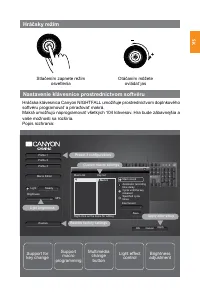
SK Hráčsky režim Nastavenie klávesnice prostredníctvom softvéru Hráčska klávesnica Canyon NIGHTFALL umožňuje prostredníctvom doplnkového softvéru programovať a priraďovať makrá. Makrá umožňujú naprogramovať všetkých 104 klávesov. Hra bude zábavnejšia a vaše možnosti sa rozšíria. Popis rozhrania: Stl...
Page 46 - Záručné podmienky; tejto webovej stránke:
Záručné podmienky Záručná doba začína plynúť dňom zakúpenia tovaru od autorizovaného predajcu značky Canyon. Za deň zakúpenia sa považuje dátum uvedený na pokladničnom bloku alebo faktúre. Počas záručnej doby môže spoločnosť Canyon na základe vlastného uváženia zariadenie opraviť, vymeniť alebo vrát...
Page 47 - Kovinsko ohišje
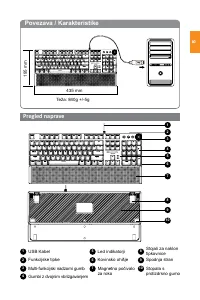
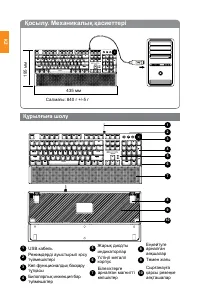
SI Povezava / Karakteristike 435 mm Teža: 840g +/-5g 195 mm Pregled naprave 1 123 45 6 7 8 9 10 5 2 6 3 7 4 USB Kabel Led indikatorji Funkcijske tipke Kovinsko ohišje 9 10 Spodnja stran Stopala s protizdrsno gumo Multi-funkcijski nadzorni gumb Magnetno počivalo za roko 8 Stojali za naklon tipkovnice...
Page 48 - Multimedijske funkcije; Igralna tipkovnica NIGHTFALL; Globina pritiska 4,0 mm; Tehnične specifikacije
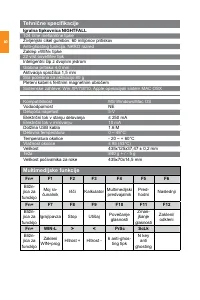
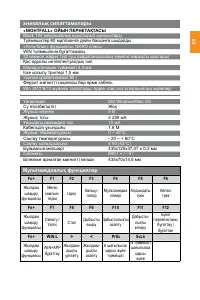
SI Multimedijske funkcije Fn+ F1 F2 F3 F4 F5 F6 Bližn - jica za funckijo Moj ra- čunalnik Išči Kalkulator Multimedijski predvajalnik Pred- hodni Naslednji Fn+ F7 F8 F9 F10 F11 F12 Bližn - jica za funckijo Igraj/pavza Stop Utišaj Povečanje glasnosti Zman- jšanje glasnosti Zakleni/ odkleni Fn+ WIN-L &...
Page 49 - Snemanje in shranjevanje po meri; ● Gumb za snemanje po meri:; Gaming načini osvetlitve; Kliknite za »utišanje«
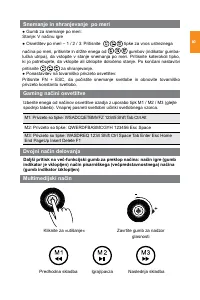
SI Snemanje in shranjevanje po meri ● Gumb za snemanje po meri: Stanje: V načinu igre● Osvetlitev po meri – 1 / 2 / 3: Pritisnite tipke za vnos ustreznega načina po meri, pritisnite in držite enega od gumbov (indikator gumba- lučka utripa), da vstopite v stanje snemanja po meri. Pritisnite katerokol...
Page 50 - Predstavitev gonilnika vmesnika:
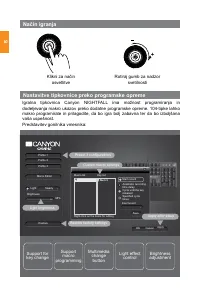
SI Način igranja Nastavitve tipkovnice preko programske opreme Igralna tipkovnica Canyon NIGHTFALL ima možnost programiranja in dodeljevanja makro ukazov preko dodatne programske opreme. 104-tipke lahko makro programirate in prilagodite, da bo igra bolj zabavna ter da bo izboljšana vaša uspešnost. P...
Page 51 - Garancija
SI Garancija Garancijski rok začne teči od dneva nakupa blaga od prodajalca. Datum nakupa je datum, naveden na računu ob prodaji ali na dobavnici. Med garancijskim obdobjem je popravilo, zamenjava ali vračilo plačila za blago, opravljeno po presoji podjetja Canyon. Za uveljavljanje garancije se blag...
Page 53 - Мультимедиалық функциялар; хникалық сипаттамалары
KZ Мультимедиалық функциялар Fn+ F1 F2 F3 F4 F5 F6 Жылдам шақыру функциясы Менің компью- терім Іздеу Кальку- лятор Мультимедиа плеері Алдындағы трек Келесі трек Fn+ F7 F8 F9 F10 F11 F12 Жылдам шақыру функциясы Ойнату / Үзіліс Стоп Дыбысты өшіру Дабыстылықты азайту Дабысты- лықты көтеру Бүкіл пернета...
Page 54 - Режимді ауыстырып қосу үшін көп функционалдық тұтқаны
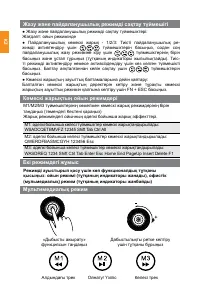
KZ Жазу және пайдаланушылық режимді сақтау түймешігі ● Жазу және пайдаланушылық режимді сақтау түймешіктері: Жағдаят: ойын режимінде ● Пайдаланушылық көмескі жарық - 1/2/3: Тиісті пайдаланушылық ре - жимді активтендіру үшін түймешіктерін басыңыз, содан соң пайдаланушылық жазу режиміне кіру үшін түйм...
Page 56 - КЕПІЛДІК МІНДЕТТЕМЕЛЕР; сатып алған сәттен бастап 2 жыл қолданылады. Пайдалану және кепіл; Шағымдарды; мающее претензии в РК, импортёр в Казахстане: ТОО «Асбис Казахстан»
KZ КЕПІЛДІК МІНДЕТТЕМЕЛЕР Кепілдік кезеңі тауар Canyon компаниясымен уәкілеттік берілген Сатушыдан сатып алынған күннен басталады. Сатып алыну күні – сіздің чекте немесе жүкқұжатта көрсетілген күн. Кепілдік кезеңінің ішінде жөндеу, ауыстыру немесе тауарлар үшін төлемді қайтару Canyon компаниясының қ...
Page 58 - Функції мультимедії; Ігрова клавіатура NIGHTFALL; Технічні характеристики
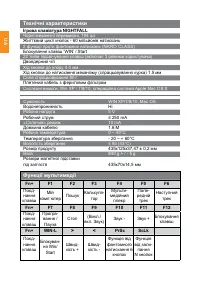
UA Функції мультимедії Fn+ F1 F2 F3 F4 F5 F6 Поєд - нання клавіш Мій комп`ютер Пошук Калькуля - тор Мульти - медійний плеєр Попе - редній трек Наступний трек Fn+ F7 F8 F9 F10 F11 F12 Поєд - нання клавіш Програ - вання / Пауза Стоп (Викл./ вкл. Звук) Звук - Звук + Блокування клавіш Fn+ WIN-L > <...
Page 59 - для перемикання режиму: режим гри (ручка управління увімкнута)
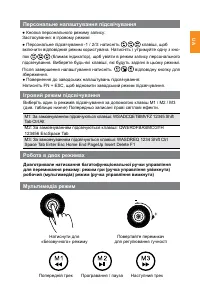
UA Персональне налаштування підсвічування ● Кнопка персонального режиму запису: Застосування: в ігровому режимі● Персональне підсвічування -1 / 2/3: натисніть клавіші, щоб включити відповідний режим користувача. Натисніть і утримуйте одну з кно - пок (блимає індикатор), щоб увійти в режим запису пер...
Page 61 - ГАРАНТІЙНІ ЗОБОВ’ЯЗАННЯ
UA ГАРАНТІЙНІ ЗОБОВ’ЯЗАННЯ Гарантійний термін обчислюється з дня покупки товару у авторизованого Продавця Canyon. За дату покупки приймається дата, зазначена на Вашо - му товарному чеку або ж на транспортній накладній. Протягом гарантійного періоду ремонт, заміна або повернення коштів за покупку про...