Canyon Hazard - User Manual
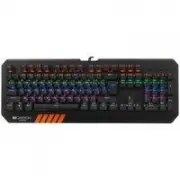
The HAZARD gaming keyboard is a customizable mechanical device designed primarily for gamers, blending physical specifications with programmable function keys and lighting modes. This product emphasizes durability (60 million keystrokes), ergonomic design (104 mechanical switches, anti-ghosting), and system compatibility across Windows/Mac OS. Its key features include adjustable brightness controls via shortcuts like FN+1–FN+8, customizable backlight patterns for gaming modes, and a dedicated personalized mode activated by FN+9 or FN+0. Warranty terms (typically 2 years) are also included in some manuals, covering repairs and replacements under specific conditions. The instruction set broadly covers technical specs, component diagrams, function key mappings, and operational modes–focusing on setup, customization, and maintenance rather than step-by-step procedures.


Table of Contents:
- Page 1 – Keyboard Physical Specifications and Components
- Page 2 – Hardware Specifications and Function Key Shortcuts
- Page 3 – Custom Modes, Gaming Modes, and Warranty Liability
- Page 4 – Keyboard Overview and Core Specifications
- Page 5 – Personalized Mode and System Control
- Page 6 – Brightness Control and Warranty Information
- Page 7 – Detailed Keyboard Components and Performance
- Page 8 – Electrical Ratings and Mode Management
- Page 9 – Backlight Modes and Warranty Terms
- Page 10 – Keyboard Component Labeling and Mechanics
- Page 11 – Electrical Parameters and Button Functions
- Page 12 – Lamp Models and Manufacturer Warranty
- Page 13 – Keyboard Structure and Component Overview
- Page 14 – Function Key Assignments and Electrical Specifications
- Page 15 – TV Signal Reception Modes and Warranty
- Page 16 – Keyboard Overview and Technical Specifications
- Page 17 – Multimedia Keyboard Specifications and Mapping
- Page 18 – Gaming Modes and Warranty Details
- Page 19 – Keyboard Component Diagram and Performance Metrics
- Page 20 – Shortcut Functions and Personalization Storage
- Page 21 – Lighting Fixture Specifications and Warranty
- Page 22 – Keyboard Component Diagram and Mechanical Specs
- Page 23 – Function Key Mapping and System Parameters
- Page 24 – Lighting Settings and Warranty Information
EN
Quick Guide v. 1.0
Connection / Physical characteristics
450.5 mm
Weight: 980g +/-5g
163.7 mm
Overview Device
3
1
6
5
1
5
2
6
3
7
4
4
2
7
Cover
Tripod
Keycap
Bottom cover
Indicator light
Foot pad
Wire
"Loading the manual" means you need to wait until the file loads and becomes available for online reading. Some manuals are very large, and the time they take to appear depends on your internet speed.
Was this manual helpful?
Helpful for 5 of 5 readers
About this manual
- Brand
- Canyon
- Model
- Hazard
- Document type
- User Manual
- Category
- Keyboard
- Language(s)
- English, Russian
- Pages
- 24
- File size
- 2.2 MB
- Format
Summary
Physical dimensions, weight, and a diagram detailing components such as the cover, keycaps, indicator light, tripod, bottom cover, wire, and foot pad.
Technical specifications including button lifespan, actuation force, operating system compatibility, and a chart mapping function keys to actions like opening the calculator or adjusting brightness.
Details on custom mode key functions, gaming modes with corresponding backlight patterns, and warranty terms including the period, repair/refund policy, and manufacturer contact information.


