Canon TR - User Manual

Canon TR – User Manual, read for free online in PDF format. We hope this helps you resolve any issues you may have. If you have further questions, please contact us through the contact form.


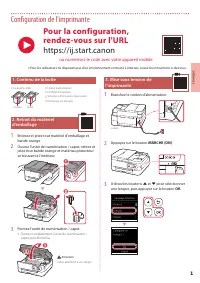
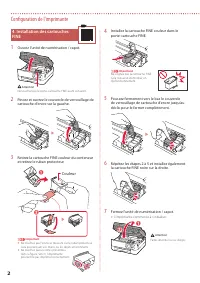
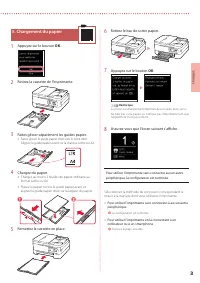
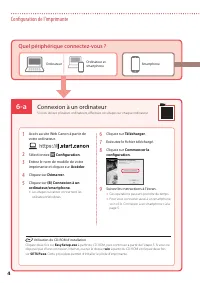
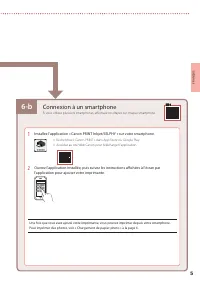
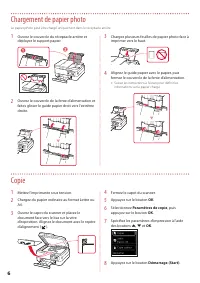

Table of Contents:
- Page 3 – Setting Up the Printer; Removing Packing Materials; Turning on the Printer; ON; For Setup, visit the URL; or scan the code with your mobile device
- Page 4 – Installing the FINE Cartridges; Color
- Page 5 – OK
- Page 6 – Connecting to a Computer; What device are you connecting?
- Page 7 – Connecting to a Smartphone
- Page 9 – Configuration de l'imprimante; Contenu de la boîte; Appuyez sur le bouton; Pour la configuration,; ou numérisez le code avec votre appareil mobile
- Page 10 – Couleur
- Page 11 – Chargement du papier; Faites glisser séparément les guides papier.
- Page 12 – Connexion à un ordinateur
- Page 13 – Connexion à un smartphone
Commencez par lire
Sécurité et informations
importantes
(addendum).
Démarrage
Getting Started
Read
Safety and Important Information
(addendum) first.
"Loading the manual" means you need to wait until the file loads and becomes available for online reading. Some manuals are very large, and the time they take to appear depends on your internet speed.
Was this manual helpful?
About this manual
- Brand
- Canon
- Model
- TR
- Document type
- User Manual
- Language(s)
- English, French
- Pages
- 16
- File size
- 3.4 MB
- Format
Other Manuals for Canon TR
Summary
1 ENGLISH Setting Up the Printer 1. Box Contents • FINE Cartridges Color Black • Power Cord • Setup CD-ROM • Safety and Important Information • Getting Started (this manual) 2. Removing Packing Materials 1 Remove and dispose of any packing materials and orange tape. 2 Open the scanning unit / cover,...
2 Setting Up the Printer 4. Installing the FINE Cartridges 1 Open the scanning unit / cover. Caution Do not touch the FINE cartridge holder until it stops moving. 2 Pinch and open the ink cartridge locking cover on the left-hand side. 3 Remove the Color FINE cartridge from the container and remove t...
3 ENGLISH 5. Loading Paper 1 Press the OK button. 2 Remove the cassette from the printer. 3 Slide apart the paper guides. • Slide the right paper guide to the right edge. Align the front paper guide with the Letter or A4 mark. 4 Load paper. • Load 2 or more sheets of Letter or A4 sized plain paper. ...
Ask a question
Related manuals
Popular Canon Other


More Canon Other models
 Canon T 70 User Manual
 Canon t70 User Manual
 Canon T90 Manual
 Canon T 90 User Manual
 Canon T2000 User Manual
 Canon TC80N3 Manual
 Canon TS User Manual
 Canon TS-E 24mm f3.5L II User Manual
 Canon TS-E 45mm f2.8 User Manual
- Canon TS-E 90mm f/2.8 User Manual
 Canon TS-E 90mm f/2.8L MACRO User Manual
- Canon TS-E 135mm f/4L MACRO User Manual