Canon EOS 200D - User Manual
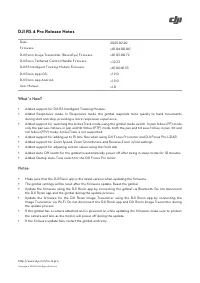
The firmware update process for the DJI RS 4 Pro gimbal system covers its core components–including the gimbal unit, image transmitter, control handle, and mobile apps–for iOS and Android platforms. This documentation highlights key enhancements like support for advanced transmission technologies (such as Intelligent Tracking Module and SDR Transmission), performance optimizations across camera modes, and new features like responsive stabilization and self-diagnostic checks. Safety protocols emphasize secure updates while ensuring uninterrupted connectivity between devices during firmware upgrades.


Table of Contents:
- Page 1 – Firmware Update Information for DJI RS 4 Pro
- Page 2 – Release Notes for Gimbal and Transmitter Components
- Page 3 – Gimbal and Transmitter Feature Updates
DJI RS 4 Pro Release Notes
http://www.dji.com/rs-4-pro
Copyright © 2025 DJI All Rights Reserved.
Date:
2025.02.20
Firmware:
v01.04.00.00
DJI Ronin Image Transmitter (RavenEye) Firmware:
v01.03.00.72
DJI Ronin
Tethered Control Handle
Firmware:
v32.33
DJI RS Intelligent Tracking Module Firmware:
v01.00.01.53
DJI Ronin App iOS:
v1.9.0
DJI Ronin App Android:
v1.9.0
User Manual:
v1.0
What’s New?
•
Added support for DJI RS Intelligent Tracking Module.
•
Added Responsive mode. In Responsive mode, the gimbal responds more quickly to hand movements
during start and stop, providing a more responsive experience.
•
Added support for switching the ActiveTrack mode using the gimbal mode switch. In pan follow (PF) mode,
only the pan axis follows; in pan and tilt follow (PTF) mode, both the pan and tilt axes follow; in pan, tilt and
roll follow (FPV) mode, ActiveTrack is not supported.
•
Added support for adding up to 15 lens files when using DJI Focus Pro motor and DJI Focus Pro LiDAR.
•
Added support for Zoom Speed, Zoom Smoothness, and Reverse Zoom in/out settings.
•
Added support for adjusting custom values using the front dial.
•
Added Auto Off switch for the gimbal to automatically power off after being in sleep mode for 10 minutes.
•
Added Startup Auto-Tune switch for the DJI Focus Pro motor.
Notes:
•
Make sure that the DJI Ronin app is the latest version when updating the firmware.
•
The gimbal settings will be reset after the firmware update. Reset the gimbal.
•
Update the firmware using the DJI Ronin app by connecting the gimbal via Bluetooth. Do not disconnect
the DJI Ronin app and the gimbal during the update process.
•
Update the firmware for the DJI Ronin Image
Transmitter
using the DJI Ronin app by connecting the
Image
Transmitter
via Wi-Fi. Do not disconnect the DJI Ronin app and DJI Ronin Image
Transmitter
during
the update process.
•
If the gimbal has a camera attached and is powered on while updating the firmware, make sure to protect
the camera and lens as the motors will power off during the update.
•
If the firmware update fails, restart the gimbal and retry.
"Loading the manual" means you need to wait until the file loads and becomes available for online reading. Some manuals are very large, and the time they take to appear depends on your internet speed.
Was this manual helpful?
About this manual
- Brand
- Canon
- Model
- EOS 200D
- Document type
- User Manual
- Language(s)
- English
- Pages
- 3
- File size
- 101.2 KB
- Format
Summary
Details on firmware updates for the DJI RS 4 Pro, listing version numbers for components, and outlining new features including Intelligent Tracking Module, Responsive mode, and customizable settings, along with safe update procedures.
Release notes detailing firmware versions for the gimbal, Image Transmitter, Tethered Control Handle, and associated iOS and Android applications. Covers new features like DJI SDR Transmission and performance optimizations, along with precautions for updating firmware.
Release notes covering firmware versions for the gimbal and Image Transmitter, including updates on gimbal self-check, stabilization improvements, and necessary update instructions.
Ask a question
Related manuals
Popular Canon Other


More Canon Other models
 Canon EOS 50E User Manual
 Canon EOS 60Da Manual
 Canon EOS 70 User Manual
 Canon EOS 70D User Manual
 Canon EOS 77D User Manual
 Canon EOS 100 User Manual
- Canon EOS 200D MARK II User Manual
 Canon EOS 250D User Manual
 Canon EOS 300 D User Manual
 Canon EOS350D Manual
 Canon EOS 350D DIGITAL Manual
 Canon EOS 400D User Manual