Page 2 - THANK YOU FOR MAKING CAFÉ A PART OF YOUR HOME.
2 THANK YOU FOR MAKING CAFÉ A PART OF YOUR HOME. We take pride in the craftsmanship, innovation and design that goes into every Café product, and we think you will too. Among other things, registration of your appliance ensures that we can deliver important product information and warranty details w...
Page 4 - IMPORTANT SAFETY INFORMATION; READ ALL INSTRUCTIONS BEFORE USING THE APPLIANCE; WARNING; SAVE THESE INSTRUCTIONS; IMPORTANT SAFEGUARDS
4 IMPORTANT SAFETY INFORMATION READ ALL INSTRUCTIONS BEFORE USING THE APPLIANCE SAVE THESE INSTRUCTIONS WARNING Read the instructions carefully before using the appliance for the first time. Save these instructions for reference. The appliance is designed for domestic use and may only be operated in ...
Page 5 - RISK OF FIRE OR ELECTRIC SHOCK
5 IMPORTANT SAFETY INFORMATION READ ALL INSTRUCTIONS BEFORE USING THE APPLIANCE SAVE THESE INSTRUCTIONS WARNING Read the instructions carefully before using the appliance for the first time. Save these instructions for reference. The appliance is designed for domestic use and may only be operated in ...
Page 6 - Getting Started; General Information; Coffee Bean Container
6 Getting Started NOTE: For household use only. General Information ■ We DO NOT recommend using oily beans (found in some dark roasts). See page 17 for more information. ■ Place drip tray before turning on the machine. The machine rinses upon first start up. ■ Recommend starting at medium grind size...
Page 7 - Components
7 Components Coffee Spout Coffee Brewer Service Door Coffee Spout Light Steam Wand Disposal Box Disposal Tray Water Tank Coffee Grinder Control Knob Water Tank Lid Coffee Bean Container Lid Coffee Bean Container Drip Tray Drip Tray Grate Steam wand only available with models C7CEBBS3RD3, C7CEBBS4RW3...
Page 8 - Accessories
8 Accessories NOTE: Milk Pitcher is only included with model C7CEBBS3RD3, C7CEBBS4RW3, C7CEBBS2RS3 Milk Pitcher Cleaning Kit Pin/Needle Cleaning Solution (3) Microfiber Cleaning Cloth Cleaning Brush Warnings Warnings Warnings Warning Warnings Warnings Warnings Warnings Warnings Warnings Warning Warn...
Page 9 - Control Panel
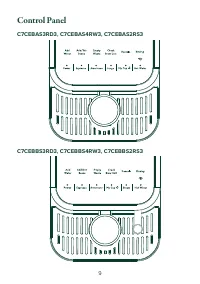
9 Control Panel C7CEBAS3RD3, C7CEBAS4RW3, C7CEBAS2RS3 C7CEBBS3RD3, C7CEBBS4RW3, C7CEBBS2RS3
Page 10 - Functions; CAUTION
10 Functions NOTE: Some settings can be changed through the SmartHQ App.NOTE: Coffee ground amounts and espresso volumes may vary depending on bean type and machine settings. Espresso Espresso is a full-flavored coffee drink served as a concentrated shot. Cappuccinos, Flat Whites, and Lattes are all...
Page 11 - Alerts
11 Alerts WiFi Your espresso machine is WiFi compatible. See page 20 for how to connect and use the SmartHQ app. Add Water The Add Water indicator appears when there is no water left in the tank or the tank is removed from the machine. If this occurs during a cycle, simply add water then press the b...
Page 12 - Using your Espresso Machine; Coffee Grinder Knob; Removable Steam Wand
12 Using your Espresso Machine NOTE: Appearance may vary slightly by model. NOTE: For household use only. Coffee Grinder Knob Add coffee beans to the coffee bean container. While grinding is occurring, adjust the coffee grinder knob to desired grind size. Align the desired grind circle to the arrow ...
Page 13 - How to Turn on the Machine; Power
13 Using your Espresso Machine How to Turn on the Machine Press the Power button to turn on the machine. Espresso, Lungo, Americano, and My Cup Functions NOTE: Make sure you have a coffee cup or container placed under the dis- penser before using any function. To use any function, press the desired ...
Page 14 - Steam and Hot Water; Custom Dispense Amount
14 Using your Espresso Machine Steam and Hot Water CAUTION To avoid possible burns to body parts and/or other injury from hot steam, do not touch liquids or steam wand during or after steaming. Do not remove pitcher until steaming is complete. Hold milk pitcher by the handle. NOTE: Steam function is...
Page 15 - Care and Cleaning; Cleaning the Espresso Machine; Cleaning the Coffee Brewer and Service Area
15 Care and Cleaning WARNING Allow heating element to completely cool to avoid risk of fire or injury and disconnect power prior to cleaning or service. CAUTION To avoid possible burns to body parts and/or other injury from hot steam, do not touch liquids or steam wand during or after steaming. Do n...
Page 16 - Descaling Process
16 Care and Cleaning Descaling Process DO NOT use any cleaning agents not provided with the product or recommended in this manual. NOTE: If descale is not properly completed, machine may timeout and return to Powered ON state. This will affect the quality of the coffee until all cleaning solution is...
Page 17 - Tips
17 Tips ■ Espresso is often mistakenly thought of as a drink made with darker roast beans. Some coffee roasters even mark their product as "Espresso Coffee". This is misleading because espresso is mainly distinguished from other coffee drinks by the correct grind size and brew process, not t...
Page 18 - Troubleshooting
18 Troubleshooting Problem Cause Solution Appliance does not work/does not turn on. No power is connected to the appliance. ■ Check cable and plug are connected to power and press the "on" button. ■ Check GFI plug. No or delayed response from pressing buttons on control panel. Panel may be d...
Page 20 - WiFi Connect – SmartHQ; WiFi Connect
20 WiFi Connect – SmartHQ WiFi Connect Press and hold the Espresso and Americano buttons simultaneously for 3 seconds to turn on the WiFi function. The espresso maker will beep to confirm the action and the WiFi icon will appear on the screen. WiFi icon will flash on UI. When the machine is successful...
Page 21 - FCC/IC COMPLIANCE STATEMENT
21 FCC/IC COMPLIANCE STATEMENT FCC/IC COMPLIANCE STATEMENT: This device complies with Part 15 of the FCC Rules. Operation is subject to the following two conditions: 1. This device may not cause harmful interference, and 2. This device must accept any interference received, including interference th...
Page 22 - Limited Warranty
22 Limited Warranty ■ Improper installation, delivery or maintenance. ■ Failure of the product if it is abused, misused, or used for other than the intended purpose or used commercially. ■ Damage caused after delivery. ■ Damage to the product caused by accident, fire, floods or acts of God. ■ Incide...
Page 23 - Consumer Support; CONTACT US; REGISTER YOUR APPLIANCE
23 49-9000016 Rev. 1 07-21 GEA Consumer Support CONTACT US If you are not satisfied with the service you receive from Café Appliances, contact us on our Website with all the details including your phone number, or write to: General Manager, General Manager, Customer Relations | GE Appliances, Applia...
Page 25 - Machine à expresso automatique AFFECT-Cafe + mousseur; MANUEL D’UTILISATION
Machine à expresso automatique AFFECT-Cafe + mousseur MANUEL D’UTILISATION FRANÇAIS . Il est temps que les électroménagers se dotent d’une personnalité. La vôtre.
Page 28 - MESURES DE SÉCURITÉ IMPORTANTES; CONSIGNES DE SÉCURITÉ IMPORTANTES; LISEZ TOUTES LES INSTRUCTIONS AVANT D'UTILISER L'APPAREIL; CONSERVEZ CES INSTRUCTIONS
4 AVERTISSEMENT Lisez les instructions attentivement avant d’utiliser cet appareil pour la première fois. Conservez ces instructions pour référence. Cet appareil est destiné à un usage domestique et il doit être utilisé conformément aux présentes instructions seulement. Manipulez-le avec soin et ave...
Page 29 - RISQUE D’INCENDIE OU DE CHOC ÉLECTRIQUE
5 AVERTISSEMENT Lisez les instructions attentivement avant d’utiliser cet appareil pour la première fois. Conservez ces instructions pour référence. Cet appareil est destiné à un usage domestique et il doit être utilisé conformément aux présentes instructions seulement. Manipulez-le avec soin et ave...
Page 30 - Pour commencer; Informations générales; Compartiment des grains de café
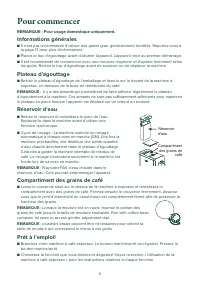
6 Pour commencer REMARQUE : Pour usage domestique uniquement. Informations générales ■ Il n'est pas recommandé d'utiliser des grains gras, généralement torréfiés. Reportez-vous à la page 17 pour plus d'informations. ■ Placez le bac d'égouttage avant d'allumer l'appareil. L'appareil rince au premier ...
Page 31 - Composants
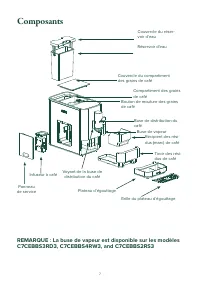
7 REMARQUE : La buse de vapeur est disponible sur les modèles C7CEBBS3RD3, C7CEBBS4RW3, and C7CEBBS2RS3 Buse de distribution du café Infuseur à café Panneau de service Voyant de la buse de distribution du café Buse de vapeur Récipient des rési-dus (marc) de café Tiroir des rési-dus de café Réservoir...
Page 32 - Accessoires
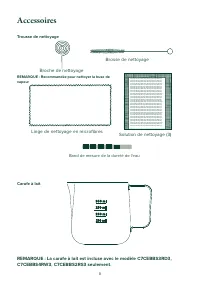
8 Accessoires Pin/Needle Cleaning Solution (3) Microfiber Cleaning Cloth Cleaning Brush Warnings Warnings Warnings Warning Warnings Warnings Warnings Warnings Warnings Warnings Warning Warnings Warnings Warnings Warnings Warnings Warnings Warning Warnings Warnings Warnings Warnings Warnings Warnings...
Page 33 - Panneau de commande
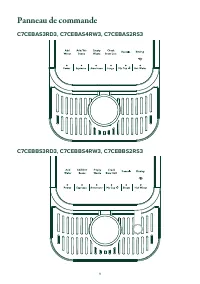
9 Panneau de commande C7CEBAS3RD3, C7CEBAS4RW3, C7CEBAS2RS3 C7CEBBS3RD3, C7CEBBS4RW3, C7CEBBS2RS3
Page 34 - Fonctions; Expresso
10 Fonctions REMARQUE : Réglages ont une valeur par défaut que l’on peut modifier avec l’application SmartHQ. REMARQUE : Les quantités de café moulu et les volumes d'espresso peuvent varier en fonction du type de grain et des réglages de la machine. Expresso L'espresso est une boisson au café pleine...
Page 35 - Alertes; Vider les déchets; Voyant d’indication lumineux
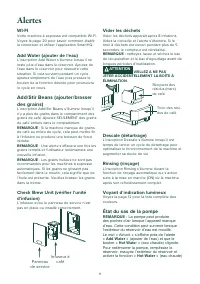
11 Alertes WI-FI Votre machine à expresso est compatible Wi-Fi. Voyez la page 20 pour savoir comment établir la connexion et utiliser l’application SmartHQ. Add Water (ajouter de l'eau) L’inscription Add Water s’illumine lorsqu’il ne reste plus d’eau dans le réservoir. Ajoutez de l'eau dans le réser...
Page 36 - Utilisation de votre machine à expresso; Bouton de mouture des grains de café; Buse de vapeur amovible
12 Utilisation de votre machine à expresso REMARQUE : L'apparence peut varier légèrement selon le modèle.REMARQUE : Pour usage domestique uniquement. Bouton de mouture des grains de café Ajoutez des grains dans le compartiment des grains de café. Pendant que la mouture se déroule, réglez le bouton d...
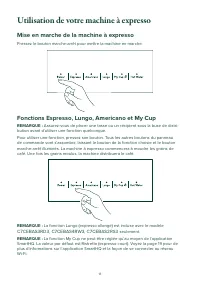
Page 37 - Mise en marche de la machine à expresso; Fonctions Espresso, Lungo, Americano et My Cup
13 Utilisation de votre machine à expresso Mise en marche de la machine à expresso Pressez le bouton marche-arrêt pour mettre la machine en marche. Fonctions Espresso, Lungo, Americano et My Cup REMARQUE : Assurez-vous de placer une tasse ou un récipient sous la buse de distri- bution avant d’utilis...
Page 38 - Quantité de distribution personnalisée
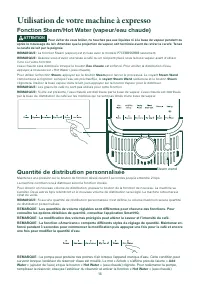
14 Utilisation de votre machine à expresso Fonction Steam/Hot Water (vapeur/eau chaude) ATTENTION Pour éviter de vous brûler, ne touchez pas aux liquides ni à la buse de vapeur pendant ou après le moussage du lait. Attendez que la projection de vapeur soit terminée avant de retirer la carafe. Tenez ...
Page 39 - Entretien et Nettoyage; Nettoyage de la machine à café expresso; Nettoyage de l’infuseur et de la zone de service
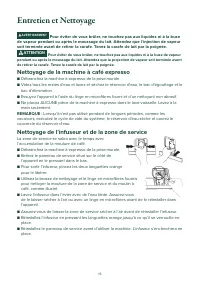
15 Entretien et Nettoyage AVERTISSEMENT Pour éviter de vous brûler, ne touchez pas aux liquides ni à la buse de vapeur pendant ou après le moussage du lait. Attendez que l’injection de vapeur soit terminée avant de retirer la carafe. Tenez la carafe de lait par la poignée. ATTENTION Pour éviter de v...
Page 40 - Procédure de détartrage; Vidage du système; Vérification de la dureté de votre eau
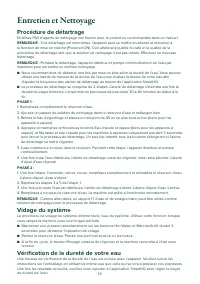
16 Entretien et Nettoyage Procédure de détartrage N'utilisez PAS d'agents de nettoyage non fournis avec le produit ou recommandés dans ce manuel. REMARQUE : Si le détartrage est interrompu, l’appareil peut se mettre en attente et retourner à la fonction de mise en marche (Powered ON). Ceci altérera ...
Page 41 - Conseils
17 Conseils ■ L'espresso est souvent considéré à tort comme une boisson à base de grains torréfiés plus foncés. Certains torréfacteurs marquent même leur produit comme « Café Espresso ». Ceci est trompeur car l'espresso se distingue principalement des autres boissons au café par la taille de mouture...
Page 42 - Dépannage
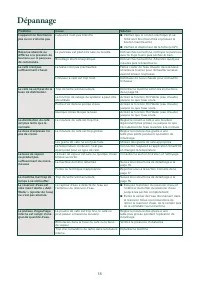
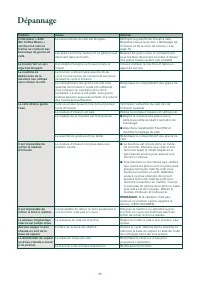
18 Dépannage Problème Cause Solution L’appareil ne fonctionne pas ou ne s’allume pas L’appareil n’est pas branché. ■ Vérifiez que le cordon électrique et sa fiche sont bien branchés et pressez le bouton marche-arrêt. ■ Vérifiez le disjoncteur de la fiche (si GFI). Réponse absente ou différée à la pr...
Page 44 - Connexion Wi-Fi – SmartHQ; SmartHQ
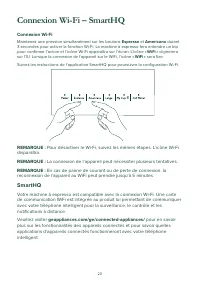
20 Connexion Wi-Fi – SmartHQ Connexion Wi-Fi Maintenez une pression simultanément sur les boutons Espresso et Americano durant 3 secondes pour activer la fonction Wi-Fi. La machine à expresso fera entendre un bip pour confirmer l’action et l’icône Wi-Fi apparaîtra sur l’écran. L’icône « WiFi » clig...
Page 45 - Renseignements réglementaires
21 Renseignements réglementaires DÉCLARATION DE CONFORMITÉ DE LA FCC/IC : Cet appareil est conforme aux prescriptions de la partie 15 des règles de la FCC. Le fonctionnement de cet équipement est assujetti aux deux conditions suivantes : 1. Cet appareil ne doit pas causer de brouillage préjudiciable...
Page 46 - Garantie limitée
22 Garantie limitée ■ Une installation, une livraison ou un entretien inadéquats. ■ La défaillance du produit en raison d’un usage abusif, d’une mauvaise utilisation, ou s’il est utilisé à des fins commerciales ou autres que celles prévues. ■ Les dommages survenus après la livraison.■ Tout dommage o...
Page 47 - Soutien au consommateur; COMMUNIQUEZ AVEC NOUS
23 49-9000016 Rev. 1 07-21 GEA Soutien au consommateur COMMUNIQUEZ AVEC NOUS Si vous n’êtes pas satisfait du service reçu de Café Appliances, contactez-nous sur notre site Web avec tous les détails, y compris votre numéro de téléphone, ou encore écrivez à : General Manager, General Manager, Customer...