Brother DCP-J752DW - User Manual

Brother DCP-J752DW – User Manual, read for free online in PDF format. We hope this helps you resolve any issues you may have. If you have further questions, please contact us through the contact form.


* ISO/IEC 24734
** ISO/IEC 24735
***Approx. cartridge yield is declared in accordance with ISO/IEC 24711
Apple iPad, iPhone, iPod, iPod touch, Mac and the Mac logo are trademarks of Apple Inc., registered in the U.S. and other countries.
PICASA and Google Drive™ are trademarks of Google Inc. Use of these trademarks are subject to Google Permissions.
FLICKR is a registered trademark of Yahoo! Inc
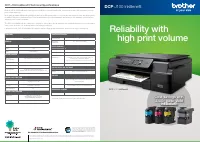
As part of the Print 3.0 range the DCP-J752DW offers enhanced connectivity and simple to use functionality in a compact and stylish machine, making it ideal
for any home or home office environment.
The DCP-J752DW offers a range of functions to enhance usability, including an automatic document feeder for scanning and copying. Print from and scan
directly to USB memory sticks or media cards without the need to turn on your PC.
Navigate the simple to follow menu system via the 6.8cm touchscreen with touch sensitive control panel to access the features you need.
Print 3.0 offers more connectivity than ever before: Print directly from your mobile device with the Brother iPrint&Scan app or wirelessly using Apple AirPrint
or Google Cloud Print™. You can also connect directly to the web from your printer in order to scan to or print from Google Drive™, Facebook™,
FLICKR
®
, Dropbox, PICASA™, EVERNOTE™, SkyDrive
®
and Box. Whilst Brother’s apps and solutions offer simple, time saving and document management
solutions to
help you work smarter.
Connect to your wireless network straight from the box with the DCP-J725DW’s simple set up wizard, to share your machine across multiple users with ease.
The DCP-J752DW offers automatic 2-sided printing to save paper, and a choice of standard or high yield ink cartridges to suit your
needs, whilst maintaining high print quality for professional looking documents.
All Brother inkjet multifunctional printers incorporate a four individual inks system meaning that you only replace the ink which runs out, reducing waste
and saving you money. The DCP-J752DW complies with the strict ENERGY STAR and German Blue Angel environmental standards and ensures low
energy consumption, low noise levels and a recycle-friendly design.
DCP
-J752DW
Contact:
Brother International Europe Ltd
Brother House, 1 Tame Street, Audenshaw, Manchester M34 5JE
Tel:+ 44 (0)161- 330 6531 Fax:+ 44 (0)161- 330 5520
Website: www.brother .com
All specifications correct at time of printing. Brother is a registered trademark of Brother Industries Ltd.
Brand product names are registered trademarks or trademarks of their respective companies.
General
Colour Printer
Colour Copier
Colour Scanner
Paper Handling
Memory Capacity
64MB
Connectivity
USB 2.0, Wireless 802.11b/g/n
Mobile Connectivity
iPrint&Scan app, AirPrint, Google Cloud Print
™
Display
6.8cm LCD touchscreen display
Speed (Laser Comparable)*
Up to 12ipm mono & 10ipm colour
2-sided Print
Automatic for A4/LTR/EXE/A5 paper sizes
Resolution
Up to 6,000 x 1,200 (Vertical x Horizontal)
Borderless Printing
Available for A4, LTR, A6, Photo 10x15cm, Indexcard, Photo-L, Photo-2L
Minimum Droplet Size
1.5pl (when used with Brother BP71 paper, see Supplies section)
Speed**
Up to 6ipm mono and colour from ADF
Resolution
Up to 1,200dpi (colour & mono)
Multi copy
Yes (99 copies)
Enlargement / Reduction Ratio 25% - 400%
Other Features
N-in1, Poster Printing
Resolution
Optical: Up to 1,200 x 2,400dpi
Interpolated: Up to 19,200dpi
Scan Speed
From 3.37 seconds Mono & 4.27 seconds Colour at 100dpi
Scan Format
JPEG, BMP, PDF, TIFF, PNG (USB Flash Memory Drive supports PDF Mono
& Colour, JPEG, TIFF)
Scan to
Email / OCR / Image / File / Card / USB Flash Drive / Web Services
Paper Input
100 sheet standard paper tray
20 sheet photo paper tray
20 sheet automatic document feeder (ADF)
Paper Output
50 sheets
Paper Handling Sizes
A4, LTR, EXE, A5, A6, Photo 10 x 15cm, Indexcard, Photo-L, Photo-2L,
C5, Com-10, DL Envelope, Monarch
Media Type
Plain, Inkjet, Glossy, Transparency
Direct Printing and Scanning
USB
PictBridge, USB Flash Memory Drive
Media Cards
Memory Stick Duo/Pro Duo/Micro, Secure Digital (SD),
Secure Digital High Capacity
(SDHC), Secure Digital Extended Capacity (SDXC), Multimedia Card,
Multimedia Card Plus, Multimedia Card Mobile
Direct Print Format
JPEG
Direct Scan Format
JPEG, PDF (colour), TIFF, PDF (mono)
Driver Software Included
Brother MFL-Pro Suite
Software - Windows
®
Brother ControlCentre4, Nuance
®
Paperport
®
12 SE with OCR,
Reallusion
®
Software - Macintosh
®
Brother ControlCentre2, NewSoft
®
Presto!
®
PageManager9
Supported Operating Systems Windows
®
8 (32bit(x86) & 64bit(x64) editions),
Windows
®
7 (32bit(x86) & 64bit(x64) editions),
Windows Vista
®
(32bit(x86) & 64bit(x64) editions),
Windows
®
XP Professional (32bit(x86) & 64bit(x64) editions),
Windows
®
XP Home,
Windows Server
®
2003, 2003 R2 & 2008 (32bit(x86) & 64bit(x64) editions),
Windows Server
®
2008 R2 & 2012 (64bit(x64) edition)
Mac OS X v10.6.8, 10.7.x, 10.8.x
Standard Cartridges
Black / Cyan / Magenta / Yellow: LC121 BK/C/M/Y -
Approx 300*** A4 pages
High Yield Cartridges
Black / Cyan / Magenta / Yellow: LC123 BK/C/M/Y -
Approx 600*** A4 pages
Brother Paper
BP71GLA: A4 glossy photo paper, 20 sheets
BP71GLP: 4x6” glossy photo paper, 20 / 50 sheets
BP60MA: A4 Matte inkjet paper, 25 sheets
BP60PA: A4 inkjet paper, 250 sheet
With Carton
10.6Kg (W)478mm x (D)244mm x (H)456mm
Without Carton
9.0Kg (W)410mm x (D)374mm x (H)180mm
DCP
-J752DW Technical Specifications
Software
Supplies
Weights & Dimensions
Others
Power Consumption
Copying - 16W
Ready - 3.5W
Sleep - 0.7W
Off - 0.2W
Sound Pressure Level
(Operating)
50dBA (Average
)
W E L C O M E TO
P R I N T 3 . 0
WELCOME TO THE NEW
BROTHER DCP-J752DW.
The printer re-defined.
"Loading the manual" means you need to wait until the file loads and becomes available for online reading. Some manuals are very large, and the time they take to appear depends on your internet speed.
Was this manual helpful?
About this manual
- Brand
- Brother
- Model
- DCP-J752DW
- Document type
- User Manual
- Language(s)
- English
- Pages
- 4
- File size
- 2.7 MB
- Format
Ask a question
Related manuals
Popular Brother Other




More Brother Other models
 Brother DCP-9270CDN User Manual
 Brother DCP-J100 User Manual
 Brother DCP-J105 User Manual
 Brother DCP-J132W User Manual
 Brother DCP-J140W User Manual
 Brother DCP-J152W User Manual
 Brother DCP-J925DW User Manual
 Brother DCP-J4110DW Manual
 Brother DCP-J4120DW User Manual
 Brother DCP-L2500D User Manual
 Brother DCP-L2520DW User Manual
 Brother DCP-L2540DN User Manual