Brother DCP-J100 - User Manual
Brother DCP-J100 – User Manual, read for free online in PDF format. We hope this helps you resolve any issues you may have. If you have further questions, please contact us through the contact form.

Brother strongly recommends the use of genuine Brother consumable
products only. Benefits include better quality print, greater yields
per consumable, protection of your machine from damages and
achievement of optimum performance. As a precaution, please note
that your machine warranty may not cover any damages arising from
the use of non-genuine consumables.
Microsoft, Windows, the Windows logo and/or other Microsoft products referenced herein are either registered trademarks of Microsoft Corporation in the U.S. and/or other countries. Brother and its
logo are trademarks of Brother Industries Ltd., Japan. All specifications are subject to change without notice. All registered trademarks referenced herein are the property of their respective companies.
Brother International Corporation, Japan.
DCP-J100 InkBenefit Technical Specifications
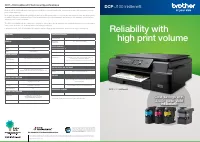
Brother’s DCP-J100 InkBenefit is designed for reliability, consistent quality and cost-savings to meet the demands of a high
print volume business.
Now, with affordable InkBenefit cartridges that boast 2,400* page-yield, you enjoy both lower running costs and quality prints.
In addition, Brother’s Laminated Piezo Print Head minimises print head damage and enhances the durability of the machine,
allowing users to save on repairs.
The DCP-J100 InkBenefit also offers N-in1 printing to save paper, and an individual ink system that allows you to only replace
each colour as it runs out, reducing waste and saving you money.
Last but not least, DCP-J100 InkBenefit complies with the Energy Star standard to ensure low energy consumption.
Reliability with
high print volume
Cost-savings with
2,400* page-yield
InkBenefit
DCP
-J100 InkBenefit
DCP
-J100
InkBenefit
FUNCTIONS
Print, Scan, Copy
GENERAL
Memory
64MB
Display
1-Line
Interface
Hi-Speed USB 2.0
COLOUR PRINTER
Print Speed
(Laser Comparable)
Up to 11ppm (mono) and 6ppm (colour)^
Print Speed (Fast Mode)
Up to 27ppm (mono) and 10ppm (colour)
Print Resolution
Up to 1,200 x 6,000 dpi
Borderless Printing
Yes: A4, LTR, A6, Photo(102x152mm/4”x6”),
Indexcard(127x203mm/5”x8”), Photo-2L(127x178mm/5”x7”)
Ink Save Mode
Yes
COLOUR COPY FUNCTION
Copy Resolution
Print: Max. 1200x2400 dpi
Scan: Max. 1200x1200 dpi
N in 1 Copy
Yes (Including ID Card Copy)
Base Colour Removal
Yes
COLOUR SCAN FUNCTION
Scan Resolution
Optical: Up to 1,200 x 2,400 dpi
Interpolated: Up to 19,200 x 19,200 dpi
(For XP/Vista/Windows 7/Windows 8)
“Scan To” Feature
Image,Email, File
ADDITIONAL FEATURES
Poster Print / Copy
Yes
Enlargement /
Reduction Ratio
25% - 400% in 1% increments
PAPER HANDLING
Paper Input (Standard Tray)
Up to 100 sheets
Paper Output
Up to 50 sheets
Paper Handling Sizes
(Standard Tray)
A4, LTR, LGL, EXE, A5, A6, Photo (102x152mm / 4”x6”), Indexcard
(127x203mm / 5”x8”), Photo-2L (127x178mm / 5”x7”), C5
Envelope, Com-10, DL Envelope, Monarch
(LGL is only for Philippines, Thailand, Malaysia, Vietnam, Gulf, Indonesia, India)
Media Type
Plain, Inkjet, Glossy, Transparency
SUPPORTED OS AND SOFTWARE
Supported Operating
Systems
Windows: XP / XP x64 / Vista / 7 / 8
Mac: OS X v10.6.8/v10.7.x/v10.8.x
SUPPLIES
Innobella™ Ink Cartridges
Super High Yield (Black) LC539XL BK: Approximate Yield 2400 A4
pages**. Super High Yield (Colour) LC535XL C/M/Y: Approximate
Yield 1300 A4 pages**
Brother Paper
BP71GA4: A4 glossy photo paper, BP71GP20: 4”x6” glossy photo
paper, BP60MA: A4 matte paper, BP60PA: A4 plain paper
DIMENSIONS & WEIGHT
Without Carton
435mm (W) x 374mm (D) x 161mm (H), 7.1kg
^ Based on ISO/IEC 24734. For more information, please refer to www.brother.com/rd/printspeed
** Approximate cartridge yield is declared in accordance with ISO/IEC 24711
"Loading the manual" means you need to wait until the file loads and becomes available for online reading. Some manuals are very large, and the time they take to appear depends on your internet speed.
Was this manual helpful?
About this manual
- Brand
- Brother
- Model
- DCP-J100
- Document type
- User Manual
- Language(s)
- English
- Pages
- 2
- File size
- 770.1 KB
- Format
Ask a question
Related manuals
Popular Brother Other




More Brother Other models
 Brother DCP-8155DN User Manual
 Brother DCP-9010CN User Manual
 Brother DCP-9020CDN User Manual
 Brother DCP-9040CN User Manual
 Brother DCP-9055CDN User Manual
 Brother DCP-9270CDN User Manual
 Brother DCP-J105 User Manual
 Brother DCP-J132W User Manual
 Brother DCP-J140W User Manual
 Brother DCP-J152W User Manual
 Brother DCP-J752DW User Manual
 Brother DCP-J925DW User Manual