Page 2 - WARNING; WARNING; CAUTION; ENVIRONMENTAL TIPS; ENVIRONMENT; Conditions of use; CONTENTS
2 CONTENTS Please read the user manual carefully and store in a handy place for later reference. The symbols you will see in this booklet have these meanings: WARNING WARNING This symbol indicates information concerning your personal safety. WARNING CAUTION This symbol indicates information on how t...
Page 3 - Installation, cleaning and servicing; General warnings; IMPORTANT SAFETY INSTRUCTIONS; IMPORTANT INFORMATION THAT MAY IMPACT
3 IMPORTANT SAFETY INSTRUCTIONS Installation, cleaning and servicing • An authorised person must install this appliance. (Certificate of Compliance to be retained). • Before using the appliance, ensure that all packing materials are removed from the appliance. • In order to avoid any potential hazar...
Page 4 - Oven; Child safety
4 IMPORTANT SAFETY INSTRUCTIONS WARNING WARNING Oven • During use the appliance becomes hot. Care should be taken to avoid touching the hot surfaces inside the oven. • Switch the appliance off at the isolating switch before removing the oven light glass for globe replacement. • To avoid an accident,...
Page 5 - CERAMIC COOKTOP MODELS; Control Panel
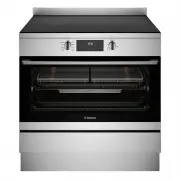
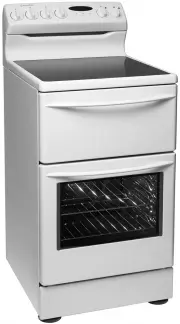
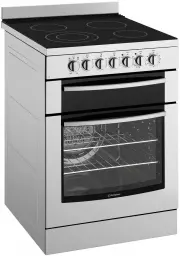
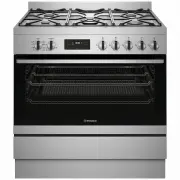
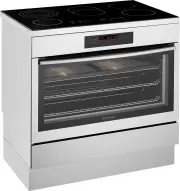
5 CERAMIC COOKTOP MODELS CERAMIC COOKTOP MODELS Freestanding cooker with electric ceramic hob and multi-function electric oven Ceramic glass hob (Refer to Chapter‘Get to know your ceramic cooktop’) Hob element controls Oven control panel Oven door Storage compartment Clip on kick panel included Stai...
Page 6 - Cabinet requirement; Dimensions; INSTALLATION OF THE APPLIANCE
6 INSTALLATION OF THE COOKTOPS Cabinet requirement Models WFE9546SD is designed to fit into a 900mm wide gap between standard kitchen cabinets. The appliance integrates with the kitchen cabinets by matching the height, depth and kick panel. The cooker may also be installed at the end of a line of ben...
Page 7 - Freestanding installation
7 INSTALLATION OF THE APPLIANCE Freestanding installation Cabinet construction for freestanding installation The freestanding type installation requires four screw-in feet to be installed before it can be fitted in between cabinets, with cabinets on one side or without adjacent cabinets. There is no ...
Page 8 - Installation of screw-in feet; IMPORTANT; INSTALLATION OF THE APPLIANCE (CONTINUED)
8 INSTALLATION OF THE APPLIANCE Freestanding installation (continued) Installation of screw-in feet • Freestanding appliance are supplied with four screw-in feet in the internal accessory pack. The screw-in feet can be adjusted by turning the lower half clockwise or anti-clockwise. TIPS & INFORM...
Page 9 - Leveling oven
9 INSTALLATION OF THE APPLIANCE Bench height + 10mm minimum If your kitchen has a 900mm height kitchen bench top, follow the quick measurement guide below before putting the cooker upright For a 900mm height kitchen bench top, adjust the lower half of the feet to measure 50mm as shown in the illustr...
Page 10 - Installation the anti-tilt brackets
10 INSTALLATION OF THE APPLIANCE Freestanding installation (continued) Installation the anti-tilt brackets To ensure cooker stability, the anti-tilt brackets must be installed.There are left and right engagement slots for the anti-tilt bracket at the bottom rear of the appliance. The following steps...
Page 12 - Installing the clip-on kick panel
12 INSTALLATION OF THE APPLIANCE Freestanding installation (continued) • Connect services to the appliance prior to placing into cavity. • To locate appliance, slide into cavity ensuring the anti-tilt brackets fully engaged with the rear left and right engagement slots. • The unit must be pushed aga...
Page 16 - WIRING REQUIREMENTS; For New Zealand Only:; Rated power input; Connecting to services and commissioning; Hard wiring detail
16 WIRING REQUIREMENTS WIRING REQUIREMENTS The cooker MUST be installed in compliance with: • Wiring connections in AS/NZS 3000 Wiring Rules. • Local regulations, municipal building codes and other statutory regulations. For New Zealand Only: The cooking range must be connected to the supply by a su...
Page 17 - INSTALLING THE FREESTANDING COOKER; Models; Electrical cable
17 INSTALLING TEH FREESTANDING COOKER INSTALLING THE FREESTANDING COOKER Models WFE9546SD 27 8 95 Electrical cable entry point
Page 18 - BEFORE OPERATING YOUR APPLIANCE; Preparing your appliance for the first time
18 BEFORE OPERATING YOUR APPLIANCE FOR THE FIRST TIME BEFORE OPERATING YOUR APPLIANCE FOR THE FIRST TIME Preparing your appliance for the first time • Please remove all internal boxes and bags from the oven before operation. • Please wipe out the oven interior prior to operation with warm soapy wate...
Page 19 - INSTALLING YOUR OVEN ACCESSORIES; Installing the slides (telescopic runners)
19 INSTALLING YOUR OVEN ACCESSORIES INSTALLING YOUR OVEN ACCESSORIES Slides (telescopic runners) (on selected models) 1. The selected models are supplied with a set of slides and instructions on how to assemble. Ensure the rack and slides are of the same hand. E.g. left hand slide should be fitted o...
Page 20 - Fitting grill dish and insert; Fitting the AirFry
20 INSTALLING YOUR OVEN ACCESSORIES Fitting grill dish and insert Your oven comes with a full width grill dish and a grill insert. The grill dish insert is designed with flexibility to adjust distance between the food and the grill element. Maximum grill power Grill dish insert brings the food close...
Page 21 - GETTING TO KNOW YOUR CERAMIC COOKTOP
21 GETTING TO KNOW YOUR CERAMIC COOKTOP 7 9 8 1 4 10 11 3 2 6 5 GETTING TO KNOW YOUR CERAMIC COOKTOP Sensor fields Funciton Description 1 On/Off To activate and deactivate the appliance. 2 Timer To set the function. 3 / - To increase or decrease the time. 4 - Timer display To show the time in minute...
Page 22 - GETTING TO KNOW YOUR CERAMIC COOKTOP(CONTINUED)
22 GETTING TO KNOW YOUR CERAMIC COOKTOP sandwich bottoms 4-6mm thick. The pan bottom should be flat, or preferably, slightly concave at room temperature so that it lies flat on the glass surface when hot. A flat or slightly concave pan is preferable for ceramic hotplates ENVIRONMENTAL TIPS ENVIRONME...
Page 23 - USING YOUR CERAMIC COOKTOP
23 USING YOUR CERAMIC COOKTOP USING YOUR CERAMIC COOKTOP Activating and deactivating Press and hold to activate or deactivate the hob. Heat setting 1. Press the desired heat setting on the control bar. 2. To deactivate a cooking zone, press 0. Activating and deactivating the outer rings You can manu...
Page 24 - Count Down Timer; Minute Minder; Power management
24 USING YOUR CERAMIC COOKTOP Count Down Timer Use this function to specify how long a cooking zone should operate during a single cooking session. Set the heat setting for the selected cooking zone and then set the function. TIPS & INFORMATION IMPORTANT You cannot activate the function while th...
Page 26 - Lock; Hob2Hood
26 USING YOUR CERAMIC COOKTOP USING YOUR CERAMIC COOKTOP (CONTINUED) Lock You can lock the control panel while the hob operates. It prevents an accidental change of the heat setting. Set the heat setting first. To activate the function: press . To deactivate the function: press again. TIPS & INF...
Page 27 - Changing the automitic mode
27 USING YOUR CERAMIC COOKTOP Changing the automitic mode 1. Deactivate the hob. 2. Press for 3 seconds. The display comes on and goes off. 3. Press for 3 seconds. 4. Press a few times until h comes on. 5. Press of the timer to select an automatic mode. TIPS & INFORMATION IMPORTANT To operate th...
Page 28 - USING YOUR OVEN
28 USING YOUR OVEN USING YOUR OVEN and browning on the base. It is great for foods such as pizzas, quiches, meat pies and fruit pies. Simply place the food in the middle of the oven and set the desired temperature. Base Heat Heat comes from the element below the floor of the oven. The Element is con...
Page 30 - Setting the cooking duration; To check or cancel settings
30 USING YOUR OVEN 1. Touch the symbol until the timer icon begins flashing. 2. Set the countdown time you want by using and . 5 seconds after the last change the timer icon will stop flashing and the countdown will start in minutes. 3. To stop the beeper, touch any symbol. 4. Maximum countdown time...
Page 31 - Get to know your new oven with this
31 USING YOUR OVEN Your WFE9546SD has the ability to add steam while baking. Cooking with steam is a great addition to straight ‘hot air’ cooking. Steam brings out all the natural flavours and goodness in the food, cooks evenly from surface to centre and retains more nutrients and vitamins. Steam as...
Page 32 - Oven shelf location
32 USING YOUR OVEN some time. Use this heat to finish custards or to dry bread. • Do not use a lot of cooking oil when roasting. This will prevent splattering oil on the sides of the oven and the oven door. Polyunsaturated fats can leave residue which is very difficult to remove. • When cooking thin...
Page 33 - Choosing the best oven settings; Cooking guide
33 COOKING GUIDE Choosing the best oven settings The following table is intended as a guide and experience may show some variation in cooking times necessary to meet individual requirements. We recommend that you preheat your oven for 30 minutes. Modes without Oven Fan FOOD TEMPERATURE ˚C OVEN SHELF...
Page 34 - EasyBake +Steam function; Air Fry Cooking (for applicable models only); To set the Air Fry Function:
34 COOKIN GGUIDE EasyBake +Steam function FOOD WATER IN CAVITY WELL (ML) TEMPERATURE • C OVEN SHELF POSITION* TIME IN MINUTES Yeast goods Bread loaves 200 180 - 200 2 or 3 35 - 45 Bread rolls 200 190 - 210 2 or 3 20 - 25 Gluten free bread 200 180 - 200 2 or 3 40 - 50 Pizza (fresh) 200 210 - 220 2 or...
Page 37 - DEALING WITH COOKING PROBLEMS
37 DEALING WITH THE COOKING PROBLEMS WARNING WARNING • Always make sure that the oven is electrically isolated before cleaning. This can be done by the functional switch nearby. • Do not line the bottom of the oven with foil or cookware. • Do not use steam cleaners. Stainless steel WARNING WARNING •...
Page 38 - Removing the side racks or shelf supports; CLEANING YOUR OVEN
38 CLEANING YOUR OVEN Removing the side racks or shelf supports • Grasp the shelf support at the front. • Pull it firmly inwards CLEANING YOUR OVEN
Page 39 - Ensure the appliance is off and cool before cleaning.; Harsh abrasive cleaners, powder; Trivets and burners; These can all be lifted off and removed for separate cleaning.; Ignition spark plug and flame safeguard sensor; GENTLY; Ensure that they are dry before use.; Do’s; Use pots with a flat base.
39 CLEANING YOUR OVEN CAUTION Ensure the appliance is off and cool before cleaning. Enamel (on burner skirts and trivets) Persistent stains may require rubbing with a nylon scourer or creamed powder cleansers. Household enamel cleaners are available, follow the manufacturer’s instructions in their u...
Page 40 - Ceramic Cooktop Cleaning
40 C LEANING YOUR OVEN Ceramic Cooktop Cleaning CUSTOMER ADVICE Sometimes SURFACE stains appear to be a “bubble” mark under the ceramic glass. These can be cleaned off with a razor blade scraper and ceramic cleaner. Keeping the ceramic cooktop clean and protected will keep it in good condition and h...
Page 41 - Stainless Steel Cooktop Cleaning; Wash with warm soapy water.; Available at the following web shops or distributors.; Before
41 CLEANING YOUR OVEN Stainless Steel Cooktop Cleaning NOTE: Ensure any oil is cleaned off the hob before use, otherwise it may cause the hob to turn a yellowish colour. All grades of stainless steel may stain, discolour or attain an adhering layer of grime in normal operation. To achieve maximum su...
Page 42 - CLEANING YOUR OVEN ACCESSORIES; Cleaning your oven door
42 CLEANIN GYOUR OVEN ACCESSORIES CLEANING YOUR OVEN ACCESSORIES Cleaning your oven door The oven door has been designed to allow the two inner door glasses to be removed for cleaning without removing the door from the product. Removing the inner door glass for cleaning: • Open the door fully to gai...
Page 43 - Changing the light globes
43 CLEANING YOUR OVEN ACCESSORIES Changing the light globes • There are 2 light globes located in the top of the oven cavity towards the front. The light globe glass is accessible between the passes of the upper element. • To remove, turn oven light glass anti-clockwise. • A special high temperature...
Page 44 - STEAM ASSISTED CLEANING; Steam Assisted Clean; OFF; Cleaning the cavity well; Perform the cleaning precedure at least every
44 STEAM ASSISTED CLEANING STEAM ASSISTED CLEANING Steam Assisted Clean This function assists in the removal of food residue from inside the oven. This method is effective in removing light soiling only. It is not effective in removing stubborn baked-on stains. This function can only be used when th...
Page 45 - TROUBLESHOOTING; Faults
45 TROUBLESHOOTING TROUBLESHOOTING Faults If there is a problem with the oven and/or grill, please: • Check the points listed below before calling for service. It may be possible to avoid a call by fixing the problem yourself – and so continue cooking. PROBLEM POSSIBLE CAUSE WHAT TO DO Oven or grill...
Page 46 - Further information
46 TROUBLESHOOTING Further information When you need information, service or replacement parts or have a warranty enquiry, please contact the Customer Care Centre: • Australia - 13 13 49, 8.00am - 5.00pm EST Monday to Friday • New Zealand - 0800 10 66 10, 8.00am - 5.00pm EST Monday to Friday Please ...
Page 47 - Warranty; Important Notice; AUSTRALIA; NEW ZEALAND
47 WARRANTY This document sets out the terms and conditions of the product warranties for Westinghouse Appliances. It is an important document. Please keep it with your proof of purchase documents in a safe place for future reference should there be a manufacturing defect in your Appliance. This war...