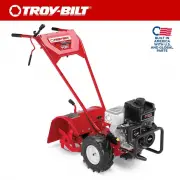
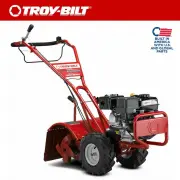
Page 2 - To The Owner; Table of Contents; ◊ Web; Thank You; odel
To The Owner 1 2 Safe Operation Practices ........................................ 3 Assembly & Set-Up .................................................. 5 Controls & Operation .............................................. 8 Service .............................................................
Page 3 - Important Safe Operation Practices; Training; Safe Handling of Gasoline:; Operation; CALIFORNIA PROPOSITION 65
Important Safe Operation Practices 2 3 Training 1. Read, understand, and follow all instructions on the machine and in the manual(s) before attempting to assemble and operate. Keep this manual in a safe place for future and regular reference and for ordering replacement parts. 2. Be familiar with al...
Page 4 - Notice Regarding Emissions; Symbol; SAVE THESE INSTRUCTIONS!
4 S ection 2 — i mportant S afe o peration p racticeS the spark plug wire and ground it against the engine to prevent unintended starting. 5. Do not change the engine governor settings or over-speed the engine. The governor controls the maximum safe operating speed of engine. 6. Maintain or replace ...
Page 5 - Assembly; Unpacking Instructions; Handle; Moving the Tiller off the Shipping Platform; Contents of Carton; Wire Harness
Assembly & Set-Up 3 5 WARNING! To prevent personal injury or property damage, do not start the engine until all assembly steps are complete and you have read and understand the safety and operating instructions in this manual. Recommended Tools for Assembly • 3⁄8” open-end wrench (1) • 7⁄16” ope...
Page 6 - Wheels/Tines PTO Drive Lever
S ection 3— A SSembly & S et -U p 6 3. Slide the plates at the end of the Wheels/ Tines/PTO Lever over the yoke plates. See Figure 3-7. To aid in the next step, insert a screw temporarily into the forward most holes of the yoke plates and the lever. Plates Wheel Speed Lever Forward Hole Wheels/T...
Page 7 - Engine Throttle Lever and Cable; Tires
S ection 3 — A SSembly & S et -U p 7 Engine Throttle Lever and Cable For shipping purposes, the throttle cable, together with the throttle lever, is wound around the engine. Carefully unwind the cable. If the throttle control label is covered with a clear protective coating, peel it off. WARNING...
Page 8 - Controls; Starting the Engine
Controls & Operation 4 8 Engine Throttle Lever Handlebar Height Adjustment Lever Wheels/Tines/PTO Drive Lever Forward Interlock Levers Depth Regulator Lever Wheel Speed Lever Tines/PTO Clutch Lever Figure 4-1 Controls WARNING! Be familiar with all the controls and their proper operation. Know ho...
Page 9 - Starting Electric Start Engine with Recoil Starter; Stopping the Engine and the Tiller; Engaging the Drive & Tines; Stopping Forward Motion & Tines
9 S ection 4 — c ontrolS & o peration 8. If equipped with an electric start system, turn the key to START position to crank the engine then release when the engine starts. If the engine does not start right away, do not hold the key at START for more than a few seconds. Release then try again af...
Page 10 - Stopping Reverse Motion; SLOW GEAR, LOW BELT RANGE; Changing Belt speed; Available wheel and tine speeds at 3000 RPM engine speed.; Belt
10 S ection 4— c ontrolS & o peration Stopping Reverse Motion Release the Wheels/Tines/PTO Drive Lever — the lever automatically returns to the NEUTRAL position. This stops the wheels immediately. The Forward Interlock Levers will not stop REVERSE motion. Turning the Tiller 1. find the balance p...
Page 11 - Changing Belt From Low Range to High Range; Changing Belt From High Range to Low Range; Clearing the Tines; Let the Tiller Do the Work
11 S ection 4 — c ontrolS & o peration Changing Belt From Low Range to High Range 1. To avoid personal injury, shut off the engine, let all moving parts come to a complete stop, then disconnect the spark plug wire from the spark plug and move the wire away from the spark plug before making any a...
Page 12 - Avoid Tilling Wet, Soggy Soil
12 S ection 4— c ontrolS & o peration • When cultivating — breaking up the surface soil around plants to help destroy weeds — use very shallow depth settings to prevent injury to plants whose roots often grow close to the surface. If needed, lift up on the handlebars slightly to prevent the tine...
Page 13 - Power Composting; PTO Power Feature; Removing the Tine Attachment
13 S ection 4 — c ontrolS & o peration • Move the belt into LOW belt range and the Wheel Speed Gear Lever to SLOW position. As in terrace gardening, start at the top of the slope and overlap the first pass by half the width of the tiller. For added stability, keep the uphill wheel in the soft, n...
Page 14 - Installing the Tine Attachment
14 S ection 4— c ontrolS & o peration 7. Loosen the two swing-out bolts that connect the power transmission to the tine attachment. See Figure 4-21. Swing-Out Bolts Figure 4-21 8. Then move the swing-out bolts out. See Figure 4-22. Swing-Out Bolt Figure 4-22 NOTE: Loosening swing-out bolts can b...
Page 15 - Service; Maintenance; Engine; Maintenance Schedule; Tine Shaft
Service 5 15 WARNING! Before inspecting, cleaning or servicing the tiller, shut off the engine and wait for all the parts to come to a complete stop. Disconnect the spark plug wire and move the wire away from the spark plug. Remove the ignition key on the electric start models. Failure to follow the...
Page 16 - Transmission Gear Oil; Oil Vents; Hardware
16 S ection 5 — S ervice Rear Bearing Cap Screws • The three rear bearing cap screws are located under the depth regulator mounting bracket. If any are loose, it can cause an oil leak or drive shaft end play. See Figure 5-3. Cap Screw Bolt Swing Bolt Lock Nut Eccentric Lever Power Unit Transmission ...
Page 18 - Forward Interlock System; Lubrication; Adjustments; Drive Belt
18 S ection 5 — S ervice 3. Slowly add gear oil in the dipstick hole. Add 1⁄2-ounce at a time to avoid overfilling. It takes about 12-1⁄2 ounces. 4. Take dipstick readings frequently. Stop when oil reaches “Cold” range marking on dipstick. Replace dipstick securely. Draining and Filling the Tine Att...
Page 19 - Reverse Drive System
19 S ection 5 — S ervice 2. Move the Wheels/Tines/PTO Drive Lever fully down to the FORWARD position. The clutch roller at the bottom of the lever should be positioned underneath the belt adjustment block. See Figure 5-13. Don’t let the clutch roller move during the next few steps. If it moves, you’...
Page 21 - Throttle Cable; Belt Replacement; Reverse Disc
21 S ection 5 — S ervice Throttle Cable The throttle lever settings are factory adjusted, so unnecessary adjustments should not be made. However, if the engine does not start or stop, or respond immediately to various throttle lever settings, then adjustments may be necessary. Please refer to the En...
Page 22 - Tines; Replacing a Single Tine; Replacing A Tine Holder Assembly
22 S ection 5 — S ervice 1. Move Wheels/Tines/PTO Drive Lever in NEUTRAL position. 2. Wedge a 5⁄16”-thick board between the top of the engine pulley and the cast iron housing next to it. This immobilizes the pulley. Avoid contacting the reverse disc. 3. Use a 9⁄16” wrench to loosen the mounting bolt...
Page 23 - Troubleshooting; Problem
Troubleshooting 6 23 Problem Cause Remedy Wheels and tines do not turn 1. Mis-adjusted drive belt and/or reverse disc 2. Loose bolt on transmission drive pulley 3. Worn worm gears 1. See Maintenance & Adjustments Section 2. Tighten bolt 3. See authorized service dealer Wheels and tines turn on t...
Page 24 - Replacement Parts; Component
Replacement Parts 7 24 Component Part Number and Description GW-9245 V-Belt 742-04223 Bolo Tine (LH), 12” 742-04224 Bolo Tine (RH), 12” 934-04231 Wheel, 16 x 4.6 x 8 756-04171 Reverse Disc 746-05084 Throttle Cable Troy-Bilt Genuine Parts can be ordered through your local authorized Troy-Bilt dealer,...
Page 25 - Notes
Page 28 - MANUFACTURER’S LIMITED WARRANTY FOR
MANUFACTURER’S LIMITED WARRANTY FOR GDOC-100023 REV. C The limited warranty set forth below is given by Troy-Bilt LLC with respect to new merchandise purchased and used in the United States and/or its territories and possessions, and by MTD Products Limited with respect to new merchandise purchased ...