Page 2 - CONTENTS; Eλληνικά
6 23 CONTENTS EnglishDeutschEspañolCatalà Eλληνικά ItalianoPortuguês РусскийҚазақша Polski Українська 13579 111315171921
Page 3 - First glance; Press and hold the power button to turn your
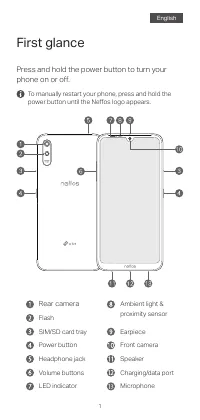
1 2 First glance Press and hold the power button to turn your phone on or off. To manually restart your phone, press and hold the power button until the Neffos logo appears. English Ambient light &proximity sensor Rear camera Flash Power button LED indicator Volume buttons Headphone jack SIM/SD ...
Page 4 - Put in the cards; Dual SIM Settings; The card tray can support two Nano-SIM cards or
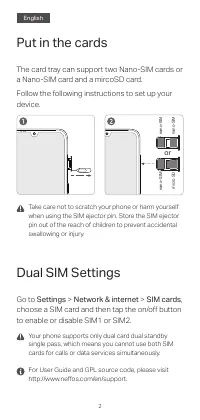
1 2 3 For User Guide and GPL source code, please visit http://www.neffos.com/en/support. Your phone supports only dual card dual standby single pass, which means you cannot use both SIM cards for calls or data services simultaneously. Put in the cards Take care not to scratch your phone or harm your...
Page 5 - Auf einen Blick
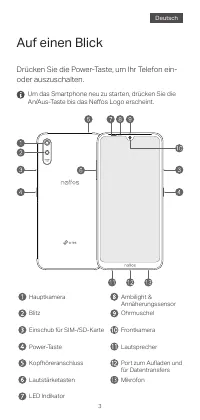
2 3 4 Auf einen Blick Drücken Sie die Power-Taste, um Ihr Telefon ein- oder auszuschalten. Um das Smartphone neu zu starten, drücken Sie die An/Aus-Taste bis das Neffos Logo erscheint. Ambilight & Annäherungssensor Hauptkamera Blitz Kopfhöreranschluss Power-Taste Lautstärketasten Einschub für SI...
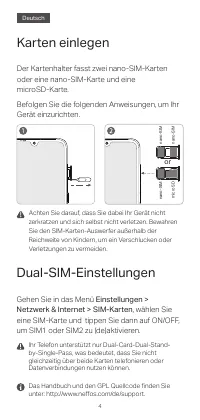
Page 6 - Karten einlegen; Gehen Sie in das Menü
3 4 Ihr Telefon unterstützt nur Dual-Card-Dual-Stand- by-Single-Pass, was bedeutet, dass Sie nicht gleichzeitig über beide Karten telefonieren oder Datenverbindungen nutzen können. Das Handbuch und den GPL Quellcode finden Sie unter: http://www.neffos.com/de/support. 5 Karten einlegen Achten Sie dar...
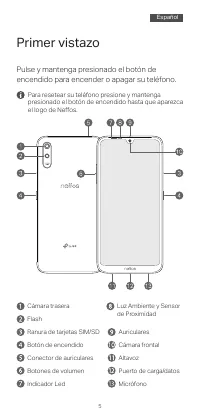
Page 7 - Primer vistazo; Pulse y mantenga presionado el botón de
4 5 6 Primer vistazo Pulse y mantenga presionado el botón de encendido para encender o apagar su teléfono. Para resetear su teléfono presione y mantenga presionado el botón de encendido hasta que aparezca el logo de Neffos. Luz Ambiente y Sensor de Proximidad Ranura de tarjetas SIM/SD Flash Botón de...
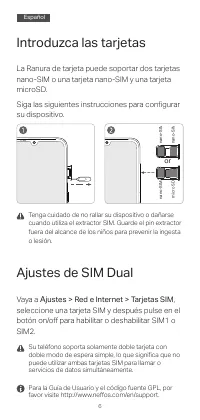
Page 8 - Introduzca las tarjetas; Ajustes de SIM Dual; Vaya a
5 6 Su teléfono soporta solamente doble tarjeta con doble modo de espera simple, lo que significa que no puede utilizar ambas tarjetas SIM para llamar o servicios de datos simultáneamente. Para la Guía de Usuario y el código fuente GPL, por favor visite http://www.neffos.com/en/support. Introduzca l...
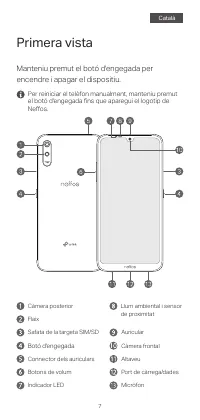
Page 9 - Primera vista; Manteniu premut el botó d'engegada per
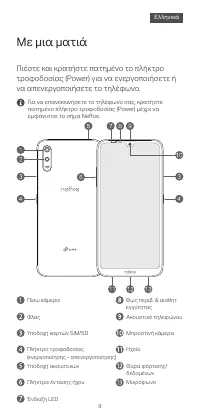
7 8 Primera vista Manteniu premut el botó d'engegada per encendre i apagar el dispositiu. Per reiniciar el telèfon manualment, manteniu premut el botó d'engegada fins que aparegui el logotip de Neffos. Safata de la targeta SIM/SD Flaix Botó d'engegada Càmera posterior Connector dels auriculars Llum ...
Page 10 - Introduïu les targetes; Aneu a
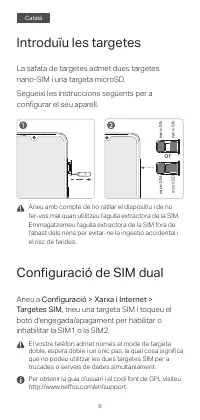
7 8 El vostre telèfon admet només el mode de targeta doble, espera doble i un únic pas, la qual cosa significa que no podeu utilitzar les dues targetes SIM per a trucades o serveis de dades simultàniament. Per obtenir la guia d'usuari i el codi font de GPL visiteu http://www.neffos.com/en/support. 9...
Page 11 - Με μια ματιά; Πιέστε και κρατήστε πατημένο το πλήκτρο
8 9 10 Με μια ματιά Πιέστε και κρατήστε πατημένο το πλήκτρο τροφοδοσίας (Power) για να ενεργοποιήσετε ή να απενεργοποιήσετε το τηλέφωνο. Για να επανεκκινήσετε το τηλέφωνο σας, κρατήστε πατημένο πλήκτρο τροφοδοσίας (Power) μέχρι να εμφανιστεί το σήμα Neffos. Φως περιβ. & αισθητ εγγύτητας Πίσω κάμ...
Page 12 - Κάρτες SIM
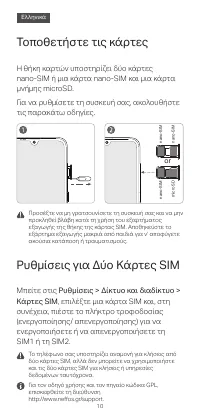
9 10 Το τηλέφωνο σας υποστηρίζει αναμονή για κλήσεις από δύο κάρτες SIM, αλλά δεν μπορείτε να χρησιμοποιήστε και τις δύο κάρτες SIM για κλήσεις ή υπηρεσίες δεδομένων ταυτόχρονα.Για τον οδηγό χρήσης και τον πηγαίο κώδικα GPL, επισκεφθείτε τη διεύθυνση http://www.neffos.gr/support. 11 Τοποθετήστε τις ...
Page 13 - Accensione; Premete il pulsante Power fino all'accensione
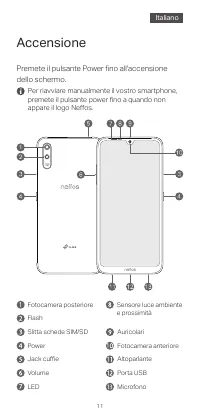
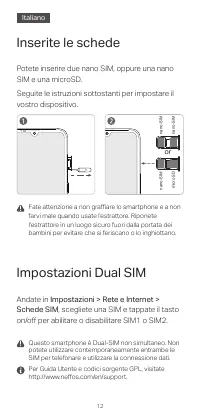
10 11 12 Accensione Premete il pulsante Power fino all'accensione dello schermo. Per riavviare manualmente il vostro smartphone, premete il pulsante power fino a quando non appare il logo Neffos. LED Sensore luce ambiente e prossimità Fotocamera posterioreFlash Jack cuffie Power Volume Slitta schede...
Page 14 - Inserite le schede; Impostazioni Dual SIM; Andate in
11 12 Questo smartphone è Dual-SIM non simultaneo. Non potete utilizzare contemporaneamente entrambe le SIM per telefonare e utilizzare la connessione dati. Per Guida Utente e codici sorgente GPL, visitate http://www.neffos.com/en/support. Inserite le schede Fate attenzione a non graffiare lo smartp...
Page 15 - Descrição do Dispositivo; Para ligar ou desligar o telefone pressione
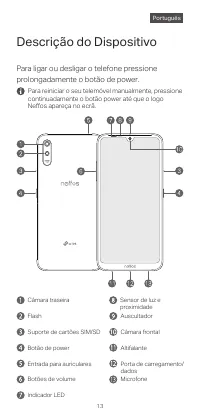
13 14 Descrição do Dispositivo Para ligar ou desligar o telefone pressione prolongadamente o botão de power. Para reiniciar o seu telemóvel manualmente, pressione continuadamente o botão power até que o logo Neffos apareça no ecrã. Indicador LED Sensor de luz e proximidade Câmara traseira Botão de p...
Page 16 - Instalar os cartões; Configurações para Dual SIM; Em
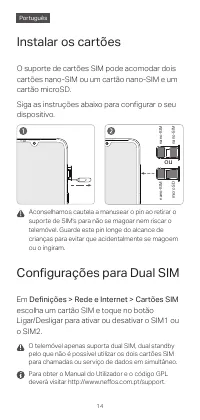
13 14 O telemóvel apenas suporta dual SIM, dual standby pelo que não é possível utilizar os dois cartões SIM para chamadas ou serviço de dados em simultâneo. Para obter o Manual do Utilizador e o código GPL deverá visitar http://www.neffos.com.pt/support. 15 Instalar os cartões Aconselhamos cautela ...
Page 17 - Общий вид; Нажмите и удерживайте кнопку питания для
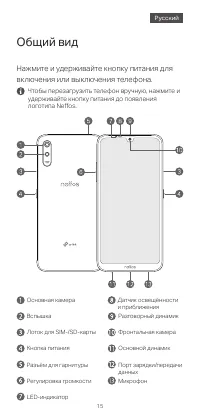
14 15 16 Общий вид Нажмите и удерживайте кнопку питания для включения или выключения телефона. Чтобы перезагрузить телефон вручную, нажмите и удерживайте кнопку питания до появления логотипа Neffos. LED-индикатор Основная камера Кнопка питания Лоток для SIM-/SD-карты Разъём для гарнитуры Вспышка Рег...
Page 18 - Настройки для двух SIM-карт; Перейдите в
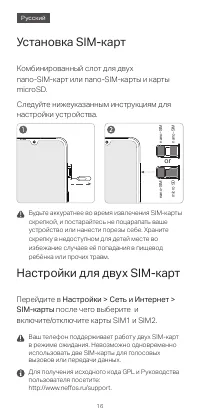
15 16 Ваш телефон поддерживает работу двух SIM-карт в режиме ожидания. Невозможно одновременно использовать две SIM-карты для голосовых вызовов или передачи данных.Для получения исходного кода GPL и Руководства пользователя посетите: http://www.neffos.ru/support. 17 Установка SIM-карт Будьте аккурат...
Page 19 - Сыртқы көрінісі; Телефонды қосу немесе өшіру үшін қуат
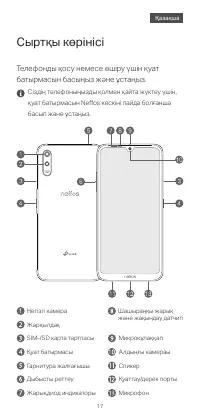
16 17 18 Сыртқы көрінісі Телефонды қосу немесе өшіру үшін қуат батырмасын басыңыз және ұстаңыз. Сіздің телефоныңызды қолмен қайта жүктеу үшін, қуат батырмасын Neffos кескіні пайда болғанша басып және ұстаңыз. Жарықдиод индикаторы Шашыраңқы жарық және жақындау датчигі Негізгі камера Жарқылдақ Гарниту...
Page 20 - Картаны орнату; карталары
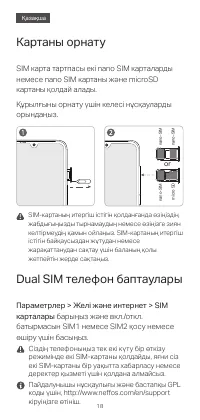
17 18 Сіздің телефоныңыз тек екі күту бір өткізу режимінде екі SIM-картаны қолдайды, яғни сіз екі SIM-картаны бір уақытта хабарласу немесе деректер қызметі үшін қолдана алмайсыз.Пайдалунышы нұсқаулығы және бастапқы GPL коды үшін, http://www.neffos.com/en/support кіруіңізге өтініш. Картаны орнату SIM...
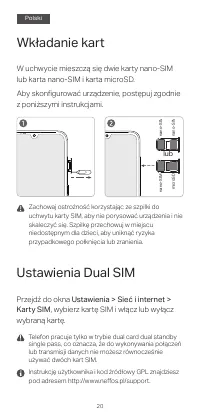
Page 21 - Wygląd urządzenia; Naciśnij i przytrzymaj przycisk zasilania, aby
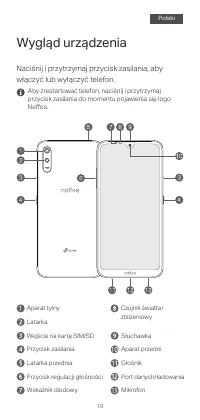
19 20 Wygląd urządzenia Naciśnij i przytrzymaj przycisk zasilania, aby włączyć lub wyłączyć telefon. Aby zrestartować telefon, naciśnij i przytrzymaj przycisk zasilania do momentu pojawienia się logo Neffos. Wskaźnik diodowy Czujnik światła i zbliżeniowy Aparat tylny Latarka Latarka przednia Przycis...
Page 22 - Wkładanie kart; Przejdź do okna
19 20 Telefon pracuje tylko w trybie dual card dual standby single pass, co oznacza, że do wykonywania połączeń lub transmisji danych nie możesz równocześnie używać dwóch kart SIM.Instrukcję użytkownika i kod źródłowy GPL znajdziesz pod adresem http://www.neffos.pl/support. 21 Wkładanie kart Zachowa...
Page 23 - Перше знайомство; Натисніть та утримуйте кнопку живлення, щоб
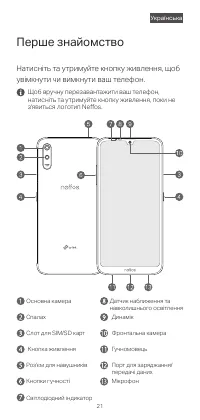
20 21 22 Перше знайомство Натисніть та утримуйте кнопку живлення, щоб увімкнути чи вимкнути ваш телефон. Щоб вручну перезавантажити ваш телефон, натисніть та утримуйте кнопку живлення, поки не з'явиться логотип Neffos. Світлодіодний індикатор Датчик наближення та навколишнього освітлення Основна кам...
Page 24 - Перейдіть у меню
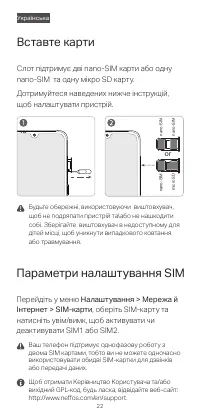
21 22 Ваш телефон підтримує однофазову роботу з двома SIM картами, тобто ви не можете одночасно використовувати обидві SIM-картки для дзвінків або передачі даних.Щоб отримати Керівництво Користувача та/або вихідний GPL-код, будь ласка, відвідайте веб-сайт: http://www.neffos.com/en/support. Вставте к...
Page 26 - Frequency bands and power; Συχνότητες και Ισχύς
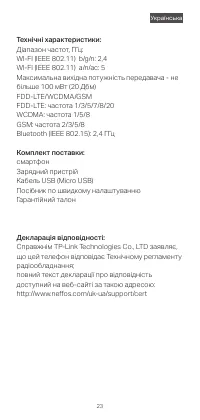
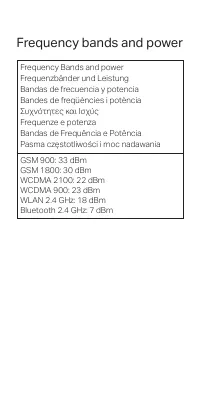
22 Frequency bands and power Frequency Bands and power Frequenzbänder und Leistung Bandas de frecuencia y potencia Bandes de freqüències i potència Συχνότητες και Ισχύς Frequenze e potenza Bandas de Frequência e Potência Pasma częstotliwości i moc nadawania GSM 900: 33 dBm GSM 1800: 30 dBm WCDMA 210...