Page 2 - Instruction manual; Utilization of the product
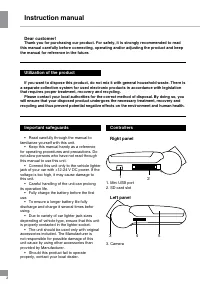
Instruction manual 2 Dear customer! Thank you for purchasing our product. For safety, it is strongly recommended to read this manual carefully before connecting, operating and/or adjusting the product and keep the manual for reference in the future. If you want to dispose this product, do not mix it...
Page 3 - Operations
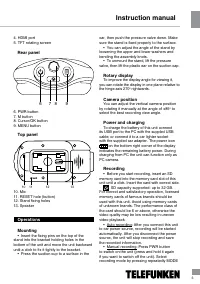
Instruction manual 3 4. HDMI port5. TFT rotating screen Rear panel 6 7 8 9 6. PWR button7. M button8. Cursor/OK button9. MENU button Top panel 1 10 11 12 13 10. Mic11. RESET hole (button)12. Stand fixing holes13. Speaker Operations Mounting • Insert the fixing pins on the top of the stand into the b...
Page 4 - Photo mode
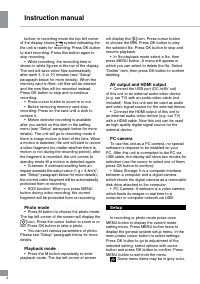
4 Instruction manual 4 button; in recording mode the top left corner of the display shows symbol indicating the the unit is ready for recording. Press OK button to start recording. Press this button again to stop recording. • While recording, the recording time is shown in white figures in the top o...
Page 5 - General system setup
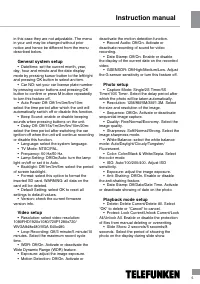
5 Instruction manual 5 in this case they are not adjustable. The menu in your unit may be changed without prior notice and hence be different from the menu described below. General system setup • Date/time: set the current month, year, day, hour and minute and the date display mode by pressing kurso...
Page 6 - Руководство по эксплуатации; Accessories
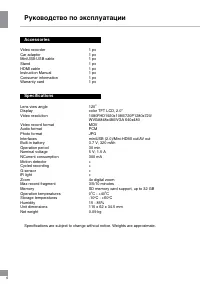
6 Руководство по эксплуатации 6 Accessories Video recorder 1 pc Car adaptor 1 pc MiniUSB-USB cable 1 pc Stand 1 pc HDMI cable 1 pc Instruction Manual 1 pc Consumer information 1 pc Warranty card 1 pc Specifications Lens view angle 120 0 Display color TFT LCD, 2.0” Video resolution 1080FHD1920x1080/7...
Page 7 - Уважаемый покупатель!
7 7 Руководство по эксплуатации Уважаемый покупатель! Благодарим Вас за покупку нашего изделия. Чтобы понять, как правильно и безо- пасно пользоваться Вашей моделью изделия, рекомендуется тщательно изучить на-стоящее руководство перед подключением, регулировкой и эксплуатацией изделия. Сохраняйте ру...
Page 8 - Органы управления
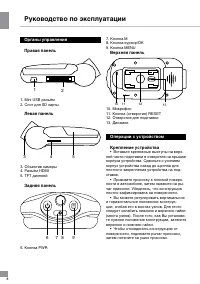
Руководство по эксплуатации 8 Органы управления Правая панель 1 2 1. Mini USB разъём2. Слот для SD карты Левая панель 3 4 5 3. Объектив камеры4. Разъём HDMI5. TFT дисплей Задняя панель 6 7 8 9 6. Кнопка PWR 7. Кнопка M8. Кнопка-курсор/ОК9. Кнопка MENU Верхняя панель 1 10 11 12 13 10. Микрофон11. Кно...
Page 9 - Поворотный экран
9 Руководство по эксплуатации Поворотный экран Для удобства считывания информации на дисплее вы можете поворачивать экран устройства в одной плоскости относительно оси шарнира на 270 0 вправо. Положение объектива Вы можете изменять положение объекти- ва по вертикали, вручную поворачивая его на шарни...
Page 10 - Режим фото
10 Руководство по эксплуатации 10 Режим фото • Нажмите кнопку M, чтобы выбрать режим фото. В левом верхнем углу дисплея отобразится символ . С помощью кноп- ки-курсора вы можете изменять масштаб изображения. Нажмите кнопку OK, чтобы сделать фотоснимок. Воспроизведение • Нажимайте кнопку M для перехо...
Page 11 - Настройки в режиме записи видео
11 11 Руководство по эксплуатации жатия кнопок. • Задержка отключения: выкл/15с/1 мин/3 мин/5 мин/10 мин/20 мин. Выберите период времени, в течение которого камера продолжит работу после отключения двига-теля автомобиля. • Язык: выберите язык экранного меню.• ТВ-режим: NTSC/PAL• Частота: 50 Гц/60 Гц...
Page 12 - Комплект поставки
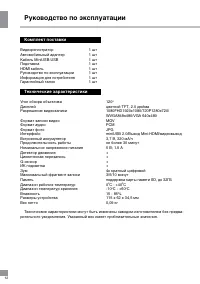
12 Руководство по эксплуатации 12 Комплект поставки Видеорегистратор 1 шт Автомобильный адаптер 1 шт Кабель MiniUSB-USB 1 шт Подставка 1 шт HDMI кабель 1 шт Руководство по эксплуатации 1 шт Информация для потребителя 1 шт Гарантийный талон 1 шт Технические характеристики Угол обзора объектива 120 0 ...