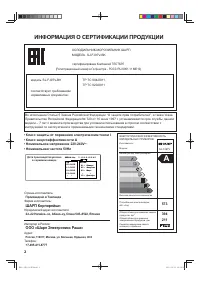
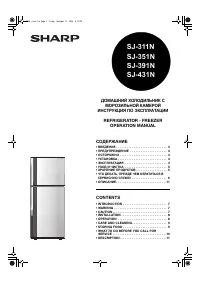
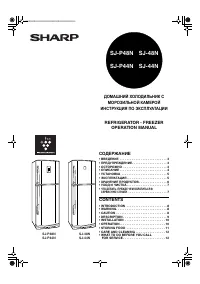
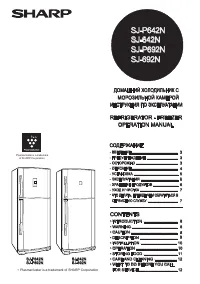
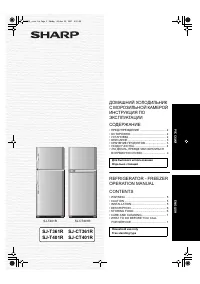
Page 2 - ИНФОРМАЦИЯ О СЕРТИФИКАЦИИ ПРОДУКЦИИ; ШАРП Корпорейшн
2 Дата производства указана в серийном номере SERIAL No. 3 1 0 1 0 1 2 3 4 5 Год 10 : 2010 11 : 2011 12 : 2012 13 : 2013 : : Месяц 01 : Январь 02 : Февраль 03 : Март : : 12 : Декабрь ИНФОРМАЦИЯ О СЕРТИФИКАЦИИ ПРОДУКЦИИ Страна–изготовитель: Произведено в Таиланде Фирма изготовитель: ШАРП Корпорейшн Ю...
Page 3 - ПРЕДУПРЕЖДЕНИЕ
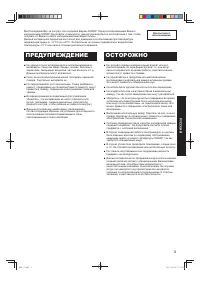
3 Р УССКИЙ Для бытового использования Мы благодарим Вас за покупку этого изделия фирмы SHARP. Перед использованием Вашего холодильника SHARP прочитайте , пожалуйста , данное руководство по эксплуатации с тем , чтобы получить от Вашего нового холодильника максимум пользы . Данный холодильник предназн...
Page 4 - УСТАНОВКА
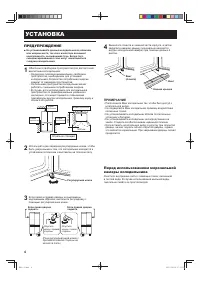
4 ПРЕДУПРЕЖДЕНИЕ H е устанавливайте данный холодильник во влажном ■ или мокром месте , так как в изоляторе возникнет неисправность , вызывающая течь . Более того , сконденсировавшиеся газы могут накапливаться снаружи холодильника . 1 Обеспечьте свободное пространство для достаточной вентиляции холод...
Page 5 - ОПИСАНИЕ
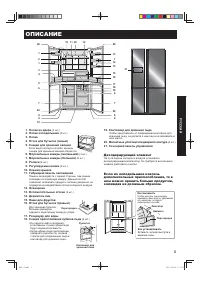
5 Р УССКИЙ Полки на двери 1. (3 шт .) Полки холодильника 2. (2 шт .) Полка 3. Отсек для бутылок ( левый ) 4. Секция для хранения овощей 5. Если ящик потянуть на себя , крышка секции для хранения овощей откроется . Морозильные камеры ( маленький ) 6. (3 шт .) Морозильные камеры ( большой ) 7. (2 шт ....
Page 7 - Энергосбережение; Подсказки; ЭКСПЛУАТАЦИЯ
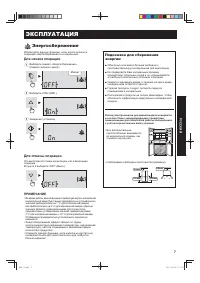
7 Р УССКИЙ Энергосбережение Используйте данную функцию , если хотите включить операцию энергосбережения в холодильнике . Для начала операции 1 Выберите символ « Энергосбережение ». ( Символ зеленого цвета ) 2 Выберите «ON» ( ВКЛ .). 3 Завершает установку . Для отмены операции Это выполняется таким ж...
Page 8 - Быстрое
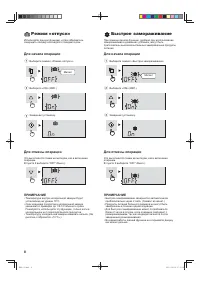
8 Режим « отпуск » Используйте данную функцию , когда собираетесь совершить поездку или надолго покидаете дом . Для начала операции 1 Выберите символ « Режим « отпуск »». 2 Выберите «ON» ( ВКЛ .). 3 Завершает установку . Для отмены операции Это выполняется таким же методом , как и включение операции...
Page 10 - Регулировка
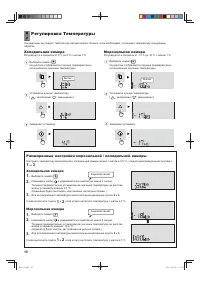
10 Расширенные настройки морозильной / холодильной камеры Настроить температуру морозильной и холодильной камеры можно с шагом в 0,5 °C, следуя нижеприведенным пунктам с 1 по 3 . Холодильная камера Выберите символ 1. . Нажимайте кнопку 2. и удерживайте ее нажатой не менее 3 секунд . Текущее предвари...
Page 13 - УХОД
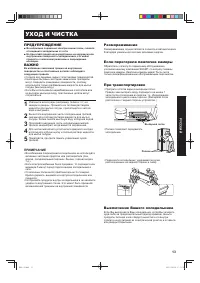
13 Р УССКИЙ ПРЕДУПРЕЖДЕНИЕ Во избежание поражения электрическим током , сначала ■ отсоедините холодильник от сети . Не брызгайте водой непосредственно на наружную или ■ внутреннюю поверхность холодильника , это может привести к появлению ржавчины и повреждению изоляции . ВАЖНО Во избежание появления...
Page 15 - WARNING; CAUTION
15 ENGLISH Household use only Thank you very much for buying this SHARP product. Before using your SHARP refrigerator, please read this operation manual to ensure that you gain the maximum bene fi t from it. This refrigerator is for household only, with ambient temperature between +5° С and +43° С ....
Page 16 - Before using your refrigerator; INSTALLATION
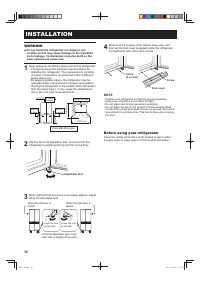
16 WARNING Do not install the refrigerator in a damp or wet ■ location as this may cause damage to the insulation and a leakage. Condensation may also build on the outer cabinet and cause rust. 1 Keep adequate ventilation space around the refrigerator. The fi gure shows the minimum required space fo...
Page 17 - DESCRIPTION
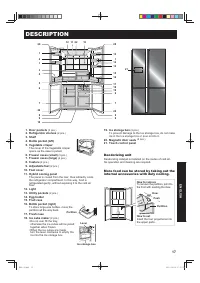
17 ENGLISH Door pockets 1. (3 pcs.) Refrigerator shelves 2. (2 pcs.) Shelf 3. Bottle pocket (left) 4. Vegetable crisper 5. The cover of the Vegetable crisper opens as the case is pulled. Freezer cases (small) 6. (3 pcs.) Freezer cases (large) 7. (2 pcs.) Casters 8. (4 pcs.) Adjustable feet 9. (2 pcs...
Page 18 - Touch control panel; To light the control panel; Feature icons; Controlling temperature icons
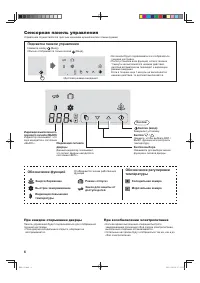
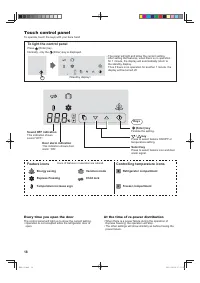
18 Touch control panel To operate, touch the keys with your bare hand. To light the control panel Press (Enter) key. Normally, only the (Enter) key is displayed. The panel will light and show the current setting. • After setting the features, when there is no operation • for 1 minute, the display wi...
Page 19 - Energy Saving; To start operation; Tips for saving energy; OPERATION
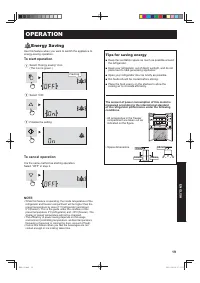
19 ENGLISH Energy Saving Use this feature when you want to switch the appliance to energy-saving operation. To start operation 1 Select “Energy saving” icon. (The icon is green.) 2 Select “ON”. 3 Finalize the setting. To cancel operation It is the same method as starting operation. Select “OFF” in s...
Page 20 - Vacation mode; Express Freezing
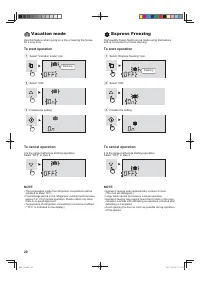
20 Vacation mode Use this feature when going on a trip or leaving the house for a long time. To start operation 1 Select “Vacation mode” icon. 2 Select “ON”. 3 Finalize the setting. To cancel operation It is the same method as starting operation. Select “OFF” in step 2. NOTE The temperature inside t...
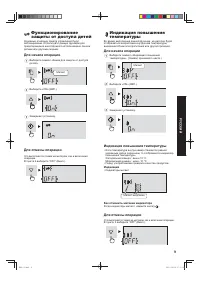
Page 21 - Child Lock; Temperature Increase sign; To cancel operation
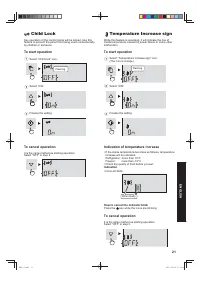
21 ENGLISH Child Lock Key operation of the control panel will be locked. Use this feature to prevent the panel from being used unintentionally by children or someone. To start operation 1 Select “Child lock” icon. 2 Select “ON”. 3 Finalize the setting. To cancel operation It is the same method as st...
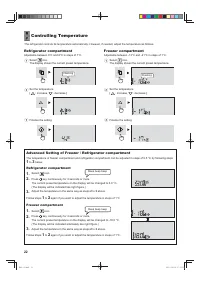
Page 22 - Advanced Setting of Freezer / Refrigerator compartment; Controlling Temperature; Refrigerator compartment
22 Advanced Setting of Freezer / Refrigerator compartment The temperature of freezer compartment and refrigerator compartment can be adjusted in steps of 0.5 °C by following steps 1 to 3 below. Refrigerator compartment Select 1. icon. Press 2. key continuously for 3 seconds or more. The current pres...
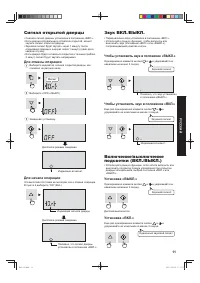
Page 23 - Door Alarm
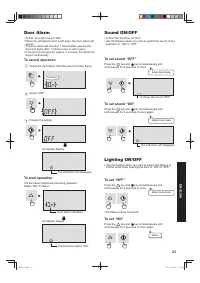
23 ENGLISH Door Alarm At fi rst, door alarm is set “ON”. • When the refrigerator door is left open, the door alarm will • sound. The door alarm will sound in 1 minute after opening the • door and again after 1 minute (once in each case). If the door is left open for approx. 3 minutes, the alarm will...
Page 24 - STORING FOOD; Dairy Products & Eggs; For best freezing
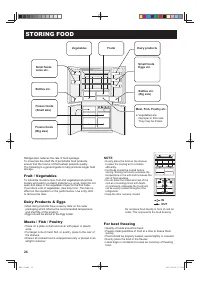
24 STORING FOOD INOUT Refrigeration reduces the rate of food spoilage. To maximize the shelf life of perishable food products, ensure that the food is of the freshest possible quality. The following is a general guide to help promote longer food storage. Fruit / Vegetables To minimize moisture loss,...
Page 25 - CARE AND CLEANING
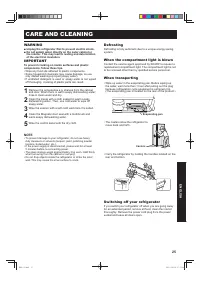
25 ENGLISH WARNING Unplug the refrigerator fi rst to prevent electric shock. ■ Do not splash water directly on the outer cabinet or ■ the interior. This may lead to rusting and deterioration of the electrical insulation. IMPORTANT To prevent cracking on inside surfaces and plastic components, follow...
Page 26 - BEFORE YOU CALL FOR SERVICE
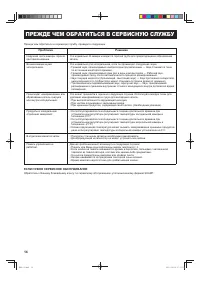
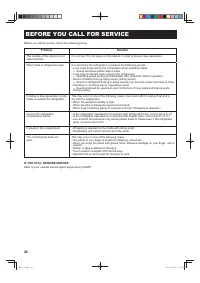
26 Before you call for service, check the following points. Problem Solution The outside of the cabinet is hot when touched. It is normal. The hot pipe is in the cabinet in order to prevent dew generation. When there is refrigerator noise. It is normal for the refrigerator to produce the following s...
Page 28 - SHARP CORPORATION
TINS-B483CBRZ 13MK TH 2 SHARP CORPORATION Напечатано в Таиланде / Printed in Thailand (B483-2).indb 28 (B483-2).indb 28 2013/10/04 13:53:47 2013/10/04 13:53:47