Page 2 - VTHS GHTLJCNJHJÖZJCNB
1 VTHS GHTLJCNJHJÖZJCNB Jpzfrjvmntcm cj dctvb erfpfzbyvb lj zfxfkf bcgjkmpjdfzby ghb<jhf. 1. Lky evtzmitzby dthjynzjcnb djpujhfzby d gtxb: f. zt gthtuhtdfqnt ghjlerns;<. elfkbnt egfrjdjxze+ ghjdjkjre c <evfözsü bkb gkfcnbrjdsü gfrtnjd lj njuj, rfr gjvtcnbnm bü d gtxm; d. zt gthtuhtdfqnt vfc...
Page 3 - Xnj ztj
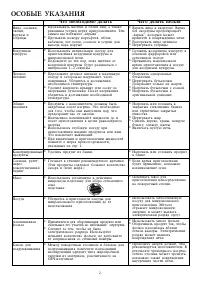
2 * Dfhbnm yqwf d crjhkegt. Dfhrf<tp crjhkegs ghtljndhfoftnfidphsdfl, rjnjhsq vjötnghbdtcnb r gjdhtöltzb+ gtxb. * Hfpjuhtdfnm yqwf wtkbrjv. * Gthtuhtdfnm ecnhbws. * Ujnjdbnm djpleize+ rerehepe dj<sxzjq afhajhjdjq bkbcntrkyzzjq gjcelt. * Ghtdsifnm vfrcbvfkmzjtdhtvy ghbujnjdktzby d gjceltlky djple...
Page 4 - BZCNHERWBY GJ ECNFZJDRT
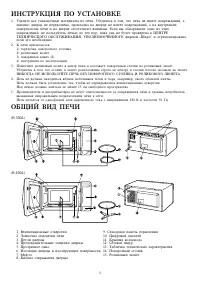
3 BZCNHERWBY GJ ECNFZJDRT 1. Elfkbnt dct egfrjdjxzst vfnthbfks bp gtxb. E<tlbntcm d njv, xnj gtxm zt bvttn gjdhtöltzbq, f bvtzzj: ldthwf zt gthtrjitzf, ghjrkflrf zf ldthwt zt bvttn gjdhtöltzbq, f zf dzenhtzzbügjdthüzjcnyü gtxb b zf ldthwt jncencnde+n dvynbzs. Tckb ds j<zfheöbkb jlzj bp änbügjd...
Page 5 - Ctzcjhzfy gfztkm eghfdktzby
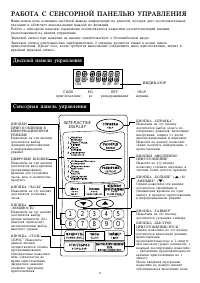
4 INTERACTIVE DISPLAY 1 2 3 4 5 6 7 8 9 O RZJGRBGHBUJNJDKTZBY DBZAJHVFWBJZZJVHTÖBVTZföfnbtv zf änb rzjgrbljcnbuftncy ds<jhaezrwbb ghbujnjdktzbyd bzajhvfwbjzzjvhtöbvt. WBAHJDST RZJGRBZföfnbtv zf änb rzjgrbljcnbuftncy ddjl dhtvtzbghjuhfvvbhjdfzby,dhtvtzb lky ecnfzjdrbxfcjd, dtcf b rjkbxtcndfghjlern...
Page 7 - Lky jnvtzs ghjuhfvvs dj dhtvy ghbujnjdktzby; Ecnfzjdrf xfcjd
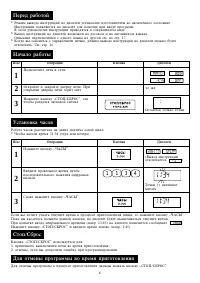
6 Gthtl hf<jnjq Ifu Jgthfwby Rzjgrf Lbcgktq Zfxfkj hf<jns Lky jnvtzs ghjuhfvvs d ghjwtcct ghbujnjdktzby ldföls zföfnm rzjgre fiCNJG/C>HJCfl. Lky jnvtzs ghjuhfvvs dj dhtvy ghbujnjdktzby Rzjgrf fiCNJG/C>HJCfl bcgjkmpetncy lky:1. dhtvtzzjuj dsrk+xtzby gtxb dj dhtvy ghbujnjdktzby;2. jnvtzs, tckb...
Page 8 - Ghbujnjdktzbt ghb gjvjob nfqvthf; O O O
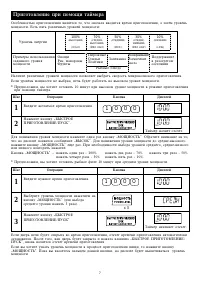
7 Ghbujnjdktzbt ghb gjvjob nfqvthf Jcj<tzzjcnm+ ghbujnjdktzby ydkytncy nj, xnj czfxfkf ddjlbncy dhtvy ghbujnjdktzby, f pfntv ehjdtzmvjozjcnb. Tcnm gynm hfpkbxzsü ehjdztq vjozjcnb: Ehjdtzm pzthubb – – – – – – – – – – – – – – – – – – – – – – – – – – – – – – – – – – – – – – – – – – – – – – – – 100% ...
Page 9 - Ghbujnjdktzbt gentv pflfzby gjcktljdfntkmzjcntq; >scnhjt ghbujnjdktzbt
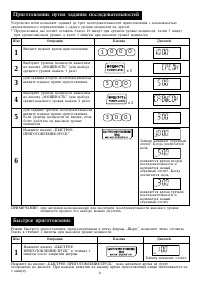
8 Nfqvth zfxbzftn j<hfnzsqjncxtn. Rjulf ljcnbuftncyzjkm, gjydkytncy dhtvy dnjhjqgjcktljdfntkmzjcnb bzfxbzftncy zjdsqj<hfnzsq jncxtn. Rjulfljcnbuftncy zjkm, gjydkytncy dhtvy nhtnmtqgjcktljdfntkmzjcnb bzfxbzftncy zjdsqj<hfnzsq jncxtn. Ecnhjqcndj gtxb gjpdjkytn pflfzbt lj nhtü gjcktljdfntkmzjc...
Page 10 - Vtlktzzjt ghbujnjdktzbt
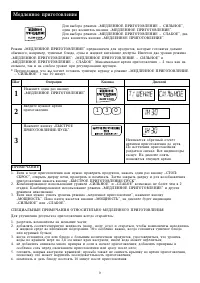
9 Vtlktzzjt ghbujnjdktzbt GHBVTXFZBT 1. Tckb d üjlt ghbujnjdktzby dfv zeözj ghjdthbnm ghjlernjd, zföfnm jlbz hfp rzjgre fiCNJG/ C>HJCfl, jnrhsnm ldthwe gtxb, ghjdthbnm b gjvtifnm. Pfntv pfrhsnm ldthwe b lky djpj<zjdktzbyghbujnjdktzby zföfnm rzjgre fi>SCNHJT GHBUJNJDKTZBT/GECRfl. 2. Rjv<bzbhj...
Page 11 - Pfvtxfzby jnzjcbntkmzj fdnjvfnbxtcrbü jgthfwbq
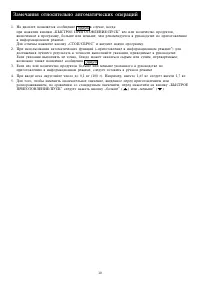
10 Pfvtxfzby jnzjcbntkmzj fdnjvfnbxtcrbü jgthfwbq 1. Zf lbcgktt gjydkytncy cjj<otzbt d ckexft, rjulf: ghb zföfnbb rzjgrb fi>SCNHJT GHBUJNJDKTZBT/GECRfl dtc bkb rjkbxtcndj ghjlernjd,drk+xtzzjt d ghjuhfvve, <jkmit bkb vtzmit, xtv htrjvtzletncy d herjdjlcndt gj ghbujnjdktzb+d bzajhvfwbjzzjv htöb...
Page 12 - Ghbujnjdktzbt d bzajhvfwbjzzjv htöbvt
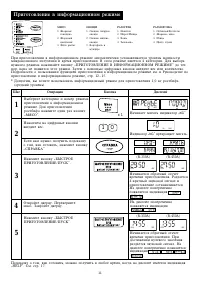
11 Ghbujnjdktzbt d bzajhvfwbjzzjv htöbvt HFPVJHJPRF 1. Jn<bdzfy/Rjnktns 2. Öfhtzjt vycj 3. Gnbwf 4. Wsgk. recrb HFPJUHTD 1. Zfgbnjr 2. Gbhju/Gbwwf 3. Rfif 4. Pfgtrfzrf JDJOB 1. Cdtöbt ndëhlst jdjob 2. Cdtöbt vyurbt jdjob 3. Rfhnjatkm d vezlbht Ghb ghbujnjdktzbb d bzajhvfwbjzzjv htöbvt fdnjvfnbxtc...
Page 13 - HTÖBVS HFPJUHTDF
12 HERJDJLCNDJ GJ GHBUJNJDKTZB* DBZAJHVFWBJZZJV HTÖBVT Rjztxzfy ntvgthfnehf pfdbcbn jn zfxfkmzjq. Gjckt ghbujnjdktzby ghjdthmnt, ujnjdf kb gbof. Ghbztj<üjlbvjcnb vjözj ghjljköbnm ghbujnjdktzbt ztrjnjhjt dhtvy ghb njv öt bkb ghb lheujv ehjdztvjozjcnb. Zfgbnjr hfccxbnfzj zf: xfqrjatdjle 1—4 xfirb (...
Page 14 - HTÖBVS HFPVJHFÖBDFZBY
13 Dhtvy dslthörb d gtxb (d vbzenfü) gjckt ghbujnjdktzby HTÖBVS HFPVJHFÖBDFZBY • J<thzenm ajkmujq njzrbt rhfy rjnktn bkb recrjd vycf. • Gjkjöbnm recrb vycf bkb rjnktns <jktt njzrbvb xfcnyvb r wtznhe d jlbz ckjq zfcnjkbr lky hfpvjhföbdfzby.Tckb recrb cvthpkbcm, gjgsnfnmcy bü rfrvjözj crjhtt hfp...
Page 17 - Cghfdrf
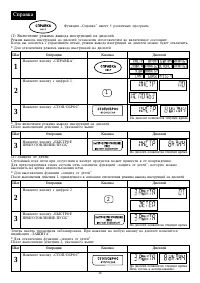
16 Cghfdrf 1 Zfövbnt rzjgre fiCGHFDRFfl. Zfövbnt rzjgre c wbahjq 1. Zfövbnt rzjgre fiCNJG/C>HJCfl. Ifu Jgthfwby Rzjgrf Lbcgktq * Lky drk+xtzby htöbvf dsdjlf bzcnherwbq zf lbcgktq Gjckt dsgjkztzby ltqcndby 2, erfpfzzjuj dsit 1 3 2 (1) Drk+xtzbt htöbvf dsdjlf bzcnherwbq zf lbcgktq Htöbv dsdjlf bzcnherw...
Page 19 - Aezrwby; Cbuzfkbpfwby
18 Aezrwby fi vtzmit—<jkmit fl Rzjgrb fivtzmit—<jkmitfl bcgjkmpe+ncy lky htuekbhjdrb dhtvtzb ghbujnjdktzby jnzjcbntkmzj njuj,xnj ghtlecvjnhtzj d bzajhvfwbjzzjv htöbvt. * Ghtlgjkjöbv, ds üjnbnt ghbujnjdbnm 1,0 ru hjcn<baf (üjhjij ghjöfhtzzjuj) d bzajhvfwbjzzjv htöbvt. Ifu Jgthfwby Rzjgrf Lbcgktq...
Page 20 - Nfqvth
19 Edtkbxtzbt dhtvtzb ghbujnjdktzby dj dhtvy dsgjkztzby ghjuhfvvs Dhtvy vbrhjdjkzjdjuj ghbujnjdktzby vjötn <snm edtkbxtzj dj dhtvy dsgjkztzby ghjuhfvvs cgjvjom+ rzjgjr fi<jkmit—vtzmitfl. * Ghtlgjkjöbv, ds üjnbnt edtkbxbnm dhtvy ghbujnjdktzby zf 2 vbzens dj dhtvy dsgjkztzby gynbvbzenzjq ghjuhfvvs...
Page 21 - GTHTL NTV RFR DSPDFNM VFCNTHF; NTÜZBXTCRBT ÜFHFRNTHBCNBRB
20 EÜJL PF GTXM* Dztizyy cnjhjzf Dztizbq rjöeü rjhgecf cktletn vsnm vyurbv vskjv b ntgkjq djljq, f pfntv zfxbcnj dsnbhfnm dkfözjqvfnthbtq. Bp<tufqnt bcgjkmpjdfzby ötcnrbü f<hfpbdzsü vj+obü chtlcnd. Ldthwf Lky elfktzby gyntz b uhypb cktletn xfcnj dsnbhfnm dkfözjq vfnthbtq c j<tbü cnjhjz ldth...
Page 22 - WARNING
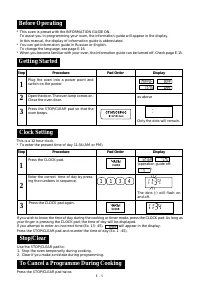
E – 1 WARNING Read all instructions before using the appliance. 1. To reduce the risk of fire in the oven cavity: a. Do not overcook food.b. Remove wire twist-ties from paper or plastic bags before placing bag in the oven.c. Do not heat oil or fat for deep frying. The temperature of the oil cannot b...
Page 23 - SPECIAL NOTES; DON’T
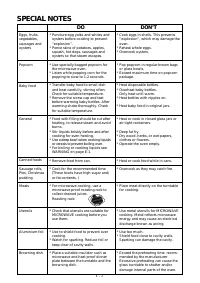
E – 2 * Puncture egg yolks and whites and oysters before cooking to prevent“explosion”. * Pierce skins of potatoes, apples, squash, hot dogs, sausages andoysters so that steam escapes. * Use specially bagged popcorn for the microwave oven. * Listen while popping corn for the popping to slow to 1-2 s...
Page 24 - INSTALLATION INSTRUCTIONS; OVEN DIAGRAM
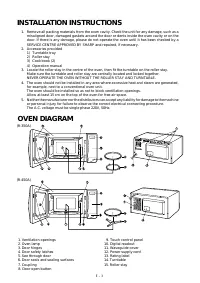
E – 3 1. Remove all packing materials from the oven cavity. Check the unit for any damage, such as a misaligned door, damaged gaskets around the door or dents inside the oven cavity or on thedoor. If there is any damage, please do not operate the oven until it has been checked by aSERVICE CENTRE APP...
Page 25 - OPERATION OF TOUCH CONTROL PANEL; Control Panel Display
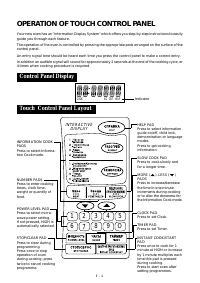
E – 4 INTERACTIVE DISPLAY 1 2 3 4 5 6 7 8 9 O INFORMATION COOKPADSPress to select Informa-tion Cook mode. NUMBER PADSPress to enter cookingtimes, clock time,weight or quantity offood. POWER LEVEL PADPress to select micro-wave power setting.If not pressed, HIGH isautomatically selected. STOP/CLEAR PA...
Page 27 - Microwave Time Cooking
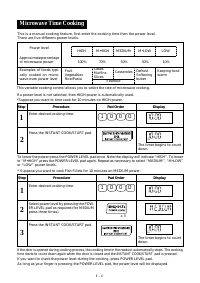
E – 6 Microwave Time Cooking This is a manual cooking feature, first enter the cooking time then the power level.There are five different power levels. – – – – – – – – – – – – – – – – – – – – – – – – – – – – – – – – – – – – HIGH LOW MEDIUM M•HIGH M•LOW Power level 100% 70% 50% 30% 10% – – – – – – – ...
Page 28 - Sequence Cooking; Instant CookTM
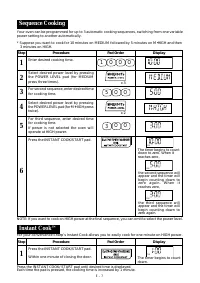
E – 7 Sequence Cooking Step Procedure Pad Order Display Enter desired cooking time. Select desired power level by pressingthe POWER LEVEL pad (for MEDIUMpress three times). 1 O O O x 3 For second sequence, enter desired timefor cooking time. 5 O O 3 Select desired power level by pressingthe POWER LE...
Page 29 - Slow Cook
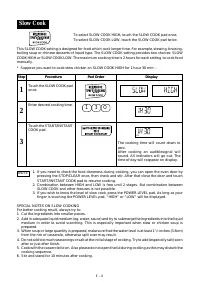
E – 8 Slow Cook This SLOW COOK setting is designed for food which cook longer time. For example, stewing, braising,boiling soup or chinese desserts of liquid type. The SLOW COOK setting provides two choices: SLOWCOOK HIGH or SLOW COOK LOW. The maximum cooking time is 2 hours for each setting to cook...
Page 30 - Notes for Automatic Operations
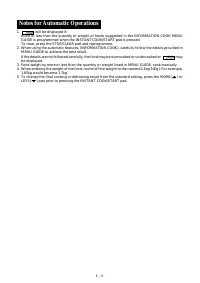
E – 9 1. will be displayed if: more or less than the quantity or weight of foods suggested in the INFORMATION COOK MENUGUIDE is programmed when the INSTANT COOK/START pad is pressed.To clear, press the STOP/CLEAR pad and reprogramme. 2. When using the automatic features, (INFORMATION COOK), carefull...
Page 31 - Information Cook
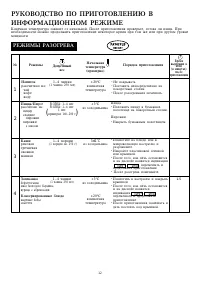
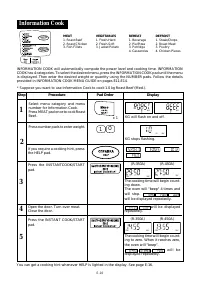
E-10 Information Cook INFORMATION COOK will automatically compute the power level and cooking time. INFORMATIONCOOK has 4 categories. To select the desired menu, press the INFORMATION COOK pad until the menuis displayed. Then enter the desired weight or quantity using the NUMBER pads. Follow the det...
Page 32 - REHEAT MENU GUIDE; INFORMATION COOK MENU GUIDE
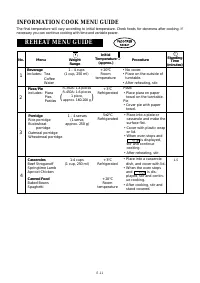
E-11 REHEAT MENU GUIDE Beverageincludes: Tea CoffeeWater Pizza/Pieincludes: Pizza PiesPasties Pizza• Place pizza on paper towel on the turntable. Pie• Cover pie with paper towel. 1 Procedure Menu No. The final temperature will vary according to initial temperature. Check foods for doneness after coo...
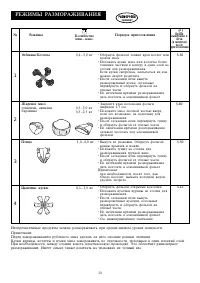
Page 33 - DEFROST MENU GUIDE
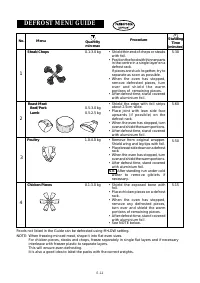
E-12 DEFROST MENU GUIDE Menu Procedure No. 0.1-3.0 kg • Shield thin end of chops or steaks with foil. • Position the food with thinner parts in the centre in a single layer on adefrost rack.If pieces are stuck together, try toseparate as soon as possible. • When the oven has stopped, remove defroste...
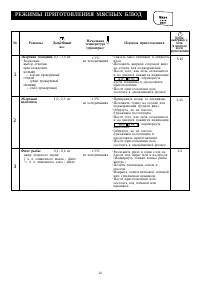
Page 34 - MEAT MENU GUIDE
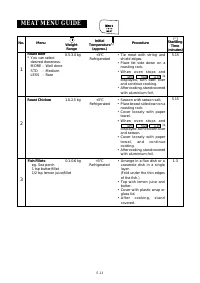
E-13 MEAT MENU GUIDE Weight Range Menu Procedure 0.5-3.0 kg +3 ° C Refrigerated • Tie meat with string and shield edges. • Place fat side down on a roasting rack. • W h e n o v e n s t o p s a n d is displayed, turn beef overand continue cooking. • After cooking, stand covered with aluminium foil. R...
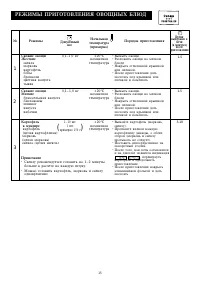
Page 35 - VEGETABLES MENU GUIDE
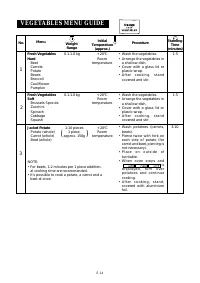
E-14 • Wash potatoes (carrots, beets). • Pierce twice with fork on each side of potato (forcarrot and beet, piercing isnot necessary). • P l a c e o n o u t s i d e o f turntable. • W h e n o v e n s t o p s a n d is d i s p l a y e d , t u r n o v e rp o t a t o e s a n d c o n t i n u ecooking. • ...
Page 36 - Help
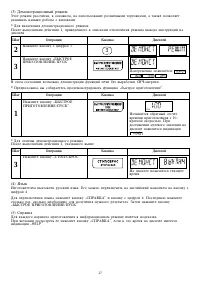
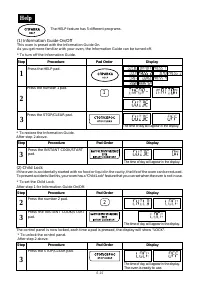
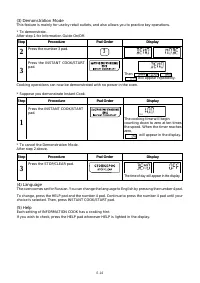
E-15 (1) Information Guide On/Off This oven is preset with the Information Guide On.As you get more familiar with your oven, the Information Guide can be turned off. * To turn off the Information Guide. Step Procedure Pad Order Display The time of day will appear in the display. Press the INSTANT CO...
Page 38 - Alarm
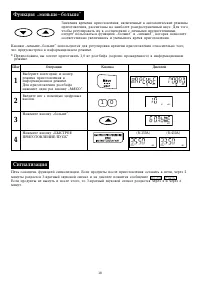
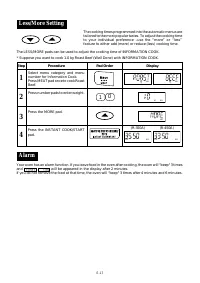
E-17 Less/More Setting The LESS/MORE pads can be used to adjust the cooking time of INFORMATION COOK. * Suppose you want to cook 1.0 kg Roast Beef (Well Done) with INFORMATION COOK. The cooking times programmed into the automatic menus aretailored to the most popular tastes. To adjust the cooking ti...
Page 39 - Increasing or Decreasing Time During A Cooking Programme; Timer
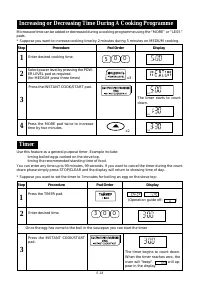
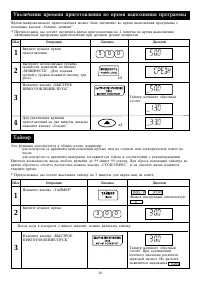
E-18 Increasing or Decreasing Time During A Cooking Programme Microwave time can be added or decreased during a cooking programme using the “MORE” or “LESS”pads.* Suppose you want to increase cooking time by 2 minutes during 5 minutes on MEDIUM cooking. Step Procedure Pad Order Display Enter desired...
Page 40 - CARE AND CLEANING
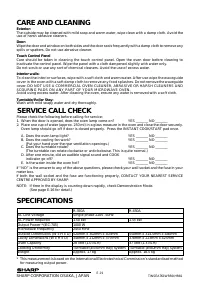
E-19 SHARP CORPORATION OSAKA, JAPAN TINSEA761WRR0-HR81 CARE AND CLEANING Exterior:The outside may be cleaned with mild soap and warm water, wipe clean with a damp cloth. Avoid theuse of harsh abrasive cleaners. Door:Wipe the door and window on both sides and the door seals frequently with a damp clo...