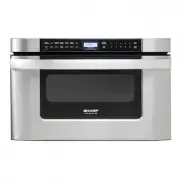
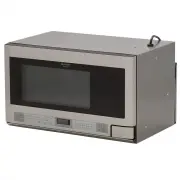
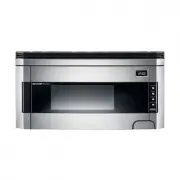
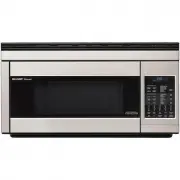
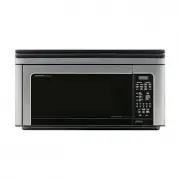
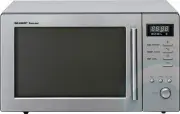
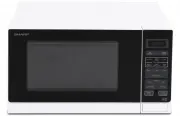
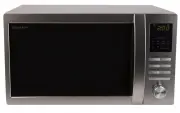
Page 2 - BZAJHVFWBY J CTHNBABRFWBB GHJLERWBB
BZAJHVFWBY J CTHNBABRFWBB GHJLERWBB VBRHJDJKZJDFY GTXM VJLTKM R-340A IFHG cthnbabwbhjdfzf Rjvgfzbtq HJCNTCN – VJCRDF, jabwbfkmzsv ghtlcnfdbntktv UJCCNFZLFHNF Hjccbb VJLTKM R-340A IFHG cjjndtncndetn nht<jdfzbyvzjhvfnbdzsü ljrevtznjd: gj <tpjgfczjcnb —UJCN H VÄR 335-2-25-1994gj ÄVC —UJCN 23450-8...
Page 3 - VTHS GHTLJCNJHJÖZJCNB
1 VTHS GHTLJCNJHJÖZJCNB Jpzfrjvmntcm cj dctvb erfpfzbyvb lj zfxfkf bcgjkmpjdfzby ghb<jhf. 1. Lky evtzmitzby dthjynzjcnb djpujhfzby d gtxb: f. zt gthtuhtdfqnt ghjlerns; <. elfkbnt egfrjdjxze+ ghjdjkjre c <evfözsü bkb gkfcnbrjdsü gfrtnjd lj njuj, rfr gjvtcnbnm bü d gtxm; d. zt gthtuhtdfqnt vf...
Page 5 - BZCNHERWBY GJ ECNFZJDRT
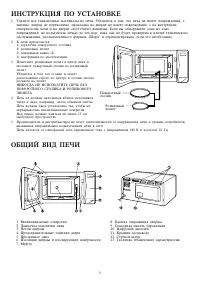
3 BZCNHERWBY GJ ECNFZJDRT 1. Elfkbnt dct egfrjdjxzst vfnthbfks bp gtxb. E<tlbntcm d njv, xnj gtxm zt bvttn gjdhtöltzbq, f bvtzzj: ldthwf zt gthtrjitzf, ghjrkflrf zf ldthwt zt bvttn gjdhtöltzbq, f zf dzenhtzzbügjdthüzjcnyü gtxb b zf ldthwt jncencnde+n dvynbzs. Tckb ds j<zfheöbkb jlzj bp änbügjd...
Page 7 - Ecnfzjdrf xfcjd
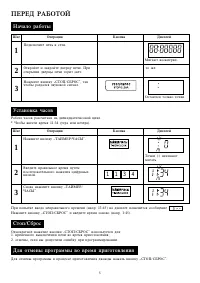
5 GTHTL HF>JNJQ Zfxfkj hf<jns Ifu Jgthfwby Rzjgrf Lbcgktq nj öt Hf<jnf xfcjd hfccxbnfzf zf ldtzflwfnbxfcjdjq wbrk. * Xnj<s ddtcnb dhtvy 11:34 (enhf bkb dtxthf). Ecnfzjdrf xfcjd Vbuf+n djcmvthrb. Gjlrk+xbnt gtxm r ctnb. Jnrhjqnt b pfrhjqnt ldthwe gtxb. Ghbjnrhsnbb ldthws gtxb ujhbn cdtn. ...
Page 8 - Ghbujnjdktzbt ghb gjvjob nfqvthf; HEXZST JGTHFWBB; O O O
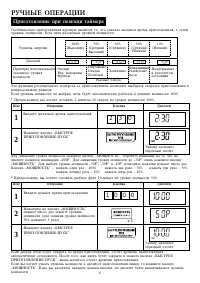
6 Änf aezrwby htuekbhetvjuj rjznhjky pf ghbujnjdktzbtv gjpdjkytn ds<bhfnm crjhjcnm ghbujnjdktzby dvbrhjdjkzjdjv htöbvt. Tckb ehjdtzm vjozjcnb zt ds<hfz, gtxm <eltn fdnjvfnbxtcrb hf<jnfnm d htöbvt vjozjcnb 100%. * Ghtlgjkjöbv, ds üjnbnt ujnjdbnm 2 vbzens 30 ctrezl zf ehjdzt vjozjcnb 100%....
Page 9 - Ghbujnjdktzbt gentv pflfzby gjcktljdfntkmzjcntq
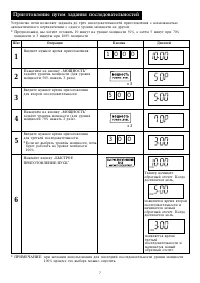
7 Ecnhjqcndj gtxb gjpdjkytn pflfdfnm lj nhtü gjcktljdfntkmzjcntq ghbujnjdktzby c djpvjözjcnm+fdnjvfnbxtcrjuj gthtrk+xtzby c jlzjuj ehjdzy vjozjcnb zf lheujq. * Ghtlgjkjöbv, ds üjnbnt ujnjdbnm 10 vbzen zf ehjdzt vjozjcnb 50%, f pfntv 5 vbzen ghb 70%vjozjcnb b 3 vbzens ghb 100% vjozjcnb. Ifu Jgthfwby ...
Page 10 - >scnhjt ghbujnjdktzbt
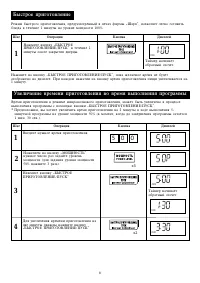
8 >scnhjt ghbujnjdktzbt Htöbv <scnhjuj ghbujnjdktzby, ghtlecvjnhtzzsq d gtxfü abhvs fiIfhgfl, gjpdjkytn kturj ujnjdbnm<k+lf d ntxtzbt 1 vbzens zf ehjdzt vjozjcnb 100%. Ifu Jgthfwby Rzjgrf Lbcgktq Zfövbnt rzjgre fi>SCNHJTGHBUJNJDKTZBT/GECRfl d ntxtzbt 1vbzens gjckt pfrhsnby ldthws. Nfqvth zfx...
Page 11 - Pfvtxfzby jnzjcbntkmzj fdnjvfnbxtcrbü jgthfwbq; Fdnjvfnbxtcrbt ghjuhfvvs; FDNJVFNBXTCRBT JGTHFWBB
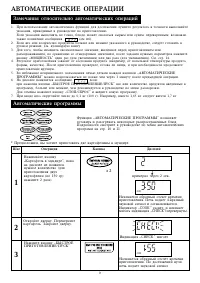
9 Pfvtxfzby jnzjcbntkmzj fdnjvfnbxtcrbü jgthfwbq 1. Ghb bcgjkmpjdfzbb fdnjvfnbxtcrbü aezrwbq lky ljcnbötzby kexituj htpekmnfnf d njxzjcnb dsgjkzyqnterfpfzby, ghbdjlbvst d herjdjlcndt gj ghbujnjdktzb+.Tckb erfpfzby dsgjkzynm zt njxzj, <k+lj vjötn jrfpfnmcy cshsv bkb ceübv, gthtdfhtzzsv; djpvjözjnf...
Page 12 - HERJDJLCNDJ GJ VTZ* FDNJVFNBXTCRBÜ GHJUHFVV
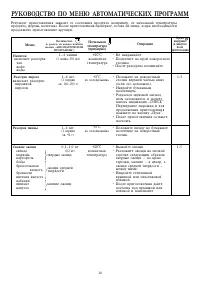
10 HERJDJLCNDJ GJ VTZ* FDNJVFNBXTCRBÜ GHJUHFVV Vtz+ Hfpjuhtd gbhjuf drk+xftn hfpjuhtd: gbhjörjdgbhjujd Zfgbnjr drk+xftn hfpjuhtd: xfyrjatdjls 1-3 Jgthfwby • Zt zfrhsdfqnt.• Gjvtcnbnt zf rhfq gjdjhjnzjuj cnjkbrf. • Gjckt hfpjuhtdf gjvtifqnt. 1—4 xfirb (1 xfirf 250 vk) +20˚C rjvzfnzfy ntvgthfnehf • Gj...
Page 14 - Hfpvjhjprf
12 Hfpvjhjprf Ifu Jgthfwby Rzjgrf Lbcgktq Zfxbzf+n vbufnm <erds fi KG fl. >erds fi KG fl ghtrhfof+n vbufnm. Htöbv fiHFPVJHJPRFfl dsgjkzytncy fdnjvfnbxtcrb gjckt ddjlfdtcf. Gjlhj<zjcnb cvjnhbnt d herjdjlcndt gj vtz+ hfpvjhjprbzf cnh. 13. 1 Lky ddjlf dtcf zfövbntrzjgrb c wbahfvb. Zföbvfqnt rzjgrefiH...
Page 15 - HERJDJLCNDJ GJ VTZ* HFPVJHJPRB
13 5-30 HERJDJLCNDJ GJ VTZ* HFPVJHJPRB 0,1–3,0 Jn<bdzfy/Rjnktns 0,1–3,0 1,0–4,0 3 2 1 He<k. vycj ujdylbzf Öfhtzjt vycj ujdylbzf, cdbzbzf<fhfzbzf Gnbwf No. Vtz+ Jgthfwby Rjkbxtcndj vbz.—vfrc. (ru) 0,5–3,00,5–2,5 4 0,1–3,0 Ghjlerns, zt erfpfzzst d lfzzjq nf<kbwt, vjuen hfpvjhföbdfnmcy zf e...
Page 16 - Aezrwby; LHEUBT ELJ>ZST AEZRWBB
14 Aezrwby fi vtzmit—<jkmit fl Pzfxtzby dhtvtzb ghbujnjdktzby, drk+xtzzst d fdnjvfnbxtcrbt htöbvs ghbujnjdktzby, hfccxbnfzs zf zfb<jktthfcghjcnhfztzzsq drec. Lky njuj, xnj<s htuekbhjdfnm bü d cjjndtncndbb c kbxzsvb ghtlgjxntzbyvb, cktletngjkmpjdfnmcy aezrwbtq fi<jkmitfl b fivtzmitfl, rjnjhfy g...
Page 17 - Nfqvth; Pfobnf jn ltntq; Ltvjzcnhfwbjzzsq htöbv; Cbuzfkbpfwby
15 Nfqvth Änf aezrwby bcgjkmpetncy d j<obü wtkyü, zfghbvth: lky rjznhjky pf dhtvtztv ghbujnjdktzby rhensü ybw zf gkbnt gj xfcfv;lky rjznhjky pf dhtvtztv dslthörb ujnjdyotujcy <k+lf d cjjndtncndbb c htrjvtzlfwbyvb. Bvttncy djpvjözjcnm ddjlf k+<juj dhtvtzb lj 99 vbzen 99 ctrezl. Lky c<hjcf...
Page 18 - GTHTL NTV RFR DSPDFNM VFCNTHF; NTÜZBXTCRBT ÜFHFRNTHBCNBRB:
16 EÜJL PF GTXM* Dztizyy cnjhjzf Dztiz++ rjöeü rjhgecf cktletn vsnm vyurbv vskjv b ntgkjq djljq, f pfntv zfxbcnj dsnbhfnm dkfözjqvfnthbtq. Bp<tufqnt bcgjkmpjdfzby ötcnrbü f<hfpbdzsü vj+obü chtlcnd. Ldthwf Lky elfktzby gyntz b uhypb cktletn xfcnj dsnbhfnm dkfözjq vfnthbtq c j<tbü cnjhjz ldth...
Page 19 - WARNING
E – 1 WARNING Read all instructions before using the appliance. 1. To reduce the risk of fire in the oven cavity: a. Do not overcook food.b. Remove wire twist-ties from paper or plastic bags before placing bag in the oven.c. Do not heat oil or fat for deep frying. The temperature of the oil cannot b...
Page 20 - SPECIAL NOTES; DON’T
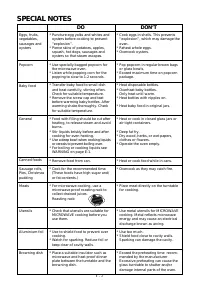
E – 2 * Puncture egg yolks and whites and oysters before cooking to prevent“explosion”. * Pierce skins of potatoes, apples, squash, hot dogs, sausages andoysters so that steam escapes. * Use specially bagged popcorn for the microwave oven. * Listen while popping corn for the popping to slow to 1-2 s...
Page 21 - INSTALLATION INSTRUCTIONS; OVEN DIAGRAM
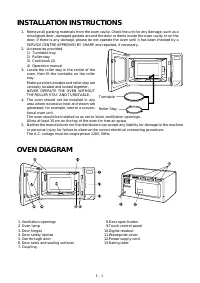
E – 3 1. Remove all packing materials from the oven cavity. Check the unit for any damage, such as a misaligned door, damaged gaskets around the door or dents inside the oven cavity or on thedoor. If there is any damage, please do not operate the oven until it has been checked by aSERVICE CENTRE APP...
Page 22 - OPERATION OF TOUCH CONTROL PANEL; Control Panel Display
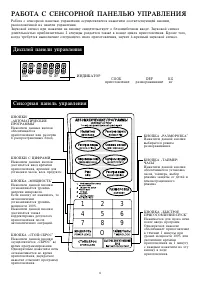
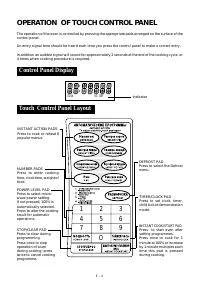
E – 4 OPERATION OF TOUCH CONTROL PANEL The operation of the oven is controlled by pressing the appropriate pads arranged on the surface of thecontrol panel. An entry signal tone should be heard each time you press the control panel to make a correct entry. In addition an audible signal will sound fo...
Page 23 - Getting Started; Clock Setting; BEFORE OPERATING; To Cancel a Programme During Cooking
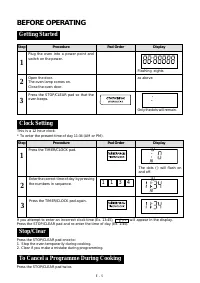
E – 5 Getting Started Step Procedure Pad Order Display 1 Plug the oven into a power point andswitch on the power. Flashing eights Open the door.The oven lamp comes on.Close the oven door. Press the STOP/CLEAR pad so that theoven beeps. as above Clock Setting This is a 12 hour clock. * To enter the p...
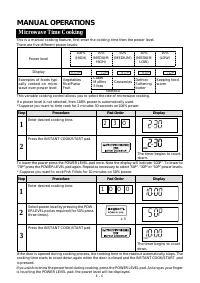
Page 24 - Microwave Time Cooking; MANUAL OPERATIONS
E – 6 Enter desired cooking time. Step Procedure Pad Order Display This variable cooking control allows you to select the rate of microwave cooking. If a power level is not selected, then 100% power is automatically used.*Suppose you want to time cook for 2 minutes 30 seconds on100% power. Power lev...
Page 25 - Sequence Cooking
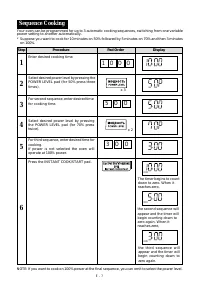
E – 7 Sequence Cooking Your oven can be programmed for up to 3 automatic cooking sequences, switching from one variablepower setting to another automatically.* Suppose you want to cook for 10 minutes on 50% followed by 5 minutes on 70% and then 3 minutes on 100%. Step Procedure Pad Order Display Ent...
Page 26 - Instant CookTM
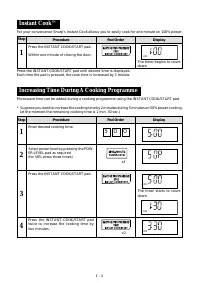
E – 8 For your convenience Sharp’s Instant Cook allows you to easily cook for one minute on 100% power. Step Procedure Pad Order Display Press the INSTANT COOK/START pad. Within one minute of closing the door. 1 Press the INSTANT COOK/START pad until desired time is displayed.Each time the pad is pr...
Page 27 - AUTOMATIC OPERATIONS; Notes for Automatic Operations; Instant Action
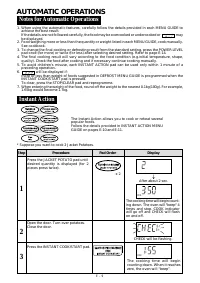
E – 9 AUTOMATIC OPERATIONS 1. When using the automatic features, carefully follow the details provided in each MENU GUIDE to achieve the best result.If the details are not followed carefully, the food may be overcooked or undercooked or may be displayed. 2. Food weighing more or less than the quanti...
Page 28 - INSTANT ACTION MENU GUIDE
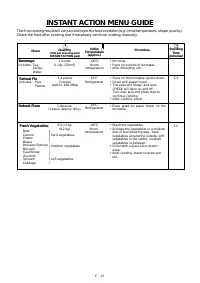
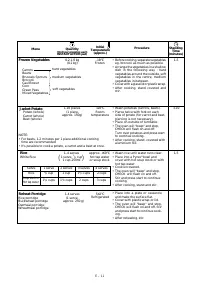
E – 10 Standing Time (minutes) Procedure Menu INSTANT ACTION MENU GUIDE The final cooking result will vary according to the food condition (e,g. initial temperature, shape, quality).Check the food after cooking and if necessary continue cooking manually. • No cover.• Place on outside of turntable.• ...
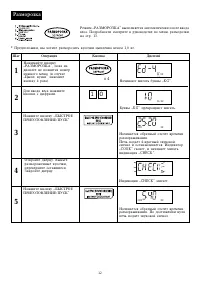
Page 30 - Defrost
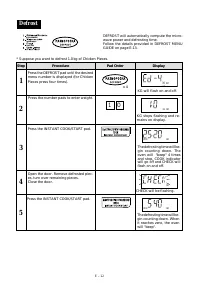
E – 12 Defrost Step Procedure Pad Order Display Press the DEFROST pad until the desiredmenu number is displayed (for ChickenPieces press four times). 1 * Suppose you want to defrost 1.0 kg of Chicken Pieces. Press the INSTANT COOK/START pad. The defrosting time will be-gin counting down. Whenit reac...
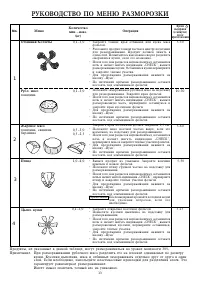
Page 31 - DEFROST MENU GUIDE
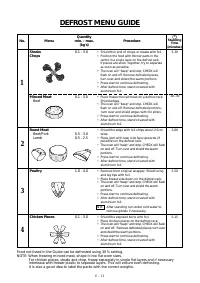
E – 13 Standing Time (minutes) • Shield thin end of chops or steaks with foil.• Position the food with thinner parts in the centre in a single layer on the defrost rack.If pieces are stuck together, try to separateas soon as possible. • The oven will "beep" and stop, CHECK will flash on and ...
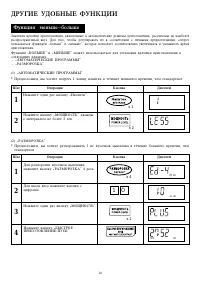
Page 32 - OTHER CONVENIENT FEATURES
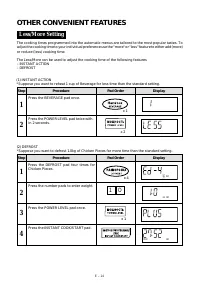
E – 14 OTHER CONVENIENT FEATURES Less/More Setting The cooking times programmed into the automatic menus are tailored to the most popular tastes. Toadjust the cooking time to your individual preference use the "more" or "less" feature to either add (more)or reduce (less) cooking time...
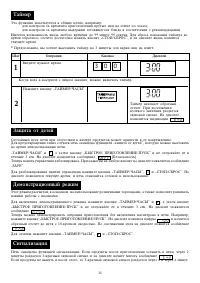
Page 33 - Timer; Child Lock
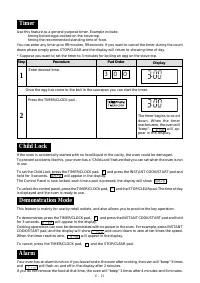
E – 15 Timer Use this feature as a general purpose timer. Example include: timing boiled eggs cooked on the stove top.timing the recommended standing time of food. You can enter any time up to 99 minutes, 99 seconds. If you want to cancel the timer during the countdown phase simply press STOP/CLEAR ...
Page 34 - CARE AND CLEANING; SERVICE CALL CHECK
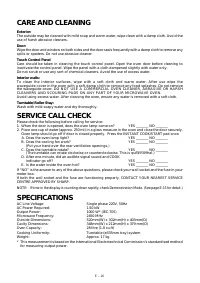
E – 16 CARE AND CLEANING Exterior:The outside may be cleaned with mild soap and warm water, wipe clean with a damp cloth. Avoid theuse of harsh abrasive cleaners. Door:Wipe the door and window on both sides and the door seals frequently with a damp cloth to remove anyspills or spatters. Do not use a...