Shark HP202 - Manuals
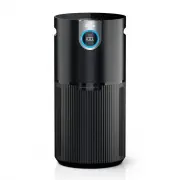
User Manual Shark HP202


Summary
SETTING UP YOUR UNIT Parts:1. Air Output Vents 2. Control Panel 3. Front Display 4. Air Purifier Base 5. Air Intake Vents 6. Filter 7. Filter Door 1. First, carefully flip the air purifier upside down and place it on a level surface. Twist the filter door to unlock the filter. 2. Take the filter out...
CONTROL PANEL A control panel on the top of the unit and a display screen on the front of the unit. TOP CONTROL PANEL FRONT DISPL AY SCREEN Displays the current air quality status based on the Air Info mode selected on the top control panel. TOP CONTROL PANEL BUTTONS MAX On/Off: Press to turn the po...
UNDERSTANDING YOUR AIR QUALITY The rings on the front and top displays will change color as your air quality changes, allowing you to easily monitor your air quality even when you are far from the unit. GOOD 85–100 % 0–25 particles A blue ring means your air quality is good, with a low level of part...
Manual Shark HP202

Summary
visit qr.sharkclean.com /hp200cseries or SCAN HERE USING YOUR SMARTPHONE CAMERA FOR FULL INSTRUCTIONS & REPLACEMENT PARTS © 2022 SharkNinja Operating LLC. SHARK is a registered trademark of SharkNinja Operating LLC. HP200CSeries_NY2_QSG_E_F_MP_Mv1 SETTING UP YOUR UNIT Please be sure to read and ...
LISEZ CES INSTRUCTIONS ET CONSERVEZ-LES Retirez le filtre de son emballage avant de l’utiliser Visitez le site qr.sharkclean.com/hp200cseries ou BALAYEZ ICI AVEC L’APPAREIL PHOTO DE VOTRE TÉLÉPHONE INTELLIGENT POUR OBTENIR DE PLUS AMPLES INSTRUCTIONS ET DES PIÈCES DE RECHANGE CONSIGNES DE SÉCURITÉ I...
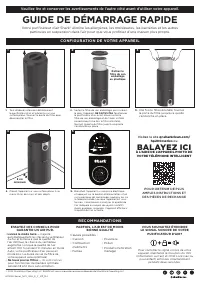
1 © 2022 SharkNinja Operating LLC. SHARK est une marque de commerce déposée de SharkNinja Operating LLC. HP200CSeries_NY2_QSG_E_F_MP_Mv1 CONFIGURATION DE VOTRE APPAREIL RECOMMANDATIONS ESSAYEZ CES CONSEILS POUR GARANTIR UN AIR PUR. • Lancez le mode Auto — il ajuste automatiquement la vitesse du vent...