Page 2 - Safety Information; To avoid electric shock, never touch the inside
ENG - 2 ENG - 3 Safety Information Thank you for purchasing this product (SWA-W500). CAUTION RISK OF ELECTRIC SHOCK. DO NOT OPEN. This symbol indicates that high voltage is present inside. It is dangerous to make any kind of contact with any internal part of this product. CAUTION : TO REDUCE THE RIS...
Page 3 - of this apparatus. Only a qualified technician
ENG - 2 ENG - 3 Safety Information Thank you for purchasing this product (SWA-W500). CAUTION RISK OF ELECTRIC SHOCK. DO NOT OPEN. This symbol indicates that high voltage is present inside. It is dangerous to make any kind of contact with any internal part of this product. CAUTION : TO REDUCE THE RIS...
Page 4 - Wiring the Main Power Supply; IMPORTANT NOTICE; Precautions
ENG - 4 ENG - 5 • Do not install the product in an unstable location such as a shaky self, a slanted floor, or a location exposed to vibration. • Do not drop or strike the product. If the product is damaged, disconnect the power cord and contact a service centre. • To clean this apparatus, unplug th...
Page 6 - Checking the Components; Subwoofer; Specifications; NOTES; Weight and dimensions are approximate.; Open Source Licence Notice; Connecting the SWA-W500 to a Soundbar; ID SET; bottom of the body. You can deform or damage the; Turn off the Soundbar
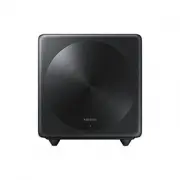
ENG - 6 ENG - 7 Checking the Components Subwoofer Power Cord • Design and specifications are subject to change without prior notice. • For more information about the power supply and power consumption, refer to the label attached to the product. (Label: Rear of the Main Unit) Specifications Weight 4...
Page 8 - Configure “ID SET” using the Soundbar’s remote control; ” in turn. When the connection is complete, “; Check if the LINK LED is solid blue (connection complete); Soundbar and the Wireless Subwoofer.; NOTE; Compatible Models
ENG - 8 ENG - 9 3. Configure “ID SET” using the Soundbar’s remote control Press the Up button on the remote control for 5 seconds or press the ID SET button located at the bottom of the Soundbar. • Until pairing is complete, the Multicolour LED on the Soundbar changes as “ Red → Green → Blue ” in tu...
Page 10 - (Applicable in countries with separate collection systems); UNITED KINGDOM
ENG - 10 Hereby, Samsung, declares that this equipment is in compliance with Directive 2014/53/EU. The full text of the EU declaration of conformity is available at the following internet address: http://www.samsung.com go to Support > Search Product Support and enter the model name. This equipme...
Page 11 - United Kingdom
ENG - 10 This Samsung product is warranted for the period of twelve (12) months from the original date of purchase, against defective materials and workmanship. In the event that warranty service is required, you should return the product to the retailer from whom it was purchased. However, Samsung ...