Page 2 - Contents
2 English Safety information 4 Safety information 4 PREPARATION 10 Name of the parts 10 Display 10 Buttons 15 Check before use 19 Module or group operation 19 Operation pattern for modules 20 Operation pattern for groups 24 OPERATION 28 Selecting group or module 28 Group or module 28 Cooling Operati...
Page 4 - WARNING; Make sure the machine is grounded to prevent electric; Safety information
4 English Saf e ty inf ormation These safety precautions are for owner’s safety and preventions of property damage. Therefore, please read this manual thoroughly before using your product. WARNING Hazards or unsafe practices that may result in severe personal injury or death. CAUTION Hazards or unsa...
Page 5 - For installation; • Failure to do so may result in electric shock, fire,
5 English Saf e ty inf ormation For installation WARNING The installation of this product must be performed by a qualified technician or service company. • Failure to do so may result in electric shock, fire, product malfunction, or injury. Connect the power with rated voltage when installing. • Fai...
Page 6 - CAUTION; • If the place cannot support its weight, the product may; For power supply; For operation; • Potential risk of electric shock or fire.
6 English Saf e ty inf ormation Safety information CAUTION Install the product on a hard and even place that can support its weight. • If the place cannot support its weight, the product may fall down and it may cause product damage. For power supply WARNING Do not pull or excessively bend the power...
Page 7 - Contact a service center to reinstall the product.
7 English Saf e ty inf ormation Contact a service center to reinstall the product. • If not, there is risk of product malfunction, water leakage, electric shock or fire. • A delivery service for the product is not provided. If you reinstall the product in another location, additional construction co...
Page 8 - Do not allow water to enter the product.
8 English Saf e ty inf ormation Safety information For operation CAUTION Do not allow water to enter the product. • There is risk of fire or explosion. Do not operate the product with wet hands. • There is risk of electric shock. Do not spray volatile material such as insecticide onto the product. •...
Page 9 - For cleaning; electric shock or fire.
9 English Saf e ty inf ormation For cleaning WARNING Do not clean the product by spraying water directly onto it. Do not use benzene, thinner, acetone or alcohol to clean the product. • This may result in discoloration, deformation, damage, electric shock or fire.
Page 10 - Name of the parts; Display
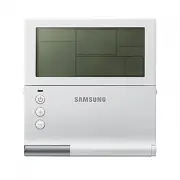
10 English PREP ARA TION A module control controls DVM CHILLERs by each group or module. Name of the parts Display 01 02 04 05 06 07 17 21 14 08 09 10 11 13 12 15 16 19 20 03 18 LED On/Off button Temp. adjustment button
Page 15 - Buttons
15 English PREP ARA TION Buttons 02 18 09 21 06 04 10 07 19 16 14 01 15 11 12 08 20 17 03 13 No use 05 Classification Button Description Start/ Stop All start/stop button • Turns on or off all the DVM CHILLERs. • You can turn on or off all the connected modules and groups. NOTE • When turning off al...
Page 19 - Check before use; Module or group operation
19 English PREP ARA TION Check before use Module or group operation Module/group operation is to combine multiple units in modules or groups of a single water pipe system and to operate them depending on the working condition. F3, F4 Module control Main Main Main Main Group 1 Group 2 Sub Sub Sub Sub...
Page 20 - Operation pattern for modules
20 English PREP ARA TION Check before use Operation pattern for modules y The default is Standard control. It can be changed in the installation service mode. Contact a service center for further details. y When the current water temperature reaches the set temperature, On/Off control will be perfor...
Page 24 - Operation pattern for groups
24 English PREP ARA TION Operation pattern for groups y Set a group to control DVM CHILLER as a high-capacity chiller. y The default is Efficiency control. Standard control y All modules start operating at the same time, and each module operates in the operation pattern which set in the installation...
Page 28 - Selecting group or module; Group or module
28 English OPERA TION Selecting group or module Group or module You can control the DVM CHILLERs by groups or modules. X Select Group/ Module X / X Select a group/module number X
Page 29 - Cool mode; Cooling Operation
29 English OPERA TION Cool mode It is a basic cooling operation mode to cool the indoor area by providing chilled water. X Select Group/ Module X X X Select Cool NOTE • It may take a while for the water to reach the set temperature. • The water outlet temperature range is 5 ~ 25 °C (41 ~ 77 °F), and...
Page 30 - Cool storage mode
30 English OPERA TION Cooling Operation Cool storage mode It is a cooling operation mode to cool the indoor area by ice that is stored in the cool storage tank. X Select Group/ Module X X X Select Cool Storage NOTE • The water outlet temperature range is 5 ~ 25 °C (41 ~ 77 °F), and you can adjust th...
Page 31 - Heating Operation; Heat mode
31 English OPERA TION Heating Operation Heat mode It is a heating operation mode to warm the indoor area by providing hot water in spring, autumn and winter. X Select Group/ Module X X X Select Heat NOTE • It may take a while for the water to reach the set temperature. – When it is cold in the morni...
Page 32 - Operation pattern; Operation pattern setting
32 English OPERA TION Operation pattern You can set an operation pattern by each group or module. X Select Efficiency/ Rotation/Standard NOTE • Efficiency p Rotation p Standard will be repeatedly selected in order. • For details about each operation pattern, refer to "Check before use". (Ref...
Page 33 - Quiet function; Quick Smart Features
33 English OPERA TION Quiet function This function will reduce the operation noise. When DVM CHILLER is operating or stopped X NOTE • It will operate depending on the standard that you set in the installation service mode. • You may operate the DVM CHILLER with lowering the operation phase up to 3 p...
Page 34 - Forced fan function; Water law function
34 English OPERA TION Quick Smart Features Forced fan function This function will operate fan to prevent snow accumulation on the fan of DVM CHILLER. When DVM CHILLER is operating or stopped X NOTE • A stopped fan of DVM CHILLER operates. Use this function when snow is accumulated because you do not...
Page 35 - Water outlet display; Monitoring function
35 English OPERA TION Water outlet display You can check the current water temperature. In operation X NOTE • The current water temperature is displayed for about 3 seconds. Monitoring function Each time you press button, you can check the temperature of water outlet, water inlet, outdoor air and wa...
Page 36 - Weekly timer; Energy-Saving Operation
36 English OPERA TION Weekly timer This function will turn on or off the outdoor unit automatically at the desired day and time. 1 Select Weekly timer. X Select Weekly 2 Select the desired day for timer. / X Select the day X NOTE • When pressing button while the desired day is blinking, the underlin...
Page 40 - Holiday setting
40 English OPERA TION Energy-Saving Operation Holiday setting This function will exclude the desired day from a weekly timer by setting holidays. When setting a holiday, the weekly timer will not operate on that day. 1 Select Holiday setting. X Select Holiday 2 Complete the setting after selecting t...
Page 41 - Checking the timer
41 English OPERA TION Checking the timer Weekly timer This function will show the weekly timers by timer numbers. X / X Display the timer's details NOTE • To modify the selected timer, press button while the display shows the timer's details. Refer to the Weekly timer for modifying the timer. • When...
Page 43 - Off timer
43 English OPERA TION Off timer This function will turn off DVM CHILLER after operating during the set time from when completing the timer setting. y Off timer can be set in additional function, and the setting should be done every time you use it.
Page 44 - Additional Features
44 English SET TING Additional Features 01 02 05 03 04 06 No. Item Description Main menu Displays main menu value of the service mode table. Sub menu Displays sub menu value of the service mode table. Page Displays Page value of the service mode table. Data Segment Displays Data value of the service...
Page 48 - Setting the additional function (Example)
48 English SET TING Additional Features Setting the additional function (Example) It is an example to set the current time. 1 Enter the user mode and then select today's date setting in the main menu. X Display the main menu X / X Select 4 2 Move to the sub menu and then set today's year, month, day...
Page 51 - Memo