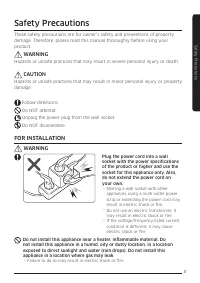
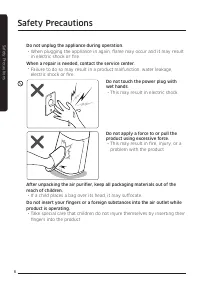
Page 2 - Safety Precautions; FOR INSTALLATION; WARNING
3 Safety Pr ec au tions Safety Precautions Safety Precautions These safety precautions are for owner’s safety and preventions of property damage. Therefore, please read this manual thoroughly before using your product. WARNING Hazards or unsafe practices that may result in severe personal injury or ...
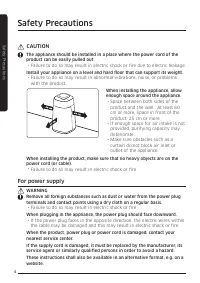
Page 3 - CAUTION; For power supply
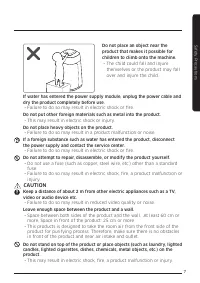
4 Safety Pr ec au tions CAUTION The appliance should be installed in a place where the power cord of the product can be easily pulled out. · Failure to do so may result in electric shock or fire due to electric leakage. Install your appliance on a level and hard floor that can support its weight. · ...
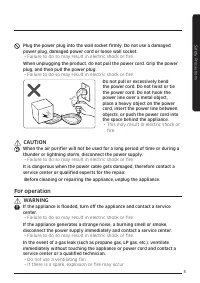
Page 4 - For operation
5 Safety Pr ec au tions Plug the power plug into the wall socket firmly. Do not use a damaged power plug, damaged power cord or loose wall socket. · Failure to do so may result in electric shock or fire. When unplugging the product, do not pull the power cord. Grip the power plug, and then pull the ...
Page 7 - For cleaning
8 Safety Pr ec au tions Do not tilt or turn the product upside down while the product is connected to the wall outlet. · Failure to do so may result in a malfunction or fire. Do not spray volatile material such as insecticide onto the product. · As well as being harmful to humans, this may also resu...
Page 8 - Accessories; Product specification
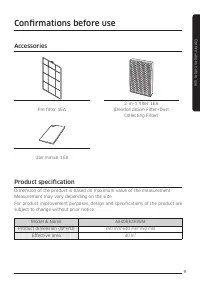
9 C onfirmations be for e use Confirmations before use Accessories Pre filter 1EA 2-in-1 filter 1EA (Deodorization Filter+Dust Collecting Filter) User manual 1 EA Product specification Dimension of the product is based on maximum value of the measurement. Measurement may vary depending on the side.F...
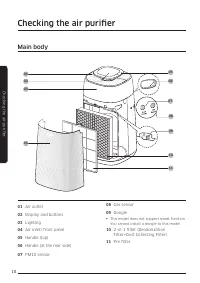
Page 9 - Main body; Checking the air purifi er
10 Checking the air purifi er Main body Checking the air purifi er 01 Air outlet 02 Display and buttons 03 Lighting 04 Air inlet/ front panel 05 Handle (top) 06 Handle (at the rear side) 07 PM10 sensor 08 Gas sensor 09 Dongle § This model does not support smart function. You cannot install a dongle ...
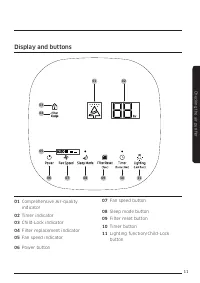
Page 10 - Display and buttons
11 Checking the air purifier Display and buttons 01 Comprehensive Air-quality indicator 02 Timer indicator 03 Child-Lock indicator 04 Filter replacement indicator 05 Fan speed indicator 06 Power button 07 Fan speed button 08 Sleep mode button 09 Filter reset button 10 Timer button 11 Lighting functi...
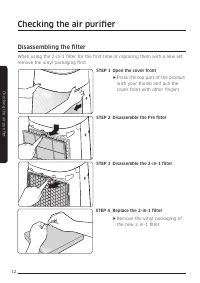
Page 11 - Disassembling the fi lter
12 Checking the air purifi er Disassembling the fi lter When using the 2-in-1 fi lter for the fi rst time or replacing them with a new set, remove the vinyl packaging fi rst. STEP 1 Open the cover front f f Press the top part of the product with your thumb and pull the cover front with other fi nger...
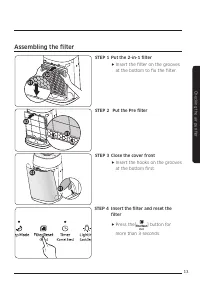
Page 12 - Assembling the fi lter
13 Checking the air purifi er Assembling the fi lter STEP 1 Put the 2-in-1 fi lter f f Insert the fi lter on the grooves at the bottom to fi x the fi lter. STEP 2 Put the Pre fi lter STEP 3 Close the cover front f f Insert the hooks on the grooves at the bottom fi rst. STEP 4 Insert the fi lter and ...
Page 13 - Using the filter
14 Checking the air purifier Using the filter f f If you operate the air purifier without the filters, air purification performance will decrease. f f New filter may smell strange when you operate the product for the first time after purchasing it. - However, it will disappear naturally in few days....
Page 14 - Using the air purifier; Turning the power on/off; Sleep mode
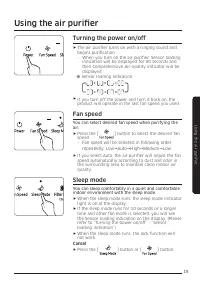
15 Using the air purifier Using the air purifier Turning the power on/off f f The air purifier turns on with a ringing sound and begins purification. - When you turn on the air purifier, Sensor loading indication will be displayed for 30 seconds and then Comprehensive Air-quality indicator will be d...
Page 15 - Timer function; Lighting function; Lock function; Using the air purifi er
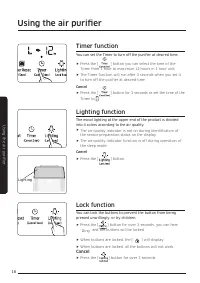
16 Using the air purifi er Timer function You can set the Timer to turn off the purifi er at desired time. f f Press the [ ] button you can select the time of the Timer from 1 hour to maximum 12 hours in 1 hour unit. f f The Timer function will run after 3 seconds when you set it to turn off the pur...
Page 16 - Filter reset function; Checking the air cleanness
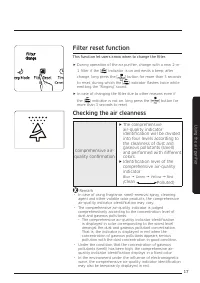
17 Using the air purifi er Filter reset function This function let users know when to change the fi lter. f f During operation of the air purifi er, change with a new 2-in- 1 fi lter if the [ ] indicator is on and emits a beep; after change, long press the [ ] button for more than 3 seconds to reset...
Page 17 - Clean and dry pre filter
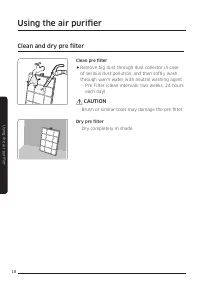
18 Using the air purifier Clean and dry pre filter Clean pre filter f f Remove big dust through dust collector in case of serious dust pollution, and then softly wash through warm water with neutral washing agent. - Pre Filter (clean intervals: two weeks, 24 hours each day) CAUTION · Brush or simila...
Page 18 - Cleaning the exterior of the air purifier; Cleaning the sensors; Cleaning and maintenance
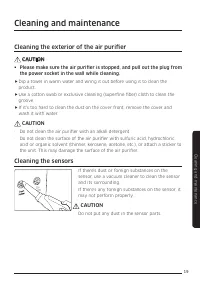
19 Cleaning and maint enanc e Cleaning the exterior of the air purifier CAUTION § Please make sure the air purifier is stopped, and pull out the plug from the power socket in the wall while cleaning. f f Dip a towel in warm water and wring it out before using it to clean the product. f f Use a cotto...
Page 19 - Grille Removal and Assembling; Disassembling the grille; Cleaning the air outlet
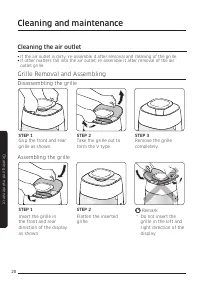
20 Cleaning and maint enanc e Cleaning and maintenance Grille Removal and Assembling Disassembling the grille STEP 1 STEP 2 STEP 3 Grip the front and rear grille as shown. Take the grille out to form the V type. Remove the grille completely. Assembling the grille STEP 1 STEP 2 Remark Insert the gril...
Page 20 - Troubleshooting
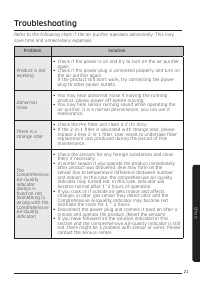
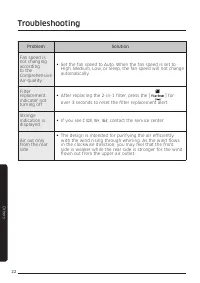
21 O ther s Refer to the following chart if the air purifier operates abnormally. This may save time and unnecessary expenses. Problem Solution Product is not working § Check if the power is on and try to turn on the air purifier again. § Check if the power plug is connected properly and turn on the...
Page 22 - Memo
Page 24 - Air purifier; User manual
Air purifier User manual AX40R3030WM ꞏ Thank you for purchasing this Samsung air purifier. ꞏ Before operating this unit, please read this user manual carefully and retain it for future reference.