remo+ DCM2MG - Manuals
User Manual remo+ DCM2MG
1

2

3

4

5

6

7

8

9

10

11

12

13

14

15

16

17

18

Summary
Page 2 - WHAT’S IN THE BOX; BATTERY COVER SCREW
2 WHAT’S IN THE BOX 3 D-CELL BATTERIES BATTERY COVER SCREW "PROTECTED BY REMO+" STICKER MOUNTING SCREWS (Optional) HEX WRENCH DOORCAM™ 2
Page 3 - MEET DOORCAMTM 2
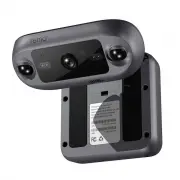
3 MEET DOORCAM™ 2 *Remove the protective film before use**Optional to secure the Battery Cover***Optional for mounting 9 10 11 12 13 14 15 Camera’s Bracket Adjustment Screw Mounting Holes*** Body’s Bracket Adjustment Screws Status Button Status LED Wi-Fi Antenna Battery Cover 1 2 3 4 5 6 7 8 PIR Sen...
Page 4 - CREATE AN ACCOUNT; Make sure your mobile device is connected to
4 CREATE AN ACCOUNT 1. Make sure your mobile device is connected to your home’s 2.4GHz Wi-Fi (5GHz not supported). 2. Download and launch the Remo+ app. 3. Press "Sign Up" at the bottom of the login page. 4. Enter your email and create a password. Then press "Sign Up". For Help, pres...