Philips XL4952DS/38 - Manuals
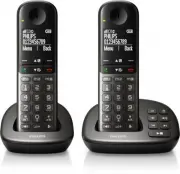
Philips XL4952DS/38 – User Manual, Quick Guide in PDF format online.
Manuals:
User Manual Philips XL4952DS/38


Summary
1 EN Contents 1 Important safety instructions 3 2 Your phone 5 What is in the box 5 Over view of the phone 6 Over view of the base station 7 3 Get started 8 Connect the base station 8 Install the handset 8 Configure your phone (countr y dependent) 9 Change the remote access PIN code (for XL495) 9 Ch...
5 EN 2 Your phone Congratulations on your purchase and welcome to Philips! To fully benefit from the suppor t that Philips offers, register your product at www.philips. com/welcome. What is in the box Handset** Base station (XL490) Base station (XL495) Charger** Power adapter** Line cord* Guarantee ...
6 EN Overview of the phone a Earpiece b • Scroll up on the menu. • Increase the earpiece/speaker volume. • Access the phonebook in standby mode. c • Delete text or digits. • Cancel operation. • Access the redial list in standby mode. • Change the sound profile during a call. d • End the call. • Exit...
Quick Guide Philips XL4952DS/38


Philips Manuals
-
 Philips 50PFL5907/F7
User Manual
Philips 50PFL5907/F7
User Manual
-
Philips 50PFL5907/F7
Quick Guide
-
 Philips 32PFL4508/F7
User Manual
Philips 32PFL4508/F7
User Manual
-
Philips 32PFL4508/F7
Quick Guide
-
 Philips 39PFL2908/F7
User Manual
Philips 39PFL2908/F7
User Manual
-
Philips 39PFL2908/F7
Quick Guide
-
Philips 55PFL5907/F7
User Manual
-
Philips 55PFL5907/F7
Quick Guide
-
Philips 46PFL5907/F7
User Manual
-
Philips 46PFL5907/F7
Quick Guide
-
Philips 40PFL4908/F7
User Manual
-
Philips 40PFL4908/F7
Quick Guide
-
Philips 40PFL4708/F7
User Manual
-
Philips 40PFL4708/F7
Quick Guide
-
Philips 40PFL1708/F7
User Manual
-
Philips 29PFL4908/F7
User Manual
-
Philips 29PFL4908/F7
Quick Guide
-
Philips 42PFL5907/F7
User Manual
-
Philips 42PFL5907/F7
Quick Guide
-
 Philips 32PFL5708/F7
User Manual
Philips 32PFL5708/F7
User Manual