Philips CD2751S/05 - Manuals
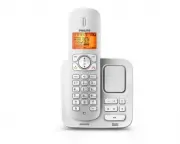
Philips CD2751S/05 – User Manual, Quick Guide in PDF format online.
Manuals:
User Manual Philips CD2751S/05


Summary
Philips Consumer Lifestyle Philips Consumer Lifystyle AMB 544-9056 AQ95-56F-1224KR 2010 ........................................................ ........................................................................... (Report No. / Numéro du Rapport) (Year in which the CE mark is affixed / Année ...
3 English EN 6 Text and numbers 20 Enter text and number 20 Switch between uppercase and lower case 20 7 Phonebook 21 View the phonebook 21 Search a record 21 Call from the phonebook 21 Access the phonebook during a call 21 Add a record 21 Edit a record 22 Delete a record 22 Delete all records 22 Di...
5 This equipment is not designed to make • emergency calls when the power fails. An alternative has to be made available to allow emergency calls.Do not expose the phone to excessive heat • caused by heating equipment or direct sunlight.Do not drop your phone or allow objects to • fall on your phone...
Quick Guide Philips CD2751S/05


Summary
Note * In multi-handset packs, there are additional handsets, chargers and power adapters. ** In some countries, you have to connect the line adapter to the line cord, then plug the line cord to the telephone socket. Caution Use only the supplied batteries • and power adapter. What’s in the box Hand...
Connect the base station Telephone socket Power socket Power adaptor Power socket Extra handset charger 3 1 2 Telephone base station Connect each end of the power adapter to: 1 the DC input jack at the bottom of the base station; • the power socket on the wall. • Connect each end of the power adapte...
2 Install Install the handset Charge 16 hours The batteries are pre-installed in the handset. Pull the batter y 1 tape off from the batter y door before charging. Place the handset on the base station to charge the handset. 2 When the handset is placed correctly on the base station, you hear the doc...
Philips Manuals
-
 Philips 50PFL5907/F7
User Manual
Philips 50PFL5907/F7
User Manual
-
Philips 50PFL5907/F7
Quick Guide
-
 Philips 32PFL4508/F7
User Manual
Philips 32PFL4508/F7
User Manual
-
Philips 32PFL4508/F7
Quick Guide
-
 Philips 39PFL2908/F7
User Manual
Philips 39PFL2908/F7
User Manual
-
Philips 39PFL2908/F7
Quick Guide
-
Philips 55PFL5907/F7
User Manual
-
Philips 55PFL5907/F7
Quick Guide
-
Philips 46PFL5907/F7
User Manual
-
Philips 46PFL5907/F7
Quick Guide
-
Philips 40PFL4908/F7
User Manual
-
Philips 40PFL4908/F7
Quick Guide
-
Philips 40PFL4708/F7
User Manual
-
Philips 40PFL4708/F7
Quick Guide
-
Philips 40PFL1708/F7
User Manual
-
Philips 29PFL4908/F7
User Manual
-
Philips 29PFL4908/F7
Quick Guide
-
Philips 42PFL5907/F7
User Manual
-
Philips 42PFL5907/F7
Quick Guide
-
 Philips 32PFL5708/F7
User Manual
Philips 32PFL5708/F7
User Manual