Page 2 - Contents
1 EN Contents 1 Important 2 Safety 2Notice 3Declaration of conformity 3 2 Your Micro Music System 4 Introduction 4What's in the box 4 Overview of the main unit 5 Overview of the remote control 6 3 Get started 8 Connect speakers 8 Connect the radio antenna 8 Connect power 8 Prepare the remote control...
Page 3 - Important; Safety; Notice
2 EN 1 Important Safety This ‘bolt of lightning’ indicates uninsulated material within the device may cause an electrical shock. For the safety of everyone in your household, please do not remove the covering. The ‘exclamation mark’ calls attention to features for which you should read the enclosed ...
Page 5 - Introduction
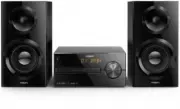
4 EN 2 Your Micro Music System Congratulations on your purchase, and welcome to Philips! To fully benefit from the support that Philips offers, register your product at www.philips.com/support. Introduction With this unit, you can: • enjoy audio from discs, USB devices, Bluetooth devices, and other ...
Page 6 - Overview of the main unit
5 EN Overview of the main unit 5 4 3 2 1 6 9 8 7 AUDIO IN 8 FM/DAB AERIAL (75 ) 12 11 10 13 d • Connect USB storage devices. e • Open or close the disc compartment. f Disc compartment g Volume knob • Adjust volume. h Display panel • Show current status. a IR sensor b LED indicator • Standby indicato...
Page 9 - Get started; Connect speakers; Connect the radio; Connect power
8 EN 3 Get started Caution • Use of controls or adjustments or performance of procedures other than herein may result in hazardous radiation exposure or other unsafe operation. Always follow the instructions in this chapter in sequence. Connect speakers Note • Insert the stripped portion of each spe...
Page 10 - Prepare the remote; Power on; Switch to standby mode; Set the clock
9 EN AUDIO IN FM/DAB A ERIAL (75 ) Connect the power cord to the wall socket. Prepare the remote control Caution • Risk of product damage! When the remote control is not used for long periods, remove the batteries. • Batteries contain chemical substances, so they should be disposed of properly. To i...
Page 11 - Play from disc; Play from USB; Control play
10 EN 4 Play Play from disc 1 Press CD to select DISC source. 2 Press to open the disc compartment. 3 Insert a disc with the label side up. 4 Press to close the disc compartment. 5 Play starts automatically. If not, press . BTB2570 Play from USB Note • Make sure that the USB device contains playable...
Page 12 - Skip tracks; Program tracks; enabled devices
11 EN Skip tracks For CD: Press / to select tracks. For MP3 disc and USB: 1 Press / to select an album or a folder. 2 Press / to select a track or a file. Program tracks This function allows you to program 20 tracks in the desired sequence. 1 In stop mode, press to activate the program mode. » is di...
Page 14 - Listen to FM radio; Tune to an FM radio station
13 EN 2 Press and hold for more than 2 seconds. » The product scans and stores all DAB+ radio stations automatically. » After scan, the first available station is broadcast. Select a DAB+ radio station After DAB+ radio stations are scanned and stored, press / to select a DAB+ station. Store DAB+ rad...
Page 15 - Select a preset FM radio station; Display RDS information; Adjust sound; Adjust volume level
14 EN » The first programmed radio station is broadcast automatically. Store FM radio stations manually 1 Tune to an FM radio station. 2 Press to activate program mode. » is displayed. 3 Press / to allocate a number from 1–20 to this radio station, and then press to confirm. 4 Repeat steps 1-3 to pr...
Page 16 - Other features; Set the alarm timer; Activate/deactivate alarm timer; Set the sleep timer; Listen to an external
15 EN 7 Other features Set the alarm timer This product can be used as an alarm clock. You can select the disc, radio, or .mp3 files on a USB storage device as alarm source. Note • Alarm timer is not available in AUDIO IN mode. • If CD/USB source is selected, but no disc is placed or no USB device i...
Page 17 - Charge your devices
16 EN 3 Start to play the device (see the device user manual). AUDIO IN 8 FM/DAB A ERIAL (75 ) AUDIO IN BTB2570 Charge your devices With this micro music system, you can charge your external devices, such as your cell phone, MP3 player or other mobile devices. 1 Use a USB cable to connect the USB so...
Page 18 - USB playability
17 EN 8 Product information Note • Product information is subject to change without prior notice. • Rated output power (Amplifier): Total 45W (max.) • Acoustic frequency response: 60Hz - 20KHz • Speaker driver: 2 x 100mm woofer; 2 x 25mm tweeter • Bass enhancement: 2 x bass port • Support disc type:...
Page 19 - Troubleshooting
18 EN Supported MP3 disc formats • ISO9660, Joliet • Maximum title number: 128 (depending on file name length) • Maximum album number: 99 • Supported sampling frequencies: 32 kHz, 44.1 kHz, 48 kHz • Supported Bit-rates: 32 ~ 256 (kbps), variable bit rates 9 Troubleshooting Warning • Never remove the...