Philips BTB2570/12 - User Manual
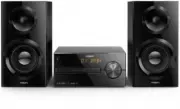
Philips BTB2570/12 – User Manual, read for free online in PDF format. We hope this helps you resolve any issues you may have. If you have further questions, please contact us through the contact form.


Table of Contents:
- Page 2 – Contents
- Page 3 – Important; Safety; Notice
- Page 5 – Introduction
- Page 6 – Overview of the main unit
- Page 9 – Get started; Connect speakers; Connect the radio; Connect power
- Page 10 – Prepare the remote; Power on; Switch to standby mode; Set the clock
- Page 11 – Play from disc; Play from USB; Control play
- Page 12 – Skip tracks; Program tracks; enabled devices
- Page 14 – Listen to FM radio; Tune to an FM radio station
- Page 15 – Select a preset FM radio station; Display RDS information; Adjust sound; Adjust volume level
- Page 16 – Other features; Set the alarm timer; Activate/deactivate alarm timer; Set the sleep timer; Listen to an external
- Page 17 – Charge your devices
- Page 18 – USB playability
- Page 19 – Troubleshooting
Register your product and get support at
www.philips.com/support
User manual
Micro music system
Mic
ro mus
ic
sys
tem
Micro music system
BTB2570
"Loading the manual" means you need to wait until the file loads and becomes available for online reading. Some manuals are very large, and the time they take to appear depends on your internet speed.
Was this manual helpful?
About this manual
- Brand
- Philips
- Model
- BTB2570/12
- Document type
- User Manual
- Language(s)
- English
- Pages
- 25
- File size
- 1014.1 KB
- Format
Summary
1 EN Contents 1 Important 2 Safety 2Notice 3Declaration of conformity 3 2 Your Micro Music System 4 Introduction 4What's in the box 4 Overview of the main unit 5 Overview of the remote control 6 3 Get started 8 Connect speakers 8 Connect the radio antenna 8 Connect power 8 Prepare the remote control...
2 EN 1 Important Safety This ‘bolt of lightning’ indicates uninsulated material within the device may cause an electrical shock. For the safety of everyone in your household, please do not remove the covering. The ‘exclamation mark’ calls attention to features for which you should read the enclosed ...
4 EN 2 Your Micro Music System Congratulations on your purchase, and welcome to Philips! To fully benefit from the support that Philips offers, register your product at www.philips.com/support. Introduction With this unit, you can: • enjoy audio from discs, USB devices, Bluetooth devices, and other ...
Ask a question
Related manuals
Popular Philips Other


More Philips Other models
 Philips BT9290/32 User Manual
 Philips BT9297/15 User Manual
 Philips BT9810/13 User Manual
 Philips BT9810/15 User Manual
 Philips BT9810/90 User Manual
 Philips BTB2470/10 User Manual
 Philips BTB3370/12 User Manual
 Philips BTB7150 Manual
 Philips BTB7150/10 User Manual
 Philips BTB8000/12 User Manual
 Philips BTD5210/12 User Manual
 Philips BTM630 Manual