Page 2 - Safety Information
2 CQ-C7405W Safety Information Warning Observe the following warnings when usingthis unit. ❑ The driver should neither watch the display noroperate the system while driving. Watching the display or operating the system will distractthe driver from looking ahead of the vehicle and can causeaccidents....
Page 3 - English; Caution
3 English CQ-C7405W Caution Observe the following cautions when using thisunit. ❑ Keep the sound volume at an appropriate level. Keep the volume level low enough to be aware of road andtraffic conditions while driving. ❑ Do not insert or allow your hand or fingers to becaught in the unit. To prevent...
Page 4 - Before Reading These Instructions
4 CQ-C7405W Safety Information (continued) Caution THIS PRODUCT IS A CLASS I LASER PRODUCT. USE OF CONTROLS OR ADJUSTMENTS OR PERFORMANCEOF PROCEDURES OTHER THAN THOSE SPECIFIED HEREINMAY RESULT IN HAZARDOUS RADIATION EXPOSURE.DO NOT OPEN COVERS AND DO NOT REPAIR BY YOURSELF.REFER SERVICING TO QUALI...
Page 5 - Before Reading These Instructions (continued); Safety Information, Before Reading These Instructions
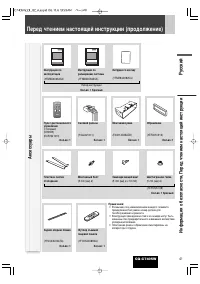
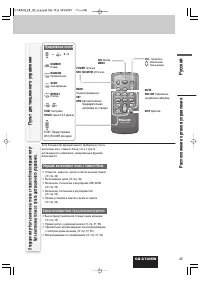
5 English CQ-C7405W Before Reading These Instructions (continued) Safety Information, Before Reading These Instructions Accessories SEL SRC BAND MUTE 2 3 1 5 8 0 6 4 9 7 # VOL DISP CAR AUDIO MENU SEL POWER SOURCE SRC SET BAND MUTE 2 3 1 5 8 0 6 4 9 7 # VOL RANDOM NUMBER TUNE TUNE SCAN REPEAT DISP Re...
Page 6 - Features
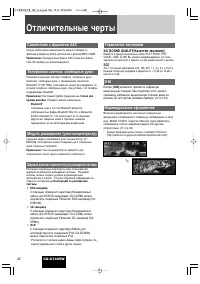
6 CQ-C7405W Features Compatible with the AAC format This unit has newly become compatible with AAC-formattedfiles in addition to the existing MP3 and WMA files. Note: Some of AAC files (such as SD-Jukebox type) are not playable. Hands-Free Phone System Connection of the optional Hands-Free Phone Sys...
Page 7 - Contents; Each
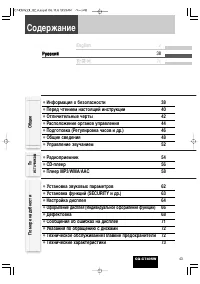
7 CQ-C7405W Contents ¡ Safety Information 2 ¡ Before Reading These Instructions 4 ¡ Features 6 ¡ Controls Layout 8 ¡ Preparation (Clock adjustment etc.) 10 ¡ General 12 ¡ Sound Control 16 ¡ Radio 18 ¡ CD Player 20 ¡ MP3/WMA/AAC Player 22 ¡ Audio Setting 26 ¡ Function Setting (Security Function Setti...
Page 8 - Controls Layout; When Face Plate; Main Unit
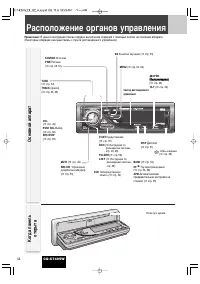
8 CQ-C7405W Controls Layout Note: This instruction manual explains operations for use with the buttons on the main unit. (Different operations excluded) Disc slot When Face Plate Opens BAND ( a page 18) y / 5 Pause/Play ( a page 20, 22) APM Auto Preset Memory ( a page 19) OPEN DISP BAND CQ-C7405W TI...
Page 9 - Operations executable only with main unit; Number Buttons
9 English CQ-C7405W Although most of the functions of this unit are executablewith both the main unit and remote control, the followingfunctions are excluded. Operations executable only with main unit ¡ Face panel’s opening, closing, tilting, and removalactions ( a page 13) ¡ Disc ejection ( a page ...
Page 10 - Preparation; Cancellation of demonstration screen; Preparation Before Initial Use
10 CQ-C7405W Preparation For the first use, the following screen may appearrepeatedly. 1 Set your car's ignition switch to the ACC or On position. The demonstration screen appears. 2 Press [SOURCE] ( PWR: POWER ). 3 Press [MENU] to display the menu display. For using the remote control, hold down [S...
Page 11 - Using Subwoofer
11 English CQ-C7405W Note: Adjust the clock when “ADJUST” appears on the display. 1 Press [MENU] to display the menu display. For using the remote control, hold down [SEL] (MENU) for 2 sec. or more. 2 Press [ ] ] or [ [ ] to display the DISPLAY menu. 3 Turn [VOL] to select “CLOCK ADJ”. For using the...
Page 12 - Power on; Power off; General; Removing; Cautions; Face Plate Removing/Mounting
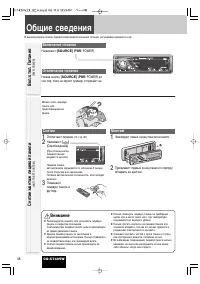
12 CQ-C7405W Power on Press [SOURCE] ( PWR: POWER ). Power off Hold down [SOURCE] ( PWR: POWER ) until you hear a beep, then release it. General This chapter explains how to turn on or off the power, how to adjust the volume, etc. You can remove the faceplate to prevent it frombeing stolen. Removing...
Page 13 - Close; Tilt; Cancel
13 English CQ-C7405W Open/Eject Press [ u OPEN] . When a disc is already loaded, the disc will automaticallybe ejected. Close Press [ u OPEN] . Tilt The display angle changes among 4 levels as followsevery time you hold down [ u OPEN] (TILT) for 1 sec. or more and release. Note: The last selected an...
Page 14 - Radio; Source Selection; Player
14 CQ-C7405W General (continued) Radio FM1, FM2, FM3, AM ( a page 18) Source Selection (SOURCE) The source changes as follows every time [SOURCE] is pressed. OPEN DISP BAND CQ-C7405W TILT /SET/ APM SQ MENU TUNETRACK MUTE SBC-SW FOLDER / P-SET / DISC LIST SOURCE PWR / VO L PUS H SEL / SRS W OW D ・ M ...
Page 15 - Display Change
15 English CQ-C7405W General The display changes as follows every time [DISP] (DISPLAY) is pressed. Note: The graphic pattern and still image are selectable. ( a page 29) At power-off: Clock display (default) Mode Folder hierarchy (Compressed Audio Player mode only) Ordinary display + graphic patter...
Page 16 - Sound Control; SRS WOW; SRS TruBass
16 CQ-C7405W Sound Control SRS and SQ that provide users with simple adjustment of sound quality are described on this page. Audio Setting ( a page 26) allows users to adjust each speaker and the optional subwoofer in more detail (regarding BASS, TREBLE, BALANCE, FADER, SUB.W, LPF,HPF, REAR). SRS WO...
Page 17 - SQ changeover; SQ Selection Based on Genre
17 English CQ-C7405W Sound Control The equalizer curve is selectable from among preset 6types (FLAT, ROCK, POP, VOCAL, JAZZ, and CLUB)depending on your listening category. Note: SQ is not changeable when SRS WOW is enabled. ( a page 16) SQ changeover The SQ category is changed every time [SQ] (SOUND...
Page 18 - Frequency adjustment; Preset station selection; Operation Flow; D·M station Calling; D·M station Setting; Direct Memor
18 CQ-C7405W Radio This chapter explains how to listen to the radio. 1 Press [SOURCE] to select the radio mode. 2 Press [BAND] to select a band. 3 Select a station. Frequency adjustment [ ] ] ( TUNE ): Lower [ [ ] ( TUNE ): Higher Note: Hold down for 0.5 sec. or more and release for station search. ...
Page 19 - APM; Manual station preset; Radio Menu Display; PRESET; Station Preset
19 English CQ-C7405W Radio Up to 6 stations can be preset in AM, FM1, FM2, and FM3respectively. Preset stations can be simply called up by pressing [ } ] ( P-SET ) or [ { ] ( P-SET ). Notes: ¡ Direct selection can be executed with [1] to [6] but- tons on remote control. ¡ You can switch between 6 an...
Page 20 - CD Player; Track selection; Pause
20 CQ-C7405W CD Player Cautions ¡ This unit does not support 8 cm discs. ¡ Do not use irregularly shaped discs. ( a page 36) ¡ Do not use discs that have a seal or label attached. ¡ To avoid damaging the face plate, do not push it down orplace objects on it while it is open. ¡ Do not pinch your fing...
Page 21 - Play Mode Selection; SCAN play; Functions Only by
21 English CQ-C7405W CD Player Random and Repeat play can be set. 1 Press [MENU] to display the menu dis- play. For using the remotecontrol, hold down [SEL] (MENU) for 2 sec. or more. 2 Turn [VOL] to select a function to be adjusted. For using the remotecontrol, use [ } ] or [ { ] . 3 Press [PUSH SE...
Page 22 - Folder selection
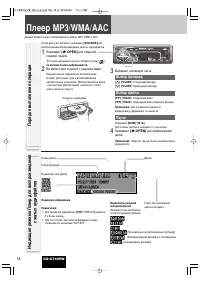
22 CQ-C7405W MP3/WMA/AAC Player This unit can play MP3, WMA, and AAC files. When a disc is already loaded, press [SOURCE] to select the compressed audio mode. 1 Press [ u OPEN] to open the face plate. When a disc is already loaded ( lights), the disc will automatically be ejected . 2 Load a disc wit...
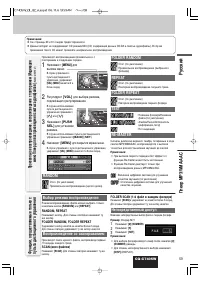
Page 23 - FOLDER RANDOM, FOLDER REPEAT; Random, Repeat Play (Compressed Audio Player
23 English CQ-C7405W MP3/WMA/AAC Player Notes: ¡ Refer to the pages 24 and 25 for cautions. ¡ This unit does not support a MIX mode CD (a CD containing both CD-DA and compressed audio files). In case of using such aCD, problems may occur such as anacoustic playback. Random and Repeat play can be set...
Page 24 - Setting at file making
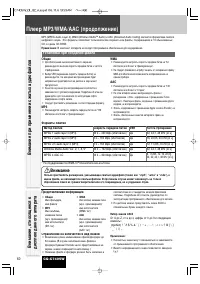
24 CQ-C7405W MP3/WMA/AAC Player (continued) Cautions as to compressed audio files Cautions as to the display of this unit Each of MP3 (MPEG Audio Layer-3), WMA (Windows Media™ Audio), and AAC (Advanced Audio Coding) is a formatfor compressed audio file. These formats allow users to save all the file...
Page 25 - Cautions as to disc making; Compressed audio file writing; Supported file systems; Folder selection order/file playback order; Maximum number of files/folders; Copyright; Common
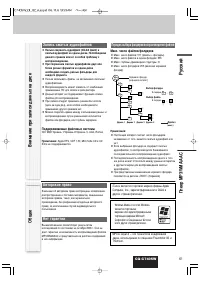
25 English CQ-C7405W MP3/WMA/AAC Player Cautions as to disc making Compressed audio file writing ¡ Do not save an audio file (CD-DA file) and a com- pressed audio file on the same disc. Failure to observe this may result in difficulty in playing. ¡ If compressed audio files formatted with two ormore...
Page 26 - Audio Setting; VOLUME; AUDIO Menu Display
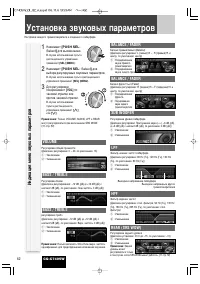
26 CQ-C7405W Audio Setting Adjustment to each speaker and an optional subwoofer VOLUME Main volume adjustment (Setting range: 0 to 40, Default: 13) q : Up w : Down BASS / TREBLE Bass adjustment (Setting range: -12 dB to +12 dB, 2 dB Step, Default:Bass 0 dB) q : Up w : Down BASS / TREBLE Treble adjus...
Page 27 - Function Setting; Audio Setting, Function Setting; MUTE KEY
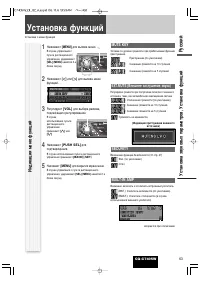
27 English CQ-C7405W Function Setting Adjustment to display on the FUNCTION menu Audio Setting, Function Setting FUNCTION Menu Display 1 Press [MENU] to display the menu dis- play. For using the remotecontrol, hold down [SEL] (MENU) for 2 sec. or more. 2 Press [ ] ] or [ [ ] to display the FUNC- TIO...
Page 28 - Display Setting; COLOR; LEVEL ADJ; Color selection; DISPLA
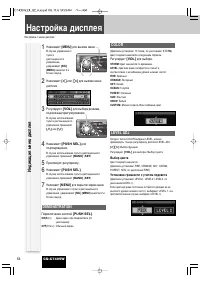
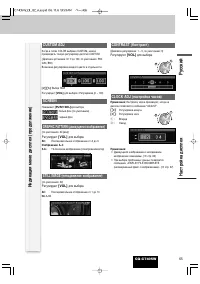
28 CQ-C7405W Display Setting Adjustment to display on the DISPLAY menu 1 Press [MENU] to display the menu display. For using the remotecontrol, hold down [SEL] (MENU) for 2 sec. or more. 2 Press [ ] ] or [ [ ] to display the DISPLAY menu. 3 Turn [VOL] to select a function to be adjusted. For using t...
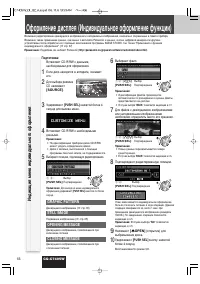
Page 30 - Customize the Display (Customize Function); CUSTOMIZE Menu Display; GRAPHIC PATTERN
30 CQ-C7405W Customize the Display (Customize Function) You can edit the moving images and still images that are initially stored in the unit. You also can use the data that is downloaded fromthe Panasonic Web site and the data that is stored with a digital camera or other devices and processed with...
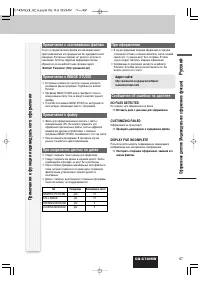
Page 31 - Notes on Customize Function; NO FILES DETECTED
31 English CQ-C7405W Notes on Customize Function Note on Download Service The download service may be suspended or stoppedwithout advance notice. The download service is notavailable in some areas. Please visit the site below forfurther information. Panasonic Web site: (http://panasonic.net) Notes o...
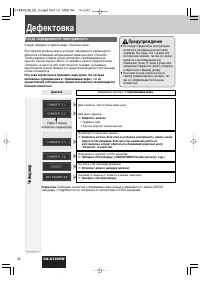
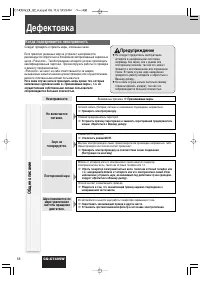
Page 32 - If You Suspect Something Wrong; Troubleshooting
32 CQ-C7405W If You Suspect Something Wrong Check and take steps as described below. If the described suggestions do not solve the problem, it isrecommended to take the unit to your nearest authorized PanasonicService Center. The product should be serviced only by qualifiedpersonnel. Please refer th...
Page 33 - oubleshooting
33 English CQ-C7405W Common (continued) Some operations are not executable. Some operations are not executable in particular modes such as menu mode. a Read the operating instructions carefully and cancel the mode. If the unit isstill out of order, consult your dealer. Problem Possible cause a Possi...
Page 34 - CD
34 CQ-C7405W Troubleshooting (continued) Remote control unit No response to pressing buttons The battery is inserted in the wrong direction. A wrong battery is inserted. a Insert a correct battery in the correct direction. The battery is weak. a Replace the battery with new one. The aiming direction...
Page 35 - Error Display Messages; Display
35 English CQ-C7405W Tr oubleshooting, Error Display Messages Error Display Messages The player for some reason cannot read the file you are trying to play. (File recordedin an unsupported file system, compression scheme, data format, file name exten-sion, damaged data, etc.) a Select a file that th...
Page 36 - Notes on Discs; How to hold the disc; Notes on
36 CQ-C7405W Notes on Discs How to hold the disc ¡ Do not touch the underside of the disc. ¡ Do not scratch on the disc. ¡ Do not bend the disc. ¡ When not in use, keep the disc in a case. Do not leave discs in the following places: ¡ In direct sunlight ¡ Near car heaters ¡ Dirty, dusty and damp are...
Page 37 - Specifications; FM
37 English CQ-C7405W Specifications Notes on discs, Maintenance/Fuse, Specifications Notes: ¡ Specifications and design are subject to modification without notice due to improvements. ¡ Some figures and illustrations in this manual may be different from your product. General Sampling Frequency 8 tim...
Page 38 - Memorandum
Page 41 - How to install the unit/; 장치를 설치하는 방법; åÓÌÚ‡Ê; 설치; How to remove the unit/; 장치를 탈착하는 방법; è‰ ÏÓÌÚ‡ÊÓÏ; 설치하시기 전에; è‰ ÏÓÌÚ‡ÊÓÏ ̋ÎÂÍÚÓÔÓ‚Ó‰ÓÍ; 배선을 하기 전에; ÑÂÚ‡ÎË, ‚ıÓ‰fl ̆Ë ‚ ÍÓÏÔÎÂÍÚ‡ˆË ̨ ÔÓÒÚ‡‚ÍË; 부속품의 하드웨어; 한국어
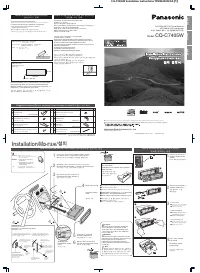
CQ-C7405W Installation Instructions YFM294C092CA (1) OPEN DISP BAND CQ-C7405W TILT /SET/ APM SQ MENU TUNETRACK MUTE SBC-SW FOLDER / P-SET / DISC LIST SOURCE PWR / VO L PUS H SEL / SRS W OW D ・ M 4 e w TEXT How to install the unit/ ä‡Í ÒÏÓÌÚËÓ‚‡Ú¸ ÔË·Ó / 장치를 설치하는 방법 Installation/ åÓÌÚ‡Ê / 설치 Mount...
Page 42 - éÍÓÌ ̃‡ÚÂÎ ̧Ì ̊È ÏÓÌÚ‡Ê; 최종 설치; éÍÓÌ ̃‡ÚÂÎ ̧̇fl ÔÓ‚Â͇; 최종 확인; åÓÌÚ‡Ê ̋ÎÂÍÚÓÔÓ‚Ó‰ÓÍ; 배선; åÓÌÚ‡Ê ̋ÎÂÍÚÓÔÓ‚Ó‰ÓÍ „ÓÏÍÓ„Ó‚ÓËÚÂÎÂÈ; 스피커 접속
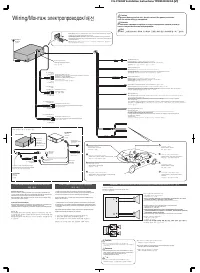
CQ-C7405W Installation Instructions YFM294C092CA (2) L R Lead Connections Connect all wires, making sure that each connection is insulated and secure. Bundle all loose wires and fasten them with tape so they will not fall down later. Now insert the unit into the mounting collar.Congratulations! Afte...
Page 45 - Refer to safety information of optional devices as well.
3 English CQ-C7405W Safety Information Caution Observe the following cautions when using thisunit. ❑ Keep the sound volume at an appropriate level. Keep the volume level low enough to be aware of road andtraffic conditions while driving. ❑ Do not insert or allow your hand or fingers to becaught in t...
Page 46 - About; System Upgrade Sample; Head Unit
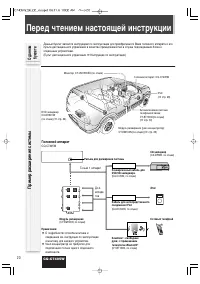
4 CQ-C7405W Before Reading These Instructions About this Book This book is an instruction manual that explains how tooperate your purchased head unit and its remote controlas an accessory when the head unit is connected tooptional devices. (Remote Control Unit a Operating Instructions) System Upgrad...
Page 47 - Each Source
5 CQ-C7405W Contents ¡ Safety Information 2 ¡ Before Reading These Instructions 4 ¡ General 6 ¡ Disc Changer 8 ¡ iPod Control 12 ¡ Hands-Free Phone System 14 English 2 Each Source ¡ Troubleshooting 16 As Needed ê êÛ ÛÒ ÒÒ ÒÍ ÍË ËÈ È 18 34 Common
Page 48 - Connectable Devices; CD Changer; iPod; Hands-Free Phone System
6 CQ-C7405W Connectable Devices General DVD Changer The optional adapter ( Conversion Cable for DVD/CD Changer: CA-CC30N ) allows you to connect the optional Panasonic DVD changer unit (CX-DH801W). For details,refer to the operating instructions for the DVD changerunit. ( a page 8, 10) CD Changer Th...
Page 50 - Disc Changer; Disc selection
8 CQ-C7405W Disc Changer (When CDs or MP3 discs are loaded) Connected an optional CD changer or an optional DVD changer can be controlled by this unit. 1 Load a magazine (discs). When a magazine is already loaded, press [SOURCE] to select the CD changer mode. The unit recognizes the magazine and sta...
Page 51 - REPEAT; Direct Access
9 English CQ-C7405W Disc Changer (When CDs or MP3 discs are loaded) Notes: ¡ When CX-DP880 or CX-DH801W is connected, a CD-RWdisc is playable. ¡ Trouble may occur while playing CD-Rs. Refer to the sectionon “Notes on CD/CD Media (CD-ROM, CD-R, CD-RW)”. ( a Operating Instructions) ¡ This unit does no...
Page 53 - For a DVD insertion; Functions Only by Remote Control Unit
11 English CQ-C7405W Disc Changer (when DVDs or VCDs are loaded) Repeat play can be set. 1 Press [MENU] to display the menu dis- play. For using the remotecontrol, hold down [SEL] (MENU) for 2 sec. or more. 2 Turn [VOL] to select a function to be adjusted. For using the remotecontrol, use [ } ] or [...
Page 54 - iPod Control; File Selection
12 CQ-C7405W iPod Control Connection of the optional iPod adapter (Direct cable for iPod) (CA-DC300N) allows users to operate the iPod including file selectionand file sequence change with the buttons on this unit. 1 Connect the iPod. 2 Press [SOURCE] to select the iPod mode. Playback starts. Note: ...
Page 55 - ALBUM RANDOM
13 English CQ-C7405W iPod Control Random and Repeat play can be set. 1 Press [MENU] to display the menu dis- play. For using the remotecontrol, hold down [SEL] (MENU) for 2 sec. or more. 2 Turn [VOL] to select a function to be adjusted. For using the remotecontrol, use [ } ] or [ { ] . 3 Press [PUSH...
Page 56 - Connecting Hands-Free Phone System; Adjust the ring volume
14 CQ-C7405W Hands-Free Phone System Preparation Connecting Hands-Free Phone System Connect the Hands-Free Phone System (CY-BT100N) andestablish the pairing. Refer to the operating instructionsfor the Hands-Free Phone System for further information. Note: This unit is designed only for receiving cal...
Page 57 - Speaker Setting
15 English CQ-C7405W Hands-Free Phone System Notes: ¡ This item is not selectable by pressing [SOURCE] , but activated by receiving an incoming call. ¡ Only outline is described here. Refer to the operatinginstructions for the Hands-Free Phone System for furtherinformation. ¡ The mute function is au...
Page 58 - DISC Changer
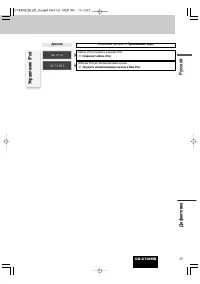
16 CQ-C7405W If You Suspect Something Wrong Check and take steps as described below. If the described suggestions do not solve the problem, it isrecommended to take the unit to your nearest authorized PanasonicService Center. The product should be serviced only by qualifiedpersonnel. Please refer th...