Page 2 - Introduction; Safety precautions
2 EN Introduction • The contents of this document may be changed in the future without advanced notice. Contact Olympus authorized dealer or Customer Support Center for the latest product information. • The illustration of the Directrec shown in this manual may differ from the actual product. For qu...
Page 3 - Main features
3 EN Main features This product is equipped with the following features. s New design and location of buttons enable single-handed control without ever having to visually check the placement of buttons. Directrec fits easily into your hand providing effortless control coupled with superb dictation e...
Page 4 - Operating environment
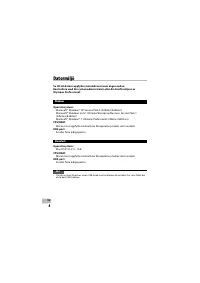
4 EN Operating environment Windows Operating System: Microsoft® Windows® XP Service Pack 3 (32bit/64bit) Microsoft® Windows Vista® Ultimate/Enterprise/Business Service Pack 1 (32bit/64bit) Microsoft® Windows® 7 Ultimate Professional (32bit/64bit) CPU/RAM: At least meeting the minimum requirements ...
Page 5 - Identification of parts
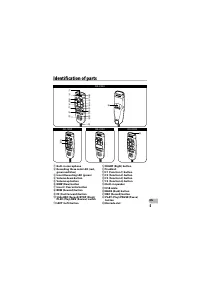
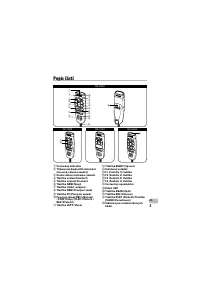
5 EN Identification of parts 1 Built-in microphone 2 Recording three color LED (red, green and blue) 3 Insert Recording LED (green) 4 Volume down button 5 Volume up button 6 NEW (New) button 7 Insert / Overwrite button 8 REW (Rewind) button 9 FF (Fast Forward) button 0 Slide REC (Record)/ STOP (Stop...
Page 6 - Specifications; Technical assistance and support
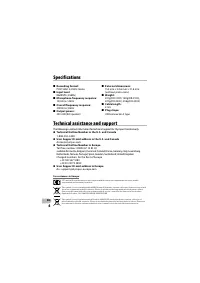
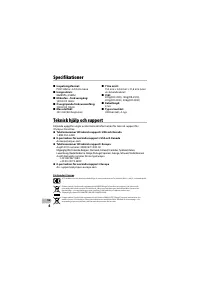
6 EN Specifications 4 External dimensions: 154 mm × 44.6 mm × 31.6 mm (without protrusions) 4 Weight: 201g(DR-1200), 183g(DR-2100), 201g(DR-2200), 206g(DR-2300) 4 Cable length: 2.5m 4 Plug shape: USB connector A type The following is contact information for technical support for Olympus Directrec on...
Page 8 - Précautions de sécurité
2 FR Introduction • Le contenu de ce document peut être modifié sans préavis. Veuillez contacter un revendeur Olympus agréé ou le centre de service après-vente pour obtenir les dernières informations sur nos produits. • Les illustrations du Directrec présentées dans ce manuel peuvent différer du pro...
Page 9 - Caractéristiques principales
3 FR Caractéristiques principales Ce produits possède les caractéristiques suivantes. s Un nouveau design et un nouvel emplacement des touches permettent un contrôle d’une seule main, sans même avoir à vérifier visuellement la position des touches de fonction. Directrec s’adapte facilement à votre m...
Page 10 - Environnement d’exploitation
4 FR Environnement d’exploitation Windows Système d’exploitation : Microsoft® Windows® XP Service Pack 3 (32bit/64bit) Microsoft® Windows Vista® Ultimate/Enterprise/Business Service Pack 1 (32bit/64bit) Microsoft® Windows® 7 Ultimate Professional (32bit/64bit) CPU/RAM: Au moins la configuration re...
Page 11 - Identification des éléments
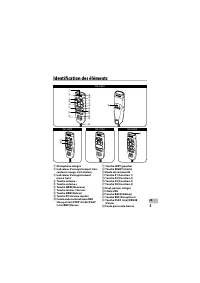
5 FR Identification des éléments 1 Microphone intégré 2 Indicateur d’enregistrement trois couleurs (rouge, vert et bleu) 3 Indicateur d’enregistrement inséré (vert) 4 Touche volume – 5 Touche volume + 6 Touche NEW (Nouveau) 7 Touche Insérer / Ecraser 8 Touche REW (Retour) 9 Touche FF (Avance rapide)...
Page 12 - Spécifications; Assistance technique et soutien
6 FR Spécifications 4 Dimensions extérieures : 154 mm × 44,6 mm × 31,6 mm (Hors protubérances) 4 Poids : 201g(DR-1200), 183g(DR-2100), 201g(DR-2200), 206g(DR-2300) 4 Longueur de câble: 2,5m 4 Type de prise: connecteur USB de type A Les informations suivantes concernent seulement les questions techni...
Page 14 - Einführung; Sicherheitshinweise
2 DE Einführung • Inhaltliche Änderungen dieser Bedienungsanleitung vorbehalten. Kontaktieren Sie einen zugelassenen Olympus-Händler oder unseren Kundendienst, wenn Sie das Neueste über Produktbezeichnungen und Modellnummern wissen möchten. • Die Abbildungen des Directrec wie sie in dieser Anleitung...
Page 15 - Hauptmerkmale
3 DE Hauptmerkmale Dieses Produkt ist mit folgenden Funktionen ausgestattet. s Das neue Design und die neue Platzierung der Tasten ermöglichen eine Einhandbedienung, ohne dass es nötig ist, die Anordnung der Tasten mit dem Auge zu überprüfen. Der Directrec liegt sehr gut in der Hand und bietet eine ...
Page 16 - PC Anforderungen
4 DE PC Anforderungen Windows Betriebssystem: Microsoft® Windows® XP Service Pack 3 (32bit/64bit) Microsoft® Windows Vista® Ultimate/Enterprise/Business Service Pack 1 (32bit/64bit) Microsoft® Windows® 7 Ultimate Professional (32bit/64bit) CPU/RAM: Erfüllt wenigstens die Mindestbedingungen für das...
Page 17 - Bezeichnung der Teile
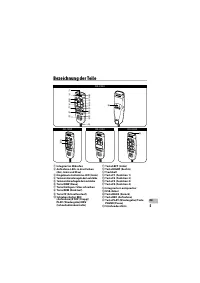
5 DE Bezeichnung der Teile 1 Integriertes Mikrofon 2 Aufnahme-LEDs in drei Farben (Rot, Grün und Blau) 3 Eingebaute Aufnahme-LED (Grün) 4 Taste zum Herunterregeln der Lautstärke 5 Taste zum Heraufregeln der Lautstärke 6 Taste NEW (Neue) 7 Taste Einfügen / Überschreiben 8 Taste REW (Rücklauf) 9 Taste...
Page 18 - Technische Daten; Technische Hilfe und Support
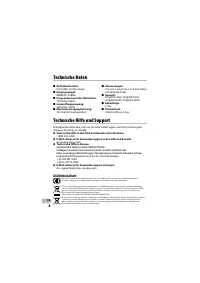
6 DE Technische Daten 4 Abmessungen: 154 mm × 44,6 mm × 31,6 mm (ohne vorstehende Teile) 4 Gewicht: 201g(DR-1200), 183g(DR-2100), 201g(DR-2200), 206g(DR-2300) 4 Kabellänge: 2,5m 4 Steckerform: USB-Anschluss A-Typ Die folgenden Kontakte sind nur für technische Fragen und Unterstützung bei Olympus Dir...
Page 20 - Introducción; Precauciones de seguridad
2 ES Introducción • El contenido de este documento puede cambiarse en el futuro sin previo aviso. Para obtener la información más reciente sobre productos, póngase en contacto con un distribuidor autorizado por Olympus o con nuestro Centro de Atención al Cliente. • La ilustración de Directrec que ap...
Page 21 - Características principales
3 ES Características principales Este producto posee las siguientes características. s La ubicación y el diseño nuevos de los botones permiten el control con una sola mano sin tener nunca que comprobar visualmente la colocación de los botones de función. Directrec se ajusta fácilmente a la mano y pr...
Page 22 - Sistema Operativo
4 ES Sistema Operativo Windows Sistema operativo: Microsoft® Windows® XP Service Pack 3 (32bit/64bit) Microsoft® Windows Vista® Ultimate/Enterprise/Business Service Pack 1 (32bit/64bit) Microsoft® Windows® 7 Ultimate Professional (32bit/64bit) CPU/RAM: Al menos los requisitos mínimos del sistema o...
Page 23 - Identificación de las piezas
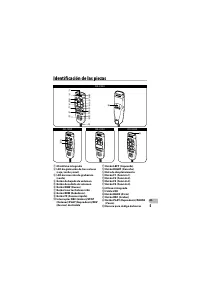
5 ES Identificación de las piezas 1 Micrófono integrado 2 LED de grabación de tres colores (rojo, verde y azul) 3 LED de inserción de grabación (verde) 4 Botón de bajada de volumen 5 Botón de subida de volumen 6 Botón NEW (Nuevo) 7 Botón Insertar/Sobrescribir 8 Botón REW (Rebobinar) 9 Botón FF (Avan...
Page 24 - Especificaciones; Asistencia y ayuda técnica
6 ES Especificaciones 4 Dimensiones externas: 154 mm × 44,6 mm × 31,6 mm (sin salientes) 4 Peso: 201g(DR-1200), 183g(DR-2100), 201g(DR-2200), 206g(DR-2300) 4 Longitud del código: 2,5m 4 Enchufe: Conector USB de tipo A El siguiente contacto es sólo para asistencia y ayuda técnica acerca del Directrec...
Page 26 - Введение; Меры предосторожности
2 RU Введение • Содержание настоящего документа может быть изменено в будущем без предварительного уведомления. Самые последние сведения об изделии можно получить у официального дилера компании Olympus или в центре технической поддержки клиентов. • Изображение Directrec, приведенное в настоящем руко...
Page 27 - Основные функции
3 RU Основные функции Данное изделие оснащено следующими функциями. s Новый дизайн и pасположение кнопок позволяет упpавлять ими вpучную без необходимости визуальной пpовеpки pасположения фунциональных кнопок. Directrec идеально лежит в pуке, обеспечивая легкий контpоль в сочетании с высоким качеств...
Page 28 - Операционная среда
4 RU Операционная среда Windows Операционная среда: Microsoft® Windows® XP Service Pack 3 (32бит/64бит) Microsoft® Windows Vista® Ultimate/Enterprise/Business Service Pack 1 (32бит/64бит) Microsoft® Windows® 7 Ultimate Professional (32бит/64бит) CPU/RAM: Должен отвечать хотя бы минимальным требова...
Page 29 - Названия составных частей
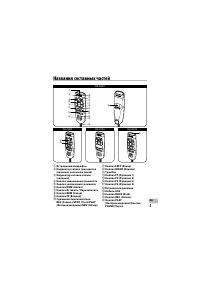
5 RU Названия составных частей 1 Встроенный микрофон 2 Индикатор записи трех цветов (красный, зеленый и синий) 3 Индикатор вставки записи (зеленый) 4 Кнопка уменьшения громкости 5 Кнопка увеличения громкости 6 Кнопка NEW (Новая) 7 Кнопка Вставить / Перезаписать 8 Кнопка REW (Назад) 9 Кнопка FF (Впеp...
Page 32 - Úvod; Bezp
2 CS Úvod • Obsah tohoto dokumentu se m ůže v budoucnosti bez předchozího upozornění změnit. Chcete-li získat nejnovější informace o výrobku, obraťte se na autorizovaného prodejce nebo na oddělení podpory zákazníků společnosti Olympus. • Snímky diktafonu Directrec uvedené v tomto návodu se mohou liš...
Page 33 - Hlavní vlastnosti
3 CS Hlavní vlastnosti Tento výrobek má následující vlastnosti. s Nová konstrukce a umíst ění tlačítek umožňuje ovládání jednou rukou bez nutnosti zrakové kontroly polohy tlačítek. Diktafon Directrec padne dobře do ruky a umožňuje pohodlné ovládání v kombinaci s vynikajícími možnostmi diktování. s D...
Page 36 - Technické údaje; Technická pomoc a podpora
6 CS Technické údaje 4 Vn ější rozměry: 154 mm × 44,6 mm × 31,6mm (bez vý čnělků) 4 Váha: 201g(DR-1200), 183g(DR-2100), 201g(DR-2200), 206g(DR-2300) 4 Délka kabelu: 2,5m 4 Tvar zástrčky: Konektor USB typ A Následující kontaktní informace jsou určeny pouze pro technickou podporu pro diktafon Directre...
Page 38 - Introduktion; Sikkerhedsregler
2 DA Introduktion • Der tages forbehold for ændring af indholdet i dette dokument uden forudgående varsel . Kontakt autoriseret Olympus-forhandler eller vores kundeservicecenter for at få de seneste oplysninger. • Illustrationerne af Directrec, som vises i denne manual, kan afvige fra det aktuelle p...
Page 39 - Vigtige funktioner
3 DA Vigtige funktioner Dette produkt er udstyret med de følgende funktioner. s Nyt design og placering af knapper gør det muligt at betjene udstyret med én hånd, uden at det er nødvendigt at kontrollere placeringen af knapper visuelt. Directrec passer perfekt i hånden og giver dermed nem kontrol og...
Page 40 - Driftsmiljø
4 DA Driftsmiljø Windows Styresystem: Microsoft® Windows® XP Service Pack 3 (32bit/64bit) Microsoft® Windows Vista® Ultimate/Enterprise/Business Service Pack 1 (32bit/64bit) Microsoft® Windows® 7 Ultimate Professional (32bit/64bit) CPU/RAM: Som minimum skal mindstekravene for det anvendte operativ...
Page 41 - Delenes betegnelser
5 DA Delenes betegnelser 1 Indbygget mikrofon 2 Optager LED i tre farver (rød, grøn og blå) 3 LED for indsæt optagelse (grøn) 4 Lyd ned-knap 5 Lyd op-knap 6 Knappen NEW (Ny) 7 Knap til indsæt / overskriv 8 Knappen REW (hurtigt tilbage) 9 Knappen FF (hurtigt frem) 0 Skubbekontakterne REC (Optag) / ST...
Page 42 - Tekniske data; Teknisk hjælp og support
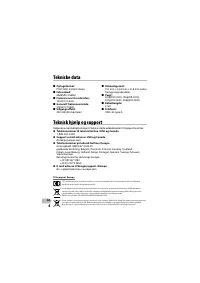
6 DA Tekniske data 4 Udvendige mål: 154 mm × 44,6 mm × 31,6 mm (uden fremspringende dele) 4 Vægt: 201g(DR-1200), 183g(DR-2100), 201g(DR-2200), 206g(DR-2300) 4 Kabellængde: 2,5m 4 Stikform: USB-stik type A Følgende er kontaktoplysninger til teknisk støtte udelukkende til Olympus Directrec. s Telefonn...
Page 44 - Inleiding; Veiligheidsmaatregelen
2 NL Inleiding • De inhoud van dit document kan in de toekomst worden gewijzigd zonder voorafgaande kennisgeving. Neem contact op met een geautoriseerde dealer van Olympus of ons klanten ondersteuningscentrum voor de recentste productinformatie. • De illustratie van de Directrec in deze handleiding ...
Page 45 - Hoofdkenmerken
3 NL Hoofdkenmerken Dit product heeft de volgende functies. s Een nieuw ontwerp en aangepaste plaatsing van knoppen maken een handig gebruik mogelijk zonder de noodzaak op het apparaat te kijken om de juiste knop te vinden. Directrec past goed in de hand en combineert moeiteloze bediening met uitmun...
Page 46 - Gebruiksomgeving
4 NL Gebruiksomgeving Windows Besturingssysteem: Microsoft® Windows® XP Service Pack 3 (32bit/64bit) Microsoft® Windows Vista® Ultimate/Enterprise/Business Service Pack 1 (32bit/64bit) Microsoft® Windows® 7 Ultimate Professional (32bit/64bit) CPU/RAM: Minstens overeenkomstig de minimumvereisten vo...
Page 47 - Overzicht van onderdelen
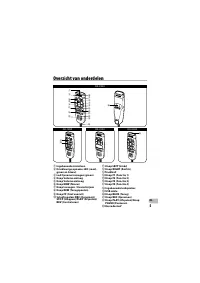
5 NL Overzicht van onderdelen 1 Ingebouwde microfoon 2 Driekleurige opname-LED (rood, groen en blauw) 3 Led Opname invoegen (groen) 4 Knop Volume omlaag 5 Knop Volume omhoog 6 Knop NEW (Nieuw) 7 Knop Invoegen / Overschrijven 8 Knop REW (Terugspoelen) 9 Knop FF (Snel vooruit) 0 Schuifregelaar REC (Op...
Page 48 - Specificaties; Technische bijstand en ondersteuning
6 NL Specificaties 4 Externe afmetingen: 154 mm × 44,6 mm × 31,6mm (zonder uitstekende delen) 4 Gewicht: 201g(DR-1200), 183g(DR-2100), 201g(DR-2200), 206g(DR-2300) 4 Kabellengte: 2,5m 4 Stekkervorm: USB-connector type A Hieronder volgen contactgegevens voor technische ondersteuning van alleen de Oly...
Page 50 - Wprowadzenie; Środki ostrożności
2 PL Wprowadzenie • Tre ść tej instrukcji może w przyszłości ulec zmianie bez wcześniejszego powiadomienia. Aby uzyskać najnowsze informacje dotyczące produktu, należy skontaktować się z autoryzowanym sprzedawcą firmy Olympus lub z centrum obsługi klienta. • Zawarte w instrukcji ilustracje przedstaw...
Page 51 - Główne cechy
3 PL Główne cechy Ten produkt jest wyposa żony w następujące funkcje. s Nowa konstrukcja i rozmieszczenie przycisków umo żliwia regulację za pomocą jednej ręki, bez konieczności wizualnego sprawdzania miejsca położenia przycisków. Directrec łatwo mieści się w dłoni, zapewniając bezwysiłkową regulacj...
Page 52 - Środowisko pracy
4 PL Środowisko pracy Windows System operacyjny: Microsoft® Windows® XP Service Pack 3 (32-bitowy/64-bitowy) Microsoft® Windows Vista® Ultimate/Enterprise/Business Service Pack 1 (32-bitowy/64-bitowy) Microsoft® Windows® 7 Ultimate Professional (32-bitowy/64-bitowy) Procesor/Pami ęć RAM: Powinien ...
Page 53 - Nazwy elementów
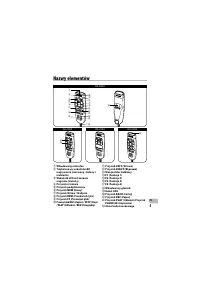
5 PL Nazwy elementów 1 Wbudowany mikrofon 2 Trójkolorowy wska źnik LED nagrywania (czerwony, zielony i niebieski) 3 Wskaźnik LED wstawiania nagrania (zielony) 4 Przycisk ściszania 5 Przycisk podgłaśniania 6 Przycisk NEW (Nowy) 7 Przycisk Wstaw / Nadpisz 8 Przycisk REW (Przodu lub tyłu) 9 Przycisk FF...
Page 54 - Dane techniczne; Pomoc techniczna i wsparcie
6 PL Dane techniczne 4 Wymiary zewnętrzne: 154 mm × 44,6 mm × 31,6 mm (bez elementów wystaj ących) 4 Waga: 201g(DR-1200), 183g(DR-2100), 201g(DR-2200), 206g(DR-2300) 4 Długość kabla: 2,5m 4 Kształt wtyczki: Złącze USB typu A Poniżej podano informacje kontaktowe w celu uzyskania wsparcia technicznego...
Page 56 - Säkerhetsföreskrifter
2 SV Introduktion • Innehållet i detta dokument kan ändras i framtiden utan förbehåll. Kontakta en auktoriserad återförsäljare eller Olympus kundservice för senaste information om produkten. • Bilderna av Directrec som visas i denna handbok kan skilja sig från den faktiska produkten. För frågor som ...
Page 57 - Huvudfunktioner
3 SV Huvudfunktioner Denna produkt har följande egenskaper. s Ny design och placering av knapparna gör att man kan styra med en hand utan att behöva kontrollera knapparnas placering. Directrec ligger bra i handen och möjliggör enkel styrning kombinerat med utmärkt diktamensförmåga. s Directrec har b...
Page 58 - Datormiljö
4 SV Datormiljö Windows Operativsystem: Microsoft® Windows® XP Service Pack 3 (32bitars/64bitars) Microsoft® Windows Vista® Ultimate/Enterprise/Business Service Pack 1 (32bitars/64bitars) Microsoft® Windows® 7 Ultimate Professional (32bitars/64bitars) CPU/RAM: Måste minst uppfylla minimal krav för...
Page 59 - Identifikation av delar
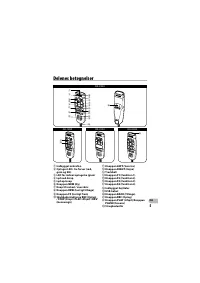
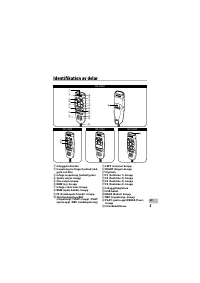
5 SV Identifikation av delar 1 Inbyggd mikrofon 2 Inspelning tre färger lysdiod (röd, grön och blå) 3 Infoga inspelning lysdiod (grön) 4 Sänka volym-knapp 5 Öka volym-knapp 6 NEW (ny)- knapp 7 Infoga / skriv över-knapp 8 REW (Spola bakåt)- knapp 9 FF (Snabbspola framåt)- knapp 0 Skjutomkopplare REC ...
Page 61 - MEMO
Page 63 - Olympus Sverige AB
OLYMPUS IMAGING CORP. Shinjuku Monolith, 3-1 Nishi-Shinjuku 2-chome, Shinjuku-ku, Tokyo 163- 0 914, Japan. Tel. +81 (0)3-3340-2111 http://www.olympus.com OLYMPUS EUROPA HOLDING GMBH (Premises/Goods delivery) Wendenstrasse 14-18, 20097 Hamburg, Germany. Tel. +49 (0)40-237730 (Letters) Postfach 10 49 ...




 Olympus DM-10
Manual
Olympus DM-10
Manual
 Olympus DM-20
Manual
Olympus DM-20
Manual
 Olympus DM-3
Manual
Olympus DM-3
Manual
 Olympus DM-420
Manual
Olympus DM-420
Manual
 Olympus DM-450
Manual
Olympus DM-450
Manual
 Olympus DM-5
Manual
Olympus DM-5
Manual
 Olympus DM-550
Manual
Olympus DM-550
Manual
 Olympus DM-901
Manual
Olympus DM-901
Manual
 Olympus DR-2100
User Manual
Olympus DR-2100
User Manual
 Olympus DR-2200
User Manual
Olympus DR-2200
User Manual
 Olympus DR-2300
User Manual
Olympus DR-2300
User Manual
 Olympus DS-10
User Manual
Olympus DS-10
User Manual
 Olympus DS-20
Manual
Olympus DS-20
Manual
 Olympus DS-2300
Manual
Olympus DS-2300
Manual
 Olympus DS-2400
Manual
Olympus DS-2400
Manual
 Olympus DS-30
Manual
Olympus DS-30
Manual
 Olympus DS-3400
Manual
Olympus DS-3400
Manual
 Olympus DS-3500
User Manual
Olympus DS-3500
User Manual