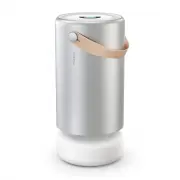
Page 3 - Place it in a big space.; Air Pro uses low energy to keep fresh air flowing.; Best practices
Place it in a big space. Air Pro will work in any room, but giving it space away from walls will help maximize clean air circulation. It’s designed for large, multi-usage rooms, up to 800 sq. ft., like offices, large bedrooms, living rooms, and open floor plans. Run it 24/7. Air Pro uses low energy ...
Page 4 - Setting up; Place away from walls for optimal airflow.
Setting up 02 Push down on center core, turn counterclockwise and release. Core will rise on its own. Lift it off. Remove PECO-Filter from plastic wrapper and place back in. Align red line inside shell with red line on core so it falls into place. Push down and turn clockwise until it locks into pla...
Page 5 - Home screen; A WiFi symbol indicates connectivity issues.; Home screen
Good PECO-Filter 86% Good Standard Quiet Manual Auto Protect z PM10 PM2.5 Good PM1.0 Moderate Bad Standby Device details Languages Reset 03 Tap the touch screen once to awaken your device and get a glance at the PM sensor level and current status of your Air Pro. Controls & interface Home screen...
Page 6 - There’s no need to replace your PECO-Filter.; Your PECO-Filter is nearing recommended replacement time.; Replace
Modes & states PECO-Filter status Track the status of your PECO-Filter and see when your next filter refill is scheduled to ship. Good There’s no need to replace your PECO-Filter. Replace soon Your PECO-Filter is nearing recommended replacement time. Replace Your PECO-Filter has reached recommen...
Page 9 - Auto Protect & particle levels
06 Auto Protect & particle levels Understanding Auto Protect and particle levels Auto Protect uses the laser-based particle sensor to take automatic readings of the air in front of it and adjusts fan speed for optimal air purification in the room in which it’s running. It’s important to note tha...
Page 10 - Bad; Your Air Pro is detecting a very; Very bad
Your Air Pro is detecting a low level of particles in the room. We suggest running your device on Auto Protect or at the lowest fan speed. Your Air Pro is detecting a moderate level of particles in the room. We suggest running your device on Auto Protect or increasing fan speed to continue cleaning ...
Page 11 - Coarse particles 10 microns or smaller in width (about 1/5th of
Auto Protect & particle levels Particle sensor Your Air Pro’s sensor measures different particle sizes in a cross section of the airof the room it’s operating in, giving you insight into your air. It can sense three sizes of particles, known as PM (particulate matter): • PM10: Coarse particles 1...
Page 12 - How do I replace the filter?; User servicing instructions
How do I replace the filter? User servicing instructions Push down on center core, turn counterclockwise and release. Core will rise on its own. Lift it off. Remove used PECO-Filter and discard. Unwrap new PECO-Filter and place in device. Align red line inside shell with red line on core so it falls...
Page 13 - Visit us; Frequently asked questions
Help & support We’re here to help. If you have issues with your device, filter, app or account: Visit us help.molekule.com Call us seven days a week, 8am-5pm PT +1 (855) 999-9069 Frequently asked questions How do PECO-Filter auto-refills work? Air Pro ships with one PECO-Filter. We offer a PECO-...
Page 14 - Make sure the device is plugged into a working outlet.; Does Molekule Air Pro emit WiFi signals?
Why is my device’s filter status red and device shutting down? We understand that our customers lead busy lives and may forget to change the filter, which prevents them from having the cleanest air possible. Once a Molekule Air Pro’s PECO-Filter status indicator is red, this means the filter is beyo...
Page 15 - Safety precautions & warnings
Never place any objects on top of the unit. Do not place the unit directly below a shelf or other objects that might hinder the exiting air flow. Never cover vents while the unit is running. Avoid dropping the device or placing the device on an uneven or potentially unstable surface. To help ensure ...
Page 16 - Disclaimer
Disclaimer Your Molekule Air Pro’s sensor is intended be comparable to other commercially available consumer air sensors. At sufficient concentrations, it is sensitive to all physical particles, like dust, smoke, components of vehicle exhaust, soot, and many other airborne substances. Internal testi...
Page 17 - Limited warranty information
Molekule warrants that for a period of two years from shipment, your Molekule Air Pro unit (the “Product”) will be free from defects in materials and workmanship under normal use in accordance with the documentation provided with the Product. In the event of a defect, visit Molekule at molekule.com/...
Page 18 - FCC statement; FCC Radiation Exposure Statement
This device complies with part 15 of the FCC Rules. Operation is subject to the following two conditions: (1) This device may not cause harmful interference, and (2) this device must accept any interference received, including interference that may cause undesired operation. NOTE: This equipment has...
Page 19 - cause undesired operation of the device.; IC statement; IC Radiation Exposure Statement
This device contains licence-exempt transmitter(s)/receiver(s) that comply with Innovation, Science and Economic Development Canada’s licence-exempt RSS(s). Operation is subject to the following two conditions: 1. This device may not cause interference.2. This device must accept any interference, in...