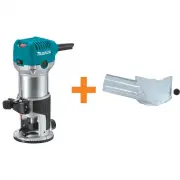
Page 2 - SPECIFICATIONS; GENERAL SAFETY RULES; Read and understand all instructions.; Failure to follow all; SAVE THESE INSTRUCTIONS
2 SPECIFICATIONS • Manufacturer reserves the right to change specifications without notice. • Specifications may differ from country to country. GENERAL SAFETY RULES USA001-2 (For All Tools) WARNING: Read and understand all instructions. Failure to follow all instructions listed below, may result in...
Page 5 - SPECIFIC SAFETY RULES
5 An adapter Fig. “B” and “C” is available for connecting Fig. “A” type plugs to two- prongreceptacles. The green-colored rigid ear, lug, etc., extending from the adapter must be con-nected to a permanent ground, such as a properly grounded outlet box. SPECIFIC SAFETY RULES USB013-3 DO NOT let comfo...
Page 8 - Speed adjusting dial
8 For RD1100 and RD1101 CAUTION: • Before plugging in the tool, always check to see that theswitch trigger actuates properly and returns to the “OFF”position when released. • Switch can be locked in “ON” position for ease ofoperator comfort during extended use. Apply cautionwhen locking tool in “ON”...
Page 9 - ASSEMBLY; Installing or removing the bit
9 ASSEMBLY CAUTION: • Always be sure that the tool is switched off andunplugged before carrying out any work on the tool. Installing or removing the bit CAUTION: • Do not tighten the collet chuck without inserting a bit, orthe collet chuck will break. • When using bit of bigger than 1-1/4” in diamet...
Page 10 - OPERATION
10 For equipped with switch-in-handle For model RD1100 and RD1101 only Connect the motor unit cord to the outlet in the handle. OPERATION Set the tool base on the workpiece to be cut without the bitmaking any contact. Then turn the tool on and wait until thebit attains full speed. Move the tool forw...
Page 12 - MAINTENANCE; Replacing carbon brushes
12 Secure the templet to the workpiece. Place the tool on thetemplet and move the tool with the templet guide slidingalong the side of the templet. MAINTENANCE CAUTION: • Always be sure that the tool is switched off andunplugged before attempting to perform inspection ormaintenance. Replacing carbon...
Page 13 - ACCESSORIES
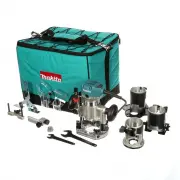
13 ACCESSORIES CAUTION: • These accessories or attachments are recommended foruse with your Makita tool specified in this manual. Theuse of any other accessories or attachments mightpresent a risk of injury to persons. Only use accessoryor attachment for its stated purpose. If you need any assistanc...
Page 14 - Memo
Page 18 - MAIL THIS PORTION; Your answers to the following questions are appreciated.; Please return this portion by facsimile or mail.
18 1. This product was purchased from: Home Center Hardware/Lumber Store Tool Distributor Industrial Supply Construction Supply Other ( ) 3. How did you learn about this product: Magazine From Dealer Newspaper Store Display Catalog Radio Exhibition From Friend Previous Usage Other ( ) 2. Use of the ...
Page 19 - FACTORY SERVICE CENTERS; RETAIN THIS PORTION FOR YOUR RECORDS
19 FACTORY SERVICE CENTERS 1-800-4-MAKITA RETAIN THIS PORTION FOR YOUR RECORDS ARIZONA 3707 E. Broadway Rd., Ste. 6 Phoenix, AZ 85040 (602) 437-2850 CALIFORNIA 41850 Christy St. Fremont, CA 94538-5107 (510) 657-9881 14930 Northam St. La Mirada, CA 90638-5753 (714) 522-8088 1970 Fulton Avenue Sacrame...
Page 20 - WARNING; MAKITA LIMITED ONE YEAR WARRANTY; Warranty Policy; Makita Corporation of America
WARNING Some dust created by power sanding, sawing, grinding, drilling, and otherconstruction activities contains chemicals known to the State of Californiato cause cancer, birth defects or other reproductive harm. Some examplesof these chemicals are:• lead from lead-based paints, • crystalline sili...