Page 2 - Linksys AC1200 Max Wi-Fi Range Extender; Introduction; Front
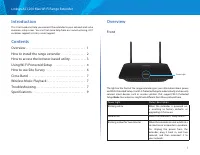
1 Linksys AC1200 Max Wi-Fi Range Extender Introduction This User Guide can help you connect the extender to your network and solve common setup issues. You can find more help from our award-winning, 24/7 customer support at Linksys.com/support. Contents Overview . . . . . . . . . . . . . . . . . . ....
Page 3 - Back; Bottom; How to install the range extender
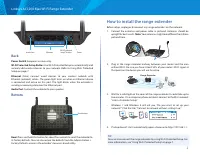
2 Linksys AC1200 Max Wi-Fi Range Extender Audio Jack Ethernet Power Wi-Fi Protected Setup™ button Back Power Switch European versions only. Wi-Fi Protected Setup Button Use Wi-Fi Protected Setup to automatically and securely add wireless devices to your network. Refer to Using Wi-Fi Protected Setup ...
Page 4 - How to access the browser-based utility; Mac OS X
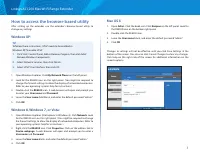
3 Linksys AC1200 Max Wi-Fi Range Extender How to access the browser-based utility After setting up the extender use the extender’s browser-based utility to change any settings. Windows XP: TIP To follow these instructions, UPnP needs to be enabled inWindows XP. To enable UPnP: 1. Click Start, Contro...
Page 5 - Using Wi-Fi Protected Setup; Wi-Fi Protected Setup light activity; Connecting the extender to an existing access point; Connecting with the Wi-Fi Protected Setup Button
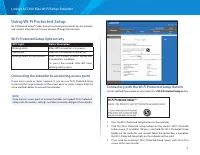
4 Linksys AC1200 Max Wi-Fi Range Extender Using Wi-Fi Protected Setup Wi-Fi Protected Setup™ makes it easy to connect your extender to your network, and connect other devices to your network through the extender. Wi-Fi Protected Setup light activity WPS Light Status/ description Blinking white When ...
Page 6 - Connecting with the range extender’s PIN; Connecting with the client device’s PIN
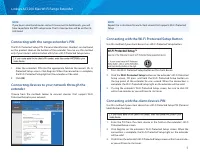
5 Linksys AC1200 Max Wi-Fi Range Extender NOTE If you have a dual-band router and wish to connect to both bands, you will have to perform the WPS setup twice. The first connection will be on the 2.4 GHz band. Connecting with the range extender’s PIN The Wi-Fi Protected Setup PIN (Personal Identifica...
Page 7 - Connecting with the extender’s PIN; How to use Site Survey
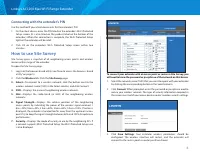
6 Linksys AC1200 Max Wi-Fi Range Extender Connecting with the extender’s PIN Use this method if your client device asks for the extender’s PIN. 1. On the client device, enter the PIN listed on the extender’s Wi-Fi Protected Setup screen. (It is also listed on the product label on the bottom of the e...
Page 8 - Wireless Music Playback; Troubleshooting; You cannot get your extender connected; You cannot access your range extender
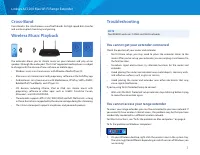
7 Linksys AC1200 Max Wi-Fi Range Extender Cross-Band Cross-Band is the simultaneous use of both bands for high-speed data transfer and uninterrupted streaming and gaming. Wireless Music Playback The extender allows you to stream music on your network and play on on speakers through the audio port. T...
Page 9 - You have intermittent connection problems
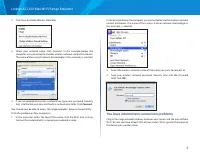
8 Linksys AC1200 Max Wi-Fi Range Extender 2. Click View Available Wireless Networks. 3. Select your network name. Click Connect. In the example below, the computer was connected to another wireless network named JimsRouter. The name of the correct network, BronzeEagle in this example, is selected. 4...
Page 10 - Specifications; Environmental
9 Linksys AC1200 Max Wi-Fi Range Extender Specifications RE6500 Model Name Linksys RE6500 Model Description Dual-band Wireless-AC Range Extender Model Number RE6500 Standards IEEE 802.11ac, 802.11a, 802.11n, 802.11g, 802.11b, 802.3u Ports Gigabit Ethernet, Audio, power Buttons Reset, Wi-Fi Protected...