Page 3 - Warning! Safety instructions
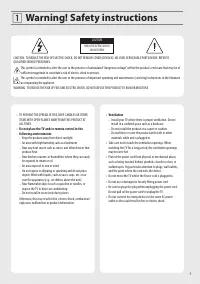
3 Warning! Safety instructions CAUTION RISK OF ELECTRIC SHOCK DO NOT OPEN CAUTION : TO REDUCE THE RISK OF ELECTRIC SHOCK, DO NOT REMOVE COVER (OR BACK). NO USER-SERVICEABLE PARTS INSIDE. REFER TO QUALIFIED SERVICE PERSONNEL. This symbol is intended to alert the user to the presence of uninsulated “d...
Page 6 - Preparing; Lifting and moving the TV
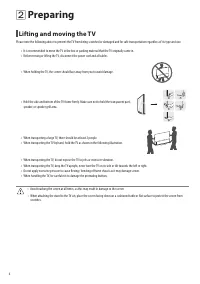
6 Preparing Lifting and moving the TV Please note the following advice to prevent the TV from being scratched or damaged and for safe transportation regardless of its type and size. • It is recommended to move the TV in the box or packing material that the TV originally came in. • Before moving or l...
Page 7 - Mounting on the Table
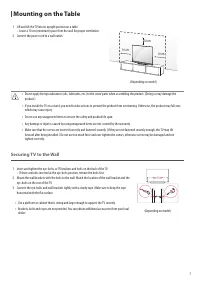
7 Mounting on the Table 1 Lift and tilt the TV into its upright position on a table. • Leave a 10 cm (minimum) space from the wall for proper ventilation. 2 Connect the power cord to a wall outlet. 10 cm 10 cm 10 cm (Depending on model) • Do not apply foreign substances (oils, lubricants, etc.) to t...
Page 8 - Mounting to the Wall
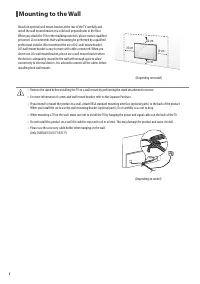
8 Mounting to the Wall Attach an optional wall mount bracket at the rear of the TV carefully and install the wall mount bracket on a solid wall perpendicular to the floor. When you attach the TV to other building materials, please contact qualified personnel. LG recommends that wall mounting be perf...
Page 9 - Satellite dish
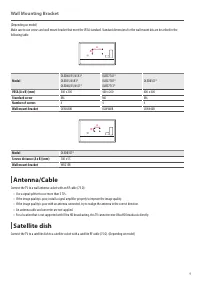
9 Wall Mounting Bracket (Depending on model)Make sure to use screws and wall mount bracket that meet the VESA standard. Standard dimensions for the wall mount kits are described in the following table. A B Model OLED48/55/65A1*OLED55/65B1*OLED48/55/65C1* OLED77A1*OLED77B1*OLED77C1* OLED83C1* VESA (A...
Page 10 - Starting TV; Turning on the TV
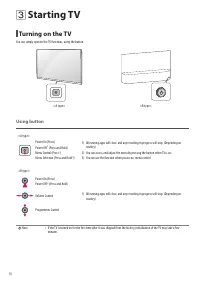
10 Starting TV Turning on the TV You can simply operate the TV functions, using the button. <A type> <B type> Using button <A type> Power On (Press)Power Off 1) (Press and Hold) Menu Control (Press 2) ) Menu Selection (Press and Hold 3) ) 1) All running apps will close, and any rec...
Page 12 - Registering Magic Remote Control; Connecting Smart Devices using NFC Tagging
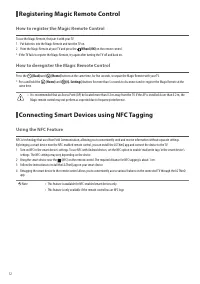
12 Registering Magic Remote Control How to register the Magic Remote Control To use the Magic Remote, first pair it with your TV.1 Put batteries into the Magic Remote and turn the TV on.2 Point the Magic Remote at your TV and press the Wheel (OK) on the remote control. * If the TV fails to register ...
Page 13 - Using Remote Control; Using Magic Remote Control
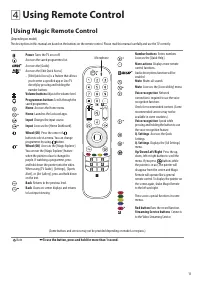
13 Using Remote Control Using Magic Remote Control (Depending on model)The descriptions in this manual are based on the buttons on the remote control. Please read this manual carefully and use the TV correctly. Power Turns the TV on or off. Accesses the saved programmes list.Accesses the [Guide].Acc...
Page 14 - Connections
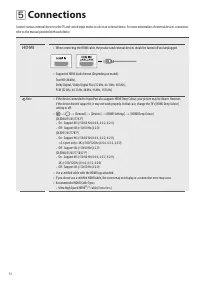
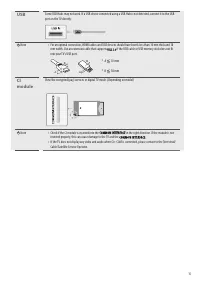
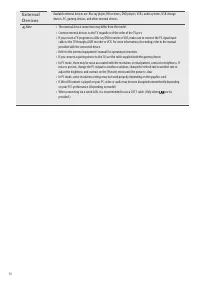
14 Connections Connect various external devices to the TV and switch input modes to select an external device. For more information of external device’s connection, refer to the manual provided with each device. HDMI • When connecting the HDMI cable, the product and external devices should be turned...
Page 17 - Troubleshooting
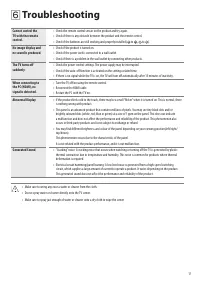
17 Troubleshooting Cannot control the TV with the remote control. • Check the remote control sensor on the product and try again. • Check if there is any obstacle between the product and the remote control. • Check if the batteries are still working and properly installed ( to , to ). No image displ...
Page 18 - Specifications
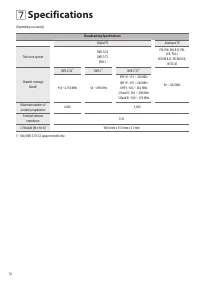
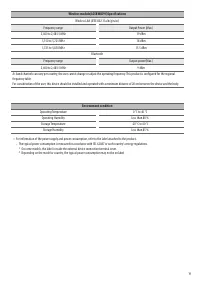
18 Specifications (Depending on country) Broadcasting Specifications Digital TV Analogue TV Television system DVB-S/S2DVB-T/T2 DVB-C PAL B/B, PAL B/G, PAL D/K, PAL-I, SECAM B/G, SECAM D/K, NTSC-M Channel coverage (Band) DVB-S/S2 1) DVB-C 1) DVB-T/T2 1) 46 ~ 862 MHz 950~2,150 MHz 46 ~ 890 MHz VHF III...
Page 20 - Open Source Software Notice Information; Licenses
20 Open Source Software Notice Information To obtain the source code under GPL, LGPL, MPL, and other open source licenses, that is contained in this product, please visit http://opensource.lge. com . In addition to the source code, all referred license terms, warranty disclaimers and copyright notic...