Page 2 - TABLE OF CONTENTS
TABLE OF CONTENTS 2 3 IMPORTANT SAFETY INSTRUCTIONS 3 READ ALL INSTRUCTIONS BEFORE USE 3 WARNING 7 INSTALLATION 7 Product Overview 7 Installation Requirements 9 OPERATION 9 Control Panel 10 Before Use 12 Quick Start and Stop 12 Manual Cooking 13 Cooking Mode 17 Cookware Guide 19 Cooking Guide 21 SMA...
Page 3 - IMPORTANT SAFETY INSTRUCTIONS; READ ALL INSTRUCTIONS BEFORE USE; Safety Messages; WARNING; Technical Safety
3 IMPORTANT SAFETY INSTRUCTIONS ENGLISH IMPORTANT SAFETY INSTRUCTIONS READ ALL INSTRUCTIONS BEFORE USE Safety Messages Your safety and the safety of others are very important. We have provided many important safety messages in this manual and on your appliance. Always read and follow all safety mess...
Page 4 - Operation
4 IMPORTANT SAFETY INSTRUCTIONS - Do not immerse cord or plug in water. Keep cord away from heated surfaces.- Do not let cord hang over edge of table or counter. • To reduce the risk of fire in the oven cavity: - Do not overcook food. Carefully attend appliance when paper, plastic, or other combusti...
Page 5 - Maintenance
5 IMPORTANT SAFETY INSTRUCTIONS ENGLISH • The appliance and its accessible parts become hot during use. Care should be taken to avoid touching heating elements inside the oven. Children must be kept away unless continuously supervised. • Do not use recycled paper products. They may contain impuritie...
Page 6 - SAVE THESE INSTRUCTIONS; FEDERAL COMMUNICATIONS COMMISSION RADIO FREQUENCY
6 IMPORTANT SAFETY INSTRUCTIONS SAVE THESE INSTRUCTIONS • Use care when cleaning the vent-hood filter. Corrosive cleaning agents, such as lye-based oven cleaners, may damage the filter. • Suitable for use above both gas and electric cooking equipment 36 inches wide or less. Radio/TV/Wireless Equipme...
Page 7 - INSTALLATION; Product Overview; Front View; Specifications; Installation Requirements; Installation Location
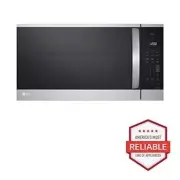
7 INSTALLATION ENGLISH INSTALLATION Product Overview Front View a Vent Grille b Location of Model Number c Control Panel d Grease Filter e Cooking Guide f Cooktop Light g Glass Turntable h Window with Metal Shield i Safety Door Lock System Accessories Accessories will vary depending on the model pur...
Page 8 - Grounding Instructions
8 INSTALLATION • Attach the 2 lag screws supporting the oven to a vertical, 2" x 4" wall stud. • DO NOT mount the microwave oven to an island or peninsula cabinet. • Be sure that the upper cabinet and rear wall structures can support 150 lb. plus the weight of any items you place inside the ...
Page 9 - OPERATION; Control Panel; Control Panel Features
9 OPERATION ENGLISH OPERATION Control Panel The actual control panel may differ from model to model. Control Panel Features a Display Shows the time of day, cooking time settings, and selected cooking functions. b SENSOR COOKING Select various functions of the Sensor Cooking. See Cooking Mode sectio...
Page 10 - Before Use; Setting the Clock
10 OPERATION p Vent Functions • Press On/Off to turn the vent fan on or off. (default: high) • Press 2 Speed to set the vent fan speed. • Press Auto Timeset to set ventilation time. (Turns off after 1, 3, 5, 10 or 30 minutes) Before Use Setting the Clock Set the current time to operate the microwave...
Page 11 - Setting Ventilation Functions; Custom Setting; Microwave Power Levels
11 OPERATION ENGLISH • Be careful when touching the glass turntable during and after cooking. The glass turntable can become hot. Setting Ventilation Functions Use this button to set the vent fan speed. The vent removes steam and other vapors from the cooking surface. Turning the Vent Fan On or Off ...
Page 12 - Quick Start and Stop; Using Quick Start; Manual Cooking; Using Manual Cooking; Cooking for 5 Minutes, 30 Seconds at; Using Multi-Stage Cooking
12 OPERATION Wi-Fi Connect the appliance to a home Wi-Fi network to use smart functions. See SMART FUNCTIONS for more details. Wi-Fi on the appliance can be turned on or off within the Settings menu. Setting Up Wi-Fi 1 Press and hold the Settings button for three seconds. The Wi-Fi icon f appears at...
Page 13 - Cooking Mode; Using the Sensor Functions; Sensor Reheat Menu; Sensor Cook Mode
13 OPERATION ENGLISH 2 Press Cook Time and enter the second cook time ( 7 , 0 , and 0 ). 3 Press Power Level and enter the power level ( 8 ). 4 Press START/Enter . Cooking Mode Cook your favorite foods without having to select cooking times and power levels. Using the Sensor Functions The sensor fea...
Page 14 - Sensor Cook Menu; Sensor Popcorn Mode; Sensor Popcorn Menu
14 OPERATION 1 Press Cook . 2 Use the number keys or press Cook to enter the desired menu code from the Sensor Cook Menu . 3 Press START/Enter . • When the cook time ends, a melody sounds and End appears in the display. Sensor Cook Menu Refer to the information below to set the desired menu item and...
Page 15 - Sensor Potato Mode; Sensor Potato Menu; Sensor Vegetable Mode; Sensor Vegetable Menu; Sensor Beverage Mode; Sensor Beverage Menu
15 OPERATION ENGLISH bag of prepackaged microwave popcorn on the center of the glass tray. Sensor Potato Mode Setting the Potato Function 1 Press Potato . 2 Press START/Enter . 3 Press STOP/Clear to cancel the sensor potato function at any time. Sensor Potato Menu Refer to the information below to s...
Page 16 - Defrost Mode; Defrost Menu
16 OPERATION WARNING • Be careful when handling the container. Microwave heating of beverages can result in delayed eruptive boiling. Therefore, care must be taken when handing the container. Defrost Mode Using Defrost Menu The oven has 4 preset defrost cycles. The Defrost Menu shows the suggested d...
Page 17 - Melt Menu; Cookware Guide; Microwave-Safe Cookware
17 OPERATION ENGLISH • 1 Butter (1, 2 or 3 sticks (4 oz/1 stick)) - Cookware: Microwave-safe dish- Food temperature: Refrigerated- Instructions: Unwrap and place food in oven. Butter will be at room temperature and ready for use in a recipe. When using ½ stick, press Cook Time and press the number k...
Page 18 - Microwave-Unsafe Cookware
18 OPERATION - Plastic Microwave Cookware : A variety of shapes and sizes of microwave cookware are available. You may be able to use items you already have on hand rather than investing in new kitchen equipment. • Paper - Use paper towels, waxed paper, paper napkins, and paper plates with no metal ...
Page 19 - Cooking Guide; Cooking Tips
19 OPERATION ENGLISH • Always be careful when taking cookware out of the oven. Some dishes absorb heat from the cooked food and may be hot. Cooking Guide Cooking Tips Carefully monitor the food in the microwave oven while it is cooking. Directions given in recipes to elevate, stir, etc., are the min...
Page 20 - Precautions
20 OPERATION food is still frozen solid in the center, return it to the microwave oven for more defrosting. - Depending on the shape of the food, some areas may defrost more quickly than others. - The shape of the package affects how quickly food will defrost. Shallow packages will defrost more quic...
Page 21 - SMART FUNCTIONS; LG ThinQ Application; LG ThinQ Application Features; Installing LG ThinQ Application and; Models with QR Code
21 SMART FUNCTIONS ENGLISH SMART FUNCTIONS LG ThinQ Application This feature is only available on models with Wi-Fi.The LG ThinQ application allows you to communicate with the appliance using a smartphone. LG ThinQ Application Features • Settings - Allows you to set various options on the oven and i...
Page 22 - Radio Equipment Specifications; FCC RF Radiation Exposure Statement; Open Source Software Notice
22 SMART FUNCTIONS NOTE • If the appliance is having trouble connecting to the Wi-Fi network, it may be too far from the router. Purchase a Wi-Fi repeater (range extender) to improve the Wi-Fi signal strength. • The network connection may not work properly depending on the Internet service provider....
Page 23 - Smart Diagnosis; Feature; Using LG ThinQ to Diagnose Issues
23 SMART FUNCTIONS ENGLISH This offer is valid to anyone in receipt of this information for a period of three years after our last shipment of this product. Smart Diagnosis TM Feature This feature is only available on models with the c or d logo. Use this feature to help you diagnose and solve probl...
Page 24 - MAINTENANCE; Cleaning; Cleaning the Interior; Cleaning the Grease Filters
24 MAINTENANCE MAINTENANCE Cleaning Cleaning the Interior 1 Use a damp cloth to clean the surfaces of the door and wipe out crumbs between the door and the frame. 2 Remove greasy spatters with a soapy cloth and then rinse and dry.• Wipe spatters immediately with a wet paper towel, especially after c...
Page 25 - Replacing Parts; Replacing the Charcoal Filter
25 MAINTENANCE ENGLISH NOTE • Do not operate the hood without the filters in place. Replacing Parts Replacing the Charcoal Filter If your oven is vented inside, the charcoal filter should be replaced every 6 to 12 months, and more often if necessary. The charcoal filter cannot be cleaned. To order a...
Page 26 - TROUBLESHOOTING; FAQs; Frequently Asked Questions
26 TROUBLESHOOTING TROUBLESHOOTING FAQs Frequently Asked Questions Q: Will the oven be damaged if it operates while empty? A: Yes. Never operate the oven while it is empty or without the glass tray. Q: Does microwave energy pass through the viewing screen in the door? A: No. The metal screen bounces...
Page 28 - Before Calling for Service
28 TROUBLESHOOTING Before Calling for Service Operation Problem Possible Cause & Solution Microwave oven does not start Power cord is unplugged, door is open, or cooking time has not been set. • Plug in power cord. Or, check for a blown circuit fuse or a tripped main circuit breaker.• Close oven...
Page 30 - LIMITED WARRANTY; USA; TERMS AND CONDITIONS; THIS LIMITED WARRANTY DOES NOT COVER:
30 LIMITED WARRANTY LIMITED WARRANTY USA TERMS AND CONDITIONS ARBITRATION NOTICE: THIS LIMITED WARRANTY CONTAINS AN ARBITRATION PROVISION THAT REQUIRES YOU AND LG ELECTRONICS ("LG") TO RESOLVE DISPUTES BY BINDING ARBITRATION INSTEAD OF IN COURT, UNLESS YOU CHOOSE TO OPT OUT. IN ARBITRATION, ...
Page 31 - NOT COVERED BY WARRANTY
31 LIMITED WARRANTY ENGLISH • Damage or failure of the Product resulting from operating the Product in a corrosive atmosphere or contrary to the Product owner’s manual. • Damage or failure of the Product caused by accidents, pests and vermin, lightning, wind, fire, floods, acts of nature, or any oth...
Page 33 - PROCEDURE FOR RESOLVING DISPUTES:
33 LIMITED WARRANTY ENGLISH PROCEDURE FOR RESOLVING DISPUTES: ALL DISPUTES BETWEEN YOU AND LG ARISING OUT OF OR RELATING IN ANY WAY TO THIS LIMITED WARRANTY OR THE PRODUCT SHALL BE RESOLVED EXCLUSIVELY THROUGH BINDING ARBITRATION, AND NOT IN A COURT OF GENERAL JURISDICTION. BINDING ARBITRATION MEANS...
Page 36 - For inquiries or comments,
LG Customer Information Center Register your product Online! www.lg.com For inquiries or comments, visit www.lg.com or call: 1-800-243-0000 U.S.A. 1-888-542-2623 CANADA