Page 2 - Technical Parameters
2 Technical Parameters Product: WCDMA digital mobile phone Model: Lenovo P770 System: Android 4.1 Size: Approximately 133*67*11.9mm Weight: Approximately161g (including battery) Standby time: Max 619 hours * Battery capacity : 3500 mAh *may vary depending on local signal strength SAR Information 0.4...
Page 4 - Charging the phone
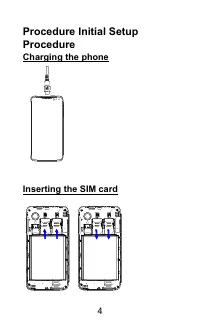
4 Procedure Initial Setup Procedure Charging the phone Inserting the SIM card
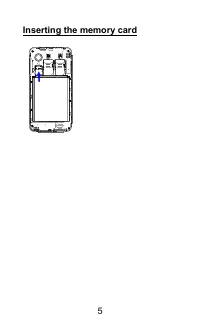
Page 5 - Inserting the memory card
Page 7 - Applications Overview
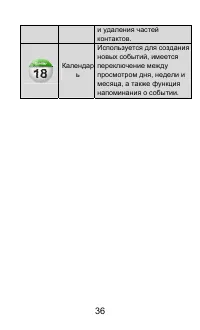
7 Applications Overview Browser Browses websites. The web browser in this unit can access the Internet via the WIFI network for business and personal use. Email Receives/Sends and views mails by linking directly to your mailbox. Gallery Browses and edits images. In an image full-screen page it suppo...
Page 9 - Use the multi-touch function; Scroll
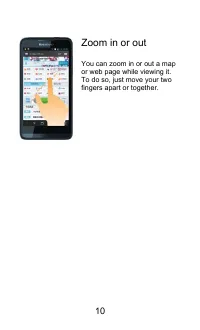
9 Use the multi-touch function The multi-touch function enables you to perform various operations on the screen. Open an application Open an application: Tap the icon of this application on the screen. By clicking home key, you can return to the home screen. Scroll Scroll the screen by dragging up o...
Page 11 - Precautions and Tips for P770
11 Precautions and Tips for P770 Never drop, strike, scratch, twist, knock, vibrate or push the P770 or place any heavy objects on it. Gently touch the P770. Keep the P770 away from any magnetic substances, mobile phones in conversation, electrical appliances or speakers. Avoid exposing the P770 to ...
Page 13 - India RoHS
13 these end of life products. Users of electrical and electronic equipment (EEE) with the WEEE marking must not dispose of end of life EEE as unsorted municipal waste, but use the collection framework available to them for the return, recycle, and recovery of WEEE and to minimize any potential effe...
Page 17 - Ponsel Lenovo
17 Panduan Penggunaan Model: Lenovo P770 Baca panduan ini dengan baik sebelum menggunakan ponsel Ponsel Lenovo Bahasa Indonesia
Page 18 - Parameter Teknis
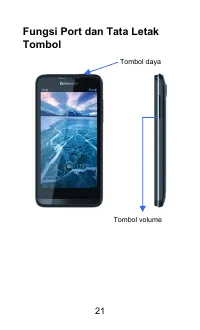
18 Parameter Teknis Produk: Ponsel digital WCDMA Model: Lenovo P770 Sistem: Android 4.1 Ukuran: Sekitar 133*67*11.9 mm Berat: Sekitar 161gr (termasuk baterai) Waktu siaga: ~619 jam * Kapasitas baterai:3500 mAh *bervariasi tergantung kekuatan sinyal lokal
Page 19 - Prosedur Pengaturan Awal; Mengisi baterai ponsel
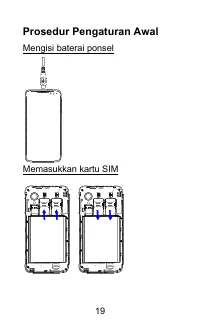
19 Prosedur Pengaturan Awal Mengisi baterai ponsel Memasukkan kartu SIM
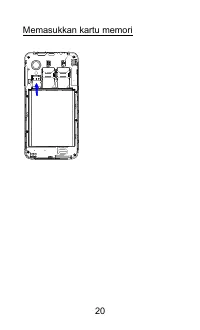
Page 20 - Memasukkan kartu memori
Page 22 - Tinjauan Aplikasi
22 Tinjauan Aplikasi Browser Menelusuri situs web. Browser web pada unit ini dapat mengakses Internet melalui jaringan WIFI untuk keperluan bisnis dan pribadi. Email Menerima/mengirim dan melihat email yang dihubungkan secara langsung ke kotak email Anda. Galeri Menelusuri dan mengedit gambar. Dalam...
Page 24 - Menggulir
24 Menggunakan fungsi multi-sentuh Fungsi multi-sentuh memungkinkan Anda melakukan berbagai operasi pada layar. Membuka aplikasi Membuka aplikasi: Sentuh ikon aplikasi ini pada layar. Dengan mengklik tombol awal, Anda dapat kembali ke layar awal. Menggulir Menggulir layar dengan menarik konten ke at...
Page 30 - Русский
30 Руководство пользователя Модель : Lenovo P770 Внимательно прочитайте это руководство перед использованием телефона Мобильный телефон Lenovo Русский
Page 32 - Зарядка
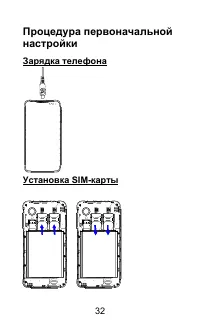
32 Процедура первоначальной настройки Зарядка телефона Установка SIM- карты
Page 38 - Открытие
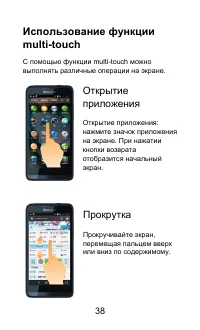
38 Использование функции multi-touch С помощью функции multi-touch можно выполнять различные операции на экране . Открытие приложения Открытие приложения : нажмите значок приложения на экране . При нажатии кнопки возврата отобразится начальный экран . Прокрутка Прокручивайте экран , перемещая пальце...
Page 44 - n Tho; Ti
44 S ổ tay s ử d ụ ng M ẫ u: Lenovo P770 Hãy đọ c k ỹ s ổ tay h ướ ng d ẫ n này tr ướ c khi s ử d ụ ng đ i ệ n tho ạ i Đ i ệ n Tho ạ i Di Độ ng Lenovo Ti ế ng Vi ệ t
Page 46 - c pin
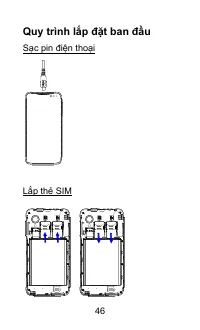
46 Quy trình l ắ p đặ t ban đầ u S ạ c pin đ i ệ n tho ạ i L ắ p th ẻ SIM
Page 50 - Dùng
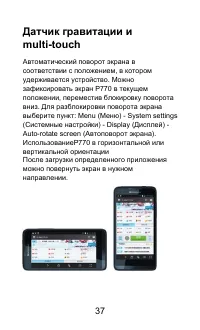
50 C ả m bi ế n tr ọ ng l ự c và c ả m ứ ng đ a đ i ể m T ự độ ng xoay màn hình theo h ướ ng xoay c ủ a đ i ệ n tho ạ i đ ang gi ữ . B ạ n có th ể khóa màn hình đ i ệ n tho ạ i P770 theo h ướ ng màn hình hi ệ n hành b ằ ng cách di chuy ể n khóa xoay xu ố ng. Để m ở khóa h ướ ng màn hình: Menu - Cài ...
Page 51 - ng d; Cu
51 Dùng ch ứ c n ă ng c ả m ứ ng đ a đ i ể m Ch ứ c n ă ng c ả m ứ ng đ a đ i ể m cho phép b ạ n th ự c hi ệ n nhi ề u thao tác khác nhau trên màn hình. M ở ứ ng d ụ ng M ở ứ ng d ụ ng: Ch ạ m bi ể u t ượ ng c ủ a ứ ng d ụ ng này trên màn hình b ằ ng cách nh ấ p phím chính (home), b ạ n có th ể tr ở...