Page 2 - CONTENTS; SAFETY WARNINGS
1 CONTENTS SAFETY WARNINGS -------------------------------------------- 2 PRODUCT OVERVIEW ----------------------------------------- 3 PRODUCT INSTALLATION ------------------------------------ 4 OPERATION INSTRUCTIONS --------------------------------- 8 CLEANING AND MAINTENANCE ---------------------...
Page 4 - PRODUCT OVERVIEW; Names of components
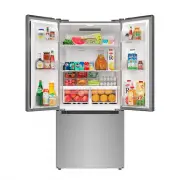
PRODUCT OVERVIEW Names of components 1 Door tray 6 Quick cold dial block 2 Shelf 7 Fruit and vegetable box 3 Fruit and vegetable box 8 Upper freezer drawer 4 LED lighting 9 Lower freezer drawer 5 Control and display panel ATTENTION The picture above is only for reference. The actual configuration wi...
Page 5 - PRODUCT INSTALLATION; Install Instruction; Installing an Optional Ice Maker; Dimensions and Clearances
PRODUCT INSTALLATION Install Instruction 4 Installing an Optional Ice Maker The refrigerator comes set up for ice maker installation, This refrigerator is compatible with Midea IM1900MD ice maker. Please refer to individual ice maker installation instruction manual. • WARNING: Connect to potable wat...
Page 7 - Moving the appliance
Leveling feet To avoid vibration, the unit must be leveled. If required, adjust the leveling screws to compensate for the uneven floor. The front should be slightly higher than the rear to aid in door closing.Leveling screws can be turned easily by tipping the cabinet slightly.Turn the leveling scre...
Page 8 - Changing the light; Connecting the appliance; Tips for energy saving
Changing the light • Any replacement or maintenance of the LED lamps is intended to be made by the manufacturer, its service agent or similar qualified person. Connecting the appliance After installing the appliance, connect the power plug into a socket outlet. ATTENTION • After connecting the power...
Page 9 - OPERATION INSTRUCTIONS; Control panal
OPERATION INSTRUCTIONS Control panal Key A Alarm/power off/power on button B Freezer button C Fridge button Display When the initial power is up, it is 3 seconds, While the boot bell rings, and then goes into normal operation display. (Refrigerator and freezer are mid-range at the time of first powe...
Page 10 - Operating instructions
Operating instructions Refrigerator settings • Press the refrigeration key to adjust the refrigeration set gear, each press the refrigeration key once, the gear change one gear, the order is as follows: 8 ℃ 4 ℃ 2 ℃ Freezer settings • Press the refrigeration key to adjust the refrigeration set gear, ...
Page 11 - Tips on storing food; Freezer compartment
Tips on storing food Freezer compartment • The freezer is designated for the storage of food frozen at very low temperature, long-term storage of frozen food, and for the production of ice. • Only use the shelves in the door of the freezer to store frozen food, not for storing hot food designated fo...
Page 12 - CLEANING AND MAINTENANCE; Defrosting; Cleaning of glass shelf; Cleaning of Box gall bottom roller groove
CLEANING AND MAINTENANCE Defrosting • The refrigerator is made based on the air-cooling principle and thus has automatic defrosting function. Frost formed due to change of season ortemperature may also be manually removed by disconnection of the appliancefrom power supply or by wiping with a dry tow...
Page 13 - Cleaning of freezer lower drawer; Stop using
• First pull out the fruit and vegetable box, because the fruit and vegetable box has a stop, it needs to lift be lifted upward before the fruit and vegetable boxcan be removed. • The roller seat is stuck in the box tank groove, press the arrow in the direction of the image, remove the roller seat, ...
Page 14 - TROUBLESHOOTING
TROUBLESHOOTING The following simple issues can be handled by the user. Please call the after-sale service department if the issues are not solved. Problem Possible reason Failed operation • Check whether the appliance is connected to power or whether the plug is in well contact • Check whether the ...
Page 16 - WARRANTY; LIMITED WARRANTY
WARRANTY LIMITED WARRANTY 1.Failure of product to perform during power failures and interruptions or inadequate electrical service 2.Damage caused by transportation or handling. 3.Damage caused to the product by accident, vermin, lightnin winds, fire, floods, or acts of God. 4.Damage resulting from ac...