Page 4 - Important safety instructions; YOUR SAFETY AND THAT OF OTHERS IS VERY IMPORTANT
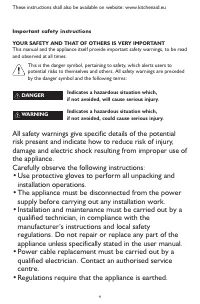
4 Important safety instructions YOUR SAFETY AND THAT OF OTHERS IS VERY IMPORTANT This manual and the appliance itself provide important safety warnings, to be readand observed at all times. This is the danger symbol, pertaining to safety, which alerts users topotential risks to themselves and others...
Page 9 - Safeguarding the environment; Disposal of packing materials; EC Declaration of conformity
9 Safeguarding the environment Disposal of packing materials • The packaging material is 100% recyclable and is marked with the recycle symbol ( ). • The various parts of the packing must therefore be disposed of responsibly and in fullcompliance with local authority regulationsgoverning waste dispo...
Page 10 - The oven needs to be fully heated (250°C) before first use; Before first use
10 Check that the voltage on the rating platecorresponds to the voltage in the home.Do not remove the microwave inlet protectionplates located on the side of the microwave ovencavity wall. They prevent grease & food particlesfrom entering the microwave inlet channels.Ensure the microwave oven ca...
Page 11 - Accessories
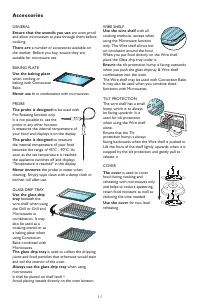
11 GENERAL Ensure that the utensils you use are oven proof and allow microwaves to pass through them beforecooking. There are a number of accessories available on the market. Before you buy, ensure they aresuitable for microwave use. BAKING PLATE Use the baking plate when cooking orbaking with Conve...
Page 12 - Probe placing
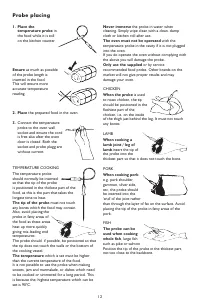
12 1. Place the temperature probe in the food while it is stillon the kitchen counter. Ensure as much as possible of the probe length isinserted in the food.This will ensure moreaccurate temperaturereading. 2. Place the prepared food in the oven. 3. Connect the temperatureprobe to the oven wallsocke...
Page 13 - Start protection
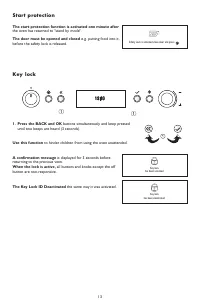
13 The start protection function is activated one minute after the oven has returned to "stand by mode". The door must be opened and closed e.g. putting food into it, before the safety lock is released. Safety Lock is activated close door and press Start protection 1. Press the BACK and OK b...
Page 14 - Messages
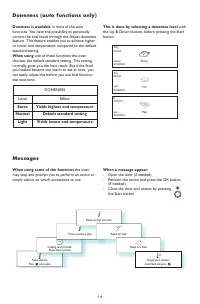
14 When using some of the functions the oven may stop and prompt you to perform an action orsimply advice on which accsessoire to use. When a message appear: - Open the door (if needed). - Perform the action and press the OK button.(if needed). - Close the door and restart by pressing the Start butt...
Page 17 - Clock setting; until Volume is displayed.; wr; Sound Setting
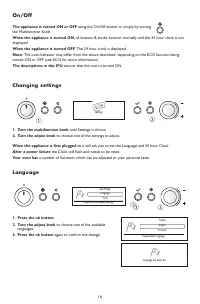
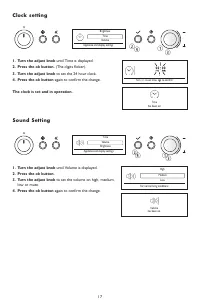
17 1. Turn the adjust knob until Time is displayed. 2. Press the ok button. (The digits flicker). 3. Turn the adjust knob to set the 24 hour clock. 4. Press the ok button again to confirm the change. The clock is set and in operation. q wr e Time Brightness Volume Appliance and display settings Cloc...
Page 18 - Brightness; Eco
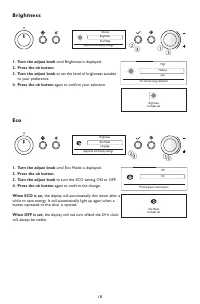
18 1. Turn the adjust knob until Brightness is displayed. 2. Press the ok button. 3. Turn the adjust knob to set the level of brightness suitable to your preference. 4. Press the ok button again to confirm your selection. q wr e Brightness Volume Eco Mode Appliance and display settings Brightness Br...
Page 19 - During cooking; Continuos cooking
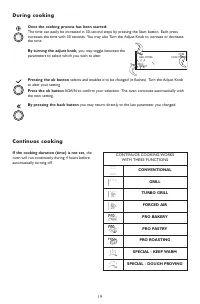
19 Once the cooking process has been started: The time can easily be increased in 30-second steps by pressing the Start button. Each pressincreases the time with 30 seconds. You may also Turn the Adjust Knob to increase or decreasethe time. By turning the adjust knob, you may toggle between the para...
Page 20 - Kitchen timer; Delayed start
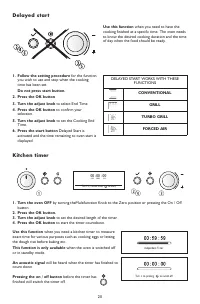
20 1. Turn the oven OFF by turning theMultifunction Knob to the Zero position or pressing the On / Off button. 2. Press the OK button.3. Turn the adjust knob to set the desired length of the timer. 4. Press the OK button to start the timer countdown. Use this function when you need a kitchen timer t...
Page 21 - Cook and reheat with microwaves; Power level
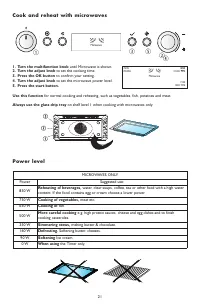
21 1. Turn the multifunction knob until Microwave is shown. 2. Turn the adjust knob to set the cooking time. 3. Press the OK button to confirm your setting. 4. Turn the adjust knob to set the microwave power level. 5. Press the start button. Use this function for normal cooking and reheating, such a...
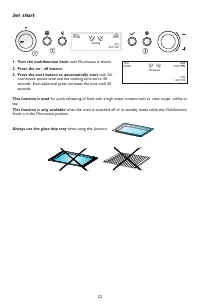
Page 22 - Turn the multifunction knob; until Microwave is shown.; Press the start button to automatically start; with full; This function is used; Knob is in the Microwave position.; Always use the glass drip tray; when using this function.; Jet start
22 1. Turn the multifunction knob until Microwave is shown. 2. Press the on / off button. 3. Press the start button to automatically start with full microwave power level and the cooking time set to 30seconds. Each additional press increases the time with 30seconds. This function is used for quick r...
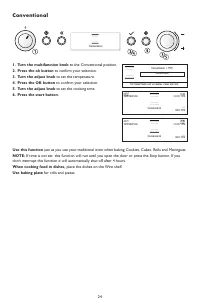
Page 24 - Conventional
24 1. Turn the multifunction knob to the Conventional position. 2. Press the ok button to confirm your selection. 3. Turn the adjust knob to set the temperature. 4. Press the OK button to confirm your selection. 5. Turn the adjust knob to set the cooking time. 6. Press the start button. Use this fun...
Page 25 - Choosing power & shelf level
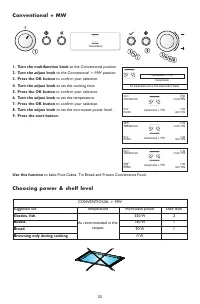
25 1. Turn the multifunction knob to the Conventional position. 2. Turn the adjust knob to the Conventional + MW position. 3. Press the OK button to confirm your selection. 4. Turn the adjust knob to set the cooking time. 5. Press the OK button to confirm your selection. 6. Turn the adjust knob to s...
Page 28 - Turbo grill
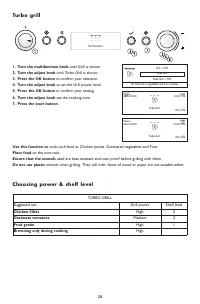
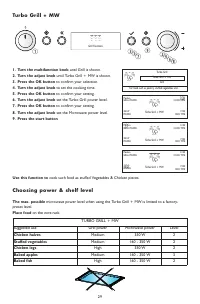
28 Turbo grill 1. Turn the multifunction knob until Grill is shown. 2. Turn the adjust knob until Turbo Grill is shown. 3. Press the OK button to confirm your selection. 4. Turn the adjust knob to set the Grill power level. 5. Press the OK button to confirm your setting. 6. Turn the adjust knob set ...
Page 31 - ry
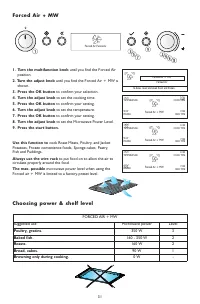
31 Forced Air + MW 1. Turn the multifunction knob until you find the Forced Air position. 2. Turn the adjust knob until you find the Forced Air + MW is shown. 3. Press the OK button to confirm your selection. 4. Turn the adjust knob to set the cooking time. 5. Press the OK button to confirm your set...
Page 33 - Special - Dough proving
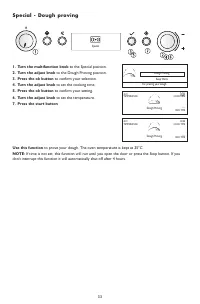
33 Special - Dough proving 1. Turn the multifunction knob to the Special position. 2. Turn the adjust knob to the Dough Proving position. 3. Press the ok button to confirm your selection. 4. Turn the adjust knob to set the cooking time. 5. Press the ok button to confirm your setting. 6. Turn the adj...
Page 34 - Auto Reheat
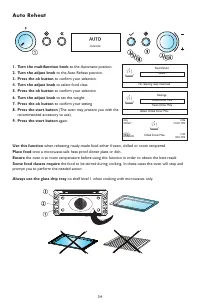
34 Auto Reheat 1. Turn the multifunction knob to the Automatic position. 2. Turn the adjust knob to the Auto Reheat position. 3. Press the ok button to confirm your selection. 4. Turn the adjust knob to select food class. 5. Press the ok button to confirm your selection. 6. Turn the adjust knob to s...
Page 36 - Rapid Defrost
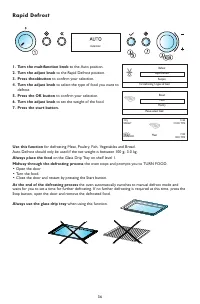
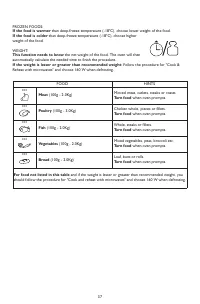
36 Rapid Defrost 1. Turn the multifunction knob to the Auto position. 2. Turn the adjust knob to the Rapid Defrost position. 3. Press theokbutton to confirm your selection. 4. Turn the adjust knob to select the type of food you want to defrost. 5. Press the OK button to confirm your selection. 6. Tu...
Page 38 - Manual Defrost
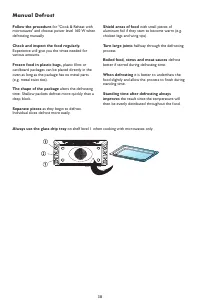
38 Manual Defrost Follow the procedure for "Cook & Reheat with microwaves" and choose power level 160 W whendefrosting manually. Check and inspect the food regularly. Experience will give you the times needed forvarious amounts. Frozen food in plastic bags, plastic films or cardboard pac...
Page 39 - Pro Bakery
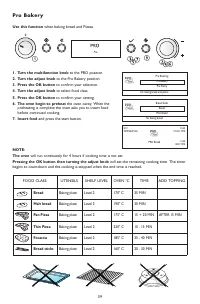
Use this function when baking bread and Pizzas. 1. Turn the multifunction knob to the PRO position. 2. Turn the adjust knob to the Pro Bakery position. 3. Press the OK button to confirm your selection. 4. Turn the adjust knob to select food class. 5. Press the OK button to confirm your setting. 6. T...
Page 40 - Pro Pastry
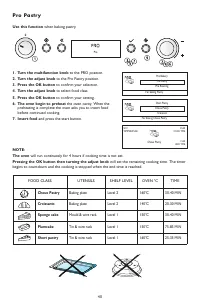
Use this function when baking pastry. 1. Turn the multifunction knob to the PRO position. 2. Turn the adjust knob to the Pro Pastry position. 3. Press the OK button to confirm your selection. 4. Turn the adjust knob to select food class. 5. Press the OK button to confirm your setting. 6. The oven be...
Page 41 - Pro Roasting
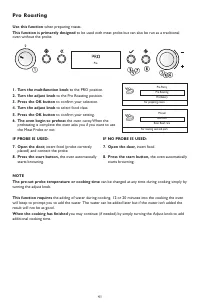
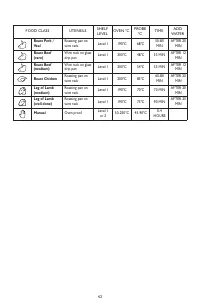
Use this function when preparing roasts. This function is primarely designed to be used with meat probe but can also be run as a traditional oven without the probe. 1. Turn the multifunction knob to the PRO position. 2. Turn the adjust knob to the Pro Roasting position. 3. Press the OK button to con...
Page 43 - Maintenance and cleaning
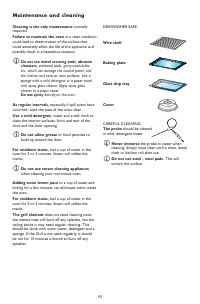
43 Cleaning is the only maintenance normally required. Failure to maintain the oven in a clean condition could lead to deterioration of the surface thatcould adversely affect the life of the appliance andpossibly result in a hazardous situation. Do not use metal scouring pads, abrasive cleansers, st...
Page 45 - Recommended use and tips
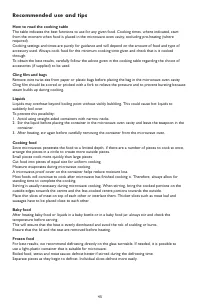
45 How to read the cooking table The table indicates the best functions to use for any given food. Cooking times, where indicated, startfrom the moment when food is placed in the microwave oven cavity, excluding pre-heating (whererequired).Cooking settings and times are purely for guidance and will ...
Page 46 - Trouble shooting guide; Before calling the After-Sales Service; Scrapping of household appliances
46 The appliance does not work • The turntable support is in place.• The door is properly closed.• Check the fuses and ensure that there is power available. • Check that the appliance has ample ventilation. Wait for 10 minutes, then try to operate theappliance once more. • Open and then close the do...
Page 48 - Printed in Italy