Page 2 - TABLE OF CONTENTS
CMD + SHIFT CLICK TO CHANGE COPY 2 BLENDER INSTRUCTIONS BLENDER SAFETY Important safeguards .......................................................................................... 3 Electrical requirements ...................................................................................... 4 PA...
Page 3 - CMD + SHIFT CLICK TO CHANGE COPY; English; BLENDER SAFETY; IMPORTANT SAFEGUARDS; When using electrical appliances, basic safety precautions
CMD + SHIFT CLICK TO CHANGE COPY English 3 BLENDER SAFETY BLENDER INSTRUCTIONS IMPORTANT SAFEGUARDS When using electrical appliances, basic safety precautions should always be followed, including the following: 1. Read all instructions. 2. To protect against risk of electrical shock, do not put Blen...
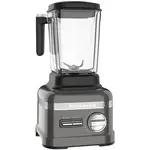
Page 4 - SAVE THESE INSTRUCTIONS; Electrical requirements; PARTS AND FEATURES
4 BLENDER SAFETY 7. Do not use outdoors. 8. Do not let cord hang over edge of table or counter. 9. Keep hands and utensils out of container while blending to reduce the risk of severe injury to persons or damage to the Blender. A scraper may be used but must be used only when the Blender is not runn...
Page 6 - ASSEMBLING THE BLENDER; Preparing the Blender for use
6 ASSEMBLING THE BLENDER 2 Rotate pitcher clockwise, approximately 1/8 turn until pitcher clicks into place. 3 Adjust the length of the Blender power cord. Preparing the Blender for use 1 Align the pitcher tabs with the slots on the base. The pitcher handle may be on the right or left side of the bl...
Page 7 - Using the Blender
English 7 ASSEMBLING THE BLENDER 1 Before using the Blender, plug into a grounded outlet, and press POWER ( ) . The Power indicator light will flash when ready. OPERATING THE BLENDER Using the Blender Before Use While the Blender Power indicator light or the PULSE mode indicator light is on:- Do not...
Page 8 - OPERATING THE BLENDER
8 OPERATING THE BLENDER 4 When finished, press POWER ( ) to stop the Blender, then press POWER ( ) a second time to turn off. Unplug Blender before removing the pitcher. 5 To remove the lid, first use the loop on the back of the lid to lift the lid and break the seal. 6 Then lift the lid from the si...
Page 9 - Using the Hot Foods function
English 9 OPERATING THE BLENDER OPERATING THE BLENDER IMPORTANT: If blending hot foods or liquids – such as soups or sauces – be sure that the lid is securely in place and use only the HOT FOODS ( ) function. Using the Hot Foods function 1 Before operating the Blender, make sure the pitcher is prope...
Page 10 - Using the Crush Ice function
CMD + SHIFT CLICK TO CHANGE COPY 10 OPERATING THE BLENDER TIP: Process up to 1/2 standard ice cube tray or 6 to 7 standard ice cubes at a time. Occasional stirring with a spatula will be helpful only when Blender is off. The CRUSH ICE ( ) feature has been optimized to crush and chop ice without addi...
Page 11 - Using the Pulse function
English 11 OPERATING THE BLENDER NOTE: PULSE mode will not work with the HOT FOODS ( ) or CRUSH ICE ( ) modes. 5 When finished, press POWER ( ) to turn off. Unplug Blender before removing the pitcher. Using the Pulse function Your Blender offers a PULSE ( ) function, which allows a “Pulse-at-any-spe...
Page 12 - Speed control guide
12 OPERATING THE BLENDER Speed Item SoupHot sauces (gravy, white sauce)Hot Drinks Chopped fruitsChopped vegetables Meat salad for sandwich filling PestoDipsCold fruit or vegetable sauce Savory crumb toppingSweet crumb topping Fruit juice from frozen concentrateSalad dressing Gravy Pancake batterWaff...
Page 13 - TIPS FOR GREAT RESULTS; Quick tips
English 13 TIPS FOR GREAT RESULTS OPERATING THE BLENDER Quick tips • If you’re making beverages using ice, start with CRUSH ICE ( ), then finish with LIQUIFY ( ) in order to produce a smoother texture. • Ice directly from the freezer will crush better than partially melted ice for snow. • Smaller ic...
Page 14 - Cleaning the Blender
14 TIPS FOR GREAT RESULTS CARE AND CLEANING Cleaning the Blender The Blender pitcher can be easily cleaned while still attached to the base, or individually. • Clean the Blender thoroughly after every use. • Do not immerse the Blender base or cord in water. • Do not use abrasive cleansers or scourin...
Page 15 - TROUBLESHOOTING; Blender does not operate when a setting is selected
English 15 TROUBLESHOOTING TIPS FOR GREAT RESULTS CARE AND CLEANING Blender does not operate when a setting is selected All indicator lights are flashing alternately. The Blender may be jammed. If it is jammed, the Blender will stop running to avoid damage to the motor. Press POWER ( ) to reset the ...