Page 2 - English; Contents; Tuner features
— 2 — English Contents Safety precautions......................3 About Cassette tape ...................4 About RDS ..................................4 General features .........................5 PowerSelecting the SourceVolumeAttenuatorLoudnessSystem QAudio ControlSpeaker SettingSwitching DisplayTE...
Page 3 - IMPORTANT INFORMATION; Safety precautions
— 3 — To prevent injury and/or fire, take thefollowing precautions: • Insert the unit all the way until it is fully locked in place. Otherwise it may fly out ofplace during collisions and other jolts. • When extending the ignition, battery or ground wires, make sure to use automotive-grade wires or ...
Page 4 - NOTE
— 4 — English • If you experience problems during installation, consult your Kenwood dealer. • If the unit does not seem to be working right, try pressing the reset button first. Ifthat does not solve the problem, consultyour Kenwood dealer. • Press the reset button if the Disc auto changer fails to...
Page 5 - Volume; Source required; Tuner; Selecting the Source; Turning ON the Power; Power; General features; ATT indicator; Release button
Increasing Volume Press the [ u ] button. Decreasing Volume Press the [ d ] button. Volume Press the [SRC] button. Source required Display Tuner "TUNER" Tape "TAPE" External disc "DISC"/"CD" Standby (Illumination only mode) "ALL OFF" This unit automatically tu...
Page 6 - Audio Control; System Q; Compensating for low and high tones during low volume.; Loudness; Turning the volume down quickly.; Attenuator
1 Select the source for adjustment Press the [SRC] button. 2 Enter Audio Control mode Press the [AUD] button for at least 1 second. 3 Select the Audio item for adjustment Press the [FM] or [AM] button. Each time the button is pressed the items that can be adjustedswitch as shown below. 4 Adjust the ...
Page 7 - The audio system automatically mutes when a call comes in.; TEL Mute; Disc title; Switching Display; OFF; Speaker Setting
The audio system automatically mutes when a call comes in. When a call comes in "CALL" is displayed.The audio system pauses. Listening to the audio during a call Press the [SRC] button. The "CALL" display disappears and the audio system comes backON. When the call ends Hang up the ph...
Page 8 - Removing the Faceplate; Reattaching the Faceplate; Theft Deterrent Faceplate; ST indicator
Function of the KRC-391/36/394/37 Tuner features The faceplate of the unit can be detached and taken with you,helping to deter theft. Removing the Faceplate Press the Release button. The faceplate is unlocked, allowing you to detach it. • The faceplate is a precision piece of equipment and can be da...
Page 9 - Calling up the stations in the memory.; Preset Tuning; Auto Memory Entry; Putting the station in the memory.; Station Preset Memory; Selecting the station.; Tuning
Calling up the stations in the memory. 1 Select the band Press the [FM] or [AM] button. 2 Call up the station Press the [#1] — [#6] button. Preset Tuning Putting a station with good reception in the memoryautomatically. 1 Select the band for Auto Memory Entry Press the [FM] or [AM] button. 2 Enter M...
Page 10 - Preset the volume; The volume level display blinks 1 time.; Presetting Volume for Traffic Information; Receiving other traffic information stations; Traffic Information; RDS features; PTY indicator
Setting the volume during Traffic Information. 1 Receive the station. 2 Set the volume you want. 3 Preset the volume Press the [VOL ADJ] button for at least 2 seconds. The volume level display blinks 1 time. Presetting Volume for Traffic Information Switching to traffic information automatically whe...
Page 11 - Search for the selected Program Type station; Selecting the Program Type and searching for a station.; Enter PTY mode
21. Social Affairs "SOCIAL" 22. Religion "RELIGION" 23. Phone In "PHONE IN" 24. Travel "TRAVEL" 25. Leisure "LEISURE" 26. Jazz Music "JAZZ" 27. Country Music "COUNTRY" 28. National Music "NATION M" 29. Oldies Music "OLDIES" 30. ...
Page 12 - Changing Language for PTY Function; Presetting the Program Type; Program Type preset
Selecting the Program Type display language. 1 Enter PTY mode Refer to <PTY (Program Type)> (page 11). 2 Enter Changing Language mode Press the [CLK] button. 3 Select the language Press the [#1] — [#3] button. Button Language [#1] English [#2] French [#3] German 4 Exit Changing Language mode P...
Page 13 - Choose the tuning mode.; Tuning Mode; Function of the KRC-30
Selecting the station. 1 Select tuner source Press the [SRC] button. Select the "TUNER" display. 2 Select the band Press the [FM] or [AM] button. Each time the [FM] button is pressed it switches between theFM1, FM2, and FM3 bands. 3 Tune up or down band Press the [ 4 ] or [ ¢ ] button. Durin...
Page 14 - Cassette player features; Play side
Cassette player features Calling up the stations in the memory. 1 Select the band Press the [FM] or [AM] button. 2 Call up the station Press the [#1] — [#6] button. Preset Tuning Putting stations with good reception in the memoryautomatically. 1 Select the band for Auto Memory Entry Press the [FM] o...
Page 16 - Fast Forwarding and Reversing; Display; Pause and play; Playing External Disc; External disc control features; Track number
Fast Forwarding Hold down on the [ ¢ ] button. Release your finger to play the disc at that point. Reversing Hold down on the [ 4 ] button. Release your finger to play the disc at that point. Fast Forwarding and Reversing Playing discs set in the optional accessory disc player connectedto this unit....
Page 17 - Magazine Random Play; Playing all the songs on the disc in random order.; Random Play; Start Track Scan; Track Scan; Repeat play; Track Repeat; Track Search
Play the songs on all the discs in the disc changer in randomorder. Press the [M.RDM] button. Each time the button is pressed the Magazine Random Play turnsON or OFF.When it's ON, "MRDM ON" is displayed. When the [ ¢ ] button is pressed, the next song select starts. Magazine Random Play (Fun...
Page 19 - Example: When you want to set the beep sound select the; Set the menu item; You can continue by returning to step 2 and setting other items.; Exit Menu mode; Menu System; Menu system; AUTO indicator
Setting during operation beep sound etc. functions.The Menu system basic operation method is explained here. Thereference for the Menu items and their setting content is afterthis operation explanation. 1 Enter Menu mode Press the [MENU] button for at least 1 second. "MENU" is displayed. 2 S...
Page 20 - News Bulletin with Timeout Setting; Selecting the button illumination color as green or red.; Selectable Illumination; Synchronizing the RDS station time data and this unit's clock.; Synchronize Clock; The clock display blinks.; Manual Clock Adjustment
It takes 3 to 4 minutes to synchronize the clock. Function of the KRC-391/36/394/37 It switches automatically when a news bulletin starts even if theradio isn't being listened to. Also, the time interval wheninterrupt is prohibited can be set. Display and Setting "NEWS OFF""NEWS 00M"...
Page 21 - Sets the tuning mode.
When the news bulletin starts, "NEWS" is displayed, and itswitches to the news bulletin. • If you choose the "20M" setting, further news bulletins will not be received for 20 minutes once the first news bulletin is received. • The news bulletin volume is the same level that was set f...
Page 22 - Setting the displayed text scroll.; Text Scroll
Setting the timer to turn this unit's power OFF automaticallywhen Standby mode continues.Using this setting can save the vehicle's battery power. Display Setting "OFF – – –" Power OFF Timer function is OFF. "OFF 20M" Turns the power OFF after 20 minutes. (Original setting)"OFF 40...
Page 23 - Cars with an ISO connector:; Accessories
— 23 — — 23 — The use of any accessories except for those provided might result indamage to the unit. Make sure only to use the accessories shipped withthe unit, as shown above. ..........................................1 ..........................................2 .....................................
Page 24 - Connecting Wires to Terminals; For Volkswagen car
English — 24 — – + + + + + — 24 — 9 Rear right output (Red) 8 Rear left output (White) KENWOOD disc changer input 25 FM/AM antenna input 10 To connect the Discchanger, consult yourDisc changer manual. 26 Wiring harness(Accessory 1 ) 13 TEL mute terminal 28 Fuse (10A) 23 Plug (page 25) 24 29 White/Bl...
Page 25 - Connector Function Guide; Connecting the ISO Connector; Battery
— 25 — — 25 — Connecting Wires to Terminals ■ Connector Function Guide ■ Plug Setting 10 12 34 5 6 7 8 1 2 3 4 5 6 7 8 10 10 Connector A Connector B Connecting the ISO Connector The pin arrangement for the ISO connectors depends on the typeof vehicle you drive. Make sure to make the proper connectio...
Page 26 - Power Control Terminal Connections; Installation
English — 26 — — 26 — Connecting Wires to Terminals ■ Power Control Terminal Connections Power Control terminal(Flat terminal) 4 Power Amplifier 6 The output of the Power Control terminal is switched along withthe power on/off switching of the unit.This terminal can be connected to the P.CON (REMOTE...
Page 28 - General; Troubleshooting Guide
English — 28 — What might seem to be a malfunction in your unit mayjust be the result of slight misoperation or miswiring.Before calling service, first check the following tablefor possible problems. General ? The power does not turn ON. 01 ✔ The fuse has blown. ☞ After checking for short circuits i...
Page 31 - Specifications; Specifications subject to change without notice.
— 31 — Specifications FM tuner section Frequency range (50 kHz space) ..............87.5 MHz – 108.0 MHzUsable sensitivity (S/N = 26dB) ................................. 0.7 µV/75 Ω Quieting Sensitivity (S/N = 46dB) .............................. 1.6 µV/75 Ω Frequency response ( ± 3 dB) ...............
Page 32 - Nederlands; Inhoud
— 32 — Nederlands Inhoud Veiligheidsvoorschriften...........33 Informatie over muziekcassettes ................................................34 Informatie over RDS .................34 Algemene kenmerken...............35 SpanningKiezen van de geluidsbronVolumeDempingToonversterkingSystem QKlankkleu...
Page 33 - Veiligheidsvoorschriften; WAARSCHUWING; BELANGRIJKE INFORMATIE
— 33 — Veiligheidsvoorschriften Voorkom persoonlijk letsel en/ofbrand en let derhalve op de volgendevoorzorgen: • Steek het toestel geheel in totdat het op zijn plaats vergrendelt. Het toestel schiet andersnamelijk in geval van een botsing ofschokken mogelijk van zijn plaats. • Bij het verlengen van...
Page 34 - OPMERKING; Reinigen van het toestel; Informatie over RDS; Informatie over muziekcassettes
— 34 — Nederlands • Raadpleeg uw Kenwood handelaar indien u problemen of vragen over het installerenheeft. • Druk op de terugsteltoets indien het toestel niet juist lijkt te functioneren. Raadpleeg uwKenwood handelaar indien het probleemvervolgens nog niet is opgelost. • Druk op de resettoets wannee...
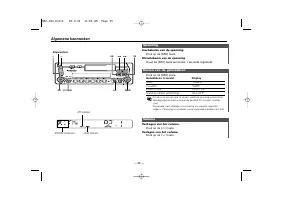
Page 35 - Geluidsbron is vereist; Kiezen van de geluidsbron; Inschakelen van de spanning; Spanning; Algemene kenmerken; Ontgrendeltoets
Verhogen van het volume. Druk op de [ u ] toets. Verlagen van het volume. Druk op de [ d ] toets. Volume Druk op de [SRC] toets. Geluidsbron is vereist Display Tuner "TUNER" Cassette "TAPE" Externe disk "DISC"/"CD" Stand-by (alleen verlichting) "ALL OFF" Om de...
Page 36 - Klankkleurregeling; Dempen van het volume.; Demping
1 Kies de in te stellen geluidsbron Druk op de [SRC] toets. 2 Activeer de klankkleurregelingsfunctie Houd de [AUD] toets tenminste 1 seconde ingedrukt. 3 Kies de in te stellen functie. Druk op de [FM] of [AM] toets. Elke keer dat de toets wordt ingedrukt, veranderen de functiesdie kunnen worden inge...
Page 37 - Leg de telefoon op de haak.; Telefoondemping; Disktitel; Veranderen van display; UIT; Luidspreker instelling
Het audiosysteem wordt automatisch gedempt wanneer uopgebeld wordt. Wanneer de telefoon overgaat "CALL" wordt getoond.Het audiosysteem wordt tijdelijk onderbroken. Luisteren naar audio tijdens een telefoongesprek Druk op de [SRC] toets. De "CALL" display verdwijnt en het audiosysteem...
Page 38 - Functies van de tuner; Verwijderen van het voorpaneel; Bevestigen van het voorpaneel; Anti-diefstal voorpaneel
Functies van de KRC-391/36/394/37 Functies van de tuner U kunt het voorpaneel van de eenheid verwijderen enmeenemen om de eenheid minder aantrekkelijk voor dieven temaken. Verwijderen van het voorpaneel Druk op de ontgrendeltoets. Het voorpaneel wordt ontgrendeld, zodat u het kunt verwijderen. • Het...
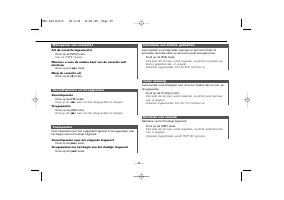
Page 39 - Oproepen van in het geheugen opgeslagen zenders; Afstemmen op voorkeurzenders; Automatisch vastleggen van zenders die goed ontvangen worden.; Voorkeurzendergeheugen; Kiezen van de zender.; Afstemmen
Oproepen van in het geheugen opgeslagen zenders 1 Kies de golfband Druk op de [FM] of [AM] toets. 2 Roep de zender op Druk op de [#1] — [#6] toets. Afstemmen op voorkeurzenders 1 Kies de golfband waarvan de zenders automatisch moetenworden vastgelegd Druk op de [FM] of [AM] toets. 2 Activeer de menu...
Page 40 - Sla het volume in het geheugen op; Het volumeniveau knippert 1 keer op de display.; Verkeersinformatie
Instellen van het volume voor verkeersinformatie. 1 Stem af op de zender. 2 Stel het gewenste volume in. 3 Sla het volume in het geheugen op Houd de [VOL ADJ] toets tenminste 2 seconden ingedrukt. Het volumeniveau knippert 1 keer op de display. Programmeren van het volume voor deverkeersinformatie A...
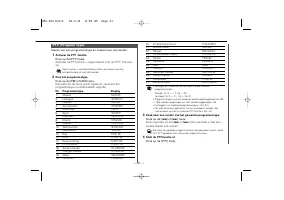
Page 41 - Kiezen van een programmatype en zoeken naar een zender.
20. Kinderprogramma's "CHILDREN" 21. Sociale zaken "SOCIAL" 22. Religie "RELIGION" 23. Luisteraarparticipatie "PHONE IN" 24. Reizen "TRAVEL" 25. Recreatie "LEISURE" 26. Jazz "JAZZ" 27. Country "COUNTRY" 28. Nationale muziek "NATION ...
Page 42 - Functies van de KRC-30; Kiezen van de taal voor het tonen van de programmatypes.; Veranderen van de taal voor de PTY-functie; Vastleggen van het programmatype; Vastleggen van voorkeurprogrammatypes
Functies van de KRC-30 Functies van de tuner Kiezen van de taal voor het tonen van de programmatypes. 1 Activeer de PTT-functie Zie <PTY (Program Type)> (blz. 41). 2 Activeer de functie voor het veranderen van de taal Houd de [CLK] toets. 3 Kies de taal Druk op de [#1] — [#3] toets. Toets Taal...
Page 43 - Kies de afstemfunctie.; Afstemfunctie; Vastleggen van zenders in het geheugen.
Kiezen van de zender. 1 Kies de tuner als geluidsbron Druk op de [SRC] toets. Kies de "TUNER" display. 2 Kies de golfband Druk op de [FM] of [AM] toets. Elke keer dat de [FM] toets wordt ingedrukt, wordtovergeschakeld tussen de golfbanden FM1, FM2 en FM3. 3 Stem op de golfband af op een hoge...
Page 44 - Functies van de cassettespeler; Kies de golfband; Weergavekant
Functies van de cassettespeler Oproepen van in het geheugen opgeslagen zenders 1 Kies de golfband Druk op de [FM] of [AM] toets. 2 Roep de zender op Druk op de [#1] — [#6] toets. Afstemmen op voorkeurzenders Functies van de KRC-30 Functies van de tuner — 44 — Nederlands 4 ¢ SRC FM AM B.S 2 3 0 T.CAL...
Page 45 - Herhalen van het huidige fragment.
Herhalen van het huidige fragment. Druk op de [REP] toets. Elke keer dat de toets wordt ingedrukt, wordt de herhaalfunctieaan- of uitgezet. Wanneer ingeschakeld, wordt "REP ON" getoond. Herhalen van muziek Automatisch overschakelen naar de tuner tijdens het vooruit- enterugspoelen. Druk op d...
Page 46 - Functies voor externe disk-bediening; Tracknummer; Tijdelijk onderbreken en hervatten van de weergave; Weergeven van externe disks
Versnelde weergave in voorwaartse richting Houd de [ ¢ ] toets ingedrukt. Laat de toets los op het punt waar u de normale weergave wilthervatten. Versnelde weergave in achterwaartse richting Houd de [ 4 ] toets ingedrukt. Laat de toets los op het punt waar u de normale weergave wilthervatten. Versne...
Page 47 - Weergave in willekeurige volgorde; Starten van het aftasten van fragment; Aftasten van fragment; Herhalen van het huidige fragment of de huidige disk.; Herhaalde weergave; Herhalen van een fragment; Herhalen van een fragment/album; Kiezen van de disk waarnaar u wilt luisteren.; Albumzoeken (Functie van de diskwisselaar); Kiezen van het fragment waarnaar u wilt luisteren.; Fragmentzoeken
In willekeurige volgorde weergeven van alle fragmenten op alledisks in de diskwisselaar. Druk op de [M.RDM] toets. Elke keer dat de toets wordt ingedrukt, wordt de functie voorweergave in willekeurige volgorde van het magazijn aan- ofuitgezet. Wanneer ingeschakeld, wordt "MRDM ON" getoond. W...
Page 48 - Bladeren van tekst/titel; Herhaal de stappen 5 t/m 6 om een naam te bevestigen.
Bladeren van de getoond CD-tekst of MD-titel. Druk op de [SCRL] toets. Bladeren van tekst/titel Namen bevestigen aan CD's. 1 Start de weergave van de disk waaraan u een naam wiltbevestigen Er kunnen geen namen worden bevestigd aan MD's. 2 Activeer de menufunctie Houd de [MENU] toets tenminste 1 seco...
Page 49 - Voorbeeld: Wanneer u de pieptoon wilt instellen, kiest u de; Stel de functie in; U kunt andere functies instellen door terug te keren naar stap 2.; Sluit de menufunctie af; Menusysteem
Instellen van het geluidssignaal van de aanraaksensor, enz.In het onderstaande wordt de basisbediening van hetmenusysteem uitgelegd. Na deze uitleg volgt een beschrijvingvan alle beschikbare functies en de daarbij behorendeinstellingen. 1 Activeer de menufunctie Houd de [MENU] toets tenminste 1 seco...
Page 50 - Kiezen van de kleur van de verlichting; Synchroniseert de klok.; Synchroonklok; De klokdisplay knippert.; Handmatig instellen van de klok
Kiezen van de groene of de rode verlichting. Display Instelling "COL GRN" De kleur van de verlichting is groen. "COL RED" De kleur van de verlichting is rood. Kiezen van de kleur van de verlichting Om potentiele dieven af te schrikken knippert er een rodeindicator op de eenheid nadat...
Page 52 - Instellen van de functie voor het bladeren van tekst.; Bladeren van tekst
Stel een bepaalde tijd in om automatisch de spanning uit teschakelen wanneer de functie Stand-by in werking blijft . Deze functie kan de accu van de auto beschermen. Display Instelling "OFF – – –" De functie voor het uitschakelen van despanning is uitgeschakeld. "OFF 20M" Schakelt de...
Page 53 - • Als uw wagen niet voorbereid is op dit speciale; Toebehoren
— 53 — Het gebruik van andere accessoires dan de bijgeleverde toebehoren kanhet toestel beschadigen. Gebruik uitsluitend de hierboven getoonde, bijhet toestel geleverde toebehoren. ..........................................1 ..........................................2 ..................................
Page 54 - Verbinden van kabels met aansluitingen; Voor Volkswagens
— 54 — Nederlands Verbinden van kabels met aansluitingen – + + + + + Rechterachteruitgang (rood) 9 8 Linkerachteruitgang (wit) Ingang voor bediening KENWOODdiskwisselaar 25 FM/AMantenne-ingang 10 Antenneconversie-adapter(ISO–JASO) (toebehoren 3 ) 12 Zie de gebruiksaanwijzingvan uw diskwisselaarvoor ...
Page 55 - Aansluiting A; Verbinden van de ISO aansluiting; Pennummers voor; Accu
— 55 — ■ Aansluitfunktie gids ■ Plug instelling 10 12 34 5 6 7 8 1 2 3 4 5 6 7 8 10 10 Aansluiting A Aansluiting B Verbinden van de ISO aansluiting De penopstelling van de ISO aansluitingen is afhankelijk van het typevan uw auto. Voorkom beschadiging en kontroleer dat de juisteverbindingen worden ge...
Page 56 - Aansluitingen van de vermogensregelingaansluiting; Installeren
— 56 — Nederlands Verbinden van kabels met aansluitingen ■ Aansluitingen van de vermogensregelingaansluiting De uitvoer van de vermogensregelingaansluiting wordt geschakeldsamen met de spanning aan/uit-schakeling van het toestel.Deze aansluiting kan worden aangesloten op de P.CON (REMOTE)-aansluitin...
Page 57 - Verwijderen van het harde rubberframe; Verwijderen van het toestel
— 57 — ■ Verwijderen van het harde rubberframe 2 Nadat de onderkant is verwijderd moet u de twee plaatsen bovenverwijderen. Het frame kan op dezelfde manier vanaf de bovenkant wordenverwijderd. Klem Vergrendeling 1 Gebruik de klempennen op het gereedschap voor het verwijderenen verwijder de twee ver...
Page 58 - Oplossen van problemen; Algemeen
— 58 — Nederlands Oplossen van problemen ? De telefoondempingfunctie werkt niet. 15 ✔ De telefoondempingkabel is niet juist verbonden. ☞ Sluit de kabels juist aan de hand van het gedeelte <Verbinden vankabels met aansluitingen> aan. ? De telefoondempingfunctie wordt geaktiveerd maar detelefoon...
Page 61 - Technische gegevens; μV
— 61 — Technische gegevens FM tunergedeelte Frekwentiebereik (50 kHz afstand) ...........87,5 MHz – 108,0 MHzBruikbare gevoeligheid (S/R = 26dB) .........................0,7 µV/ 75 Ω Onderdrukkinggevoeligheid (S/R = 46dB) ..................1,6 µV/ 75 Ω Frequentieweergave ( ± 3 dB)......................
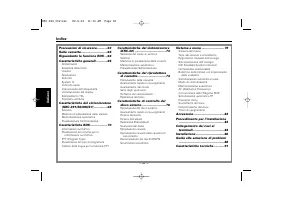
Page 62 - Italiano; Indice; informazioni sul traffico
— 62 — Italiano Indice Precauzioni di sicurezza ...........63 Sulla cassetta............................64 Riguardante la funzione RDS ...64 Caratteristiche generali ............65 AlimentazineSelezione della fonteVolumeAttenuatoreSonoritàSystem QControllo audioImpostazione dell'altoparlanteCommutaz...
Page 63 - Precauzioni di sicurezza; AVVERTENZA; INFORMAZIONI IMPORTANTI
— 63 — Precauzioni di sicurezza Per evitare lesioni e/o incendi,osservare le seguenti precauzioni: • Inserire l'apparecchio fino in fondo finché si blocca saldamente in posizione, altrimentipotrebbe fuoriuscire in caso di scontri o altrescosse. • Quando si prolungano i cavi dell'accensione, della ba...
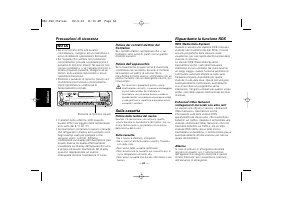
Page 64 - • Se si incontrano difficoltà durante; NOTA; Allarme; Riguardante la funzione RDS; Pulizia della testina del nastro; cui la temperatura è molto alta.; Sulla cassetta; Pulizia dell’apparecchio
— 64 — Italiano • Se si incontrano difficoltà durante l'installazione, rivolgersi ad un rivenditore oad un installatore specializzato Kenwood. • Se l'apparecchio sembra non funzionare correttamente, provare a premere prima ilpulsante di ripristino (reset). Se questo nonrisolve il problema, o se l’ap...
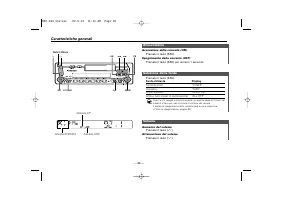
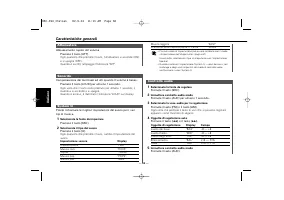
Page 65 - Fonte richiesta; Sintonizzatore; Selezione della fonte; Caratteristiche generali; Indicatore ATT; Tasto di rilascio
Aumento del volume Premete il tasto [ u ]. Attenuazione del volume Premete il tasto [ d ]. Volume Premete il tasto [SRC]. Fonte richiesta Display Sintonizzatore "TUNER" Cassetta "TAPE" Disco esterno "DISC"/"CD" Attesa (solo modo di illuminazione) "ALL OFF" Que...
Page 66 - Controllo audio; Compensazione dei toni bassi ed alti quando il volume è basso.; Sonorità; Abbassamento rapido del volume; Attenuatore
1 Selezionate la fonte da regolare Premete il tasto [SRC]. 2 Immettere controllo audio modo Premete il tasto [AUD] per almeno 1 secondo. 3 Selezionate la voce audio per la regolazione Premete il tasto [FM] o il tasto [AM]. Ogni volta che premete il tasto le voci che si possono regolareappaiono come ...
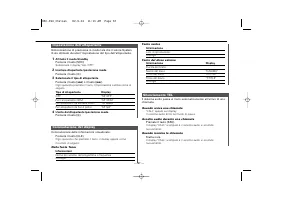
Page 67 - Silenziamento TEL; Commutazione delle informazioni visualizzate.; Commutazione del display
Il sistema audio passa al muto automaticamente all'arrivo di unachiamata. Quando arriva una chiamata "CALL" appare sul display.Il sistema audio entra nel modo di pausa. Ascolto audio durante una chiamata Premete il tasto [SRC]. Il display "CALL" scompare e il sistema audio si accende...
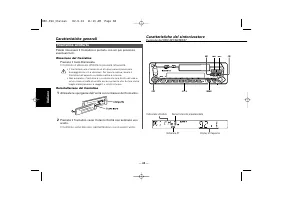
Page 68 - Caratteristiche del sintonizzatore; Rimozione del frontalino; Reinstallazione del frontalino; Frontalino antifurto; Indicatore ST
Funzione del KRC-391/36/394/37 Caratteristiche del sintonizzatore Potete rimuovere il frontalino e portarlo con voi per prevenireeventuali furti. Rimozione del frontalino Premete il tasto Disinnesta. Il frontalino è sbloccato affinché lo possiate rimuovere. • Il frontalino è uno strumento ad alta pr...
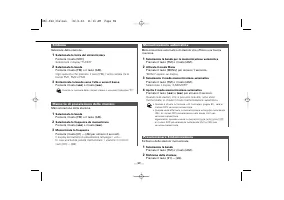
Page 69 - Richiamo delle stazioni memorizzate.; Preselezionare Sintonizzazione; Memorizzazione automatica; Memorizzazione della stazione.; Memoria di preselezione delle stazioni; Selezione della stazione.; Sintonia
Richiamo delle stazioni memorizzate. 1 Selezionate la banda Premete il tasto [FM] o il tasto [AM]. 2 Richiamo della stazione Premete il tasto [#1] — [#6]. Preselezionare Sintonizzazione Memorizzazione automatica di stazioni che offrono una buonaricezione. 1 Selezionate la banda per la memorizzazione...
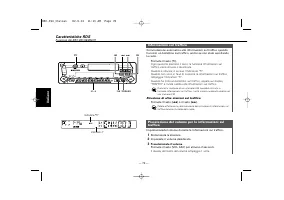
Page 70 - Preselezionate il volume; Il display del livello del volume lampeggia 1 volta.; Informazioni sul traffico; Caratteristiche RDS; Indicatore PTY
Impostazionedel volume durante le informazioni sul traffico. 1 Sintonizzate la stazione. 2 Impostate il volume desiderato. 3 Preselezionate il volume Premete il tasto [VOL ADJ] per almeno 2 secondi. Il display del livello del volume lampeggia 1 volta. Preselezione del volume per le informazioni sult...
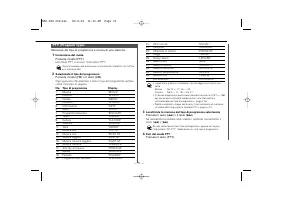
Page 71 - Selezione del tipo di programma e ricerca di una stazione.
21. Affari sociali "SOCIAL" 22. Religione "RELIGION" 23. Chiamate in diretta "PHONE IN" 24. Viaggi "TRAVEL" 25. Tempo libero "LEISURE" 26. Musica jazz "JAZZ" 27. Musica country "COUNTRY" 28. Musica nazionale "NATION M" 29. Musica sempre...
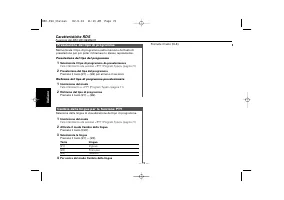
Page 72 - Cambio della lingua per la funzione PTY; Preselezione del tipo del programma; Preselezione del tipo di programma
Premete il tasto [CLK]. Selezione della lingua di visualizzazione del tipo di programma. 1 Immissione del modo Fate riferimento alla sezione <PTY (Program Type)> (pagina 71). 2 Attivate il modo Cambio della lingua Premete il tasto [CLK]. 3 Selezionate la lingua Premete il tasto [#1] — [#3]. Ta...
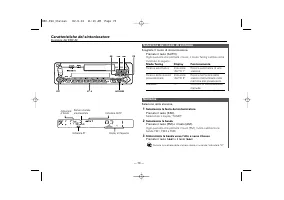
Page 73 - Scegliete il modo di sintonizzazione.; Selezione del modo di sintonia
Selezione della stazione. 1 Selezionate la fonte del sintonizzatore Premete il tasto [SRC]. Selezionate il display "TUNER" . 2 Selezionate la banda Premete il tasto [FM] o il tasto [AM]. Ogni qualvolta che premete il tasto [FM], l'unità cambia tra lebande FM1, FM2 e FM3. 3 Sintonizzate la ba...
Page 74 - Caratteristiche del riproduttore di cassette; Lato di riproduzione
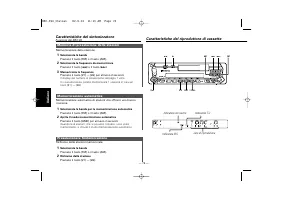
Caratteristiche del riproduttore di cassette Richiamo delle stazioni memorizzate. 1 Selezionate la banda Premete il tasto [FM] o il tasto [AM]. 2 Richiamo della stazione Premete il tasto [#1] — [#6]. Preselezionare Sintonizzazione Memorizzazione automatica di stazioni che offrono una buonaricezione....
Page 75 - Riproduzione ripetuta del brano corrente.
Riproduzione ripetuta del brano corrente. Premete il tasto [REP]. Ogni qualvolta che premete il tasto, la funzione Ripetizione deibrani viene attivato o disattivato.Quando è attivato, appare sul display l'indicazione "REP ON" . Ripetizione dei brani Commutazione automatica alla radio durante...
Page 76 - Avanzamento rapido e riavvolgimento; Pausa e riproduzione; Riproduzione del disco esterno; Caratteristiche di controllo del disco esterno; Numero di brano
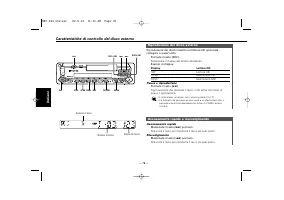
Avanzamento rapido Mantenete il tasto [ ¢ ] premuto. Rilasciate il tasto per riprodurre il disco da quel punto. Riavvolgimento Mantenete il tasto [ 4 ] premuto. Rilasciate il tasto per riprodurre il disco da quel punto. Avanzamento rapido e riavvolgimento Riproduzione dei dischi inserito nel lettore...
Page 77 - Riproduzione casuale dalla cassetta di caricamento; Riproduzione di tutti i brani sul disco in ordine casuale.; Riproduzione casuale; Avvio della scansione del brano; Scansione del brano; Riproduzione ripetuta del brano/disco in fase di riproduzione.; Riproduzione ripetuta; Ripetizione del brano; Ripetizione Brano/album; Selezione del disco da ascoltare.; Ricerca del brano
Riproducete in ordine casuale tutti i brani su tutti i dischi nelmultilettore. Premete il tasto [M.RDM]. Ogni qualvolta che premete il tasto, si attiva o si disattiva lafunzione Riproduzione casuale delle cassetta di caricamento.Quando è attivato, appare sul display l'indicazione "MRDM ON" ....
Page 78 - Per scorrere il testo CD o il titolo MD visualizzato.; Scorrimento testo/titolo; Allegando un titolo al CD.
Per scorrere il testo CD o il titolo MD visualizzato. Premete il tasto [SCRL]. Scorrimento testo/titolo Allegando un titolo al CD. 1 Riproducete il disco desiderato alla quale desiderate fissareun nome Non è possibile fissare un titolo sul minidisco. 2 Attivate il modo Menu Premete il tasto [MENU] p...
Page 79 - Esempio:Quando desiderate impostare la suoneria, selezionate il; Impostate la voce del menù; Potete continuare ritornando al passo 2 ed impostare altre voci.; Per uscire dal modo Menu; Sistema del menu; Sistema a menu; Indicatore AUTO
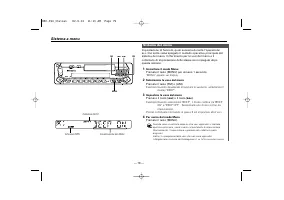
Impostazione di funzioni, quali suoneria durante l'operazioneecc. Qui sotto viene spiegato il metodo operativo principale delsistema del menù. Il riferimento per le voci del menù e ilcontenuto di impostazione delle stesse sono spiegate dopoquesta sezione. 1 Immettere il modo Menu Premete il tasto [M...
Page 80 - Illuminazione selezionabile; Sincronizzazione dell'orologio; ] mantenendolo premuto per; Regolazione manuale dell'orologio; Si sente un segnale acustico.; Tono del sensore a sfioramento
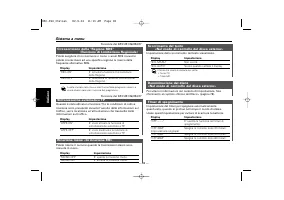
Funzione del KRC-391/36/394/37 Cambia automaticamente quando ha inizio un bollettino dellenotizie, anche se non state ascoltando la radio. Inoltre, poteteimpostare l'intervallo di tempo quando è bloccata l'interruzione. Bollettino delle notizie con impostazione dellascadenza Selezione del colore ver...
Page 81 - Memorizzazione autoamtica; Imposta il modo di sintonizzazione.; Modo di sintonizzazione
Funzione del KRC-391/36/394/37 Quando la ricezione è di cattiva qualità, l'unità cercaautomaticamente lo stesso programma nella rete RDS con unamigliore ricezione. Display Impostazione "AF ON" La funzione AF è accesa. "AF OFF" La funzione AF è spenta. Quando è attivata la funzione AF...
Page 82 - TImer di spegnimento; Impostazione dello scorrimento del testo visualizzato.; Scorrimento del testo
Impostazione del timer per spegnere automaticamentequest’unità, quando si protrae nel tempo il modo di attesa. Usate quest'impostazione per evitare di scaricare la batteria. Display Impostazione "OFF – – –" E' spenta la funzione del timer di spegnimento. "OFF 20M" Spegne la corrente ...
Page 83 - Automobili con un connettore ISO:; Accessorio
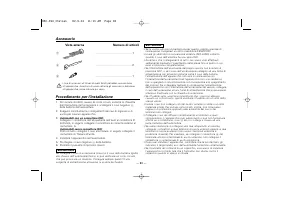
— 83 — ..........................................1 L’uso di accessori all’infuori di quelli forniti potrebbe causare danniall’apparecchio. Accertarsi di usare soltanto gli accessori in dotazioneall’apparecchio, come indicato qui sopra. ..........................................1 .......................
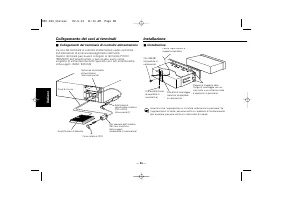
Page 84 - Collegamento dei cavi ai terminali; Per una macchina Volkswagen
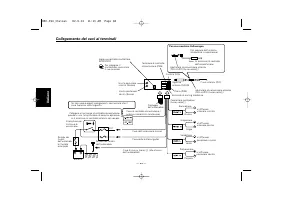
— 84 — Italiano Collegamento dei cavi ai terminali – + + + + + Uscita posterioredestra (Rosso) 9 Uscita posterioresinistra (Bianco) 8 Ingresso controllo multilettoreKENWOOD 25 Ingressoantenna FM/AM 10 Adattatore di conversione antenna(ISO–JASO) (Accessorio 3 ) 12 Per collegare ilmultilettore, consul...
Page 85 - Connettore A; Collegamento del connettore ISO; Numeri dei terminali; Batteria
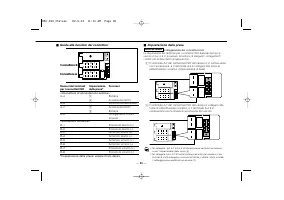
— 85 — 10 12 34 5 6 7 8 1 2 3 4 5 6 7 8 ■ Guida alle funzioni dei connettori ■ Impostazione della presa 10 10 Connettore A Connettore B Collegamento del connettore ISO La disposizione dei terminali per i connettori ISO dipende dal tipo diveicolo di cui si è in possesso. Accertarsi di eseguire i coll...
Page 86 - Collegamenti del terminale di controllo alimentazione; Installazione
— 86 — Italiano Collegamento dei cavi ai terminali ■ Collegamenti del terminale di controllo alimentazione L’uscita del terminale di controllo alimentazione viene controllatadall’interruttore di accensione/spegnimento dell’unità.Questo terminale può essere collegato al terminale P.CON(REMOTE) dell’a...
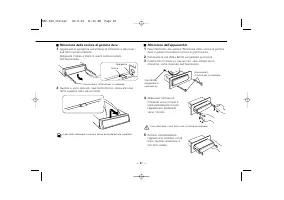
Page 87 - Rimuovere la vite (M4
— 87 — ■ Rimozione della cornice di gomma dura 1 Agganciare le sporgenze sull'attrezzo di rimozione e sbloccare idue fermi sul lato inferiore.Abbassare il telaio e tirarlo in avanti come mostratonell’illustrazione. 2 Quando si sono sbloccati i due fermi inferiori, sbloccare i duefermi superiori nell...
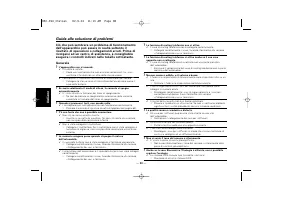
Page 88 - Generale; Guida alla soluzione di problemi
— 88 — Ciò che può sembrare un problema di funzionamentodell'apparecchio può essere in realtà soltanto ilrisultato di operazioni o collegamenti errati. Prima dirivolgersi ad un centro di assistenza, è consigliabileeseguire i controlli indicati nella tabella sottostante. Generale ? L'apparecchio non ...
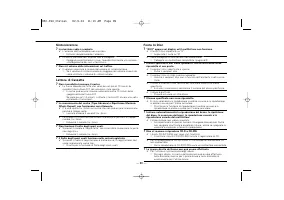
Page 91 - Caratteristiche tecniche; Risposta di frequenza (
— 91 — Caratteristiche tecniche Sezione del sintonizzatore FM Gamma di frequenza (passi da 50 kHz) ....87,5 MHz – 108,0 MHzSensibilità utile (S/R = 26dB) .....................................0,7 µV/ 75 Ω Sensibilità silenziamento (S/R = 46dB).......................1,6 µV/ 75 Ω Risposta di frequenza ...
Page 92 - Español; Índice; emisoras
— 92 — Español Índice Precauciones de Seguridad ......93 Acerca de la cinta de cassette ................................................94 Acerca del RDS .........................94 Características generales .........95 AlimentaciónSelección de la fuenteVolumenAtenuadorSonoridadSystem QControl de au...
Page 93 - Precauciones de Seguridad; ADVERTENCIA; INFORMACION IMPORTANTE
— 93 — Precauciones de Seguridad Para evitar el riesgo de lesiones y/ofuego, observe las siguientesprecauciones: • Inserte la unidad hasta el fondo, de manera que quede firmemente bloqueada en susitio. De lo contrario, podría salir despedidacon fuerza durante un choque u otrassacudidas. • Cuando ext...
Page 94 - Limpieza de la unidad; Acerca del RDS; Limpie la cabeza de la cinta.; No utilice cintas de cassette deformadas.; Acerca de la cinta de cassette
Español Precauciones de Seguridad • Si tiene problemas durante la instalación, consulte con su distribuidor KENWOOD. • Si le parece que su unidad no está funcionando satisfactoriamente, primeropruebe pulsando el botón de reposición. Sicon esto no consigue corregir el problema,consulte con su concesi...
Page 95 - Volumen; Fuente requerida; Sintonizador; Selección de la fuente; Encendido de la alimentación; Alimentación; Características generales; Indicador ATT; Botón de liberación
Para aumentar el nivel de volumen Pulse el botón [ u ]. Para disminuir el nivel de volumen Pulse el botón [ d ]. Volumen Pulse el botón [SRC]. Fuente requerida Visualización Sintonizador "TUNER" Cinta "TAPE" Disco externo "DISC"/"CD" En espera (sólo modo de iluminació...
Page 96 - Control de audio; Compensación de los registros graves y agudos a bajo volumen.; Sonoridad; Para bajar el volumen rápidamente.; Atenuador
1 Seleccione la fuente para el ajuste Pulse el botón [SRC]. 2 Acceda al modo de Control de Audio Pulse el botón [AUD] durante más de 1 segundo. 3 Seleccione el elemento de Audio para el ajuste Pulse el botón [FM] o [AM]. Cada vez que se pulse el botón, los elemento que puedenajustarse cambian como s...
Page 97 - Silenciamiento de TEL; Cambio de la información visualizada.; Cambio de Visualización
El sistema de audio se silencia automáticamente al entrar unallamada. Cuando se recibe una llamada Se visualiza "CALL" .El sistema de audio queda en pausa. Audición del audio durante una llamada Pulse el botón [SRC]. La visualización "CALL" desaparece y el sistema de audio vuelve aAC...
Page 98 - Características del sintonizador; Extracción de la placa frontal; Deslice la placa frontal hasta que sienta que hace clic.; Placa frontal antirrobo; Indicador ST
Función del KRC-391/36/394/37 Características del sintonizador La placa frontal de la unidad puede extraerla y llevarla con ustedpara impedir robos. Extracción de la placa frontal Pulse el botón de liberación. La placa frontal queda desbloqueada permitiendo su extracción. • La placa frontal es una p...
Page 99 - Recuperación de las emisoras de la memoria; Sintonización preajustada; Entrada de memoria automática; Almacenamiento de la emisora en la memoria.; Memoria de presintonización de emisoras; Selección de la emisora.; Sintonización
Recuperación de las emisoras de la memoria 1 Seleccione la banda Pulse el botón [FM] o [AM]. 2 Recupere la emisora Pulse el botón [#1] — [#6]. Sintonización preajustada Almacenamiento automático de emisoras con buena recepciónen la memoria. 1 Seleccione la banda de la entrada de memoria automática P...
Page 100 - Predefina el volumen; La visualización del nivel de volumen parpadea 1 vez.; Información de tráfico; Características de RDS; Indicador PTY
Ajuste del volumen durante la Información de Tráfico. 1 Seleccione la emisora que desea recibir. 2 Ajuste el volumen deseado. 3 Predefina el volumen Pulse el botón [VOL ADJ] durante más de 2 segundos. La visualización del nivel de volumen parpadea 1 vez. Preajuste del Volumen para la Información deT...
Page 101 - Selección del Tipo de Programa y búsqueda de una emisora.
21. Asuntos sociales "SOCIAL" 22. Religión "RELIGION" 23. Telefonía "PHONE IN" 24. Viajes "TRAVEL" 25. Ocio "LEISURE" 26. Música jazz "JAZZ" 27. Música country "COUNTRY" 28. Música nacional "NATION M" 29. Música "oldies" "OL...
Page 102 - Cambio del idioma de la Función PTY; Preajuste del Tipo dePrograma; Preajuste de Tipo de Programa
Selección del idioma de visualización del Tipo de Programa. 1 Acceda al modo PTY. Remítase a <PTY (Program Type)> (página 101). 2 Acceda al modo de Cambio de Idioma Pulse el botón [CLK]. 3 Seleccione el idioma Pulse el botón [#1] — [#3]. Botón de Idioma [#1] Inglés [#2] Francés [#3] Alemán 4 S...
Page 103 - Seleccione la fuente de sintonizador; Elija el modo de sintonización.; Modo de Sintonización Visualización Funcionamiento; Modo de Sintonización
Selección de la emisora. 1 Seleccione la fuente de sintonizador Pulse el botón [SRC]. Seleccione la visualización "TUNER" . 2 Seleccione la banda Pulse el botón [FM] o [AM]. Cada vez que pulse el botón [FM] cambiará entre las bandasFM1, FM2, y FM3. 3 Sintonice la banda hacia arriba o hacia a...
Page 104 - Características del reproductor de cinta; Lado de reproducción
Características del reproductor de cinta Recuperación de las emisoras de la memoria 1 Seleccione la banda Pulse el botón [FM] o [AM]. 2 Recupere la emisora Pulse el botón [#1] — [#6]. Sintonización preajustada Almacenamiento automático de emisoras con buena recepciónen la memoria. 1 Seleccione la ba...
Page 106 - Avance rápido y rebobinado; Seleccione la visualización del reproductor de discos deseado.; Visualización; cambiador de CD; Reproducción de un Disco Externo; Características de control de disco Externo; Número de pista
Avance rápido Mantenga pulsado el botón [ ¢ ]. Libere el botón en el punto en el que desea reanudar lareproducción. Inversión Mantenga pulsado el botón [ 4 |]. Libere el botón en el punto en el que desea reanudar lareproducción. Avance rápido y rebobinado Reproducción de discos colocados en el acces...
Page 107 - Comience la Exploración de Pistas; Repetición de la canción/disco que esté escuchando.; Repetición de reproducción; Repetición de Pista
Reproduzca las canciones de todos los discos del cambiador dediscos en orden aleatorio. Pulse el botón [M.RDM]. Cada vez que se pulsa el botón, la Reproducción AleatoriaMagazine se activa o desactiva.Cuando está activada se visualiza "MRDM ON" . Cuando se pulsa el botón [ ¢ ], comenzará la s...
Page 108 - Despliegue del texto de CD o el título de MD.; Despliegue de Texto/Título; Asignación de un título a un CD.
Despliegue del texto de CD o el título de MD. Pulse el botón [SCRL]. Despliegue de Texto/Título Asignación de un título a un CD. 1 Reproduzca el disco al que desee asignar el título No es posible asignar un título a un MD. 2 Acceda al modo de menú Pulse el botón [MENU] durante más de 1 segundo. Se v...
Page 109 - Ejemplo:Cuando desee ajustar el sonido de bip, seleccione la; Ajuste el elemento de menús.; Puede continuar volviendo al paso 2 y ajustando otras opciones.; Salga del modo de Menús; Sistema de Menús; Acerca del Menú; Indicador AUTO
Ajuste de la función de sonido bip, etc. durante elfuncionamiento.Aquí se explica el método de funcionamiento básico del sistemade Menús. La referencia a los elemento de menús y el contenidode sus ajustes se encuentra a continuación de esta explicaciónde funcionamiento. 1 Acceda al modo de Menús Pul...
Page 110 - Boletin de Noticias con el Ajuste de Interrupción; Selección del color de iluminación del botón en verde o rojo.; Iluminación seleccionable; LED desactivado; Sincronice el reloj; La indicación horaria parpadea.; Ajuste manual del reloj
La sincronización del reloj tarda de 3 a 4 minutos. Función del KRC-391/36/394/37 Cambia automáticamente cuando comienza un boletín denoticias, aunque la radiono se esté escuchando.Además, puedeajustarse el intervalo de tiempo en que la interrupción no estápermitida. Visualización Ajuste "NEWS O...
Page 111 - Entrada de Memoria Automática; Ajusta el modo de sintonización.
Función del KRC-391/36/394/37 Cuando haya mala recepción, cambie automáticamente a otrafrecuencia que emita el mismo programa en la misma red RDS yque ofrezca mejor recepción. Visualización Preajuste "AF ON" La función AF está activada. "AF OFF" La función AF está desactivada. Cuando...
Page 112 - Apaga la alimentación transcurridos 20; Temporizador de desconexión automática; Ajuste del Despliegue de texto visualizado.; Despliegue de Texto; La recepción monoaural está desactivada.; Búsqueda TP Automática
Ajuste del temporizador para apagar esta unidadautomáticamente cuando el modo en espera continúa. Este ajuste sirve para ahorrar energía de la batería del vehículo. Visualización Preajuste "OFF – – –" Función de desactivación por Temporizador desactivada. "OFF 20M" Apaga la alimentac...
Page 113 - terminal; Accesorios
— 113 — — 113 — El uso de accesorios distintos de los suministrados podría causar dañosen la unidad. Asegúrese de utilizar únicamente los accesoriosentregados con la unidad, mencionados arriba. ..........................................1 ..........................................2 .....................
Page 114 - Conexión de cables a los terminals; Para coches Volkswagen
— 114 — Español Conexión de cables a los terminals – + + + + + Salida traseraderecha (Rojo) 9 Salida traseraizquierda (Blanco) 8 Entrada de control del cambiador dediscos KENWOOD 25 Entrada de antenade FM/AM 10 Adaptador de conversión de antena(ISO-JASO) (Accesorio 3 ) 12 Para conectar elCambiador d...
Page 115 - Connector A; Conexión del conector ISO; Número de patillas; Batería
— 115 — ■ Guía de función del conector ■ Conexión 10 12 34 5 6 7 8 1 2 3 4 5 6 7 8 10 10 Connector A Connector B Conexión del conector ISO La disposición de las patillas de los conectores ISO depende segúnel tipo de vehículo. Asegúrese de efectuar las conexiones de maneraapropiada para evitar que se...
Page 116 - Conexiones del terminal de control de la alimentación; Instalación
— 116 — Español Conexión de cables a los terminals ■ Conexiones del terminal de control de la alimentación La emisión del terminal de control de alimentación se cambia conel interruptor de alimentación encendido/apagado de la unidad.Este terminal se puede conectar al terminal P.CON (REMOTO) delampli...
Page 118 - Guia Sobre Localización De Averias
— 118 — Español Lo que podría parecer una falla de funcionamiento desu unidad podría ser simplemente el resultado de unpequeño error de operación o de un defecto deconexión. Antes de acudir al servicio, verifique primeroel siguiente cuadro sobre los problemas que se podríanpresentar. General ? No se...
Page 121 - Especificaciones; Sensibilidad de silenciamiento
— 121 — Especificaciones Sección del sintonizador de FM Gama de frecuencias (intervalo 50 kHz) ...87,5 MHz – 108,0 MHzSensibilidad útil (Relación señal / ruido : 26dB) ..........0,7 µV/ 75 Ω Sensibilidad de silenciamiento (Relación señal / ruido : 46dB) ..............................1,6 µV/ 75 Ω Res...












 Kenwood VR-2080
User Manual
Kenwood VR-2080
User Manual
 Kenwood CD-224M
User Manual
Kenwood CD-224M
User Manual
 Kenwood HTB-505
User Manual
Kenwood HTB-505
User Manual
 Kenwood KR-797
User Manual
Kenwood KR-797
User Manual
 Kenwood 1070VR
User Manual
Kenwood 1070VR
User Manual
 Kenwood 1080VR
User Manual
Kenwood 1080VR
User Manual
 Kenwood 144MHz FM TRANSCEIVER K2E
User Manual
Kenwood 144MHz FM TRANSCEIVER K2E
User Manual
 Kenwood 25th Anniversary Products XXV-02A
User Manual
Kenwood 25th Anniversary Products XXV-02A
User Manual
 Kenwood 25th Anniversary Products XXV-03A
User Manual
Kenwood 25th Anniversary Products XXV-03A
User Manual
 Kenwood 411
User Manual
Kenwood 411
User Manual
 Kenwood 5-CHANNEL POWER AMPLIFIER KAC-959
User Manual
Kenwood 5-CHANNEL POWER AMPLIFIER KAC-959
User Manual
 Kenwood 50 MHZ ALL MODE TRANSCEIVER TS-590S
User Manual
Kenwood 50 MHZ ALL MODE TRANSCEIVER TS-590S
User Manual