Page 2 - Table of contents; Appendix 1- “Warranty card”
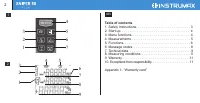
2 Table of contents 1. Safety Instructions. . . . . . . . . . . . . . . . . . . . . . . . . . . . . 3 2. Start up. . . . . . . . . . . . . . . . . . . . . . . . . . . . . . . . . . . . . 4 3. Menu functions. . . . . . . . . . . . . . . . . . . . . . . . . . . . . . . 4 4. Measurements . . . . . . . ...
Page 3 - Laser classification
Congratulations on the purchase of laser distance meter INSTRUMAX SNIPER 50 PLUS! Permitted use · Measuring distances · Computing functions, e.g. areas, volumes, Pythagorean calculation The safety regulations and instructions along with the operating manual should be read carefully before initial op...
Page 5 - imum distance from a fixed measuring point. It is commonly
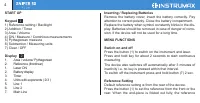
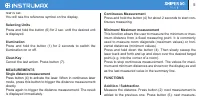
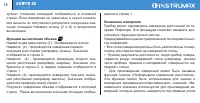
5 rear is set. You will see the reference symbol on the display. Selecting Units Press and hold the button (6) for 2 sec. until the desired unit is displayed. Illumination Press and hold the button (1) for 2 seconds to switch the illumination on or off. Clear-Key Cancel the last action. Press button...
Page 6 - Area; First measurement is displayed in the first line. The result of; Addition / Subtraction of areas; If the measurements are not finished, press button (2 or 6) to; Volume; First measurement is displayed in the first line.
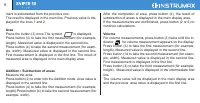
6 ment is substracted from the previous one. The result is displayed in the main line. Previous value is dis- played in the lines 1 and 2. Area Press the button (3) once.The symbol is displayed. Press button (4) to take the first measurement (for example, length). Measured value is displayed in the ...
Page 7 - Indirect measurement; tive reflecting surface and can’t be measured directly.; Indirect measurement – determing a distance using 2; is displayed in the first line.; Indirect measurement – determing a distance using 3
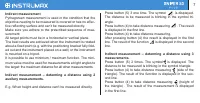
7 Indirect measurement Pythagorean measurement is used in the condition that the objective needing to be measured is covered or has no effec- tive reflecting surface and can’t be measured directly. Make sure you adhere to the prescribed sequence of mea- surement: All target points must be in a horiz...
Page 8 - Calculation overflow
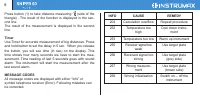
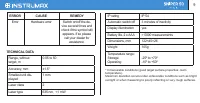
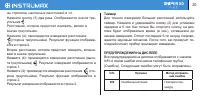
8 Press button (1) to take distance measuring (side of the triangle) . The result of the function is displayed in the sec- ond line. The result of the measurement is displayed in the second line. Timer Use Timer for accurate measurement of big distances. Press and hold button to set the delay in 5 s...
Page 10 - Measuring conditions; has a bad reflection.; Measuring Surfaces; deflects the laser beam and measurement errors can occur.; Precautions; - Large fluctuation of temperature: if instrument will be used
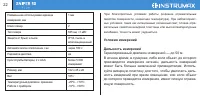
Measuring conditions Measuring range: the range is limited to 50 m. At night, at dusk and when the target is shadowed the measuring range without target plate is increased. Use a target plate to in- crease the measurement range during daylight or if the target has a bad reflection. Measuring Surface...
Page 11 - and loss of profits. The manufacturer, or its representatives,
11 Laser classification The instrument is a laser class 2 laser product accortding to DIN IEC 6082 5-1:2007. It is allowed to use unit without further safety precautions. Warranty This product is warranted by the manufacturer to the origi- nal purchaser to be free from defects in material and work- ...
Page 12 - WARRANTY DOESN’T EXTEND TO FOLLOWING CASES:; All adaptations and modifications with the purpose of improve; WARRANTY CARD
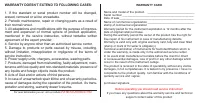
WARRANTY DOESN’T EXTEND TO FOLLOWING CASES: 1. If the standard or serial product number will be changed, erased, removed or wil be unreadable. 2. Periodic maintenance, repair or changing parts as a result of their normal runout. 3. All adaptations and modifications with the purpose of improve - ment...
Page 13 - INSTRUMAX SNIPER 50 PLUS
Содержание 1. Инструкция по безопасной эксплуатации прибора. . . . . . . . . . . . . . . . . . . . . . . . . . . .13 2. Начало работы. . . . . . . . . . . . . . . . . . . . . . . . . . . . . . . 14 3. Функции меню. . . . . . . . . . . . . . . . . . . . . . . . . . . . . . . .15 4. Измерения. . . . ....
Page 20 - Info
20 ны стропила, наклонных расстояний и т.п. Нажмите кнопку (5) два раза. Отображается значок тре - угольник . Расстояние, которое предстоит измерить, мигает в значке треугольник.Нажмите (4): производится измерение расстояния (сторона треугольника). Результат функции отобража - ется в строке 2. Второ...
Page 21 - ТЕХНИЧЕСКИЕ ХАРАКТЕРИСТИКИ; Error
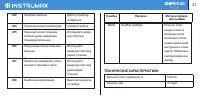
21 ТЕХНИЧЕСКИЕ ХАРАКТЕРИСТИКИ 252 Перегрев прибора Дайте устройству охладиться 253 Слишком низкая температура Согрейте прибор 255 Принятый сигнал слишком слабый, время измерения слишком длительное Используйте визир - ную пластину 256 Полученный сигнал слишком сильный Используйте визирную пластину (с...
Page 25 - Освобождение от ответственности
25 распространяется на продукт, если повреждения возникли в результате деформации, неправильного использования или ненадлежащего обращения. Все вышеизложенные безо всяких ограничений причины, а также утечка батареи, деформация прибора являются дефектами, которые возникли в результате неправильного и...
Page 26 - ГАРАНТИЙНЫЕ ОБЯЗАТЕЛЬСТВА НЕ РАСПРОСТРАНЯЮТСЯ НА
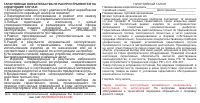
ГАРАНТИЙНЫЙ ТАЛОН Наименование изделия и модель _______________________________ Серийный номер___________________ Дата продажи____________ Наименование торговой организации __________________________ Штамп торговой организации мп. Гарантийный срок эксплуатации приборов составляет 12 месяцев со дня п...
Page 28 - olina, equipamento de gás, produção química e assim por; Classificação do laser; Display; a medição de Pitágoras)
INSTRUÇÕES DE SEGURANÇA Utilização proibida Por favor, siga as instruções dadas no manual. Não use o instrumento em ambiente explosivo (posto de gas- olina, equipamento de gás, produção química e assim por diante). Não retirar os rótulos de aviso ou instruções de segurança . Nao desmonte o equipamen...
Page 32 - Cronômetro; Use o cronômetro para medição mais precisas e de grandes; Medição indireta - Determine uma distância utilizando
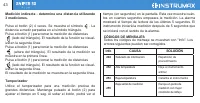
Pressione o botão (4) para tirar a medição de distância (lado do triângulo). O resultado da função se mostrará na segunda linha. Pressione o botão (4) para tirar a medição de distância (al - tura do triângulo). O resultado da função se mostrará na pri - meira linha. Pressione o botão (4) para tirar ...
Page 33 - Códigos de mensagens; Todos os códigos de mensagens são exibidos com qualquer; DADOS TÉCNICOS
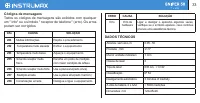
Códigos de mensagens Todos os códigos de mensagens são exibidos com qualquer um " Info" ou o símbolo " receptor de telefone " (erro). Os erros podem ser corrigidos. 33 ERRO CAUSA SOLUÇÃO Erro Erro de hardware Ligar e desligar o aparelho algumas vezes, verifique se o símbolo aparece, ...
Page 34 - Condições de Medição
34 Durante o transporte colocar o instrumento em uma bolsa macia. Nota: o instrumento deve estar seco! Manutenção e limpeza Não mergulhe o instrumento em água. Limpe a sujeira com um pano úmido e macio. Não use agentes de limpeza ou soluções agressivas. Razões específicas para resultados de medição ...
Page 36 - Antes de operar, você deve ler a instrução de serviço!; GARANTIA não se estende aos seguintes casos:
CARTÃO DE GARANTIA Nome e modelo do produto ________________________ Número de série __________________________________________ Date de sale_____________________________________________ Nome da organização ______________________________ Período de garantia para a explotação instrumento é de 12 meses...
Page 37 - TARJETA DE GARANTÍA”; sp; • Medición de distancias; en el manual de instrucciones, deben ser leídas antes
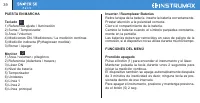
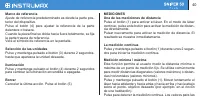
Tabla de Contenido 1. Instrucciones de seguridad. . . . . . . . . . . . . . . . . . . . . .38 2. Puesta en marcha. . . . . . . . . . . . . . . . . . . . . . . . . . . . .39 3. Funciones del menú. . . . . . . . . . . . . . . . . . . . . . . . . . . 39 4. Mediciones. . . . . . . . . . . . . . . . . . ...
Page 41 - Suma / resta de las áreas; visualización principal.; Volumen; veces hasta que aparezca el indicador para la medición
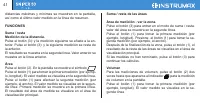
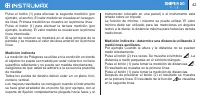
distancias máximas y mínimas se muestran en la pantalla, así como el último valor medido en la línea de resumen. FUNCIONES Suma / resta Medición de la distancia. Pulse el botón (3): y la medición siguiente se añade a la an- terior. Pulse el botón (3): y la siguiente medición se resta de la anterior....
Page 44 - DATOS TÉCNICOS
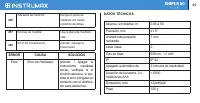
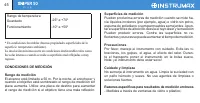
44 256 Alta señal de medición Escoja un punto de medición con menor condición de reflejo 257 Errores de medida Use la placa de medición café 258 Error de inicialización prender / Apagar el instrumento DATOS TÉCNICOS Alcance, sin objetivo, m 0.05 a 50 Precisión, mm ±1.5* Unidad más pequeña mostrada 1...
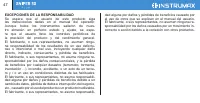
Page 47 - dad alguna por daños y pérdidas de beneficios causado por; EXCEPCIONES DE LA RESPONSABILIDAD; directo, indirecto, consecuente y pérdida de beneficios.
dad alguna por daños y pérdidas de beneficios causado por el uso de otros que se explican en el manual del usuario. El fabricante, o sus representantes, no asumen ninguna re- sponsabilidad por los daños causados por un movimiento in- correcto o acción debido a la conexión con otros productos. EXCEPC...
Page 48 - ¡Antes de operar debe leer la instrucción de servicio!
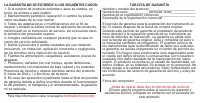
LA GARANTÍA NO SE EXTIENDE A LOS SIGUIENTES CASOS: 1. Si el número de producto estándar o serie se cambia, se borra, se elimina o será ilegible. 2. Mantenimiento periódico, reparación o cambio de piezas como resultado de su uso normal. 3. Todas las adaptaciones y modificaciones con el fin de mejorar...