Page 2 - IMPORTANT SAFEGUARDS; WARNING; instantappliances.com
IMPORTANT SAFEGUARDS 2 | [email protected] | 1-800-828-7280 WARNING Read this manual carefully and completely and retain for future reference. Failure to adhere to safety instructions may result in serious injury or damage. At Instant Brands ™ your safety always comes first. The Instant ™ Omni ™ Plu...
Page 5 - Cancel; SAVE THESE INSTRUCTIONS.
IMPORTANT SAFEGUARDS instantappliances.com | 5 WARNING Read this manual carefully and completely and retain for future reference. Failure to adhere to safety instructions may result in serious injury or damage. 24 To avoid risk of fire or electrical shock, oversize foods, metal foil packages and met...
Page 6 - • DO NOT use an adapter.; THE FAILURE TO FOLLOW ANY OF THE IMPORTANT SAFEGUARDS AND/OR; Special cord set instructions
IMPORTANT SAFEGUARDS 6 | [email protected] | 1-800-828-7280 WARNING Read this manual carefully and completely and retain for future reference. Failure to adhere to safety instructions may result in serious injury or damage. WARNING Electrical shock hazard. Use grounded outlet only. • DO NOT remove g...
Page 7 - Product, parts and accessories; Toaster Oven; Accessories
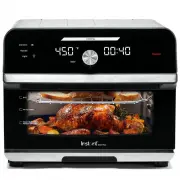
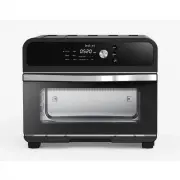
instantappliances.com | 7 Product, parts and accessories Before using your amazing new toaster oven, make sure that everything is present and accounted for. Toaster Oven Illustrations in this document are for reference only and may differ from the actual product. Always refer to the actual product. ...
Page 8 - Get started; Initial set up; Is something missing or damaged?; CAUTION
8 | [email protected] | 1-800-828-7280 Get started Initial set up “We all eat, and it would be a sad waste of opportunity to eat badly.” — Anna Thomas 01 Pull that Omni Plus out of the box! 02 Remove all the packaging material from in and around the toaster oven. Don’t remove any safety warning stic...
Page 9 - Initial test run; accessories without proper hand protection.
instantappliances.com | 9 Get started Initial test run Do you have to do the test run? No — but getting to know the ins and outs of your Omni Plus prepares you for success in the kitchen! Take a few minutes to get to know how this little beauty works. Stage 1: Setting up for cooking 01 Open the oven...
Page 10 - Control panel
10 | [email protected] | 1-800-828-7280 Control panel 1 Smart programs • Air Fry• Bake • Roast• Broil • Warm• Reheat• Toast• Dehydrate 2 Temperature field Shows the cooking temperature in different Smart Programs and modes.Touch the temperature field to select it. 3 Time field Shows the cooking time...
Page 11 - Status messages
instantappliances.com | 11 Control panel Status messages The Omni Plus is in standby mode and ready to go! A smart program is in the preheat stage. Only applies to Air Fry, Roast and Bake. The oven door is open. If the oven door remains open for over 5 minutes during cooking and/or 30 seconds during...
Page 12 - Cooking; Cooking accessories; the cooking chamber, and never use aluminum foil.
12 | [email protected] | 1-800-828-7280 Cooking The Omni Plus is a powerhouse countertop oven that you can trust to cook evenly and deeply. What we love about it What you should know about it By combining rapid air circulation with innovative golden quartz heating elements, the Omni Plus heats up qu...
Page 14 - Toast
14 | [email protected] | 1-800-828-7280 Cooking Toast Toast up to 6 slices of bread or bagel halves at a time — no flipping required! Smart program Default number of pieces Time range Default toast darkness level Toast darkness range Toast 2 pieces ( 2PC ) Adjusts by quantity of slices and toast dar...
Page 15 - Rotisserie cooking
instantappliances.com | 15 Rotisserie cooking The rotisserie spit and forks are perfect for roasting whole chicken, tenderloin and much more. Follow the steps below to prepare your food, then turn on the rotisserie to get crispy, gorgeous, golden-all-over results! You can also view the "how to u...
Page 16 - temperature reaches a safe minimum temperature. Refer to the; USDA’s Safe; at
16 | [email protected] | 1-800-828-7280 Rotisserie cooking 03 Touch the temperature field . When the temperature field flashes, use the dial to adjust the cooking temperature. 04 Touch the time field to select it then turn the dial to adjust the cooking time. 05 Touch Start . 06 To turn the rotisser...
Page 17 - Dishwasher safe; Damp cloth only and mild dish soap
instantappliances.com | 17 Care, cleaning and storage Clean your Instant Omni Plus and accessories after each use.Always unplug the toaster oven and let it cool to room temperature before cleaning. Never use harsh chemical detergents, scouring pads, or powders on any of the parts or components. Let ...
Page 18 - Warranty
Warranty 18 | [email protected] | 1-800-828-7280 Limited Warranty This Limited Warranty is effective for one year from the date of original consumer purchase. Proof of original purchase date and, if requested by an authorized representative of Instant Brands Inc. (“Instant Brands”), return of your a...