Page 2 - Table of contents
2 Dear customer! Thank you for purchasing our product. For safety, it is strongly recommended to read this manual carefully before connecting,operating and/or adjusting the product and keep the manual for reference in the future. Table of contents Table of contents .....................................
Page 3 - Important safeguards
3 Important safeguards Read carefully through this manual to familiarize yourself with this high-quality sound system.Disconnect the vehicle's negative battery terminal while mounting and connecting the unit.When replacing the fuse, be sure to use one with an identical amperage rating. Using a fuse ...
Page 4 - Accessories
4 Accessories 1. Receiver 1 pc 2. Carrying case 1 pc 3. Mounting parts:Hexagon nut M5 1 pc Spring washer M5 1 pc Plain washer M5 1 pc Metal bar 1 pc Release Keys 2 pcs M5 x 25 screw 1 pc Mounting box 1 pc 5. Customer information 1 pc 6. Warranty card 1 pc 7. Instruction manual 1 pc
Page 5 - Installation/Connections; Remove the mechanism transit screw before installation
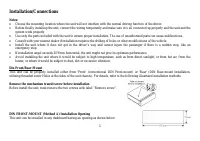
5 Installation/Connections Notes: Choose the mounting location where the unit will not interfere with the normal driving function of the driver.Before finally installing the unit, connect the wiring temporarily and make sure it is all connected up properly and the unit and thesystem work properly.Us...
Page 6 - Installing the unit
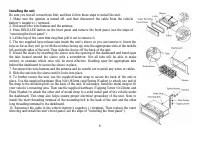
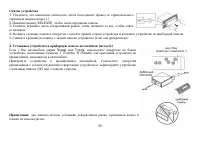
6 Installing the unit Be sure you test all connections first, and then follow these steps to install the unit.1. Make sure the ignition is turned off, and then disconnect the cable from the vehiclebattery’s negative (-) terminal.2. Disconnect the wire harness and the antenna.3. Press RELEASE button ...
Page 7 - Removing the unit
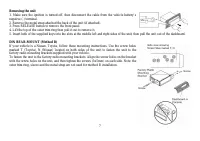
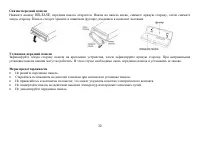
7 Removing the unit 1. Make sure the ignition is turned off, then disconnect the cable from the vehicle battery’snegative (-) terminal.2. Remove the metal strap attached the back of the unit (if attached).3. Press RELEASE button to remove the front panel.4. Lift the top of the outer trim ring then p...
Page 9 - Connection diagram
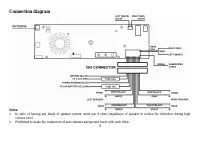
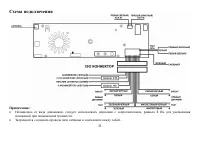
9 Connection diagram Notes: In spite of having any kinds of speaker system, must use 4 ohms impedance of speaker to reduce the distortion during highvolume level.Prohibited to make the conductors of auto antenna and ground touch with each other.
Page 10 - Controllers; Front panel
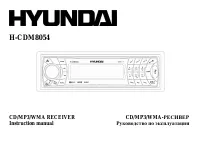
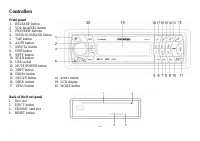
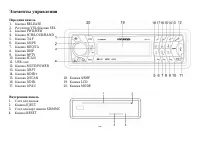
10 Controllers Front panel 1. RELEASE button 2. VOL knob/SEL button 3. FWD/REW buttons 4. SCH/LOUD/BAND button 5. 7/AF button 6. AS/PS button 7. 8/EQ/TA button 8. DISP button 9. 9/PTY button 10. SCAN button11. USB socket12. MUTE/POWER button13. 3/RPT button14. 6/DIR+ button15. 2/SCAN button 18. 4/SH...
Page 11 - General operations; stored status you set.
11 General operations Resetting the unit Operating the unit for the first time or after replacing the car battery, you must reset the unit. Press RELEASE button on the panel toopen the front panel and press RESET button with a thin hard object to restore the unit to the original factory settings. Po...
Page 12 - Display mode; Press DISP button to change the display mode.; Equalizer
12 Display mode Press DISP button to change the display mode. Equalizer Press 8/EQ/TA button to turn on equalizer function and to select an equalizer mode as following: FLAT => CLAS => POP M =>ROCK => OFF. System setting Press and hold SEL button to enter the system setting mode.Press re...
Page 14 - Radio operations; BAND selection; the following service is not available, either.
14 Radio operations BAND selection Press SCH/LOUDBAND button repeatedly to select your desired radio band in RADIO mode: FM1, FM2, FM3, MW1 (AM1), MW2(AM2). Each band can store 6 preset stations, for a total of 30 preset memory stations. Tuning Press FWD/REW buttons to enable automatic search of a r...
Page 17 - Random playback
17 During MP3/WMA playback, press 3/RPT button to repeat all tracks in the current folder. The display will show “F-repeat”. Pressagain to cancel. Random playback During CD playback, press 4/SHF button to start random playback of all tracks in the disc. “Shuffle” will appear on the display. Pressaga...
Page 19 - MP3 overview; Notes on MP3 and WMA
19 MP3 overview Notes on MP3 and WMA MP3 is short for MPEG Audio Layer 3 and refers to an audio compression technology standard.This product allows playback of MP3 files on CD-ROM, CD-R or CD-RW discs.The unit can read MP3 files written in the format compliant with ISO 9660. However it does not supp...
Page 22 - Troubleshooting guide; Symptom
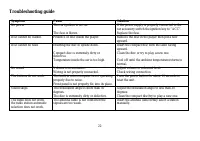
22 Troubleshooting guide Symptom Cause Solution No power The car ignition is not on. The fuse is blown. If the power supply is properly connected to thecar accessor y switch the ignition key to “ACC”.Replace the fuse. Disc cannot be loaded. Presence of disc inside the player. Remove the disc in the ...
Page 23 - Specification; General
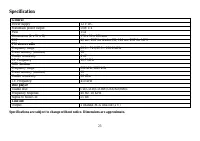
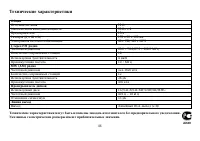
23 Specification General Power supply 12 V DC Maximum power output 50W x 4 Fuse 15A Dimensions (L x W x H) 178 x 50 x 160 mm ESP 40 sec. ESP for Audio-CD, 120 sec. ESP for MP3 FM stereo radio Frequency range 65.0 – 74.0/87.5 – 108.0 Hz Preset memory (stations) 18 Usable sensitivity 4 uV I.F. Frequen...
Page 27 - DIN
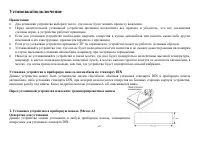
27 : , . , , . , . 30° , . , , , . , , , , , , , , . DIN : DIN , DIN, , . . 1. ( ) , DIN.
Page 28 - RELEASE
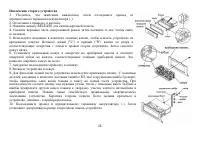
28 1. , , (-). 2. . 3. RELEASE . 4. , , . 5. , . ("L") ("R") . . 6. , . . 7. . 8. . 9. . , ( (M5 ) ), . . 5x25 . . , – . 10. (-). .
Page 29 - Nissan
29 1. , , (-). 2. RELEASE, . 3. , , . 4. . 5. ( ). 2. ( ) Nissan Toyota, , T (Toyota), N (Nissan) , . . (5x5 ) . : , .
Page 33 - SEL
33 RESET ( ) RELEASE. . RESET. : , , . MUTE/POWER, . . , . «Have a nice day!». : , , . VOL. . SEL, . SEL FWD/REW, : Bass ( ) => Treble ( ) => Balance ( ) => Fader ( ). VOL, : MUTE/POWER, . , . MODE, : RADIO ( ) => CD ( ) => USB => CARD => AUX. : USB, CARD, CD , .
Page 36 - RDS
36 SCH/LOUDBAND, : FM1, FM2, FM3, MW1 (AM1), MW2 ( 2). 6 , 30. FWD/REW, . , . “Manual seeking”. FWD/REW . , ; “Auto seeking”. AS/PS; “Aut o storing”. , . 6 . AS/PS, . (1-6), . (1-6), , . RDS : RDS ( ) . , RDS , .
Page 37 - VOL
37 RDS 7/AF, RDS. , “RDS”. PTY 9/PTY, PTY; . VOL FWD/REW, . RDS 9/PTY, RDS; VOL FWD/REW, . , . TA SEEK/TA ALARM TA SEEK, ; TA ALARM, , , . MASK DPI/MASK ALL AF ( ), , , , , MASK DPI. , , , , , , MASK ALL.RETUNERetune-Short Retune-Long – TA Seek. Retune Short: , TA SEEK 30 . Retune Long: , TA SEEK 90...
Page 39 - Intro; CD
39 CD/MP3/WMA : CD/CD-R/-RW. : MP3/WMA. RELEASE, . . . MODE, CD. . EJECT, . , . , , . 1/ PAUSE, . , . FWD/REW, . . FWD/REW, . , . Intro CD : . 2/SCN, . «Scan». , .
Page 42 - WMA
42 3 3 WMA 3 MPEG 3 . 3 CD-ROM, CD-R CD-RW. 3, , ISO 9660. 3, . 3, , “.mp3”. 3 , “.mp3”, . , “ MP3” “ ”, PC ” “ ” . 8, . 256. . , , 3. 8 VBR, , . VBR: . WMA . ID3 WMA , . WMA (Windows Media Audio) – , Microsoft Corporation. , , , ( , 64 ) ( ). , , . CD-R CD-RW, MP3 3 44,1 128 . 256 3 .
Page 45 - POWER
45 . . , “ ”. . . , . . . . . . , . . . . . . . POWER 10 , . 30 . . , 30 . . . . . . .
Page 46 - FM
46 12 50 4 15 ( ) 178 50 160 : 40 CD/ 120 MP3 FM 65.0 – 74.0/87.5 – 108.0 184 10.7 MW (AM) 522-1620 1236 450 D/CD-R/CD-RW/USB/SD/MMC 40 – 18 55 RCA- (2 ) . .