Page 2 - Table of contents
2 Dear customer! Thank you for purchasing our product. For safety, it is strongly recommended to read this manual carefully before connecting,operating and/or adjusting the product and keep the manual for reference in the future. Table of contents TABLE OF CONTENTS .....................................
Page 3 - Important safeguards; Do not install the detachable panel before connecting the wire.
3 Important safeguards · Read carefully through this manual to familiarize yourself with this high-quality sound system. · Disconnect the vehicle's negative battery terminal while mounting and connecting the unit. · When replacing the fuse, be sure to use one with an identical amperage rating. Using...
Page 6 - Connection scheme
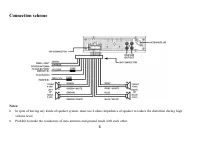
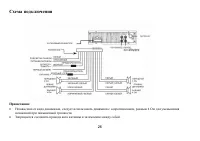
6 Connection scheme Notes: · In spite of having any kinds of speaker system, must use 4 ohms impedance of speaker to reduce the distortion during highvolume level. · Prohibit to make the conductors of auto antenna and ground touch with each other.
Page 7 - Panel controls; Front panel
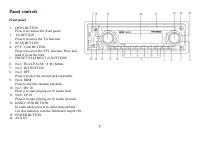
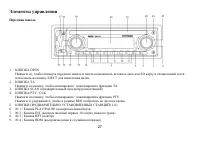
7 Panel controls Front panel 1. OPEN BUTTON Press it to remove the front panel. 2. TA BUTTON Press it to active the TA function. 3. SCAN BUTTON4. PTY / CLK BUTTON Press it to active the PTY function. Press andhold it to set the time. 5. PRESET STATION [1-6] BUTTONS 6. No 1/ PLAY/PAUSE ( 4; ) button....
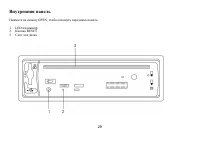
Page 8 - Inner panel
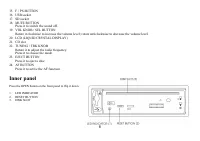
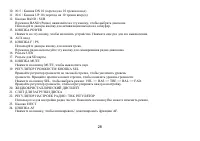
8 15. F / PS BUTTON16. USB socket17. SD socket18. MUTE BUTTON Press it to switch the sound off. 19. VOL KNOB / SEL BUTTON Rotate it clockwise to increase the volume level; rotate anticlockwise to decrease the volume level. 20. LCD (LIQUID CRYSTAL DISPLAY)21. CD slot22. TUNING / TRK KNOB Rotate it to...
Page 9 - Functions of controls; stored status you set.
9 Functions of controls General operationsPower button Press any button to switch the unit on. The display will show a message WELCOME . Press and hold the POWER button to switchthe unit off. The display will show a message GOOD-BYE . Note: After the unit is off, volume level and radio current setti...
Page 10 - Radio operations
10 Beep Sound Off function Press the VOLUME knob / SEL until Beep On is displayed. Turn the Volume knob to switch between Beep ON and OFF. Equalizer setting Press the Volume button, until EQ indication is displayed then rotate the Volume knob to choose between the EQ sound effects:CLASS => POP =&...
Page 11 - Select a station by; RDS function; Local radio station search
11 · Select a band (if needed). · Select a station by 3 / 4 buttons. · Press and hold a numbered button (1-6) which you want store the station for at least 2 seconds. · To recall a station: · Select a band (if needed). · Press a Preset button (1-6) briefly to recall the stored station. RDS function ...
Page 12 - Press the sound select button for 2 seconds.
12 PTY function Press the PTY / CLK button once to show the music type. Then press 1-6 button to choose the different music types available.Press the PTY / SLK button twice to show the speech type program. Then press 1-6 button to choose the different speech typeprogram. Each number key will show 3 ...
Page 15 - AUX IN
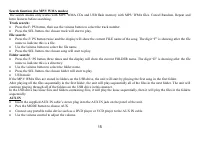
15 Search function (for MP3/ WMA modes) The search modes only works with MP3/ WMA CDs and USB flash memory with MP3/ WMA files. Cancel Random, Repeat andIntro features before searching. Track search: · Press the F/ PS button, then use the volume button to select the track number. · Press the SEL but...
Page 17 - MP3 overview; Notes on MP3; The unit may not play tracks in the order of Track numbers.; Notes on creating your own CD-Rs or CD-RWs containing MP3 files; DO NOT store more than 256 MP3 files per disc.
17 MP3 overview Notes on MP3 · MP3 is short for MPEG Audio Layer 3 and refers to an audio compression technology standard. · This product allows playback of MP3 files on CD-ROM, CD-R or CD-RW discs. · The unit can read MP3 files written in the format compliant with ISO 9660. However it does not supp...
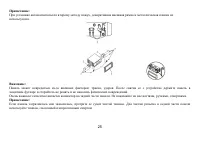
Page 18 - Insert left side of the control panel into the main unit.; Remove the unit
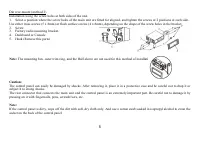
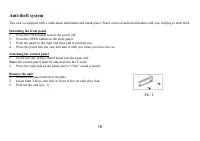
18 Anti-theft system This unit is equipped with a slide-down detachable and mask panel. Panel can be detached and taken with you, helping to deter theft. Detaching the front panel 1. Press the PWR button to turn the power off.2. Press the OPEN button on the front panel.3. Push the panel to the right...
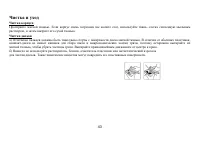
Page 19 - Handling compact discs; Cleaning
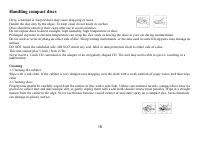
19 Handling compact discs Dirty, scratched or warped discs may cause skip ping or noise.Handle the disc only by the edges. To keep clean do not touch its surface.Discs should be stored in their cases after use to avoid scratches.Do not expose discs to direct sunlight, high humidity, high temperature...
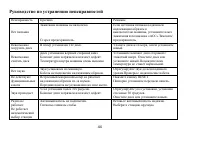
Page 20 - Troubleshooting guide
20 Troubleshooting guide Symptom Cause Solution GeneralNo power The car ignition is not on. The fuse is blown. If the power supply is properlyconnected to the car accessoryswitch the ignition key to " ACC ".Replace the fuse. DiscDisc cannot be loaded. Presence of CD disc inside the player. R...
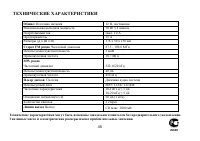
Page 21 - Specification; General
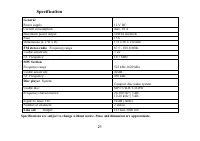
21 Specification Specifications are subject to change without notice. Mass and dimension are approximate. General Power supply 12 V DC Current consumption max. 10 A Maximum power output 50Wx4 channels Fuse 15A Dimensions (L x W x H) 178 x 50 x 150 mm FM stereo radio Frequency range 87.5 - 108.0 MHz ...
Page 29 - RESET
Page 30 - BASS TREBLE
30 , . «WELCOME». POWER, . «GOOD-BYE». : , , . . . SEL ( ), : BAS 0 ( ) => TRE 0 ( ) => BAL R-L ( / ) => FAD ( / ). , . · BASS/TREBLE: -7, -6, -5,......, 0, +1, +2,......+5, +6, +7 · BALANCE: 7L, 11L,......, L=R, 1R,......,7R(R- , L - ) · FADER: 7R, 11R,......, R=F, 1F,......, 7F : BASS TRE...
Page 32 - «ST ON»
32 B ND / SUB, : FM1, FM2, FM3, AM1, 2. 6 , 30. TUNE, . 3 . , . / ( FM ) VOLUME / SEL «ST ON» «ST OFF» ( ). , / . « », . F / PS 3 . . · F/ PS , . 30 (18 FM, 12 AM) . · : · ( ). · 3 / 4 . · (1-6) 2 , . · : · ( ). · Preset (1-6), .
Page 33 - RDS; PTY
33 RDS CD . , . . AF ( ) AF, FM . AF , RDS . «AF» , RDS . TA ( ) TA, . TA, 2 , TA SEEK. , TA SEEK TA ALARM, . TA SEEK , TA. TA ALARM «TA/TP» , . / SEL, ( ) . , . , , . PTY PTY / CLK, . 1-6, . PTY , . 1-6, . 3 .
Page 34 - MASK DPI MASK ALL.
34 Mask DPI- Mask all · . · SEL, «Mask DPI». · , MASK DPI MASK ALL. · . MASK DPI, (AF), , PI, AF. MASK ALL, , , PI, RDS. Retune S/L Short/ Long TA. · 2 «TA SEEK». · SEL, «RETUNE_S». · VOL+/- «RETUNE_S» «RETUNE_L». · «RETUNE_S».
Page 35 - CD; USB
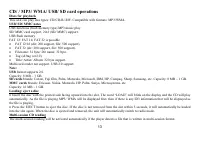
35 CD / SD / USB : CD/CD-R/-RW. : MP3/WMA. USB/ SD/ MMC MP3 USB ( ). SD/ MMC, 2 1 (SD/MMC). USB . FAT 12/ FAT 16/ FAT 32 · FAT 12/ 16 ( 200 , 500 ), · FAT 32 ( 200 , 500 ). · : 32 / : 32 . · (id3tag ver 2.0) / / : 32 . . USB 2.0. : USB: USB 2.0. : 8 M ~ 1 . SD: SD : Cannon, Fuji film, Palm, Motorola...
Page 37 - Intro; Search
37 UP 10/ DN 10 ( MP3, WMA ) No 6 / UP 10, 10 . No 5 / DN 10, . No 3 / R , . «RPT». , . MP3/ WMA/ USB/ SD No 3/ RPT, RPT-1, RPT-DIR ( ) RPT-OFF. No 4 / RDM, . «RDM»/ «RDM ON» ( USB/ SD). , . Intro 10 . No 2 / INT, . «INT». , . ID3 Tag ( MP3/ WMA ) MP3 ID3 Tag, . . Search ( MP3/ WMA ) Search c MP3/ W...
Page 41 - OPEN
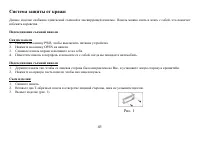
41 . , . 1. PWR, . 2. OPEN . 3. . 4. , . 1. , , . 2. , . 1. . 2. , . 3. ( . 1). . 1