Page 2 - Table of contents
2 Dear customer! Thank you for purchasing our product. For safety, it is strongly recommended to read this manual carefully before connecting,operating and/or adjusting the product and keep the manual for reference in the future. Table of contents Table of contents .....................................
Page 3 - Important safeguards
3 Important safeguards Read carefully through this manual to familiarize yourself with this high-quality sound system.The beginning of operation is the moment of the unit installation. Before use the device in winter it is recommended to heatup the passenger compartment during 20 seconds or to the o...
Page 4 - Accessories
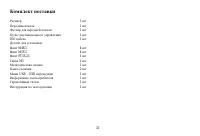
4 Accessories Receiver 1 pc Front panel 1 pc Front panel case 1 pc Remote controller 1 pc ISO cable 1 pc USB adapter cable 1 pc Mounting parts:Screw M4X5 4 pcs Screw M5X5 4 pcs Screw ST5X25 1 pc Nut M5 1 pc Mounting strap 1 pc Release key 2 pcs Customer information 1 pc Warranty card 1 pc Instructio...
Page 5 - Installation/connection
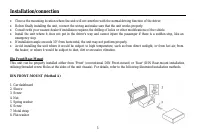
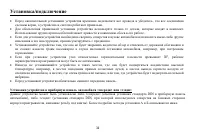
5 Installation/connection Choose the mounting location where the unit will not interfere with the normal driving function of the driver.Before finally installing the unit, connect the wiring and make sure that the unit works properly.Consult with your nearest dealer if installation requires the dril...
Page 6 - to fix the sleeve in place.; Dismantling the unit; – Trim frame; Trim frame installation
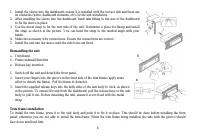
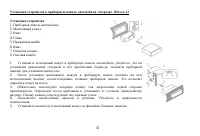
6 1. Install the sleeve into the dashboard; ensure it is installed with the correct side and there are no obstacles (wires, dashboard elements, etc) for the unit installation. 2. After installing the sleeve into the dashboard, bend tabs fitting to the size of the dashboard to fix the sleeve in place...
Page 7 - Installing the front panel
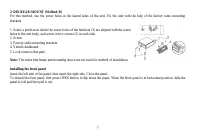
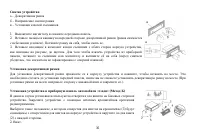
7 2. DIN REAR-MOUNT (Method B) For this method, use the screw holes in the lateral sides of the unit. Fix the unit with the help of the factory radio mountingbrackets. 1. Select a position in which the screw holes of the brackets (3) are aligned with the screwholes in the unit body, and screw in two...
Page 8 - Remove the panel; Put it to the protective case and take it with you.
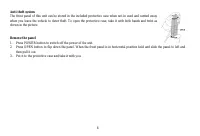
8 Anti-theft system The front panel of this unit can be stored in the included protective case when not in used and carried awaywhen you leave the vehicle to deter theft. To open the protective case, take it with both hands and twist asshown in the picture. Remove the panel 1. Press POWER button to ...
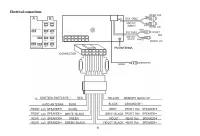
Page 9 - Electrical connections
Page 10 - Panel controls; Front panel
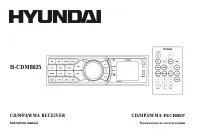
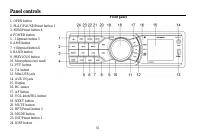
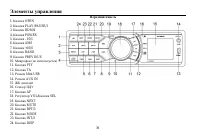
10 Panel controls Front panel 1. OPEN button2. PLAY/PAUSE/Preset button 13. RDM/Preset button 44. POWER button5. –10/preset button 56. AMS button7. +10/preset button 68. BAND button9. PREVIOUS button10. Microphone (not used)11. PTY button12. TA button13. Mini USB jack14. AUX IN jack15. Display16. RC...
Page 11 - Inner panel
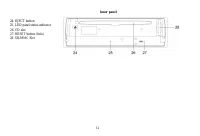
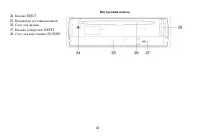
11 Inner panel 24. EJECT button25. LED panel status indicator26. CD slot27. RESET button (hole)28. SD/MMC Slot
Page 12 - Remote control
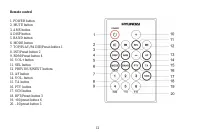
12 Remote control 1. POWER button2. MUTE button3. AMS button4. DISP button5. BAND button6. MODE button7. TOP/PLAY/PAUSE/Preset button 18. INT/Preset button 29. RDM/Preset button 410. VOL+ button11. SEL button12. PREVIOUS/NEXT buttons13. AF button14. VOL- button15. TA button16. PTY button17. SCN butt...
Page 13 - Changing the battery; Insert the battery tray into the remote control.
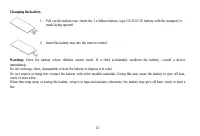
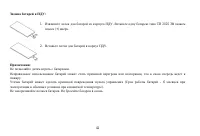
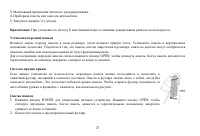
13 Changing the battery 1. Pull out the battery tray. Insert the 1 x lithium battery, type CR 2025 3V battery with the stamped (+) mark facing upward. 2. Insert the battery tray into the remote control. Warning: Store the battery where children cannot reach. If a child accidentally swallows the batt...
Page 14 - LCD layout; Track second time display/radio frequency
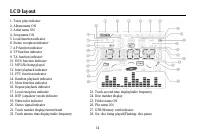
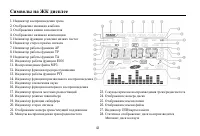
14 LCD layout 1. Track play indicator2. Album name ON3. Artist name ON4. Song name ON5. Loud function indicator6. Stereo reception indicator7. AF function indicator8. TP function indicator9. TA function indicator10. EON function indicator11. MP3 file being played12. Intro playback indicator13. PTY f...
Page 15 - General operations; Reset the unit
15 General operations Reset the unit Operating the unit for the first time or after replacing the car battery, you must reset the unit. Press OPEN button on the panel todetach the panel take it off and press the RESET button with thin hard object to restore the unit to the original factory settings....
Page 17 - Do not open the front panel while using the AUX in jack.
17 ESP (Electronic Shock Protection) MODEChoose the value for CD disc (40 sec. ESP for Audio-CD, 120 sec ESP for MP3).BEEP MODEBEEP ON: BEEP sound can be heard from speaker when the buttons are pressed. BEEP OFF: no beep sound is heard.SEEK MODE (for Radio mode)SEEK 1: When SEEK 1 mode is activated,...
Page 18 - Digital tuner operation; Band selection
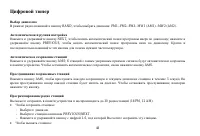
18 Digital tuner operation Band selection In Radio mode, press BAND button. Each band is toggled cyclically by pressing this button: FM1--FM2--FM3 --MW1 (AM1)--MW2 (AM2). Automatic/manual tuning Press and hold NEXT button to start automatic search of programs upwards; press and hold PREVIOUS button ...
Page 21 - Do not open the front panel while playing files from a USB.
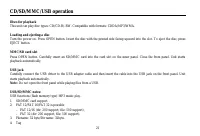
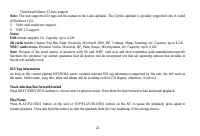
21 CD/SD/MMC/USB operation Discs for playback This unit can play disc types: CD/CD-R/-RW. Compatible with formats: CDDA/MP3/WMA. Loading and ejecting a disc Turn the power on. Press OPEN button. Insert the disc with the printed side facing upward into the slot. To eject the disc, pressEJECT button. ...
Page 23 - (only for files and folders named in the Latin alphabet)
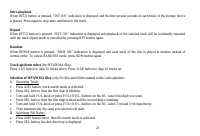
23 Intro playback When INT/2 button is pressed, “INT ON” indication is displayed and the first several seconds of each track of the storage deviceis played. Press again to stop intro and listen to the track. Repeat When RPT/3 button is pressed, “RPT ON” indication is displayed and playback of the se...
Page 24 - Searching Character:
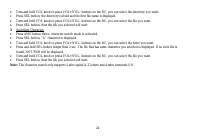
24 Turn and hold VOL knob or press VOL+/VOL- buttons on the RC, you can select the directory you want.Press SEL button, the directory is fixed and the first file name is displayed.Turn and hold VOL knob or press VOL+/VOL- buttons on the RC, you can select the file you want.Press SEL button, then the...
Page 25 - Notes on creating your own CD-R or CD-RW containing MP3 files:
25 MP3/WMA overview MP3 is short for MPEG Audio Layer 3 and refers to an audio compression technology standard.This product allows playback of MP3 files on CD-ROM, CD-R or CD-RW discs.The unit can read MP3 files written in the format compliant with ISO 9660. However it does not support the MP3 dataw...
Page 27 - Cleaning the cabinet
27 Handling discs Dirty, scratched or warped discs may cause skip ping or noise.Handle the disc only by the edges. To keep clean do not touch its surface.Discs should be stored in their cases after use to avoid scratches.Do not expose discs to direct sunlight, high humidity, high temperature or dust...
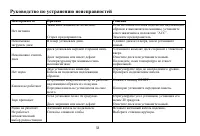
Page 28 - Troubleshooting guide; Symptom
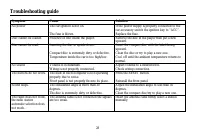
28 Troubleshooting guide Symptom Cause Solution No power The car ignition is not on. The fuse is blown. If the power supply is properly connected to thecar accessory switch the ignition key to “ACC”.Replace the fuse. Disc cannot be loaded. Presence of disc inside the player. Remove the disc in the p...
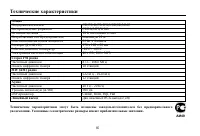
Page 30 - Specification; General
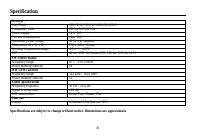
30 Specification General Disc/Flash CD/CD-R/CD-RW/USB/SD/MMC Compatible with CDDA/MP3/WMA Power supply 12 V DC Current consumption max. 10A Maximum power output 50 W x 4 channels Dimensions (L x W x H) 178 x 163x 50 mm Working temperature range -20º - +65º ESP 40 sec. ESP for Audio-CD, 120 sec ESP f...
Page 33 - ISO
33 1 1 1 1 ISO 1 : M4X5 4 M5X5 4 ST5X25 1 M5 1 1 2 USB - USB 1 1 1 1
Page 34 - DIN
34 , , . , . . , . , , , . 30°, . , , , , , , , , . . « » « » « » ( DIN ), « » ( DIN, , ). .
Page 37 - POWER
37 3. . 4. . 5. ( ). : . , . . , , . OPEN, . , . , , . , . . , , . 1. POWER . OPEN, . , . 2. .
Page 40 - EJECT
Page 47 - AUX
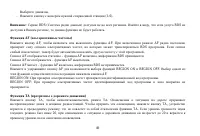
47 LOCAL DISTANT (DX) ( ; ). VOL LAST/ADJUST ( ) , . VOL LAST, , . VOL ADJUST: . : 15. , 15 . , . AUX AUX, . : AUX.
Page 50 - PTY
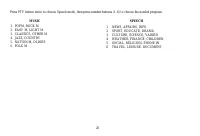
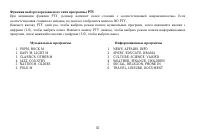
50 PTY PTY, . , NO PTY. PTY , , (1-6), . PTY , , (1-6), . 1. POPM, ROCK M2. EASY M, LIGHT M3. CLASSICS, OTHER M4. JAZZ, COUNTRY5. NATION M, OLDIES6. FOLK M 123456 NEWS, AFFAIRS, INFOSPORT, EDUCATE, DRAMACULTURE, SCIENCE, VARIEDWEATHER, FINANCE, CHILDRENSOCIAL, RELIGION, PHONE INTRAVEL, LEISURE, DOCU...
Page 51 - USB
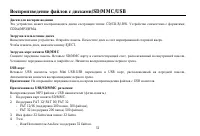
51 /SD/MMC/USB : CD/CD-R/-RW. : CDDA/MP3/WMA. . . . , EJECT. SD/MMC . SD/MMC , . . . USB USB Mini USB-USB USB , . . : USB . USB/SD/MMC : MP3 USB ( ). 1. SD/MMC. 2. FAT 12/ FAT 16/ FAT 32 - FAT 12/16 ( 200 , 500 ), - FAT 32 ( 200 , 500 ). 3. : 32 : 32 . 4. - : 32 .
Page 55 - WMA
55 3 WMA 3 MPEG 3 . 3 CD-ROM, CD-R CD-RW. 3, , ISO 9660. 3, . 3, , “.mp3”. 3 , “.mp3”, . , “ MP3” “ ”, PC ” “ ” . 8, . 256. . , , 3. 8 VBR, , . VBR: . WMA . ID3 WMA , . WMA (Windows Media Audio) – , Microsoft Corporation. , , , ( , 64 ) ( ). , , . CD-R CD-RW , MP3: 3 44,1 128 .
Page 60 - FM; DSP
60 CD/CD-R/CD-RW/USB/SD/MMCCDDA/MP3/WMA12 10 50 4 ( ) 178 163 50 -20º - +65º40 CD, 120 c MP3 FM 87.5 - 108.0 18 MW (AM) 522 - 1620 12 20 – 20 (A-vtd) >60 DSP Classic, Rock, Pop, Flat RCA- (2 ) . .