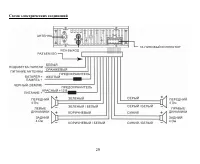
Page 2 - Table of contents
2 Dear customer! Thank you for purchasing our product. For safety, it is strongly recommended to read this manual carefully before connecting, operating and/or adjusting the product and keep the manual for reference in the future. Table of contents Table of contents ....................................
Page 3 - Important safeguards
3 Important safeguards Read carefully through this manual to familiarize yourself with this high-quality sound system.The beginning of operation is the moment of the unit installation. Before use the device in winter it isrecommended to heat up the passenger compartment during 20 seconds or to the o...
Page 4 - Components
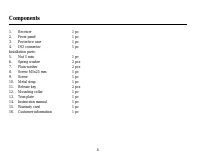
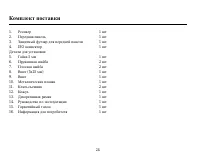
4 Components 1. Receiver 1 pc 2. Front panel 1 pc 3. Protective case 1 pc 4. ISO connector 1 pc Installation parts: 5. Nut 5 mm 1 pc 6. Spring washer 2 pcs 7. Plain washer 2 pcs 8. Screw M5x25 mm 1 pc 9. Screw 1 pc 10. Metal strap 1 pc 11. Release key 2 pcs 12. Mounting collar 1 pc 13. Trim plate 1 ...
Page 5 - Installation/Connections
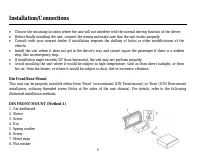
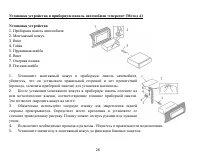
5 Installation/Connections Choose the mounting location where the unit will not interfere with the normal driving function of the driver.Before finally installing the unit, connect the wiring and make sure that the unit works properly.Consult with your nearest dealer if installation requires the dri...
Page 6 - the dashboard to fix the sleeve in place.; Dismantling the unit; – Trim frame; Trim frame installation
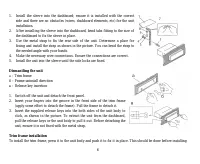
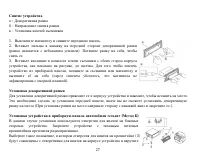
6 1. Install the sleeve into the dashboard; ensure it is installed with the correct side and there are no obstacles (wires, dashboard elements, etc) for the unitinstallation. 2. After installing the sleeve into the dashboard, bend tabs fitting to the size of the dashboard to fix the sleeve in place....
Page 7 - Installing the front panel
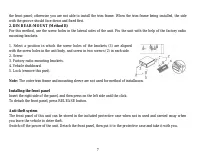
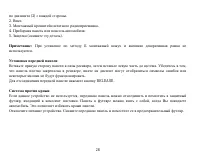
7 the front panel; otherwise you are not able to install the trim frame. When the trim frame being installed, the sidewith the groove should face down and fixed first. 2. DIN REAR-MOUNT (Method B) For this method, use the screw holes in the lateral sides of the unit. Fix the unit with the help of th...
Page 8 - Electrical connections
Page 9 - Panel controls
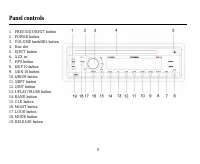
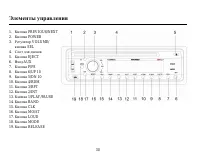
9 Panel controls 1. PREVIOUS/NEXT button2. POWER button3. VOLUME knob/SEL button4. Disc slot5. EJECT button6. AUX in7. F/PS button8. 6/UP 10 button9. 5/DN 10 button10. 4/RDM button11. 3/RPT button12. 2/INT button13. 1/PLAY/PAUSE button14. BAND button15. CLK button16. MO/ST button17. LOUD button18. M...
Page 10 - General functions; Mode
10 General functions Turning on/off Press any key on the front panel to turn the unit on. Press POWER button again to turn the unit off. Mode Press MODE button to select between AUX, TUNER or S-CDP (disc) modes. Volume control The volume level can be adjusted at any time by rotating VOLUME knob. Bas...
Page 11 - LOUD mode; Press LOUD button to emphasize the bass output.; Multi-session disc reading
11 LOUD mode Press LOUD button to emphasize the bass output. Multi-session disc reading This unit can read multi-session CDs. The multi-session reading will be activated automatically if the player detects a file that is written in multi-session format. Press and hold SEL button, then press SEL butt...
Page 12 - Radio operations; Choose radio band; In FM radio mode, press MO/ST button to choose STEREO or MONO.; Save your preset stations; scan and save stations for the current band.
12 Radio operations Choose radio band Press BAND button to operate the radio function (even when a CD is playing). Total 3 sets of FM band (FM1, FM2, FM3) and 2 sets or MW band (MW1, MW2) are available. In each set of bands can be stored up to 6 presetstations, making total 30 preset memory stations...
Page 14 - Disc operations; MP3 track search
14 Disc operations Electronic Shock Protection (ESP) CD Electronic Shock ProtectionThe electronic shock protection is ideal for driving uneven road.Press SEL button for 2 seconds, the display will show “DSP OFF”. Press the button again so that “ESP 12” will be shown on the display indicating that El...
Page 15 - Note; this type of search to function properly.; Scanning tracks
15 Track searchPress F/PS button, the display will show “TRK SCH”. Press SEL button, the last digit of the track number will blink. Rotate VOL knob to input the digit. Press SEL button to confirm and go to the next digit of the tracknumber. As you input thus the whole number of the track, press SEL ...
Page 16 - Repeat; again to stop repeating.; Random playback; again to stop random play.
16 Repeat Press 3/RPT button to repeat the same track continuously. “RPT ON" will appear on the display. Press this button again to stop repeating. Random playback Press 4/RDM button to play all the tracks in random order. “RDM ON” will appear on the display. Press the button again to stop rando...
Page 17 - MP3 Overview; Notes on creating your own CD-R or CD-RW containing MP3 files:
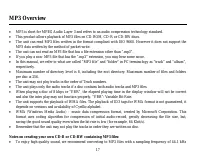
17 MP3 Overview MP3 is short for MPEG Audio Layer 3 and refers to an audio compression technology standard.This product allows playback of MP3 files on CD-ROM, CD-R or CD-RW discs.The unit can read MP3 files written in the format compliant with ISO 9660. However it does not support theMP3 data writt...
Page 19 - Cleaning the cabinet; weak solution of soapy water, and then wipe clean.; Cleaning discs
19 Handling compact discs Dirty, scratched or warped discs may cause skip ping or noise.Handle the disc only by the edges. To keep clean do not touch its surface.Discs should be stored in their cases after use to avoid scratches.Do not expose discs to direct sunlight, high humidity, high temperature...
Page 20 - Troubleshooting guide
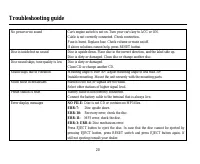
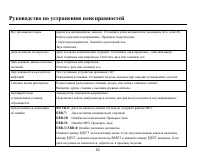
20 Troubleshooting guide No power or no sound Car's engine switch is not on. Turn your car's key to ACC or ON. Cable is not correctly connected. Check connection. Fuse is burnt. Replace fuse. Check volume or mute on/off. If above solutions cannot help, press RESET button. Disc is inside but no sound...
Page 21 - Specification; General; Maximum power output:; FM Stereo Radio; Disc digital audio system
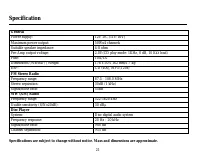
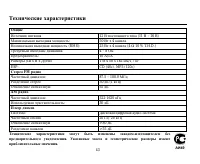
21 Specification General Power supply: 12V DC (11V-16V) Maximum power output: 50Wx4 channels Suitable speaker impedance: 4-8 ohm Pre-Amp output voltage: 2.0V(CD play mode: 1KHz, 0 dB, 10 K load) Fuse: 10A/1A Dimensions (WxHxD) / Weight 178 50 162 mm/1.7 kg ESP: CD (40s), MP3 (120s) FM Stereo Radio F...
Page 25 - DIN
25 , , . , . . , . , , , . 30°, . , , , , , , , , . . « » « » « » ( DIN ), « » ( DIN, , ). .
Page 31 - BEEP
31 . POWER . MODE, : AUX, TUNER ( ) S-CDP ( ). VOL . , , SEL : BAS ( ), TRE ( ), BAL ( ), FAD ( ). . VOL, . DSP . BEEP SEL 2 ; «DSP OFF». SEL, «BEEP ON». VOL BEEP ON ( ) BEEP OFF ( ), , .
Page 33 - BAND
33 BAND . 3 FM (FM1, FM2, FM3) 2 W (MW1, MW2). 6 ( 30 ). PREVIOUS/NEXT, . PREVIOUS/NEXT; . . ( FM) MO/ST, (STEREO) (MONO). 6 , . , , . . : F/PS; . : F/PS, .