Page 2 - Table of contents
2 Dear customer! Thank you for purchasing our product. For safety, it is strongly recommended to read this manual carefully beforeconnecting, operating and/or adjusting the product and keep the manual for reference in the future.The unit is recommended for installation in cars by Hyundai, Kia, as we...
Page 3 - Important safeguards
3 Important safeguards Using the device at temperature below -10º may cause the breakage of the device. Before using please heat up thepassenger compartment to the recommended temperature!Read carefully through this manual to familiarize yourself with this high-quality system.Disconnect the vehicle'...
Page 4 - Accessories; Operating instructions
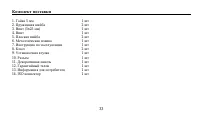
4 Accessories 1. Nut 5 mm 1 pc. 2. Spring washer 2 pcs. 3. Screw M5x25 mm 1 pc. 4. Screw 1 pc. 5. Plain washer 2 pcs. 6. Strap 1 pc. 7. Operating instructions 1 pc. 8. Key 2 pcs. 9. Mounting collar 1 pc. 10. Wire connector 1 pc. 11. Trim plate 1 pc. 12. Warranty card 1 pc. 13. Customer information 1...
Page 5 - Installation/Connections; Before installation; Remove the old unit from the dashboard.
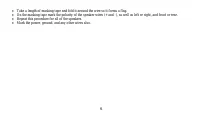
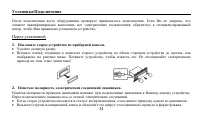
5 Installation/Connections First complete the electrical connections, and then check them for correctness. If you are not confident working withelectrical wiring, removing and reinstalling interior panels, carpeting, dashboards or other components of your vehicle,please call your dealer in order to ...
Page 7 - Installation method A; owner’s manual for proper instructions.
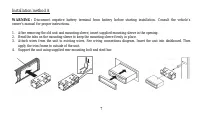
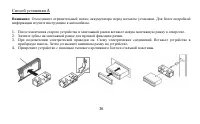
7 Installation method A WARNING: Disconnect negative battery terminal from battery before starting installation. Consult the vehicle’s owner’s manual for proper instructions. 1. After removing the old unit and mounting sleeve, insert supplied mounting sleeve in the opening.2. Bend the tabs on the mo...
Page 8 - Installation method B; Outer trim frame, hook, and mounting sleeve are not used for this
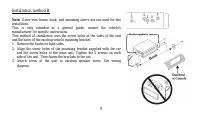
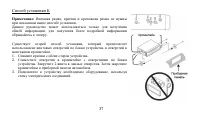
8 Installation method B Note: Outer trim frame, hook, and mounting sleeve are not used for this installation.This is only intended as a general guide; contact the vehicle'smanufacturer for specific instructions.This method of installation uses the screw holes at the sides of the unitand the holes of...
Page 9 - Electrical connections; Speaker Wiring Notes
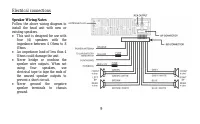
9 Electrical connections Speaker Wiring Notes Follow the above wiring diagram toinstall the head unit with new orexisting speakers. This unit is designed for use withfour (4) speakers with theimpedance between 4 Ohms to 8Ohms.An impedance load of less than 4Ohms could damage the unit.Never bridge or...
Page 10 - Using the ISO Connector; Function
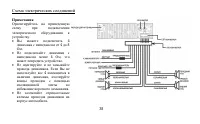
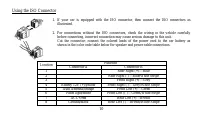
10 Using the ISO Connector 1. If your car is equipped with the ISO connector, then connect the ISO connectors as illustrated. 2. For connections without the ISO connectors, check the wiring in the vehicle carefully before connecting, incorrect connection may cause serious damage to this unit.Cut the...
Page 11 - Panel controls; Front panel
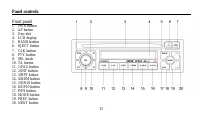
11 Panel controls Front panel 1. PWR button2. AF button3. Disc slot4. LCD display5. BAND button6. EJECT button7. CLK button8. PTY button9. SEL knob10. TA button11. 1/PAU button12. 2/INT button13. 3/RPT button14. 4/RDM button15. 5/DN10 button16. 6/UP10 button17. F/PS button18. MODE button19. PREV but...
Page 12 - General operations; Mode selection; Press MODE button to switch between Radio and CD play mode.; Volume control; The volume level can be adjusted by rotating SEL knob in any mode.; LOUD mode
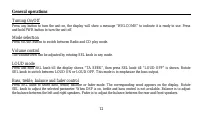
12 General operations Turning On/Off Press any button to turn the unit on, the display will show a message “WELCOME” to indicate it is ready to use. Pressand hold PWR button to turn the unit off. Mode selection Press MODE button to switch between Radio and CD play mode. Volume control The volume lev...
Page 13 - POP ROCK CLASSIC FLAT DSP OFF; Preset volume level
13 BEEP function Press and hold SEL knob for 2 seconds; the display will show “TA SEEK”. Press SEL knob repeatedly until the displayshows “BEEP OFF”, rotate SEL knob to toggle between BEEP ON and BEEP OFF, then leave the unit idle for yourdesired setting to take effect. Clock setting The clock can b...
Page 14 - RCA output
14 You can rotate SEL knob to switch to “VOL ADJ”. Press SEL knob to confirm, then “A-VOL” will be displayed. Atthis time, rotate SEL knob to set the volume level you need. This will be the preset sound level for unit. Then every timethe unit will be turned on with this volume level. Leave the unit ...
Page 15 - Radio operations; Choose Radio Band
15 Radio operations Choose Radio Band Press BAND button to activate the Radio mode. The unit is equipped with 3 FM bands (FM1, FM2 and FM3) and 2 AMbands (MW1 and MW2). Each of the bands can store up to 6 preset stations, making total 30 preset memory stations. Radio Tune/Seek Function In Radio mode...
Page 16 - Automatic scan and store:; Local/Distance reception control
16 Save Your Preset Stations There are six numbered preset buttons, which can store and recall stations for each band. While listening to a radiostation you would like to save as a preset, press and hold one of the buttons numbered 1-6 until you hear a beep. Thebutton you pressed is now the preset b...
Page 17 - RDS operations; Following functions are available for radio FM band mode.; AF – Alternative frequency
17 RDS operations Following functions are available for radio FM band mode. RDS-EON Control This unit is equipped with the latest technology of EON control, so that when you are listening to Radio or CD, if thereis any travel announcement from a nearby local station, the radio will already know the ...
Page 18 - PTY – Program type
18 PTY – Program type This radio will allow you to select the type of program required, and will search for a station broadcasting that type ofprogram. Press PTY button once to show the music type. Then press numbered 1-6 buttons to choose different musictypes available. Press the PTY button twice t...
Page 19 - The electronic shock protection is ideal for driving uneven road.; For MP3 discs
19 CD/MP3/WMA operations Electronic Shock Protection (ESP) The electronic shock protection is ideal for driving uneven road. For MP3 discs Electronic Skip Protection for MP3 discs is a default feature. Please note that this feature supports the CDs with songsencoded by 96 Kb/s and 32000 Hz. For song...
Page 20 - MP3 Track search mode; Simple search; Multi-session CD reading
20 MP3 Track search mode You can use the 4 search modes to find your favorite MP3 songs. The search modes work only with MP3 discs. Simple search Press PREV/NEXT buttons to choose your song. Press the 5/DN10 and 6/UP10 button to advance 10 songs up or down. Track search Press F/PS button and the dis...
Page 22 - MP3 Overview; Notes on MP3
22 MP3 Overview Notes on MP3 MP3 is short for MPEG Audio Layer 3 and refers to an audio compression technology standard.This product allows playback of MP3 files on CD-ROM, CD-R or CD-RW discs.The unit can read MP3 files written in the format compliant with ISO 9660. However it does not support the ...
Page 24 - Cleaning the cabinet
24 Handling discs Dirty, scratched or warped discs may cause skip ping or noise.Handle the disc only by the edges. To keep clean do not touch its surface.Discs should be stored in their cases after use to avoid scratches.Do not expose discs to direct sunlight, high humidity, high temperature or dust...
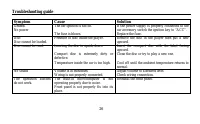
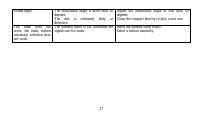
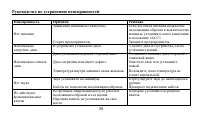
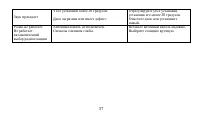
Page 26 - Troubleshooting guide; Symptom; The car ignition is not on.
26 Troubleshooting guide Symptom Cause Solution GeneralNo power The car ignition is not on. The fuse is blown. If the power supply is properly connected to thecar accessory switch the ignition key to “ACC”.Replace the fuse. DiscDisc cannot be loaded. Presence of disc inside the player. Remove the di...
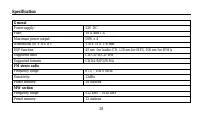
Page 28 - Specification; General; Maximum power output:; FM stereo radio
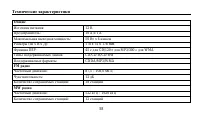
28 Specification General Power supply: 12V DC Fuse: 10 A and 1 A Maximum power output: 50W x 4 Dimensions (W x H x D): 178 x 51 x 178 mm ESP function 45 sec. for Audio-CD, 120 sec for MP3, 300 sec for WMA Supported discs CD/CD-R/CD-RW Supported formats CDDA/MP3/WMA FM stereo radio Frequency range: 8...
Page 29 - Audio specification; Signal to Noise ratio:; Line out
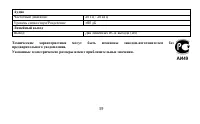
29 Audio specification Frequency response: 20 Hz to 20 KHz Signal to Noise ratio: >80dB Line out Output: 2 channels RCA line-out (2V) Specifications are subject to change without notice. Dimensions are approximate.
Page 39 - ISO
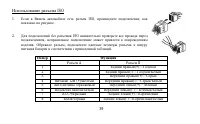
39 ISO 1. ISO, , . 2. ISO , . , . A B 1 (+)--- 2 (-)--- 3 (+)--- 4 12 (+)/ (-)--- 5 / (+)--- 6 ((-)--- 7 ACC+/ (+)--- 8 (-)---
Page 41 - LOUD
41 , WELCOME, , . PWR . MODE CD/MP3. VOL . LOUD SEL; “TA SEEK”. SEL, “LOUD OFF”. LOUD ON ( LOUD ) LOUD OFF ( LOUD ). . , , SEL : bass ( ), treble ( ), balance ( ) fader ( , ). . SEL, . DSP .
Page 42 - POP ROCK CLASSIC FLAT DSP OFF (
42 BEEP SEL 2 ; «TA SEEK». SEL, «BEEP OFF»; SEL BEEP ON ( ) BEEP OFF ( ), , . . CLK, CLK 3 , . 1. SEL . 2. SEL . 3. CLK , . CLK, . DSP SEL 2 , “TA SEEK”. SEL, «DSP OFF». SEL, DSP: POP ROCK CLASSIC FLAT DSP OFF ( ) , .
Page 43 - RCA
43 SEL; «TA SEEK». SEL, «VOL LAST». , . SEL «VOL ADJ». SEL , «A-VOL». SEL, . . , . RCA RCA . , . .
Page 46 - RDS; AF –
46 RDS FM . RDS-EON EON ( ). , . , . . AF – AF, , . , . «AF», RDS ; «AF» , RDS . TA – TA, . TA SEL 2 ; «TA SEEK». «TA SEEK» «TA ALARM»; , . TA SEEK TA; TA ALARM . .
Page 47 - PTY –; SEL
47 PTY – , , . PTY, . (1-6) . PTY, . (1-6) . . MASK DPI/MASK ALL SEL 2 ; «TA SEEK». «MASK DPI». «MASK DPI» «MASK ALL». , . MASK DPI, . . MASK ALL , , RDS. RETUNE S/L TA SEEK. SEL, «TA SEEK»; , «RETUNE_S». SEL «RETUNE_S» «RETUNE_L». «RETUNE_S». «RETUNE» . «S» 30 , «L» 90 .
Page 48 - ESP; CD
48 D/MP3/WMA (ESP) . MP3 MP3 . , , 96 32000 . , , ESP . CD SEL 2 , «TA SEEK». , «ESP 12», , 12 . , 45 , «ESP 45». , . . , . MP3 , «MP3 DISC». . «ROOT», ID3 , . CD , «LOAD», . EJECT . 5 , . .
Page 58 - WMA; FM
58 : 12 : 10 A 1 A : 50 4 ( ): 178 x 51 x 178 mm ESP: 45 CD/120 c MP3/300 WMA CD/CD-R/CD-RW CDDA/MP3/WMA FM : 87,5 – 108,0 : 12 : 18 MW : 522 – 1620 : 12