Page 5 - Original operating instructions; Information about the documentation; DANGER
*2284804* 2284804 English 1 Original operating instructions 1 Information about the documentation 1.1 About this documentation • Read this documentation before initial operation or use. This is a prerequisite for safe, trouble-free handling and use of the product. • Observe the safety instructions a...
Page 6 - Safety
2 English 2284804 *2284804* 1.3 Product-dependent symbols 1.3.1 Symbols on the product The following symbols can be used on the product: The product supports wireless data transmission compatible with iOS and Android platforms. If applied on the product, the product has been certified by this certif...
Page 9 - Description
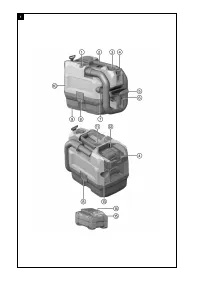
*2284804* 2284804 English 5 3 Description 3.1 Product overview 1 @ EJECT button for hose ; Grip = Control switch % Holder for shoulder strap & Hand nozzle ( Hose ) Crevice nozzle + Catch § Waste material container / Suction head : CLEAN button for filter cleaning ∙ Battery compartment $ Discharg...
Page 10 - WARNING
6 English 2284804 *2284804* 3.5 Indication of overloading and overheating The power tool is equipped with an electronic system to protect against overloading and overheating. The power tool switches itself off automatically in the event of overloading or overheating. The power tool might not restart...
Page 11 - Technical data; Preparations at the workplace
*2284804* 2284804 English 7 Status Meaning All LEDs show in sequence, followed by one (1) LED showing constantly red. If a connected product can still be used, the re- maining battery capacity is below 50 %. If a connected product can no longer be used, the battery has reached the end of its useful ...
Page 12 - Types of work
8 English 2284804 *2284804* 5.3 Inserting the battery WARNING Risk of injury by short circuit or falling battery! ▶ Before inserting the battery, make sure that the contacts on the battery and the contacts on the product are free of foreign matter. ▶ Make sure that the battery always engages correct...
Page 13 - Care and maintenance
*2284804* 2284804 English 9 3. Connect the hose to the outlet socket. ▶ The vacuum cleaner is ready for use In order to use the suction function, reconnect the hose to the intake socket. 6.3 Cleaning the filter 1. Switch the appliance on. 2. Hold your hand over the end of the hose. 3. Wait until max...
Page 14 - Transport and storage of cordless tools and batteries; Troubleshooting
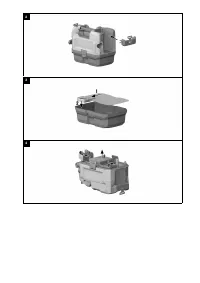
10 English 2284804 *2284804* 7.1 Changing the filter 4 1. Switch the appliance off. 2. Open the two catches. 3. Lift the suction head off the waste material container. 4. Open the twist lock. 5. Remove the filter along with the filter frame. 6. Remove all dust from the seal and from the filter frame...
Page 15 - Disposal; Manufacturer’s warranty
*2284804* 2284804 English 11 Trouble or fault Possible cause Action to be taken 1 LED flashes yellow. The motor has overheated. ▶ Switch the appliance off. ▶ Wait 10 minutes. ▶ Remove the blockage or clean the filter, intake connector, hose or exhaust air filter. ▶ Switch the appliance on. Reduced s...
Page 16 - Mode d'emploi original; Indications relatives à la documentation
12 Français 2284804 *2284804* Mode d'emploi original 1 Indications relatives à la documentation 1.1 À propos de cette documentation • Lire intégralement la présente documentation avant la mise en service. C'est la condition préalablement requise pour assurer la sécurité du travail et un maniement sa...
Page 17 - Sécurité
*2284804* 2284804 Français 13 1.3 Symboles spécifiques au produit 1.3.1 Symboles sur le produit Les symboles suivants peuvent être utilisés sur le produit : Le produit prend en charge la transmission de données sans fil qui est compatible avec les plates-formes iOS et Android.Si présent sur le produ...
Page 21 - AVERTISSEMENT
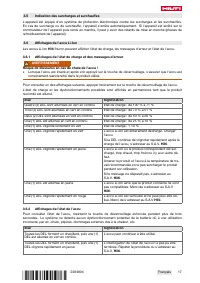
*2284804* 2284804 Français 17 3.5 Indication des surcharges et surchauffes L'appareil est équipé d'un système de protection électronique contre les surcharges et les surchauffes. En cas de surcharge ou de surchauffe, l'appareil s'arrête automatiquement. Si l'appareil est arrêté sur le commutateur de...
Page 22 - Caractéristiques techniques; Préparatifs
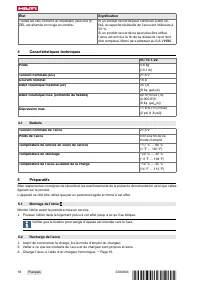
18 Français 2284804 *2284804* État Signification Toutes les DEL forment un chenillard, puis une (1) DEL est allumée en rouge en continu. Si un produit raccordé peut continuer à être uti- lisé, la capacité résiduelle de l'accu est inférieure à 50 %. Si un produit raccordé ne peut plus être utilisé, l...
Page 23 - Travail
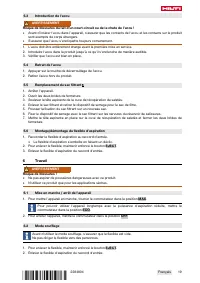
*2284804* 2284804 Français 19 5.3 Introduction de l'accu AVERTISSEMENT Risque de blessures du fait d'un court-circuit ou de la chute de l'accu ! ▶ Avant d'insérer l'accu dans l'appareil, s'assurer que les contacts de l'accu et les contacts sur le produit sont exempts de corps étrangers. ▶ S'assurer ...
Page 24 - Nettoyage et entretien
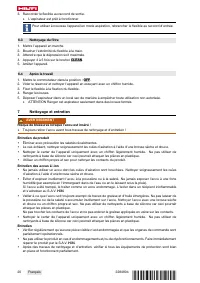
20 Français 2284804 *2284804* 3. Raccorder le flexible au raccord de sortie. ▶ L'aspirateur est prêt à fonctionner Pour utiliser à nouveau l'appareil en mode aspiration, rebrancher le flexible au raccord d'entrée. 6.3 Nettoyage du filtre 1. Mettre l'appareil en marche. 2. Boucher l'extrémité du flex...
Page 25 - Transport et stockage des outils sur accu et des accus; Guide de dépannage
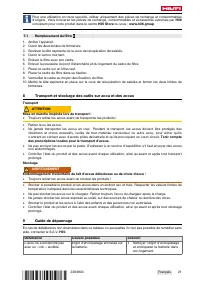
*2284804* 2284804 Français 21 Pour une utilisation en toute sécurité, utiliser uniquement des pièces de rechange et consommables d'origine. Vous trouverez les pièces de rechange, consommables et accessoires autorisés par Hilti convenant pour votre produit dans le centre Hilti Store ou sous : www.hil...
Page 26 - Recyclage; Garantie constructeur
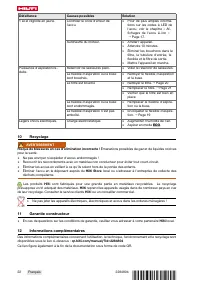
22 Français 2284804 *2284804* Défaillance Causes possibles Solution 1 LED clignote en jaune. Contrôler le code d'erreur de l'accu. ▶ Pour de plus amples informa- tions sur les codes à LED de l'accu, voir le chapitre « Af- fichages de l'accu LiIon » → Page 17. Surchauffe du moteur. ▶ Arrêter l'appar...
Page 27 - Manual de instrucciones original; Información sobre la documentación; PELIGRO
*2284804* 2284804 Español 23 Manual de instrucciones original 1 Información sobre la documentación 1.1 Acerca de esta documentación • Lea detenidamente esta documentación antes de la puesta en servicio. Ello es imprescindible para un trabajo seguro y un manejo sin problemas. • Respete las indicacion...
Page 28 - Seguridad
24 Español 2284804 *2284804* 1.3 Símbolos dependientes del producto 1.3.1 Símbolos en el producto En el producto se pueden utilizar los siguientes símbolos: El producto permite la transferencia de datos inalámbrica, compatible con plataformas iOS y Android.Si está en el producto, significa que el or...
Page 31 - Descripción
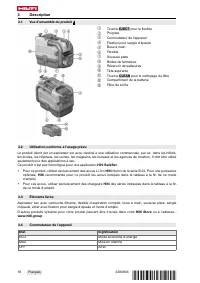
*2284804* 2284804 Español 27 3 Descripción 3.1 Vista general del producto 1 @ Tecla EJECT para manguera ; Empuñadura = Interruptor de la herramienta % Soporte para correa de hombro & Boquilla manual ( Manguera ) Boquilla para juntas + Pinza de cierre § Depósito de suciedad / Cabezal de aspiració...
Page 32 - ADVERTENCIA
28 Español 2284804 *2284804* 3.5 Indicador de sobrecarga y sobrecalentamiento La herramienta está equipada con una protección electrónica contra sobrecarga y una protección contra sobrecalentamiento. En caso de sobrecarga o sobrecalentamiento, la herramienta se desconecta automáti- camente. Si la he...
Page 33 - Datos técnicos; Preparación del trabajo
*2284804* 2284804 Español 29 Estado Significado Todos los LED se encienden como luz en movi- miento y, a continuación, se enciende un (1) LED permanentemente en verde. La batería puede seguir utilizándose. Todos los LED se encienden como luz en movi- miento y, a continuación, parpadea un (1) LED ráp...
Page 34 - Procedimiento de trabajo
30 Español 2284804 *2284804* 5.2 Carga de la batería 1. Antes de cargarla, lea el manual de instrucciones del cargador. 2. Asegúrese de que los contactos de la batería y del cargador estén limpios y secos. 3. Cargue la batería en un cargador autorizado. → página 27 5.3 Colocación de la batería ADVER...
Page 35 - Cuidado y mantenimiento
*2284804* 2284804 Español 31 1. Para extraer la manguera de aspiración, mantenga pulsado el botón EJECT . 2. Extraiga la manguera de aspiración de la pieza de empalme de entrada de la manguera de aspiración. 3. Conecte la manguera a la pieza de empalme de salida. ▶ El aspirador está listo para funci...
Page 36 - Transporte y almacenamiento de las baterías y sus herramientas; Localización de averías
32 Español 2284804 *2284804* Para garantizar un correcto funcionamiento, utilice exclusivamente piezas de repuesto y consumibles originales. Las piezas de repuesto, los consumibles y los accesorios autorizados por Hilti se pueden consultar en su Hilti Store o en: www.hilti.group 7.1 Cambio del filtr...
Page 37 - Reciclaje; Garantía del fabricante
*2284804* 2284804 Español 33 Anomalía Posible causa Solución 1 LED parpadea en amarillo. Compruebe el código de avería de la batería. ▶ Para más información sobre los códigos LED de la batería, consulte el capítulo «Indicacio- nes de la batería de Ion-Litio» → página 28. Motor sobrecalentado. ▶ Apag...