Page 3 - ENGLISH; TABLE OF CONTENTS
ENGLISH TABLE OF CONTENTS PRODUCT REGISTRATION Thank you for purchasing our Haier product. This easy-to-use manual will guide you in getting the best use of your product. Remember to record the model and serial numbers. They are on a label on the side of your unit. Model number Serial number Date of...
Page 4 - PAGE 2; WARNING; IMPORTANT SAFETY PRECAUTIONS
1. Use this air conditioner only for its intended application as described in this Use & Care Guide. 2. This air conditioner must be properly installed and use the correct wall outlet that matches with the air conditioner’s power supply cord in accordance with the Installation Section of this Us...
Page 5 - This air conditioner contains R410a refrigerant and requires; READ AND FOLLOW THE; SAVE THESE INSTRUCTIONS
SAFETY INFORMATION PAGE 3 ENGLISH 8. This air conditioner contains R410a refrigerant and requires certified technicians to use the proper equipment, tools and safety standards that are approved for this refrigerant. Use only equipment certified for R410a refrigerant. In addition, under federal law, al...
Page 6 - OPERATIONAL SAFETY & WARNINGS; finge; PAGE 4
ENGLISH OPERATIONAL SAFETY & WARNINGS 1. This air conditioner contains no consumer serviceable parts. If you have problems or questions regarding the operation of your air conditioner always call Haier Customer Service: 1-877-337-3639. 2. Be sure that the air conditioner is properly and securely...
Page 7 - TOOLS AND PARTS; TOOLS NEEDED; IMAGE; INSTALLATION REQUIREMENTS
ENGLISH TOOLS AND PARTS Read and follow the instructions provided with any tools listed here. TOOLS NEEDED PARTS SUPPLIED: Check that all parts for your specific air conditioner are included in the parts package. NOTE: If parts are missing, call Haier Customer Service: 1-877-337-3639. Phillips head s...
Page 8 - THE LOCATION SHOULD PROVIDE:; NOTE: The outside cabinet louvers must not be obstructed by bushes,; WINDOW INSTALLATION; LOCATION REQUIREMENTS
ENGLISH PAGE 6 INSTALLATION REQUIREMENTS IMPORTANT: e v r e s b O all governing codes and ordinances. Check the location where the air conditioner will be installed. Make sure you have everything necessary for correct installation. THE LOCATION SHOULD PROVIDE: • A grounded electrical outlet within 6...
Page 9 - ELECTRICAL SAFETY and WARNINGS; ELECTRICAL REQUIREMENTS; POWER SUPPLY CORD
ENGLISH 1. O D NOT cut or remove the grounding prong on the attached power supply cord. Doing so may cause sparks or fi re, and voids all warranties. For safety purposes the air conditioner must be properly grounded. 2. To avoid a fi re hazard or possible electric shock, DO NOT use an adapter plug, ex...
Page 10 - REQUIRED GROUNDING METHOD; ELECTRICAL REQUIREMENTS cont.
ENGLISH PAGE 8 INSTALLATION REQUIREMENTS REQUIRED GROUNDING METHOD (See Fig.3) This air conditioner must be grounded. This air conditioner is equipped with a power supply cord that has a 3 prong grounding plug. The power supply cord must be plugged into a mating, grounded 3 prong outlet, and grounde...
Page 11 - TO TEST YOUR POWER SUPPLY CORD:
ENGLISH TO TEST YOUR POWER SUPPLY CORD: 1. g u l P power supply cord into a mating, grounded 3 prong outlet. (See Fig.5) 2. Press RESET (on some devices, a green light will turn on).3. r P ess TEST (listen for click; Reset button will trip, and on some devicesa green light will turn off). 4. r P ess ...
Page 12 - UNPACKING THE AIR CONDITIONER; EXCESSIVE WEIGHT HAZARD; HOW TO INSTALL
REMOVE PACKAGING MATERIALS • Remove packaging materials. Save the carton and the foam packaging for storing the unit when not in use. NOTE: • Handle the air conditioner gently. • Keep the air conditioner upright and level. Do not set the air conditioner on its side, front, back or upside down. • The...
Page 13 - INSTALL SIDE CURTAINS; PREPARING THE AIR CONDITIONER cont.
ENGLISH INSTALL SIDE CURTAINS NOTE: Attach side curtains to the air conditioner before placing the unit in the window.1. Place the tabbed side of the side curtain in the track on the right-hand side of the air conditioner cabinet. (See Fig.9) 2. Slide the tabbed side of the side curtain down over al...
Page 14 - PREPARING THE WINDOW
PREPARING THE WINDOW ENGLISH 1. Measure the width of the window opening. (See Fig.13) 2. Mark the center line on the inside of the windowsill with a pencil. (See Fig.14) • Do not block the air discharge or air intake areas on the front panel. • Do not block the louvers on the outside of the air cond...
Page 15 - COMPLETING THE INSTALLATION; ATTACH SIDE CURTAINS TO WINDOW
ENGLISH COMPLETING THE INSTALLATION ATTACH SIDE CURTAINS TO WINDOW 1. Pull the left-hand curtain and frame out until it fits flush to the side of the window frame. (See Fig.17) 2. Use a 1/8” drill bit to drill a starter hole through the top hole in the side curtain and into the window sash. 3. Insert ...
Page 16 - STARTING THE AIR CONDITIONER; USING YOUR AIR CONDITIONER
Operating your air conditioner properly helps you to obtain the best possible results.This section explains how to operate this air conditioner. STARTING THE AIR CONDITIONER MODE SPEED TIMER FAN HIGH ON MED OFF ENERGY SAVE DEHUM LOW AUTO COOL SLEEP °F/°C Hr TEMP/TIME CLEAN FILTER POWER AUTO RESTART ...
Page 17 - FAN; STARTING THE AIR CONDITIONER cont.
1. Carefully remove the clear plastic film from the control panel. 2. r P ess POWER once to turn on the air conditioner. NOTE: n e h W the air conditioner is fi rst plugged in, the LED display will show “88” for 3 seconds. After the air conditioner is turned on for the fi rst time, the display will sho...
Page 18 - SPEED; LOW
STARTING THE AIR CONDITIONER cont. SPEED 1. r P ess FAN SPEED until you see the indicator light come on next to the desired setting. 2. Choose High, Med, Low or Auto Cool H G I H ―For maximum cooling D E M ―For normal cooling LOW ―For minimum cooling AUTO COOL – s t s u j d A the fan speed automatic...
Page 19 - TO CLEAR TIMER PROGRAM:; NOTE: Air conditioner can be either on or; TIMER ON
ENGLISH STARTING THE AIR CONDITIONER cont. TO CLEAR TIMER PROGRAM: NOTE: Air conditioner can be either on or off. Press TIMER until Timer indicator light turns off. TO VIEW OR CHANGE THE REMAINING TIME (IN HOURS):TIMER OFF 1. Press the TEMP/TIME up or down arrow button to increase or decrease the time...
Page 20 - FILTER RESET; NOTE: The raised dots are Braille for the visually impaired.; Remote control may; NOTE: Remove and discard protective
FILTER RESET This feature automatically no tifies you that the air filter must be cleaned. The indicator light will come on after 240 hours of operation. Clean the air filter (refer to Care and Cleaning), place it back in the front panel, and press the Filter Reset button. The light will turn off. NOTE:...
Page 21 - USING THE REMOTE CONTROL cont.; TO CLEAR TIMER DELAY PROGRAM:
USING THE REMOTE CONTROL cont. TO SET TIMER TO TURN ON THE AIR CONDITIONER, CHANGING THE PREVIOUS SETTINGS: 1. Turn on the air conditioner.2. Adjust the mode to Fan, Energy Save, Cool or Dehum.3. r o F Fan or Dehum mode,adjust the fan speed to High,Med or Low. For Cool or Energy Save mode,adjust the...
Page 22 - SLEEP; CHANGING THE AIR DIRECTION
SLEEP 1. Press the TIMER button to choose Sleep mode. The indicator light will turn on.2. The temperature will increase by 2˚F 1 hour after the mode is chosen. The temperature then increases another 2˚F after 1 hour. The unit will hold this temperature for 6 hours then stops. 3. To turn off Sleep mod...
Page 23 - NORMAL SOUNDS OF AN AIR CONDITIONER; NORMAL SOUNDS
ENGLISH USING YOUR AIR CONDITIONER PAGE 21 NORMAL SOUNDS OF AN AIR CONDITIONER NORMAL SOUNDS Your new air conditioner is designed to give you many years of dependable service. This section tellsWhile your air conditioner is operating, it is normal to hear the following sounds: you how to clean and c...
Page 24 - CLEANING THE AIR FILTER; CARING FOR YOUR AIR CONDITIONER
The air filter is r emovable for easy cleaning. A clean air filter helps remove dust, lint, and particles from the air for optimal c ooling and ope r ating efficiency. The Filter R eset light will turn on t o n o tify you that the air filter must be cleaned. The light goes on after the air c onditioner h...
Page 25 - AIR CONDITIONER; IMPORTANT; CLEANING THE FRONT PANEL
AIR CONDITIONER Your air conditioner needs annual maintenance to help ensure steady performance throughout the year. Call your local air conditioner servicer to schedule an annual checkup. If you need a referral, you may call Haier Customer Service at 1-877-337-3639 to request one. The annual inspec...
Page 26 - TROUBLESHOOTING; POSSIBLE
PAGE 24 TROUBLESHOOTING TROUBLESHOOTING POSSIBLE PROBLEM POSSIBLE CAUSE REMEDY Air Conditioner does not start or operate Power supply cord is not plugged into an outlet. Plug unit into a mating grounded outlet. Power supply cord has tripped. Press and release RESET button on the power supply cord. U...
Page 27 - LIMITED WARRANTY
ONE YEAR LIMITED WARRANTY This warranty covers all defects in workmanship or material for the mechanical and electrical parts (including labor costs) contained in this product for a period of 12 months from the date of purchase. For commercial or rental application, the warranty is 90 days. You must...
Page 28 - Exigences relatives à l'emplacement
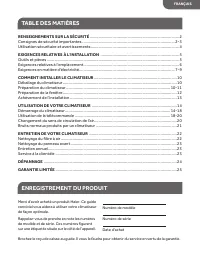
TABLE DES MATIÈRES ENREGISTREMENT DU PRODUIT Brochez le reçu de caisse au guide. Il vous le faudra pour obtenir du service en vertu de la garantie. RENSEIGNEMENTS SUR LA SÉCURITÉ ................................................................................... 2 Consignes de sécurité importantes ....
Page 29 - L'INFORMATION FIGURANT DANS CE GUIDE D'UTILISATION; AVERTISSEMENT; CONSIGNES DE SÉCURITÉ IMPORTANTES
1. N'utiliser cet appareil qu'aux fins prévues, tel que décrit dans ce guide d'utilisation et d'entretien. 2. Avant l'utilisation, ce climatiseur doit être correctement installé et branché dans une prise murale appropriée correspondant au cordon d'alimentation du climatiseur, conformément à la parti...
Page 30 - RENSEIGNEMENTS SUR LA SÉCURITÉ; LISEZ ATTENTIVEMENT ET OBSERVEZ À LA LETTRE; CONSERVEZ CES INSTRUCTIONS; ffe
RENSEIGNEMENTS SUR LA SÉCURITÉ PAGE 3 8. Ce climatiseur contient un fluide frigorigène d e type R410a. Par conséquent, les électriciens dev ront être certifiés et utiliser l'équipement et les outils appropriés, en plus de suiv re les normes de sécurité appropriées à ce fluide frigorigène. N'utiliser qu...
Page 31 - dans sa fenêtre, et que ce soit fait conformément aux directives
UTILISATION SÉCURITAIRE ET AVERTISSEMENTS 1. L'appareil ne comporte aucune pièce pouvant être entretenue ou réparée. En cas de problème, ou pour toute question relative au fonctionnement du climatiseur, toujours appeler le service à la clientèle de Haier : 1-877-337-3639. 2. S'assurer que le climati...
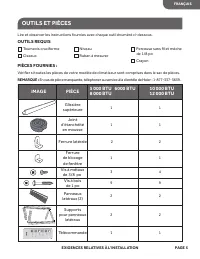
Page 32 - OUTILS ET PIÈCES; OUTILS REQUIS; EXIGENCES RELATIVES À L'INSTALLATION
OUTILS ET PIÈCES Lire et observer les instructions fournies avec chaque outil énuméré ci-dessous. OUTILS REQUIS PIÈCES FOURNIES : Vérifier si toutes les pièces de votre modèle de climatiseur sont comprises dans le sac de pièces. REMARQUE : En cas de pièce manquante, téléphoner au service à la clientè...
Page 33 - INSTALLATION À LA FENÊTRE; EXIGENCES RELATIVES À L’EMPLACEMENT
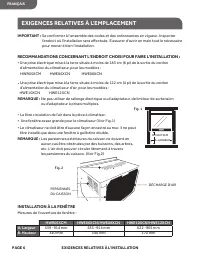
PAGE 6 EXIGENCES RELATIVES À L'INSTALLATION IMPORTANT : e S conformer à l'ensemble des codes et des ordonnances en vigueur. Inspecter l'endroit où l'installation sera eff ectuée. S'assurer d'avoir en main tout le nécessaire pour mener à bien l'installation. RECOMMANDATIONS CONCERNANT L'ENDROIT CHOI...
Page 34 - SÉCURITÉ ÉLECTRIQUE et AVERTISSEMENTS; EXIGENCES EN MATIÈRE D'ÉLECTRICITÉ; CORDON D'ALIMENTATION
1. NE PAS couper ou enlever la broche de mise à la terre de la fiche d'alimentation. Cela pourrait provoquer des étincelles ou un incendie, et annulera toutes les garanties. Pour des raisons de sécurité, le climatiseur doit être correctement mis à la terre. 2. Pour éviter tout risque d'incendie ou ...
Page 35 - MOYEN DE MISE À LA TERRE REQUIS
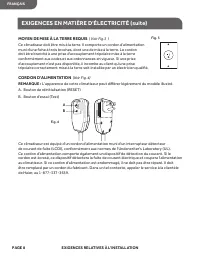
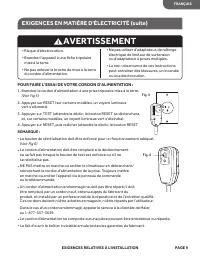
PAGE 8 EXIGENCES RELATIVES À L'INSTALLATION MOYEN DE MISE À LA TERRE REQUIS ( Voir Fig.3 ) Ce climatiseur doit être mis à la terre. Il comporte un cordon d'alimentation muni d'une fiche à trois br oche s, dont une de mise à la terre. Le cordon doit être br anché à une prise d'accouplement tripolaire ...
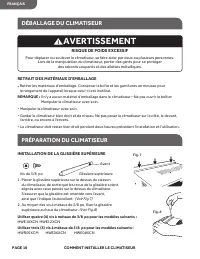
Page 37 - RETRAIT DES MATÉRIAUX D'EMBALLAGE; INSTALLATION DE LA GLISSIÈRE SUPÉRIEURE; DÉBALLAGE DU CLIMATISEUR; RISQUE DE POIDS EXCESSIF; COMMENT INSTALLER LE CLIMATISEUR
RETRAIT DES MATÉRIAUX D'EMBALLAGE • Retirer les matériaux d'emballage. Conserver la boîte et les garnitures en mousse pour le rangement de l'appareil lorsque celui-ci est inutilisé. REMARQUE : Il n'y a aucun matériel d'emballage dans le climatiseur--Ne pas ouvrir le boîtier Manipuler le climatiseu...
Page 38 - INSTALLATION DES PANNEAUX LATÉRAUX
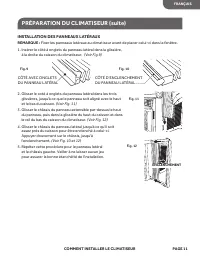
INSTALLATION DES PANNEAUX LATÉRAUX REMARQUE : Fixer les panneaux latéraux au climatiseur avant de placer celui-ci dans la fenêtre.1. Insérer le côté à onglets du panneau latéral dans la glissière, à la droite du caisson du climatiseur. 2. Glisser le coté à onglets du panneau latéral dans les tro...
Page 39 - PRÉPARATION DE LA FENÊTRE; REMARQUE : L'apparence de votre modèle peut être; REMARQUES ET AVERTISSEMENTS :
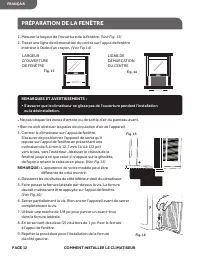
PRÉPARATION DE LA FENÊTRE 1. Mesurer la largeur de l'ouverture de la fenêtre. (Voir Fig. 13) 2. Tracer une ligne de démarcation du centre sur l'appui de fenêtre intérieur à l’aide d’un crayon. (Voir Fig.14) • Ne pas bloquer les zones d'entrée ou de sortie d'air du panneau avant. • Rien ne doit obstr...
Page 40 - ACHÈVEMENT DE L'INSTALLATION; FIXATION DES PANNEAUX LATÉRAUX À LA FENÊTRE; INSTALLATION FINALE
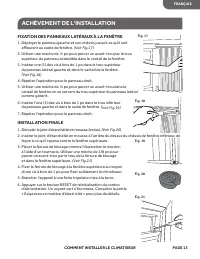
ACHÈVEMENT DE L'INSTALLATION FIXATION DES PANNEAUX LATÉRAUX À LA FENÊTRE 1. Déployer le panneau gauche et son châssis jusqu'à ce qu'il soit affleu rant au cadre de fenêtre. (Voir Fig.17) 2. Utiliser une mèche de ⅛ po pour percer un avant-trou par le trou supérieur du panneau extensible dans le vantail...
Page 41 - UTILISATION DU CLIMATISEUR; DÉMARRAGE DU CLIMATISEUR
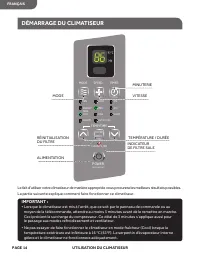
Le fait d'utiliser votre climatiseur de manière appropriée vous procurera les meilleurs résultats possibles.La partie suivante explique comment faire fonctionner ce climatiseur. IMPORTANT : • Lorsque le climatiseur est mis à l'arrêt, que ce soit par le panneau de commande ou au moyen de la télécom...
Page 42 - COOL
1 . Ôter la pellicule de plastique recouvrant le panneau de commande. 2 . Appuyer une fois sur le bouton de mise en marche (POWER) pour mettre en marche l'appareil. Le voyant indicateur de mise en marche s'illuminera. REMARQUE : La Première Fois Que Le Climatiseur Est Branché, L'écran Del Affiche ra L...
Page 43 - VITESSE; MED; MINUTERIE
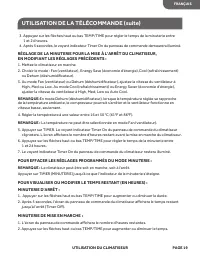
DÉMARRAGE DU CLIMATISEUR (suite) VITESSE 1. u p p A yer sur FAN SPEED (vitesse du ventilateur) jusqu'à ce que le voyant indicateur s'illumine au réglage désiré. 2. r e n n o i t c e l é S High (élevé), Med (moyen), Low (bas), ou Auto Cool (rafraîchissement automatique). H G I H ―Pour un rafraîchisse...
Page 45 - RÉINITIALISATION DU FILTRE; REMARQUE : En Braille pour les personnes ayant une; L'apparence de la télécommande peut; REMARQUE : Retirer et jeter le; UTILISATION DE LA TÉLÉCOMMANDE; MISE EN MARCHE/ARRÊT
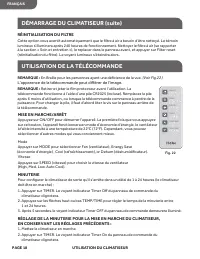
RÉINITIALISATION DU FILTRE Cette option vous avertit automatiquement que le filt re à air a besoin d'être nettoyé. Le témoin lumineux s'illuminera après 240 heures de fonctionnement. Nettoyer le filt re à air (se rapporter à la section « Soin et entretien »), le replacer dans le panneau avant, et appu...
Page 47 - VEILLE; CHANGEMENT DU SENS DE CIRCULATION DE L'AIR
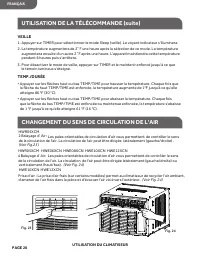
VEILLE 1. u p p A yer sur TIMER pour sélectionner le mode Sleep (veille). Le voyant indicateur s'illuminera. 2. a L température augmentera de 2˚ F une heure après la sélection de ce mode. La température augmentera ensuite d'un autre 2 ˚F après une heure. L'appareil maintiendra cette température pend...
Page 48 - SONS NORMAUX DU CLIMATISEUR; SONS NORMAUX
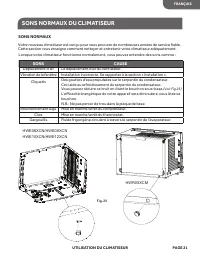
UTILISATION DU CLIMATISEUR PAGE 21 SONS NORMAUX DU CLIMATISEUR FRANÇAIS SONS NORMAUX Votre nouveau climatiseur est conçu pour vous procurer de nombreuses années de service fi able. Cette section vous enseigne comment nettoyer et entretenir votre climatiseur adéquatement. SONS CAUSE Déplacement d’air ...
Page 49 - NETTOYAGE DU FILTRE À AIR; ENTRETIEN DU CLIMATISEUR; REMARQUE : Ne jamais faire f
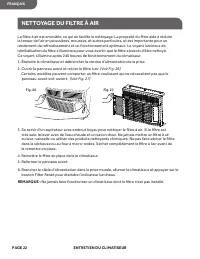
Le filt re à air est amovible, ce qui en f acilite le ne tt oyage. La propr eté du filt re aide à r édui re la teneur de l'air en poussières , mousses , et aut res particule s , et est importante pour un r endement de refr oidissement et un f onctionnement optimaux. Le voy ant lumineux de r éinitialis...
Page 50 - CLIMATISEUR; le service Haier Customer Satisfaction Center,; NETTOYAGE DU PANNEAU AVANT
CLIMATISEUR Votre climatiseur nécessite un entretien annuel pour s’assurer qu'il vous procure un rendement stable tout au long de l'année. Appeler le dépositaire local autorisé pour planifier un examen annuel. Si vous avez besoin d'une référence, il est possible d'en obtenir en appelant le service à...
Page 51 - DÉPANNAGE; PROBLÈME
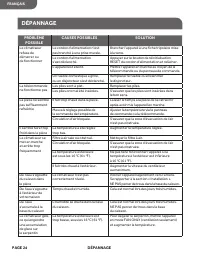
PAGE 24 DÉPANNAGE DÉPANNAGE PROBLÈME POSSIBLE CAUSES POSSIBLES SOLUTION Le climatiseur refuse de démarrer ou de fonctionner Le cordon d'alimentation n'est pas branché à une prise murale. Brancher l'appareil à une fiche tripolaire mise à la terre. Le cordon d'alimentation s'est déclenché. Appuyer sur...
Page 52 - GARANTIE LIMITÉE
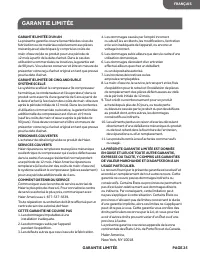
GARANTIE LIMITÉE D'UN AN La présente garantie couvre l'ensemble des vices de fabrication ou de matériaux relativement aux pièces mécaniques et électriques (y compris les coûts de main-d'œuvre) de ce produit pour une période de 12 mois à partir de la date d'achat. Dans le cas des utilisations commerc...
Page 55 - PÁGINA 2; SE DEBE SEGUIR LA INFORMACIÓN DE ESTA GUÍA DE USO Y CUIDADO; ADVERTENCIA; PRECAUCIONES IMPORTANTES
1. Utilice este aire acondicionado solamente para lo que fue diseñado, según se describe en esta guía de uso y cuidado. 2. Antes de poner en funcionamiento, este aire acondicionado debe instalarse correctamente y estar conectado al tomacorriente apropiado que corresponda al cable de suministro eléct...
Page 56 - técnicos; LEA Y SIGA CUIDADOSAMENTE; GUARDE ESTAS INSTRUCCIONES; Para desecho responsable del producto, por favor contacte
INFORMACIÓN DE SEGURIDAD PÁGINA 3 8. Este aire acondicionado contiene refrigerante R410a y requiere que técnicos certificados utilicen el equipo, herramientas y estándares de seguridad adecuados aprobados para este refrigerante. Utilice únicamente equipo certificado para el refrigerante R410a. Además,...
Page 57 - se incluyen en esta guía de uso y cuidado.; PÁGINA 4; INFORMACIÓN DE SEGURIDAD
SEGURIDAD EN EL FUNCIONAMIENTO Y ADVERTENCIAS 1. Este aire acondicionado no contiene partes a las que el cliente pueda dar mantenimiento. Si tiene problemas o dudas sobre el funcionamiento del aire acondicionado llame siempre al centro de servicio al cliente de Haier: 1-877-337-3639. 2. Asegúrese de...
Page 58 - HERRAMIENTAS Y PARTES; HERRAMIENTAS NECESARIAS; IMAGEN; REQUISITOS DE INSTALACIÓN
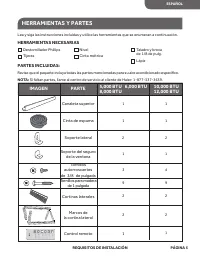
HERRAMIENTAS Y PARTES Lea y siga las instrucciones incluidas y utilice las herramientas que se enumeran a continuación. HERRAMIENTAS NECESARIAS PARTES INCLUIDAS: Revise que el paquete incluya todas las partes mencionadas para su aire acondicionado especí fi co. NOTA: Si faltan partes, llame al centro...
Page 59 - LA UBICACIÓN DEBE CONTAR CON LO SIGUIENTE:; INSTALACIÓN EN UNA VENTANA; REQUISITOS DE UBICACIÓN
PÁGINA 6 REQUISITOS DE INSTALACIÓN IMPORTANTE: Respete todos los códigos y normativas correspondientes. Revise la ubicación donde se instalará el aire acondicionado. Asegúrese de tener todo lo necesario para realizar la instalación correctamente. LA UBICACIÓN DEBE CONTAR CON LO SIGUIENTE: • Tomacorr...
Page 60 - SEGURIDAD ELÉCTRICA y ADVERTENCIAS; REQUISITOS ELÉCTRICOS; CABLE DE SUMINISTRO ELÉCTRICO
1. O N corte ni quite la clavija de conexión a tierra en el cable de suministro eléctrico colocado. Si lo hace pueden salir chispas o fuego y se invalidarían todas las garantías. Por motivos de seguridad, el aire acondicionado debe conectarse a tierra de manera apropiada. 2. r a P a evitar el ries...
Page 61 - MÉTODO DE PUESTA A TIERRA REQUERIDO; REQUISITOS ELÉCTRICOS, continuación
PÁGINA 8 REQUISITOS DE INSTALACIÓN MÉTODO DE PUESTA A TIERRA REQUERIDO (véase la Figura 3). Este aire acondicionado debe conectarse a tierra y está equipado con un cable de suministro eléctrico que tiene un enchufe con conexión a tierra de 3 clavijas. El cable de suministro eléctrico debe enchuf...
Page 62 - PARA PROBAR EL CABLE DE SUMINISTRO ELÉCTRICO:
PARA PROBAR EL CABLE DE SUMINISTRO ELÉCTRICO: 1. f u h c n E e el cable de suministro eléctrico en un tomacorriente apropiado de 3 clavijas con conexión a tierra (véase la Figura 5) . 2. a m i r p O RESET (restablecer) (en algunos dispositivos se encenderá una luz verde). 3. a m i r p O TEST (pr...
Page 63 - CÓMO DESEMPACAR EL AIRE ACONDICIONADO; RIESGO DE EXCESO DE PESO; CÓMO INSTALAR
CÓMO QUITAR LOS MATERIALES DE EMPAQUE • Cómo quitar los materiales de empaque. Guarde la caja y la espuma de empaque para almacenar la unidad cuando no la esté utiliz ando. NOTA: NO hay materiales de empaque internos qué quitar. No abra el gabinete. • Manipule el aire acondicionado con cuidado. • Ma...
Page 64 - INSTALACIÓN DE LOS SEGUROS PARA CORTINA; CÓMO PREPARAR EL AIRE ACONDICIONADO, continuación
INSTALACIÓN DE LOS SEGUROS PARA CORTINA NOTA: Fije las cortinas laterales al aire acondicionado antes de colocar la unidad en la ventana.1. Coloque el lado con aleta de la cortina lateral en la guía del lado derecho del gabinete del aire acondicionado (véase la Figura 9). 2. Deslice hacia abajo el l...
Page 65 - CÓMO PREPARAR LA VENTANA; NOTA: La apariencia del modelo que usted tiene puede ser; NOTAS Y ADVERTENCIAS:
CÓMO PREPARAR LA VENTANA 1. Mida el ancho de la abertura de la ventana (véase la Figura 13) . 2. Marque con un lápiz una línea central en la parte interior de la base de la ventana (véase la Figura 14) . • NO obstruya las partes por donde se descarga el aire o por donde entra el aire en el panel fro...
Page 66 - CÓMO FINALIZAR LA INSTALACIÓN; CÓMO FIJAR LAS CORTINAS LATERALES A LA VENTANA
CÓMO FINALIZAR LA INSTALACIÓN CÓMO FIJAR LAS CORTINAS LATERALES A LA VENTANA 1. Jale hacia afuera la cortina izquierda y el marco hasta que encajen al ras de la parte lateral del marco de la ventana (véase la Figura 17) . 2. Con una broca de taladro de ⅛ de pulgada, haga un orificio inicial a tra...
Page 67 - CÓMO ENCENDER EL AIRE ACONDICIONADO; USO DEL AIRE ACONDICIONADO
Poner en funcionamiento de manera correcta el aire acondicionado le permite obtener los mejores resultados posibles.Esta sección le explica cómo poner en funcionamiento este aire acondicionado. CÓMO ENCENDER EL AIRE ACONDICIONADO IMPORTANTE: • o d n a u C apague el aire acondicionado, ya sea en el...
Page 68 - MODO; DEHUM: Ayuda a eliminar la humedad de la habitación. Esta con; CÓMO ENCENDER EL AIRE ACONDICIONADO, continuación
1. Quite con cuidado la película de plástico transparente del panel de control.2. Oprima POWER (encendido) una vez para encender el aire acondicionado. Se encenderá la luz indicadora POWER. NOTA: Cuando el aire acondicionado se conecte por primera vez, la pantalla LED mostrará “88” durante 3 segundo...
Page 69 - NOTA: En el modo Dehum, cuando la temperatura con
CÓMO ENCENDER EL AIRE ACONDICIONADO, continuación SPEED 1. Oprima FAN SPEED hasta que vea que la luz indicadora se enciende para la con fi guración deseada. 2. Elija High, Med, Low o Auto Cool.lHIGH: Para enfriar al máximo.MED: Para enfriamiento normal.LOW: Para enfriar al mínimo.AUTO COOL (ENFRI...
Page 70 - PARA BORRAR LA PROGRAMACIÓN DEL TEMPORIZADOR:
CÓMO ENCENDER EL AIRE ACONDICIONADO, continuación 7. La luz indicadora Timer On permanecerá encendida. PARA BORRAR LA PROGRAMACIÓN DEL TEMPORIZADOR: NOTA: El aire acondicionado puede estar encendido o apagado.Presione TIMER (TEMPORIZADOR) hasta que la luz del indicador de temporizador se apague. PAR...
Page 72 - USO DEL CONTROL REMOTO, continuación; NOTA: En el modo Fan no se puede con; PARA BORRAR LA PROGRAMACIÓN DE DEMORA DEL TEMPORIZADOR:
USO DEL CONTROL REMOTO, continuación PARA CONFIGURAR EL TEMPORIZADOR PARA QUE ENCIENDA EL AIRE ACONDICIONADO CAMBIANDO LOS AJUSTES PREVIOS: 1. Encienda el aire acondicionado.2. Ajuste el modo a Fan, Cool Energy Save, o Dehum. 3. Para el modo Fan o Dehum, ajuste la velocidad del ventilador en High, M...
Page 73 - CAMBIO DE LA DIRECCIÓN DEL AIRE
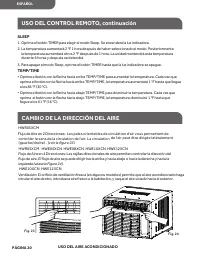
SLEEP 1. Oprima el botón TIMER para elegir el modo Sleep. Se encenderá la luz indicadora.2. La temperatura aumentará 2 °F 1 hora después de haber seleccionado el modo. Posteriormente la temperatura aumentará otros 2 °F después de 1 hora. La unidad mantendrá esta temperatura durante 6 horas y después...
Page 74 - SONIDOS NORMALES DE UN AIRE ACONDICIONADO; SONIDOS NORMALES
USO DEL AIRE ACONDICIONADO PÁGINA 21 SONIDOS NORMALES DE UN AIRE ACONDICIONADO ESPAÑOL SONIDOS NORMALES Su nuevo aire acondicionado está diseñado para ofrecerle muchos años de servicio con fi able. En esta sección se explica cómo limpiar y cuidar adecuadamente el aire acondicionado. SONIDOS MOTIVO Mo...
Page 75 - LIMPIEZA DEL FILTRO DE AIRE; CÓMO CUIDAR EL AIRE ACONDICIONADO
El fi ltro de aire se puede quitar para facilitar la limpieza. Un fi ltro de aire limpio contribuye a eliminar el polvo, las pelusas y partículas del aire para optimizar el enfriamiento y para que el aparato funcione e fi cazmente. La luz de restablecimiento del fi ltro se encenderá para noti fi carle ...
Page 76 - AIRE ACONDICIONADO; IMPORTANTE; LIMPIEZA DEL PANEL FRONTAL
AIRE ACONDICIONADO El aire acondicionado requiere mantenimiento anual para garantizar su funcionamiento estable todo el año. Llame a su taller de reparaciones de aire acondicionado local para programar una revisión anual. En caso de que necesite una referencia, puede llamar al centro de servicio al ...
Page 77 - SOLUCIÓN DE PROBLEMAS; POSIBLE
PÁGINA 24 SOLUCIÓN DE PROBLEMAS SOLUCIÓN DE PROBLEMAS POSIBLE PROBLEMA POSIBLE CAUSA SOLUCIÓN El aire acondicionado no enciende ni funciona El cable de suministro eléctrico no está conectado en un tomacorriente. Enchufe la unidad en un tomacorriente apropiado con conexión a tierra. El cable de sumin...
Page 78 - GARANTÍA LIMITADA
UN AÑO DE GARANTÍA LIMITADA Esta garantía cubre todos los defectos de fabricación o de material para las partes mecánicas y eléctricas (incluidos los costos de mano de obra) de este producto, durante un período de 12 meses a partir de la fecha de compra. Para usos comerciales o de renta, la garantía...












 Haier HF11CM10NW
User Manual
Haier HF11CM10NW
User Manual
 Haier BCF46B
User Manual
Haier BCF46B
User Manual
 Haier HCC2230AGS
User Manual
Haier HCC2230AGS
User Manual
 Haier HLTD500ACW
User Manual
Haier HLTD500ACW
User Manual
 Haier HRT18RCPB1
User Manual
Haier HRT18RCPB1
User Manual
 Haier HVTS18DTBB
User Manual
Haier HVTS18DTBB
User Manual
 Haier HRT18R1APB
User Manual
Haier HRT18R1APB
User Manual
 Haier ESA3159
User Manual
Haier ESA3159
User Manual
 Haier CPN11XCJ
User Manual
Haier CPN11XCJ
User Manual
 Haier PBFS21EDAS
User Manual
Haier PBFS21EDAS
User Manual
 Haier HLP24E
User Manual
Haier HLP24E
User Manual
 Haier DWL4035DBWW
User Manual
Haier DWL4035DBWW
User Manual
 Haier CPN12XH9
User Manual
Haier CPN12XH9
User Manual