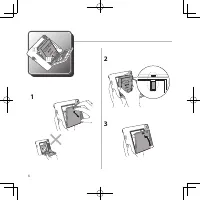
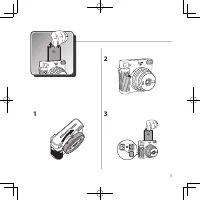
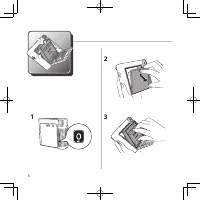
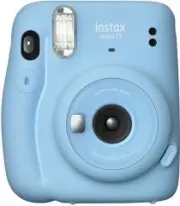
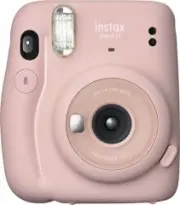
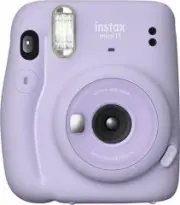
Page 9 - Names of Parts; Front; English
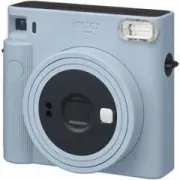
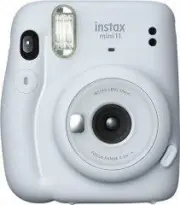
EN 9 Names of Parts Front 3 56 1 2 4 7 8 9 10 11 Back 15 12 18 17 16 121314 1 Flash lampface 2 Film ejection slot 3 Flash charging lamp 4 Viewfinder 5 Shutter button 6 Lens ring / Power 7 AE light sensor 8 Flash light sensor 9 Lens barrel 10 Selfie mirror 11 Lens cover / Lens 12 Strap eyelet 13 Back...
Page 10 - Taking Pictures
EN 10 Taking Pictures Do not open the back cover until you have used up the film. Otherwise, the rest of the film will become exposed and turn white, and can no longer be used. 1 Turn on the camera by rotating the lens ring to ON. The lens barrel extends and the flash charging lamp blinks and then l...
Page 11 - Taking a Photo in Selfie Mode; Taking a picture of yourself; Taking a closeup
EN 11 Taking a Photo in Selfie Mode Taking a picture of yourself If you shoot in selfie mode, you can take a picture of yourself using the selfie mirror on the front of the camera to confirm your exposure. 1 Rotate the lens ring to SELFIE and pull out the lens to the selfie mode. 2 Hold the camera s...
Page 12 - Precautions for Taking Photos; Precautions for Holding the Camera; Flash charging
EN 12 Precautions for Taking Photos Precautions for Holding the Camera Correct way to hold Do not cover the flash lampface with a finger Do not cover the flash light sensor and AE light sensor with a finger • Take care that a finger or the strap does not cover the flash light sensor, AE light sensor...
Page 14 - Handling; Handling of Camera
EN 14 Handling ■ Handling of Camera 1. The camera is a precision instrument, so do not get it wet, drop it, or subject it to shock. Also, do not place the camera where it will be exposed to sand. 2. Before using a commercially available strap, check the strength of the strap. Be especially careful w...
Page 16 - Specifications; Information for traceability in Europe
EN 16 Specifications Film FUJIFILM instax SQUARE instant film Photo Picture Size 62 mm × 62 mm Lens 2 components, 2 elements, f = 65.75 mm, 1:12.6 Viewfinder Reverse Galilean finder, 0.4×, with target spot Shooting Range 0.3 m and beyond (use selfie mode for 0.3 m to 0.5 m) Shutter Programmed electr...
Page 17 - Teilebezeichnungen; Vorderseite; Deutsch; finden Sie auf den Seiten 3 bis 6.
DE 17 Teilebezeichnungen Vorderseite 3 56 1 2 4 7 8 9 10 11 Rückseite 15 12 18 17 16 121314 1 Blitzlichtfenster 2 Filmausgabeschlitz 3 Blitzladeleuchte 4 Sucher 5 Auslöser 6 Objektivring / Ein/Aus 7 Automatikbelichtungssensor 8 Blitzlichtsensor 9 Objektivtubus 10 Selfie-Spiegel 11 Objektivdeckel/Obj...
Page 18 - Bilder aufnehmen
DE 18 Bilder aufnehmen Öffnen Sie die Rückwand erst, wenn Sie den Film aufgebraucht haben. Sonst wird der Rest des Films belichtet, färbt sich weiß und kann nicht mehr verwendet werden. 1 Schalten Sie die Kamera ein, indem Sie den Objektivring auf ON drehen. Der Objektivtubus fährt heraus, die Blitz...
Page 19 - Aufnahmen im Selfie-Modus; Sich selbst fotografieren; Eine Nahaufnahme machen
DE 19 Aufnahmen im Selfie-Modus Sich selbst fotografieren Im Selfie-Modus können Sie sich selbst fotografieren und dabei mit dem Selfie-Spiegel vorn an der Kamera Ihr Aussehen überprüfen. 1 Drehen Sie den Objektivring auf SELFIE und ziehen Sie das Objektiv auf den Selfie-Modus heraus. 2 Halten Sie d...
Page 20 - Vorsichtsmaßnahmen beim Fotografieren; Vorsichtsmaßnahmen zum Halten der Kamera; Status der
DE 20 Vorsichtsmaßnahmen beim Fotografieren Vorsichtsmaßnahmen zum Halten der Kamera Richtige Halteweise Das Blitzlicht nicht mit dem Finger verdecken Den Blitzlichtsensor und Automatikbelichtungssensor nicht mit dem Finger verdecken • Achten Sie darauf, dass der Blitzlichtsensor, der Automatikbelic...
Page 22 - Handhabung; Handhabung der Kamera
DE 22 Handhabung ■ Handhabung der Kamera 1. Die Kamera ist ein Präzisionsinstrument, lassen Sie sie daher nicht nass werden, lassen Sie sie nicht fallen und setzen Sie sie keinen Stößen aus. Lassen Sie die Kamera außerdem nicht an einem Ort liegen, an dem sie Sand ausgesetzt ist. 2. Überprüfen Sie d...
Page 24 - Technische Daten; Informationen zur Rückverfolgbarkeit in Europa
DE 24 Technische Daten Film FUJIFILM instax SQUARE Sofortbildfilm Foto Größe 62 mm × 62 mm Objektiv 2 Baugruppen, 2 Elemente, f = 65,75 mm, 1:12,6 Sucher Invers-Galiläischer Sucher, 0,4×, mit Zielpunkt Aufnahmebereich 0,3 m und weiter (von 0,3 m bis 0,5 m den Selfie-Modus verwenden) Verschluss Progr...
Page 25 - Noms des pièces; Avant; Français
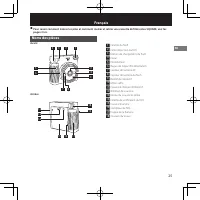
FR 25 Noms des pièces Avant 3 56 1 2 4 7 8 9 10 11 Arrière 15 12 18 17 16 121314 1 Fenêtre du flash 2 Fente d’éjection du film 3 Témoin de chargement du flash 4 Viseur 5 Déclencheur 6 Bague de l’objectif/Alimentation 7 Capteur de lumière AE 8 Capteur de lumière du flash 9 Barillet de l’objectif 10 M...
Page 26 - Prise de photos
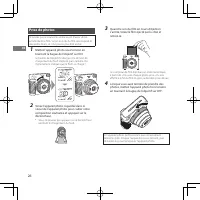
FR 26 Prise de photos N’ ouvrez pas le couvercle arrière avant d’avoir utilisé entièrement le film. Sinon, le reste du film sera exposé et deviendra blanc, et il ne pourra plus être utilisé. 1 Mettez l’appareil photo sous tension en tournant la bague de l’objectif sur ON. Le barillet de l’objectif s...
Page 27 - Prendre une photo en mode Selfie; Prendre un auto-portrait; Faire un gros plan
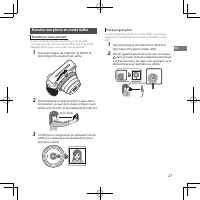
FR 27 Prendre une photo en mode Selfie Prendre un auto-portrait Si vous souhaitez réaliser une photo en mode selfie, vous pouvez vous servir du miroir selfie situé à l’avant de l’appareil photo pour vous cadrer plus facilement. 1 Tournez la bague de l’objectif sur SELFIE et tirez l’objectif jusqu’en...
Page 28 - Précautions pour prendre des photos; Précautions pour la prise en main de l’appareil photo; État du témoin
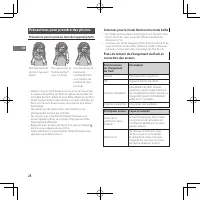
FR 28 Précautions pour prendre des photos Précautions pour la prise en main de l’appareil photo Manière correcte de tenir l’appareil photo Ne couvrez pas la fenêtre du flash avec un doigt Ne couvrez pas le capteur de lumière du flash et le capteur de lumière AE avec un doigt • Veillez à ce que votre...
Page 30 - Manipulation; Manipulation de l’appareil photo
FR 30 Manipulation ■ Manipulation de l’appareil photo 1. L’appareil photo est un instrument de précision : ne le mouillez pas, ne le laissez pas tomber et ne le soumettez pas à des chocs. Ne placez pas non plus l’appareil photo dans un endroit où il puisse se trouver exposé à du sable. 2. Avant d’ut...
Page 32 - Caractéristiques; Informations de traçabilité en Europe
FR 32 Caractéristiques Film Film instantané FUJIFILM instax SQUARE Image photo Taille 62 mm × 62 mm Objectif 2 composants, 2 éléments, f = 65,75 mm, 1:12,6 Viseur Viseur Galiléen inversé, 0,4×, avec spot de cible Plage de prise de vue 0,3 m et plus (0,3m à 0,5m en mode selfie) Obturateur Obturateur ...
Page 33 - Nombres de las piezas; Parte frontal; Español
ES 33 Nombres de las piezas Parte frontal 3 56 1 2 4 7 8 9 10 11 Parte trasera 15 12 18 17 16 121314 1 Flash 2 Ranura de expulsión de la película 3 Piloto de aviso de carga del flash 4 Visor 5 Botón del obturador 6 Anillo del objetivo/Alimentación 7 Sensor de luz AE 8 Sensor de luz del flash 9 Tubo ...
Page 34 - Toma de fotografías
ES 34 Toma de fotografías No abras la tapa trasera hasta que no hayas agotado la película. Si lo haces, el resto de la película sufrirá una exposición a la luz y se volverá de color blanco, no pudiendo volver a usarse. 1 Enciende la cámara girando el anillo del objetivo hacia ON. El tubo del objetiv...
Page 35 - Tomar una foto en modo Selfie; Tomar una foto de ti mismo; Toma de un primer plano
ES 35 Tomar una foto en modo Selfie Tomar una foto de ti mismo Si disparas en el modo Selfie, puedes tomar una foto de ti mismo usando el espejo Selfie en la parte frontal de la cámara para confirmar tu encuadre. 1 Gira el anillo del objetivo a SELFIE y extrae el objetivo en el modo Selfie. 2 Sujeta...
Page 36 - Precauciones al tomar fotografías; Precauciones al sujetar la cámara
ES 36 Precauciones al tomar fotografías Precauciones al sujetar la cámara Modo correcto de sostener la cámara No cubras la superficie del flash con un dedo No cubras el sensor de la luz del flash y el sensor de luz AE con un dedo • Ten cuidado de que un dedo o la correa no cubran el sensor de luz de...
Page 38 - Manejo; Manejo de la cámara
ES 38 Manejo ■ Manejo de la cámara 1. La cámara es un instrumento de precisión, así que no la moje, la deje caer ni la someta a golpes. Además, no coloque la cámara donde quede expuesta a la arena. 2. Antes de usar una correa disponible comercialmente, compruebe la resistencia de la correa. Tenga es...
Page 40 - Especificaciones; Información para la trazabilidad en Europa
ES 40 Especificaciones Película Película instantánea FUJIFILM instax SQUARE Fotografía Tamaño 62 mm × 62 mm Objetivo 2 componentes, 2 elementos, f = 65,75 mm, 1:12,6 Visor Buscador Galileo inverso, 0,4×, con punto objetivo Alcance del disparo De 0,3 m hacia adelante (use el modo selfie entre los 0,3...
Page 41 - TW; 各零件名稱; 中國語(繁體字); instax SQUARE
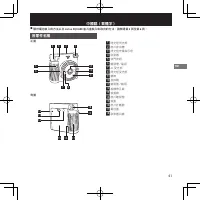
TW 41 各零件名稱 正面 3 56 1 2 4 7 8 9 10 11 背面 15 12 18 17 16 121314 1 閃光燈閃光部 2 底片排出槽 3 閃光燈充電指示燈 4 取景器 5 快門按鈕 6 鏡頭環 / 電源 7 AE 受光部 8 閃光燈受光部 9 鏡筒 10 自拍鏡 11 鏡頭蓋 / 鏡頭 12 相機帶孔眼 13 後蓋鎖 14 底片確認窗 15 後蓋 16 底片計數器 17 電池蓋 18 取景器目鏡 中國語(繁體字) ● ● 關於電池裝入的方法以及 instax SQUARE 底片盒裝入和取出的方法,請參閱第 3 頁至第 6 頁。
Page 42 - 拍照; 將鏡頭環轉到; 拍照結束後將鏡頭環轉到
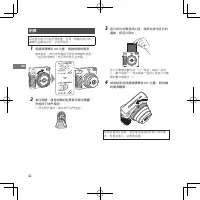
TW 42 拍照 用完底片後才可以打開後蓋。否則,剩餘的底片將會曝光且變成白色,不能再使用。 1 將鏡頭環轉到 ON 位置,開啟相機的電源。 鏡筒伸出,閃光燈充電指示燈從閃爍變為亮燈。(指示燈閃爍時,表示閃光燈正在充電。) 2 拿住相機,透過相機的取景器來確定構圖,然後按下快門按鈕。 * 閃光燈充電時,無法按下快門按鈕。 3 底片排出的聲音停止後,請抓住排出底片的邊緣,將底片取出。 底片計數器的數字從“ 10 ”開始,每拍一張照 片,數字就減一。拍完最後一張照片後底片計數器的數字會顯示“ 0 ”。 4 拍照結束後將鏡頭環轉到 OFF 位置,將相機 的電源關閉。 如果相機發生故障,請在電源接通的...
Page 43 - 在自拍模式下拍照; 拍攝自拍照; 拍攝特寫; SELFIE
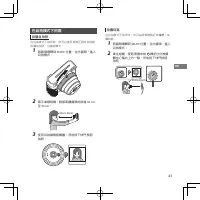
TW 43 在自拍模式下拍照 拍攝自拍照 在自拍模式下拍照時,您可以使用相機正面的自拍鏡拍攝自拍照,以確認曝光。 1 將鏡頭環轉到 SELFIE 位置,拉出鏡頭,進入 自拍模式。 2 兩手拿穩相機,臉部距離鏡頭的前端 30 cm 至 50 cm 。 30cm-50cm 3 使用自拍鏡確認構圖,然後按下快門按鈕拍照。 拍攝特寫 在自拍模式下拍照時,您可以將相機移近被攝體,拍攝特寫。 1 將鏡頭環轉到 SELFIE 位置,拉出鏡頭,進入 自拍模式。 2 拿住相機,使取景器中的 標記位於被攝 體中心偏右上方一點,然後按下快門按鈕拍照。 30cm-50cm
Page 44 - 拍照注意事項; 握持相機的注意事項; 普通模式和自拍模式的拍攝距離
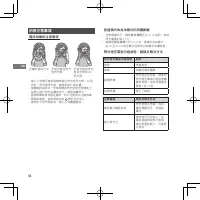
TW 44 拍照注意事項 握持相機的注意事項 正確的握持方法 手指勿遮住閃光 燈閃光部 手指勿遮住閃光燈受光部和 AE 受光部 • 請小心勿讓手指或相機帶遮住閃光燈受光部、 AE 受 光部、閃光燈閃光部、鏡頭或底片排出槽。 • 相機橫向拍照時,所持相機的閃光燈閃光部應朝上。 • 在禁止進行閃光拍攝的地方,請勿拍攝照片。 • 握持相機時請勿握住鏡筒。照片可能無法正確成像。 • 窺視取景器,使取景器中的 標記位於中心。 • 當您按下快門按鈕時,請小心勿觸碰鏡頭。 普通模式和自拍模式的拍攝距離 • 在普通模式下,應距離被攝體至少 0.5 m 拍照。有效 閃光範圍約為 2.7 m 。 • 相機距離被攝...
Page 45 - 安全使用須知; 警告
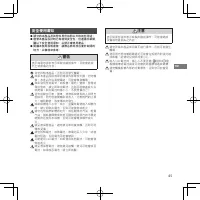
TW 45 安全使用須知 ● ● 請勿將本產品及其附件用於拍照以外的其他用途。 ● ● 儘管本產品設計時已考慮到安全性,但還請仔細閱讀以下安全使用須知,以便正確使用產品。 ● ● 閱讀本使用說明書後,請務必將其放在便於取閱的地方,以備將來參考。 警告 表示如果忽視本表示或做出錯誤操作,可能會造成死亡或重傷之內容。 切勿拆解本產品。否則可能發生觸電。 如果本產品因跌落等而導致內部零件外露,切勿觸摸。本產品內設高壓電路,可能會導致觸電。 如果發現任何異常,如相機(電池)變熱、冒煙或發出焦味,請立即取出電池。否則可能會造成火災或燙傷(取出電池時請小心,不要燙傷自己)。 切勿給騎自行車、駕車、滑滑板或...
Page 46 - 使用
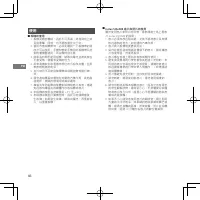
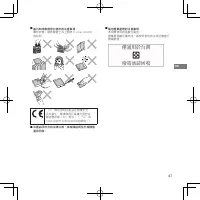
TW 46 使用 ● ■ 相機的使用 1. 相機是精密機械,因此不可弄濕、掉落到地上或受到衝擊。同時,也不要放置於沙子中。 2. 使用市售相機帶時,必須先確認一下相機帶的強度才可以使用。手機和智能手機用的相機帶只能供輕量機器使用,所以應特別注意。 3. 如果長時間不使用相機,請取出電池並將其放在不會受熱、積塵和受潮的地方。 4. 用吹風機吹去取景器等部位的污垢和灰塵,並用軟布輕輕擦拭乾淨。 5. 去污時忌不可使用稀釋劑或酒精溶劑等進行擦拭。 6. 請勿將相機長時間放在封閉的汽車內部、其他高溫場所、潮濕的環境中或海岸邊等。 7. 樟腦丸等防蛀劑的氣體對相機和底片有害。請避免在放有樟腦丸的櫥櫃內存...
Page 48 - 規格
TW 48 規格 底片 富士馬上看底片 instax SQUARE 照片尺寸 62 mm × 62 mm 鏡頭 2 組 2 片構成, f = 65.75 mm , 1:12.6 取景器 逆伽利略取景器, 0.4 倍, 帶瞄準標記 拍攝距離 0.3 m ∼ ∞(在 0.3 m 至 0.5 m 的距離內可使用自拍模式) 快門 經編程電子快門 1/2 至 1/400 秒 光線不足時可使用慢速同步 曝光控制 自動, Lv 5.0 至 15.5 ( ISO 800 ) 底片排出 電動式 底片顯影時間 約為 90 秒(因環境溫度而異) 閃光燈 持續閃光(自動調光),充電時間: 7.5 秒或更短(使用新電 ...
Page 49 - 각부 명칭; 한국어
KO 49 각부 명칭 앞면 3 56 1 2 4 7 8 9 10 11 뒷면 15 12 18 17 16 121314 1 플래시램프 2 필름 출구 슬롯 3 플래시 충전 램프 4 뷰파인더 5 셔터 버튼 6 렌즈 링 / 전원 7 AE 라이트 센서 8 플래시 라이트 센서 9 렌즈 배럴 10 셀피 미러 11 렌즈 커버 / 렌즈 12 스트랩 구멍 13 뒷면 커버 잠금 14 필름 확인창 15 뒷면 커버 16 필름 카운터 17 배터리 덮개 18 뷰파인더 접안렌즈 한국어 ● 배터리 삽입 방법과 instax SQUARE 필름 팩의 삽입과 제거 방법에 대...
Page 50 - 사진 촬영하기
KO 50 사진 촬영하기 필름을 다 쓸 때까지 뒷면 커버를 열지 마십시오. 그렇지 않으면, 나머지 필름이 노출되어 하얗게 변하고 더는 사용할 수 없습니다. 1 렌즈 링을 ON으로 돌려 카메라 전원을 켭니다. 렌즈 배럴이 확장되고 플래시 충전 램프가 깜박인 후에 켜집니다. (점멸하는 것은 플래시가 충전 중임을 나타냅니다) 2 카메라를 잡고 카메라의 뷰파인더를 통해 보면서 원하는 구도를 잡은 후에 셔터 버튼을 누릅니다. * 플래시를 충전하는 동안에는 셔터 버튼을 누를 수 없습니다. 3 필름이 배출되는 소리가 멈추면 배출된 필름의 가장자...
Page 51 - 셀피 모드로 사진 촬영하기; 자화상 촬영하기
KO 51 셀피 모드로 사진 촬영하기 자화상 촬영하기 셀피 모드로 촬영하는 경우, 카메라 앞에 있는 셀피 미러를 사용하여 자신의 사진을 촬영하여 노출을 확인할 수 있습니다. 1 렌즈 링을 SELFIE로 돌리고 렌즈를 셀피 모드로 당기십시오. 2 카메라를 양손으로 단단히 잡고 얼굴이 렌즈의 끝에서 30~50cm 떨어지도록 하십시오. 30cm-50cm 3 셀피 미러를 사용하여 구도를 확인하고 셔터를 눌러 사진을 촬영하십시오. 근접 촬영하기 셀피 모드로 촬영하는 경우, 카메라를 피사체에 가까이 이동하여 근접 촬영할 수 있습니다. 1 렌즈...
Page 52 - 사진 촬영 시의 주의 사항; 카메라 잡을 시의 주의사항
KO 52 사진 촬영 시의 주의 사항 카메라 잡을 시의 주의사항 올바르게 잡는 방법 손가락으로 플래시램프를 가리지 마십시오. 손가락으로 플래시 라이트 센서와 AE 라이트 센서를 가리지 마십시오. • 손가락 또는 스트랩이 플래시 라이트 센서, AE 라이트 센서, 플래시램프, 렌즈 또는 필름 출구 슬롯을 가리지 않도록 주의하십시오. • 수평 방향의 사진을 찍을 때는 플래시램프가 위에 오도록 카메라를 잡으십시오. • 플래시 촬영이 금지된 곳에서는 사진을 찍지 마십시오. • 카메라를 잡을 때는 렌즈 배럴을 잡지 마십시오. 완성된 사진에 나...
Page 54 - 취급
KO 54 취급 ■ 카메라 취급 1. 카메라는 정밀 기기이므로 젖거나 떨어뜨리거나 충격을 주지 마십시오. 또한 모래에 노출될 곳에 카메라를 두지 마십시오. 2. 시판되는 스트랩을 사용하기 전에 스트랩의 강도를 확인하십시오. 휴대폰 및 스마트폰용 스트랩은 가벼운 장치를 위해 만들어졌기 때문에 이 스트랩을 사용할 경우에는 특히 주의하여야 합니다. 3. 카메라를 장시간 사용하지 않을 때는 배터리를 꺼내 열, 먼지 및 습기를 피하는 곳에 보관하십시오. 4. 뷰파인더 창 등의 때나 먼지는 에어 블로어로 제거하고 부드러운 천 조각으로 가볍게 ...
Page 56 - 제품 사양
KO 56 제품 사양 필름 FUJIFILM instax SQUARE 인스턴트 필름 사진 화상 크기 62 mm × 62 mm 렌즈 2군 2매 구성, f = 65.75 mm, 1:12.6 뷰파인더 역 갈릴레안식 파인더, 0.4×, 타깃 스팟 포함 촬영 범위 0.3 m 이상 (0.3 m~0.5 m 셀피 모드 사용) 셔터 프로그램식 전자 셔터1/2~1/400초.저조도용 슬로우싱크로 노출 제어 자동, Lv 5.0~15.5 (ISO 800) 필름 배출 전동식 필름현상 속도 약 90초 (주위 온도에 따라 다름) 플래시 상시 발광 플래시 (자동 ...
Page 57 - Nomes das Peças; Frente; Português
PT 57 Nomes das Peças Frente 3 56 1 2 4 7 8 9 10 11 Verso 15 12 18 17 16 121314 1 Face da lâmpada do flash 2 Ranhura de ejeção de filme 3 Lâmpada de carregamento do flash 4 Visor 5 Disparador 6 Anel da objetiva/Alimentação 7 Sensor de luz AE 8 Sensor de luz do flash 9 Cano da objetiva 10 Espelho par...
Page 58 - Fotografar
PT 58 Fotografar Não abra a tampa traseira até terminar o filme. Caso contrário, o resto do filme será exposto e ficará branco, e já não poderá ser utilizado. 1 Ligue a câmara rodando o anel da objetiva para ON. O cano da objetiva prolonga-se e a lâmpada de carregamento do flash pisca e acende-se. (...
Page 59 - Tirar uma Fotografia no Modo Selfie; Tirar uma Fotografia Sua; Tirar uma fotografia aproximada
PT 59 Tirar uma Fotografia no Modo Selfie Tirar uma Fotografia Sua Se fotografar no modo selfie, poderá tirar uma fotografia sua usando o espelho de selfies na parte frontal da câmara para confirmar a sua exposição. 1 Rode o anel da objetiva para SELFIE e puxe a objetiva para o modo de selfie. 2 Seg...
Page 60 - Precauções para Tirar Fotografias; Precauções para Segurar a Câmara
PT 60 Precauções para Tirar Fotografias Precauções para Segurar a Câmara Forma correta de segurar Não cubra a face da lâmpada do flash com um dedo Não cubra o sensor de luz do flash e o sensor de luz AE com um dedo • Tenha o cuidado de evitar que um dedo ou a correia obstruam sensor de luz do flash,...
Page 62 - Manuseamento; Manusear a Câmara
PT 62 Manuseamento ■ Manusear a Câmara 1. A câmara é um instrumento de precisão, por isso, não a deixe molhar-se, não a deixe cair, nem a submeta a choques. Além disso, não coloque a câmara num local onde fique exposta a areia. 2. Antes de colocar uma correia disponível no mercado, verifique a resis...
Page 64 - Especificações; Informações para rastreabilidade na Europa
PT 64 Especificações Filme Filme instantâneo FUJIFILM instax SQUARE Fotografia Tamanho 62 mm × 62 mm Objetiva 2 componentes, 2 elementos, f = 65,75 mm, 1:12,6 Visor Localizador galileano invertido, 0,4×, com ponto alvo Alcance de Disparo 0,3 m e mais longe (use o modo selfie para 0,3 m a 0,5 m) Obtu...
Page 65 - Названия деталей; Лицевая сторона; Русский
RU 65 Названия деталей Лицевая сторона 3 56 1 2 4 7 8 9 10 11 Тыльная сторона 15 12 18 17 16 121314 1 Лампа вспышки 2 Отверстие для вывода отпечатков 3 Индикатор зарядки вспышки 4 Видоискатель 5 Кнопка спуска затвора 6 Кольцо объектива/Питание 7 Светочувствительный датчик АЕ 8 Светочувствительный да...
Page 66 - Съемка
RU 66 Съемка Не открывайте заднюю крышку, пока не израсходуете фотобумагу. В противном случае оставшаяся фотобумага засветится и станет белой и будет непригодна для использования. 1 Включите фотокамеру, повернув кольцо объектива в положение ON. Корпус объектива выдвигается, и индикатор зарядки вспыш...
Page 67 - Съемка автопортрета; Съемка крупным планом
RU 67 Съемка в режиме автопортрета (селфи) Съемка автопортрета В режиме автопортрета можно сфотографировать себя, установив композицию с помощью зеркала для автопортретов, расположенного на корпус панели фотокамеры. 1 Поверните кольцо объектива в положение SELFIE и выдвиньте объектив в режим автопор...
Page 68 - Меры предосторожности при съемке; Состояние
RU 68 Меры предосторожности при съемке Меры предосторожности при удерживании фотокамеры Правильный способ держать фотокамеру Не закрывайте лампу вспышки пальцем Не закрывайте светочувствительный датчик вспышки и светочувствительный датчик AE пальцем • Следите за тем, чтобы палец или ремешок не закры...
Page 70 - Уход за изделием; Уход за фотокамерой
RU 70 Уход за изделием ■ Уход за фотокамерой 1. Фотокамера является точным инструментом, поэтому берегите ее от намокания, падения и ударной нагрузки. Кроме того, не держите фотокамеру в местах, где в нее может попадать песок. 2. Перед использованием имеющегося в продаже ремешка проверьте его прочно...
Page 72 - Технические характеристики; Информация для отслеживания в Российской
RU 72 Технические характеристики Фотобумага Фотобумага для моментальной печати instax SQUARE производства FUJIFILM Размер фотоснимка 62 мм × 62 мм Объектив Двухкомпонентный, двухэлементный объектив, f = 65,75 мм, 1:12,6 Видоискатель Видоискатель обратный галилеев, 0,4-кратное увеличение, с точкой фо...
Page 73 - Nomi delle parti; Parte anteriore; Italiano; vedere le pagine da 3 a 6.
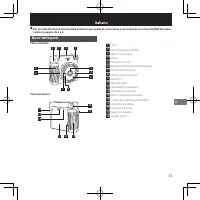
IT 73 Nomi delle parti Parte anteriore 3 56 1 2 4 7 8 9 10 11 Parte posteriore 15 12 18 17 16 121314 1 Flash 2 Slot di espulsione del film 3 Spia di ricarica flash 4 Mirino 5 Pulsante di scatto 6 Barilotto dell’obiettivo/Alimentazione 7 Sensore luminosità AE 8 Sensore luminosità flash 9 Obiettivo 10...
Page 74 - Scatto di foto
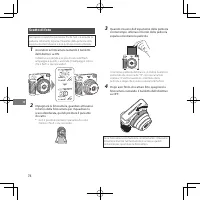
IT 74 Scatto di foto Non aprire il coperchio posteriore finché non si è esaurita la pellicola. Altrimenti, la parte rimanente della pellicola verrà esposta, diventerà bianca e non potrà più essere utilizzata. 1 Accendere la fotocamera ruotando il barilotto dell’obiettivo su ON. L’obiettivo si estend...
Page 75 - Scatto in modalità selfie; Scatto di un autoritratto; Scatto di un primo piano
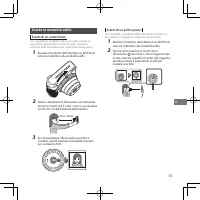
IT 75 Scatto in modalità selfie Scatto di un autoritratto Se si riprende in modalità selfie, è possibile scattare un autoritratto utilizzando lo specchio selfie sulla parte anteriore della fotocamera per confermare l’esposizione. 1 Ruotare il barilotto dell’obiettivo su SELFIE ed estrarre l’obiettiv...
Page 76 - Precauzioni per lo scatto di foto; Precauzioni per impugnare la fotocamera
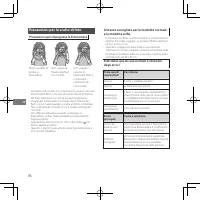
IT 76 Precauzioni per lo scatto di foto Precauzioni per impugnare la fotocamera Modo corretto di tenere la fotocamera Non coprire la finestra del flash con un dito Non coprire il sensore di luminosità flash e il sensore di luminosità AE con un dito • Accertarsi che un dito o la cinghia non coprano i...
Page 78 - Gestione; Gestione della fotocamera
IT 78 Gestione ■ Gestione della fotocamera 1. La fotocamera è uno strumento di precisione, quindi non bagnarla, non lasciarla cadere o sottoporla a sole o fonti di calore. Inoltre, non posizionare la fotocamera in luoghi in cui sarà esposta a sabbia. 2. Prima di utilizzare un cinturino disponibile i...
Page 80 - Caratteristiche; Informazioni per la tracciabilità in Europa
IT 80 Caratteristiche Pellicola FUJIFILM instax SQUARE instant film Dimensioni della foto 62 mm × 62 mm Obiettivo 2 componenti, 2 elementi, f = 65,75 mm, 1:12,6 Mirino Rilevatore Galileo inverso, 0,4×, con punto di destinazione Gamma di ripresa 0,3 m e oltre (utilizzare la modalità selfie da 0,3 m a...
Page 81 - Namen van onderdelen; Voorkant; Nederlands; instax SQUARE film pack.
NL 81 Namen van onderdelen Voorkant 3 56 1 2 4 7 8 9 10 11 Achterkant 15 12 18 17 16 121314 1 Flitslampje 2 Filmuitwerpsleuf 3 Flitsoplaadlampje 4 Zoeker 5 Ontspanknop 6 Lensring/Aan-uit 7 AE-lichtsensor 8 Flitslichtsensor 9 Lens 10 Selfiespiegel 11 Lensdop 12 Riemoogje 13 Vergrendeling achterklep 1...
Page 82 - Foto’s maken
NL 82 Foto’s maken Open de achterklep niet voordat u de film hebt opgebruikt. Anders wordt de rest van de film blootgesteld aan licht en wordt deze wit, en kan hij niet meer worden gebruikt. 1 Schakel de camera in door de lensring naar ON te draaien. De lens schuift uit en het flitslampje knippert e...
Page 83 - Een foto maken in de Selfiestand; Een foto van uzelf maken
NL 83 Een foto maken in de Selfiestand Een foto van uzelf maken Als u in de selfiestand fotografeert, kunt u een foto van uzelf maken met behulp van de selfiespiegel aan de voorzijde van de camera om uw belichting te bevestigen. 1 Draai de lensring naar SELFIE en trek de lens uit naar de selfie-stan...
Page 84 - Afstanden voor Normale stand en Selfiestand
NL 84 Voorzorgsmaatregelen voor het nemen van foto's Voorzorgsmaatregelen voor het vasthouden van de camera Correcte manier om vast te houden Bedek het flitslicht niet met uw vinger Bedek de flitslichtsensor en de AE-lichtsensor niet met uw vinger • Zorg ervoor dat uw vinger of de riem de flitslicht...
Page 86 - Gebruik; Gebruik van de camera
NL 86 Gebruik ■ Gebruik van de camera 1. De camera is een precisie-instrument, dus zorg dat hij niet nat wordt, laat hem niet vallen en stel hem niet bloot aan schokken. Plaats de camera ook niet op een plek waar deze wordt blootgesteld aan zand. 2. Voordat u een in de handel verkrijgbare riem gebru...
Page 88 - Specificaties; Informatie over traceerbaarheid in Europa
NL 88 Specificaties Film FUJIFILM instax SQUARE instant film Stilstaand beeld Grootte 62 mm × 62 mm Lens 2 componenten, 2 elementen, f = 65,75 mm, 1:12,6 Zoeker Omgekeerde Galileische zoeker, 0,4×, met doelspot Opnamebereik 0,3 m en meer (gebruik de selfiestand voor 0,3 m tot 0,5 m) Sluiter Geprogra...
Page 89 - Nazwy części; Widok z przodu; Polski
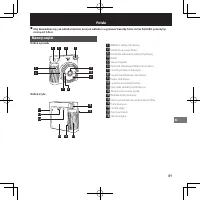
PL 89 Nazwy części Widok z przodu 3 56 1 2 4 7 8 9 10 11 Widok z tyłu 15 12 18 17 16 121314 1 Reflektor lampy błyskowej 2 Szczelina wysuwu filmu 3 Kontrolka ładowania lampy błyskowej 4 Wizjer 5 Spust migawki 6 Pierścień obiektywu/Włącznik zasilania 7 Czujnik pomiaru ekspozycji 8 Czujnik światła lamp...
Page 90 - Fotografowanie
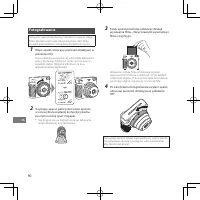
PL 90 Fotografowanie Tylną pokrywę można otworzyć dopiero po zużyciu całego filmu. W przeciwnym razie niewykorzystana część filmu zostanie prześwietlona i nie będzie już zdatna do użycia. 1 Włącz aparat, obracając pierścień obiektywu w położenie ON. Tubus obiektywu wysunie się, a kontrolka ładowania...
Page 91 - Robienie zdjęć w trybie autoportretów; Fotografowanie samego siebie
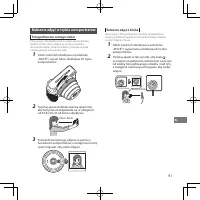
PL 91 Robienie zdjęć w trybie autoportretów Fotografowanie samego siebie Korzystając z fotografowania w trybie autoportretów, możesz zrobić sobie zdjęcie za pomocą lusterka do autoportretów umieszczonego z przodu aparatu i ułatwiającego ustawienie kadru. 1 Obróć pierścień obiektywu w położenie „SELF...
Page 92 - Środki ostrożności dotyczące trzymania aparatu
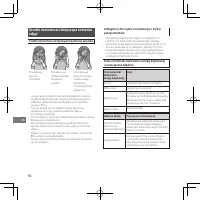
PL 92 Środki ostrożności dotyczące robienia zdjęć Środki ostrożności dotyczące trzymania aparatu Prawidłowy sposób trzymania Nie zakrywaj reflektora lampy błyskowej palcem Nie zakrywaj palcem czujnika światła lampy błyskowej i czujnika pomiaru ekspozycji • Uważaj, aby nie zasłonić palcem lub paskiem...
Page 94 - Obsługa; Obchodzenie się z aparatem
PL 94 Obsługa ■ Obchodzenie się z aparatem 1. Aparat jest precyzyjnym urządzeniem, dlatego nie mocz go, nie upuszczaj ani nie narażaj na wstrząsy i uderzenia. Poza tym nie umieszczaj aparatu w miejscach narażonych na działanie piasku. 2. Przed użyciem dostępnego w sprzedaży paska sprawdź jego wytrzy...
Page 96 - Dane techniczne; Informacje dotyczące identyfikacji w Europie
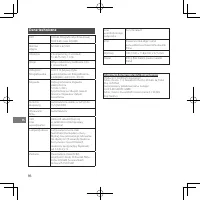
PL 96 Dane techniczne Film Film do fotografii natychmiastowej FUJIFILM instax SQUARE Rozmiar zdjęcia 62 mm × 62 mm Obiektyw 2 komponenty, 2 soczewki, f = 65,75 mm, 1:12,6 Wizjer Wizjer odwrócony Galileusza, 0,4×, z celownikiem Odległość fotografowania Od 0,3 m (używaj trybu autoportretów do fotograf...
Page 97 - Názvy částí; Přední strana; Česky
CS 97 Názvy částí Přední strana 3 56 1 2 4 7 8 9 10 11 Zadní strana 15 12 18 17 16 121314 1 Krycí sklíčko blesku 2 Výstupní štěrbina filmu 3 Kontrolka nabíjení blesku 4 Hledáček 5 Tlačítko spouště 6 Kroužek objektivu/Zapnutí 7 Světelné čidlo AE 8 Čidlo světla blesku 9 Tubus objektivu 10 Zrcátko pro ...
Page 98 - Fotografování
CS 98 Fotografování Neotvírejte zadní kryt, dokud nevypotřebujete celý film. V opačném případě bude zbytek filmu exponován, zbělá a nebude možné jej dále použít. 1 Fotoaparát zapnete otočením kroužku objektivu do pozice ON. Tubus objektivu se vysune, kontrolka nabíjení blesku bude blikat a poté se r...
Page 99 - Fotografování v režimu Selfie (autoportrét); Fotografování sebe sama; Detailní fotografování zblízka
CS 99 Fotografování v režimu Selfie (autoportrét) Fotografování sebe sama Pokud fotografujete v režimu selfie, můžete vyfotografovat sami sebe, přičemž kompozici snímku ověříte pomocí zrcátka pro autoportréty na přední straně fotoaparátu. 1 Pro aktivaci režimu selfie otočte kroužkem objektivu do poz...
Page 100 - Opatření a pokyny pro fotografování; Opatření a pokyny pro držení fotoaparátu; Stav kontrolky
CS 100 Opatření a pokyny pro fotografování Opatření a pokyny pro držení fotoaparátu Správný způsob držení Nezakrývejte krycí sklíčko blesku prstem. Nezakrývejte prstem čidlo světla blesku a světelné čidlo AE. • Dejte pozor na to, aby prst nebo popruh nezakrývaly čidlo světla blesku, světelné čidlo A...
Page 102 - Manipulace; Manipulace s fotoaparátem
CS 102 Manipulace ■ Manipulace s fotoaparátem 1. Fotoaparát je přesným nástrojem, proto jej nenamáčejte, nenechte jej spadnout ani jej nevystavujte nárazům. Rovněž neumisťujte fotoaparát tam, kde bude vystaven písku. 2. Před použitím komerčně dostupného popruhu zkontrolujte pevnost daného popruhu. P...
Page 104 - Technické údaje; Informace o sledovatelnosti v Evropě
CS 104 Technické údaje Film Instantní film FUJIFILM instax SQUARE Fotografický snímek Velikost 62 mm × 62 mm Objektiv 2 komponenty, 2 členy, f = 65,75 mm, 1:12,6 Hledáček Obrácený Galileův hledáček, 0,4×, s bodem pro cílení Rozsah fotografování 0,3 m a více (od 0,3 m do 0,5 m použijte režim selfie) ...
Page 105 - Názvy častí; Predná strana; Slovenčina; nájdete na stranách 3 až 6.
SK 105 Názvy častí Predná strana 3 56 1 2 4 7 8 9 10 11 Zadná strana 15 12 18 17 16 121314 1 Čelná plocha svetla blesku 2 Štrbina na vysúvanie fotografií 3 Kontrolka nabíjania blesku 4 Hľadáčik 5 Tlačidlo spúšte 6 Krúžok objektívu/Napájanie 7 Senzor svetla automatickej expozície 8 Senzor svetla bles...
Page 106 - Zhotovovanie snímok
SK 106 Zhotovovanie snímok Zadný kryt neotvárajte, kým neminiete všetok fotografický materiál. V opačnom prípade sa zvyšok fotografického materiálu exponuje, zafarbí na bielo a už ho nebudete môcť použiť. 1 Fotoaparát zapnete otočením krúžku objektívu do polohy ON. Hlaveň objektívu sa vysunie, indik...
Page 107 - Snímanie fotografií v režime autoportrétu; Snímanie autoportrétu; Zhotovovanie záberov zblízka
SK 107 Snímanie fotografií v režime autoportrétu Snímanie autoportrétu Ak snímate v režime autoportrétu, môžete zhotoviť snímku vlastnej osoby pomocou zrkadla na autoportrét na prednej strane fotoaparátu, aby ste overili svoju expozíciu. 1 Otočte krúžok objektívu do polohy SELFIE a vytiahnite objekt...
Page 108 - Opatrenia pri fotografovaní; Opatrenia pri držaní fotoaparátu; Stav indikátora
SK 108 Opatrenia pri fotografovaní Opatrenia pri držaní fotoaparátu Správny spôsob držania Blesk nezakrývajte prstom Senzor svetla blesku a senzor svetla automatickej expozície nezakrývajte prstom • Dávajte pozor, aby prst ani remienok nezakrývali senzor svetla blesku, senzor svetla automatickej exp...
Page 110 - Manipulácia; Manipulácia s fotoaparátom
SK 110 Manipulácia ■ Manipulácia s fotoaparátom 1. Fotoaparát je presný nástroj, preto nedovoľte, aby došlo k jeho namočeniu, pádu a ani ho nevystavujte nárazom. Fotoaparát neumiestňujte na miesta, kde by mohol byť vystavený piesku. 2. Pred použitím komerčne dostupného remienka skontrolujte jeho pev...
Page 112 - Informácie o možnosti vysledovania v Európe
SK 112 Technické údaje Fotografický materiál Fotografický materiál s okamžitým vyvolaním FUJIFILM instax SQUARE Veľkosť fotografie 62 mm × 62 mm Objektív 2 komponenty, 2 optické prvky, f = 65,75 mm, 1:12,6 Hľadáčik Opačný galileovský hľadáčik, 0,4×, s reguláciou cieľového bodu Rozsah snímania 0,3 m ...
Page 113 - Az egyes részek elnevezése; Eleje; Magyar
HU 113 Az egyes részek elnevezése Eleje 3 56 1 2 4 7 8 9 10 11 Hátulja 15 12 18 17 16 121314 1 Vakulámpa 2 Filmkiadó nyílás 3 Vakutöltő lámpa 4 Kereső 5 Exponáló gomb 6 Objektívgyűrű/Teljesítmény 7 AE fényérzékelő 8 Vaku fényérzékelő 9 Objektívtartó 10 Szelfi tükör 11 Védőfedél/Objektív 12 Szíjrögzí...
Page 114 - Fényképek készítése
HU 114 Fényképek készítése A hátsó fedelet a teljes filmcsomag felhasználása előtt nem szabad kinyitni. Ellenkező esetben a film megmaradt része fényt kap és fehér színűvé válik, és már nem használható fel. 1 Kapcsolja be a fényképezőgépet az objektívgyűrű ON állásba forgatásával. Az objektívtartó k...
Page 115 - Fényképezés szelfi módban; Önmaga fényképezése; Közeli felvétel készítése
HU 115 Fényképezés szelfi módban Önmaga fényképezése Amennyiben szelfi módban fényképez, a fényképezőgép elején található szelfi tükörrel hagyhatja jóvá az exponálást. 1 Forgassa az objektívgyűrűt SELFIE állásba, és húzza ki az objektívet szelfi módba. 2 Tartsa a fényképezőgépet stabilan két kézzel ...
Page 116 - A vakutöltő
HU 116 Óvintézkedések a fényképezéssel kapcsolatban Óvintézkedések a kamera tartását illetően Helyes tartás Ujjával ne takarja el a vakulámpát Ujjával ne takarja el a vaku fényérzékelőt és az AE fényérzékelőt • Ügyeljen arra, hogy ujja vagy a szíj ne takarja el a vaku fényérzékelőjét, az AE fényérzé...
Page 118 - Kezelés; A fényképezőgép kezelése
HU 118 Kezelés ■ A fényképezőgép kezelése 1. A fényképezőgép egy precíziós eszköz, ezért vigyázzon, hogy ne legyen vizes, ne ejtse le, és ne tegye ki ütésnek. Ne tegye a fényképezőgépet olyan helyen, ahol homoknak van kitéve. 2. A kereskedelmi forgalomban kapható szíj használata előtt, ellenőrizze a...
Page 120 - Műszaki adatok; Információk az európai jogszabályok szerint:
HU 120 Műszaki adatok Film FUJIFILM instax SQUARE instant film Fénykép Méret 62 mm × 62 mm Objektív 2 komponens, 2 elem, f = 65,75 mm, 1:12,6 Kereső Fordított Galilei-féle kereső, 0,4×, célponttal Fényképezési tartomány 0,3 m esetén és felette (szelfi mód használata 0,3 m és 0,5 m között) Exponálás ...
Page 121 - Назви деталей; Лицьовий бік; Українська
UK 121 Назви деталей Лицьовий бік 3 56 1 2 4 7 8 9 10 11 Тильний бік 15 12 18 17 16 121314 1 Лампа спалаху 2 Отвір для виводу фотознімка 3 Індикатор заряджання спалаху 4 Видошукач 5 Кнопка спуску затвора 6 Кільце об’єктива / Живлення 7 Світлочутливий датчик автоекспозиції 8 Світлочутливий датчик спа...
Page 122 - Фотозйомка
UK 122 Фотозйомка Не відкривайте задню кришку, поки не буде використано весь фотопапір. Інакше решта аркушів фотопаперу засвітяться і стануть білими, після чого будуть непридатними для використання. 1 Увімкніть фотокамеру, повернувши кільце об’єктива в положення ON. Оправа об’єктива висувається, інд...
Page 123 - Фотозйомка в режимі автопортрета; Зйомка автопортрета; Фотозйомка крупним планом
UK 123 Фотозйомка в режимі автопортрета Зйомка автопортрета У режимі автопортрета ви можете сфотографувати себе, використовуючи для перевірки кадру дзеркало для автопортрета, розташоване на передній панелі фотокамери. 1 Поверніть кільце об’єктива в положення SELFIE та витягніть об’єктив у режим авто...
Page 124 - Застереження щодо фотозйомки; Застереження щодо тримання фотокамери; Стан індикатора
UK 124 Застереження щодо фотозйомки Застереження щодо тримання фотокамери Правильний спосіб тримати фотокамеру Не закривайте лампу спалаху пальцем Не закривайте пальцем світлочутливі датчики спалаху й автоекспозиції • Слідкуйте за тим, щоб палець або ремінець не закривали світлочутливий датчик спала...
Page 126 - Поводження з виробом; Поводження з фотокамерою
UK 126 Поводження з виробом ■ Поводження з фотокамерою 1. Фотокамера є високоточним пристроєм, тому бережіть її від вологи, падіння й ударів. Також не залишайте фотокамеру в місцях, де на неї може попасти пісок. 2. Перш ніж використовувати ремінець, доступний у продажу, перевірте його міцність. Будь...
Page 128 - Технічні характеристики; Інформація для відстеження в Європі
UK 128 Технічні характеристики Фотопапір Фотопапір для миттєвого друку FUJIFILM instax SQUARE Розмір знімка 62 мм × 62 мм Об’єктив 2 компоненти, 2 елементи, f = 65,75 мм, 1:12,6 Видошукач Видошукач оберненої системи Галілея, 0,4×, з позначкою цілі Діапазон відстаней зйомки 0,3 м і більше (використов...