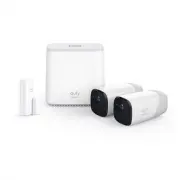
Table of Contents Connect the HomeBase to the Internet 02 Get the App and Setup the System 03 Find a Good Mounting Spot 04 Mounting the Camera Outdoors 06 Mounting the Camera Indoors 07 Charging eufyCam 08 Safety 09 Customer Service 11
Page 3 - Connect the HomeBase to the Internet; For HomeBase Installation:
01 02 Connect the HomeBase to the Internet 1. Power on the HomeBase, then use the ethernet cable provided to connect the HomeBase. 2. The LED indicator turns to white (this may take up to 1min) when HomeBase is ready for setup. HomeBase (T8001) eufyCam (T8111) Indoor Mount Outdoor Mount HomeBase Pow...
Page 4 - Find a Good Mounting Spot; Signal Strength; Get the App and Setup the System
03 04 Find a Good Mounting Spot Signal Strength Use the “Mounting Guide” function, found at the end of the setup process or under Camera Settings > Mounting Guide , to test the wireless signal strength of eufyCam at the location you wish to mount the camera. Move the camera as close to the HomeBa...
Page 5 - Mounting the Camera Outdoors; Height and Location
05 06 Mounting the Camera Outdoors Outdoor mount is designed specifically for outdoor environment. a Drill holes with a 15/64 in (6 mm) drill bit, then insert the anchors into the holes; anchors are necessary for walls that are made out of hard materials such as concrete, brick, or stucco. b Screw t...
Page 6 - Charging eufyCam; For troubleshooting, check Help on the eufy Security app.; Mounting the Camera Indoors
07 08 Charging eufyCam Fast charging (<4Hr) Normal charging Use the provided micro-USB charging cable to connect eufyCam to the camera charging port on the backside of the HomeBase. Charging a camera takes approximately 4 hours; it will take longer if you charge the camera via a universal 5V USB ...
Page 7 - Safety
10 09 A statement regarding the AC/DC adapter as disconnect device is missing in the user manual.The statement shall require a socket outlet that is installed near equipment and that shall be easily accessible. The adapter shall be installed near the equipment and shall be easily accessible. Do not ...
Page 8 - Customer Service; • Warranty; • Call Us
12 11 Customer Service • Warranty 12-month limited warranty • Call Us United States +1 (800) 988 7973 Mon-Fri 9AM-5PM (PT)United Kingdom +44 (0) 1604 936 200 Mon-Fri 6AM-11AM (GMT)Germany +49 (0) 69 9579 7960 Mon-Fri 6:00-11:00 • Email Us Customer Support: [email protected]