Page 2 - CONTENTS; Visit our website to:; WE’RE THINKING OF YOU; IMPORTANT INFORMATION THAT MAY IMPACT YOUR
............................................ 8 ................................. 9 2 www.electrolux.com CONTENTS 1.1 1.2 1.3 1.4 1.5 Conditions Of Use Child Safety General Safety Installation Use 1. SAFETY INFORMATION ....................... 4 ................................. 5 .......................
Page 4 - SAFETY INFORMATION; Conditions Of Use
4 www.electrolux.com SAFETY INFORMATION In the interest of your safety and to ensure the correct use, before installing and first using the appliance, read this user manual carefully, including its hints and warnings. This appliance is intended to be used in household and similar applications such a...
Page 8 - PRODUCT DESCRIPTION
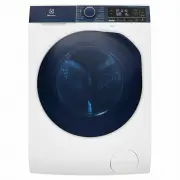
8 www.electrolux.com PRODUCT DESCRIPTION 2. Detergent/Softener Dispenser (see page 19) Cabinet Front Panel Door Drain Pump Filter (see page 30) Level Adjustment Feet (Front) 2.1 Parts Worktop Control Panel (see page 10) Level Adjustment Feet (Back) Water Inlet Hose (see page 42) Transit Bolts & ...
Page 10 - CONTROL PANEL; Control Panel Description
10 www.electrolux.com CONTROL PANEL 3. 3.1 Control Panel Description D E F G H I J K L N O P C B A M A) B) Spin Speed Program Phase Indication Icon: C) D) Delay Start Icon Temperature ( corresponds to cold wash) Ultramix Phase Wash Phase Rinse Phase Spin Phase E) F) G) H) I) J) K) L) M) N) O) P) Doo...
Page 12 - Woolmark Apparel Care - Blue; Program Options Compatibility
12 www.electrolux.com 1) Vapour option can be combined with temperature 40°C to 90°C only. 2) Do not select a spin speed LOWER than that proposed by the appliance to avoid a too long drying time so saving energy. In any case the reduction of the spin speed is only possible after selecting drying. 3)...
Page 13 - Wash/Dry Mode Touchpad; Temperature Touchpad
13 3.4 Options Wash/Dry Mode Touchpad This touchpad is used to select Program Mode of your machine. Program mode available are : Wash Only Mode (default) ● Wash and Dry Mode ● Dry Only Mode ● / Changing a running program mode is possible only by switching off the machine. Temperature Touchpad Press ...
Page 14 - Prewash Touchpad; Delay Start Touchpad
14 www.electrolux.com Prewash Touchpad Select this option if you wish your laundry to be pre-washed before the main wash. Use this option for heavy soil. The indicator of this option will be on. Select this option to add approximately 30 minutes of tumbling in vapour during the wash cycle. Vapour he...
Page 15 - Dryness Level Touchpad
15 At the end of the program the appliance performs the anti-crease phase for approximately 10 minutes. During this time, the display will show time remaining “ ” and door is locked “ ”. Dryness Level Touchpad Press this touchpad to set dryness level using auto sensing feature. The display will show...
Page 17 - Buzzer
17 To deactivate the function, press and hold “Prewash” touchpad about 2 seconds until the display shows the icon “ ”. Save Favourite ( ) Program 3.5 Settings This setting permits you to either enable or disable the buzzer at the end of the program. As an example, you might wish to disable this buzz...
Page 18 - BEFORE FIRST USE
18 www.electrolux.com BEFORE FIRST USE 4. Ensure that the electrical and water connections comply with the installation instructions. Put 2 litres of water in the detergent compartment for washing phase. This activates the drain system. 1. 2. 3. Select a Cottons cycle at 90 °C, without any laundry i...
Page 19 - Loading The Laundry; Using Detergent And
19 ● ● DAILY USE - WASHING (Only) 5. Press the On/Off button to turn on the Wahser-Dryer. Turn the knob to set a program. The Wahser-Dryer will propose a temperature and automati- cally select the spin value provided for the program you have chosen. Check and remove objects (if there are any) that c...
Page 22 - When The Washing; At The End Of The Program
Alternatively , before pressing the “Start/Pause” touchpad, you can press the “Spin ” touchpad to change the spin speed. You can select “No Spin ( )”, if you want the machine to only drain the water. 22 www.electrolux.com When the program is completed and the door lock indicator “ ” goes off, you ca...
Page 23 - Washing Program + “Dryness Level” Option
If a program is not compatible with the drying option selected, the symbol “ ” will flash on display. After anti-crease phase finish, the door lock indicator “ ” goes off. The display will show “ ”. The display will show “ ” and “Anti Crease ( )” icon is lit.The door lock indicator “ ” is still on.T...
Page 24 - Washing Program + “Time Dry ” Option
24 www.electrolux.com ● ● ● ● NOTE Load the laundry and add detergent and fabric softener. Make sure the load size does not exceed the maximum drying capacity of the machine. 1. Turn the knob to set a wash program which can select drying option (refer to Program Chart on page 11), according to your ...
Page 25 - WASHING HINTS; Sorting The Laundry; Before Loading The
25 WASHING HINTS 8. Follow the wash code symbols on each garment label and the manufacturer’s washing instructions. Sort the laundry as follows: whites, coloureds, synthetics, delicates, woollens. 8.1 Sorting The Laundry 8.2 Temperatures 90°C Temp Soil level 60°C 50°C 40°C 30°C Cold For normally soi...
Page 26 - Quantity of detergent to be used
26 www.electrolux.com Oil based paint : moisten with benzine stain remover, lay the garment on a soft cloth and dab the stain; treat several times. Dried grease stains : moisten with turpentine, lay the garment on a soft surface and dab the stain with the fingertips and a cotton cloth. Rust : oxalic...
Page 27 - DRYING HINTS; Preparing The Drying Cycle
27 DRYING HINTS 9. the washload to turn grey, greasy clothes. oversudsing, inadequate rinsing. reduced washing effect, Not enough detergent causes: Too much detergent causes: you are washing a small load, large amounts of foam during washing. the laundry is lightly soiled, Use less detergent if: As ...
Page 28 - INTERNATIONAL WASH CODE SYMBOLS; Additional Drying
28 www.electrolux.com 10. INTERNATIONAL WASH CODE SYMBOLS These symbols appear on fabric labels, in order to help you choose the best way to treat your laundry. Bleach in cold water DO NOT bleach Bleaching Hand wash Max. wash temperature 95 °C Hot iron max. 200 °C Dry cleaning in all solvents Dry cl...
Page 29 - CARE AND CLEANING; External Cleaning
29 CARE AND CLEANING 11. You must DISCONNECT the appliance from the electricity supply, before you can carry out any cleaning or maintenance work. The water we use normally contains lime. It is a good idea to periodically use a water softening powder in the machine. Clean the appliance only with soa...
Page 33 - Emergency Drain; Frost Precautions
33 If the appliance is installed in an area where the temperature can be less than 0 °C, remove the remaining water from the inlet hose and the drain pump. Emergency Drain 11.9 Frost Precautions Disconnect the main plug from the main socket. Turn off the water tap. 1. 2. Remove the water inlet hose....
Page 34 - Possible Failures; TROUBLESHOOTING
34 www.electrolux.com 12.1 Possible Failures 12. TROUBLESHOOTING Certain problems are due to lack of simple maintenance or oversights, which can be solved easily without calling out an engineer. Before contacting your local Service Centre, please check troubleshooting.Once the problem has been elimi...
Page 38 - Emergency Door Opening
38 www.electrolux.com In case of power failure or appliance failure, the appliance door remains locked. The wash program continues when power is restored. If the door remains locked in case of failure, it is possible to open it using the emergency unlock feature. Before opening the door: 12.2 Emerge...
Page 44 - ENVIRONMENT CONCERNS; Electrical Connection
44 www.electrolux.com The materials marked with the symbol are recyclable. >PE<=polyethylene >PS<=polystyrene >PP<=polypropyleneThis means that they can be recycled by disposing them properly in appropriate collection containers. To save water, energy and to help protect the enviro...
Page 45 - WI-FI CONNECTIVITY SETUP; Installing and configuring
45 WI-FI CONNECTIVITY SETUP 16. This chapter describes how to connect the smart appliance to the Wi-Fi network and to link it to a mobile devices.By this functionality you can monitor and control your laundry appliance from your mobile devices. By this functionality you can receive notifications, mo...
Page 46 - Remote Start; Activate Remote Start
46 www.electrolux.com You’ll need to select your Wi-Fi network name and input your password. Please proceed to the next screen to register the Washer-Dryer. To switch the wireless connection off, Connection success! Now you’re all set up. You can start exploring the Electrolux Life App. Congratulati...