Page 3 - CONTENTS
D-Link DGS-1005D Unmanaged Gigabit Ethernet Switch iii CONTENTS INTRODUCTION ..................................................................................................................................................................1 E THERNET T ECHNOLOGY ........................................
Page 4 - Preface; Intended Readers
D-Link DGS-1005D Unmanaged Gigabit Ethernet Switch iv Preface The DGS-1005D Manual is divided into sections that describe the system installation and operating instructions with examples. Section 1, Introduction - A description of the physical features of the Switch, including LED indicators, ports ...
Page 5 - Safety Instructions; Safety Cautions
D-Link DGS-1005D Unmanaged Gigabit Ethernet Switch v Safety Instructions Use the following safety guidelines to ensure your own personal safety and to help protect your system from potential damage. Throughout this safety section, the caution icon ( ) is used to indicate cautions and precautions tha...
Page 6 - General Precautions for Rack-Mountable Products
D-Link DGS-1005D Unmanaged Gigabit Ethernet Switch vi When connecting or disconnecting power to hot-pluggable power supplies, if offered with your system, observe the following guidelines: – Install the power supply before connecting the power cable to the power supply. – Unplug the power cable be...
Page 7 - Protecting Against Electrostatic Discharge
D-Link DGS-1005D Unmanaged Gigabit Ethernet Switch vii Protecting Against Electrostatic Discharge Static electricity can harm delicate components inside your system. To prevent static damage, discharge static electricity from your body before you touch any of the electronic components, such as the m...
Page 8 - SECTION 1; Introduction; Ethernet Technology; Fast Ethernet Technology
D-Link DGS-1005D Unmanaged Gigabit Ethernet Switch SECTION 1 Introduction Ethernet Technology 802.1p and QoS D-Link’s Green Technology Switch Description Features Ports Front-Panel Components Ethernet Technology Fast Ethernet Technology The growing importance of LANs and the increasing complexity of...
Page 9 - Understanding QoS; D-Link’s Green Technology
D-Link DGS-1005D Unmanaged Gigabit Ethernet Switch Mapping QoS on the Switch The picture above shows the default priority setting for the Switch. Class-3 has the highest priority of the four priority queues on the Switch. In order to implement QoS, the user is required to instruct the Switch to exam...
Page 10 - Switch Description; Features; Front-Panel Components
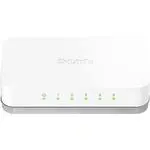
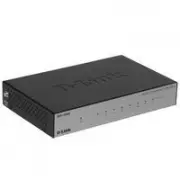
D-Link DGS-1005D Unmanaged Gigabit Ethernet Switch segments (ports). This allows the total network capacity to be multiplied, while still maintaining the same network cabling and adapter cards. For Fast Ethernet or Gigabit Ethernet networks, a Switch is an effective way of eliminating problems of ch...
Page 11 - LED Indicators
D-Link DGS-1005D Unmanaged Gigabit Ethernet Switch LED Indicators The LED indicators of the Switch include Power, and Link/Act/Speed. The following shows the LED indicators for the Switch along with an explanation of each indicator. Figure 1-2. LED Indicators Comprehensive LED indicators display the...
Page 12 - Rear Panel Description
D-Link DGS-1005D Unmanaged Gigabit Ethernet Switch Rear Panel Description DC Power Jack: Power is supplied through an external AC power adapter. Check the technical specification section for information about the AC power input voltage. Figure 1-3. Rear panel view of the Switch 10/100/1000BASE-T Por...
Page 13 - SECTION 2; Installation; Package Contents; Before You Connect to the Network
D-Link DGS-1005D Unmanaged Gigabit Ethernet Switch SECTION 2 Installation Package Contents Before You Connect to the Network Installing the Switch Power On Package Contents Open the shipping carton of the Switch and carefully unpack its contents. The carton should contain the following items: One ...
Page 14 - Mounting the Switch on a Wall; Power On; Power Failure
D-Link DGS-1005D Unmanaged Gigabit Ethernet Switch Mounting the Switch on a Wall The DGS-1005D can also be mounted on a wall. Two mounting slots are provided on the bottom of the switch for this purpose. Please make sure that the front panel is exposed in order to view the LEDs. Please refer to the ...
Page 15 - Section 3; Connecting The Switch; Switch To End Node; Switch to Hub or Switch
D-Link DGS-1005D Unmanaged Gigabit Ethernet Switch Section 3 Connecting The Switch Switch To End Node Switch To Hub or Switch Connecting To a Server Switch To End Node End nodes include PCs outfitted with a 10, 100, or 1000 Mbps RJ-45 Ethernet/Fast Ethernet Network Interface Card (NIC) and most rout...
Page 16 - Connecting To Network Backbone or Server
D-Link DGS-1005D Unmanaged Gigabit Ethernet Switch Figure 3-2. Switch connected to a port on a hub or switch using either a straight or crossover cable–any standard Ethernet cable is fine Connecting To Network Backbone or Server Any of the five Gigabit Ethernet ports are ideal for uplinking to a net...
Page 17 - Appendix A; Technical Specifications; General; Physical and Environmental
D-Link DGS-1005D Unmanaged Gigabit Ethernet Switch Appendix A Technical Specifications General Standards: IEEE 802.3ab 1000BASE-T IEEE 802.3u 100BASE-TX IEEE 802.3 10BASE-T IEEE 802.3x Flow Control IEEE 802.1p priority Queues Protocol: CSMA/CD Data Transfer Rate: 10Mbps (Half-duplex) Ethernet: 20Mbp...
Page 19 - Glossary
D-Link DGS-1005D Unmanaged Gigabit Ethernet Switch Glossary 1000BASE-SX – A short laser wavelength on multimode fiber optic cable for a maximum length of 550 meters. 1000BASE-LX – A long wavelength for a "long haul" fiber optic cable for a maximum length of 10 kilometers. 100BASE-FX – 100Mbp...