Page 3 - Thanks for purchasing COMICA STA-U1
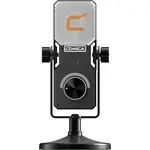
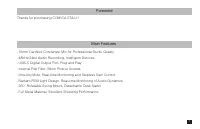
Foreword Main Features Thanks for purchasing COMICA STA-U1 . 16mm Cardioid Condenser Mic for Professional Studio Quality. 48kHz/24bit Audio Recording, Intelligent Denoise. USB-C Digital Output Port, Plug and Play. Internal Pop Filter, Block Plosive Sounds. One-key Mute, Real-time Monitoring and Step...
Page 4 - Tips; When used in computer, please follow the steps below:; Sound; Notice
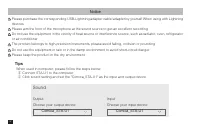
Tips When used in computer, please follow the steps below: ① Connect STA-U1 to the computer ② Click sound setting and set the "Comica_STA-U1" as the input and output device Sound OutputChoose your output device Comica_STA-U1 InputChoose your input device Comica_STA-U1 Notice Please purchase ...
Page 5 - Packing List; Microphone
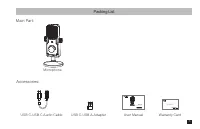
Packing List Microphone Main Part: Accessories: USB C-USB C Audio Cable USB C-USB A Adapter User Manual Warranty Card User Manual STA-U1 Cardioid Condenser USB Microphone 3
Page 7 - Work with the Round Base
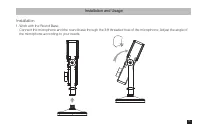
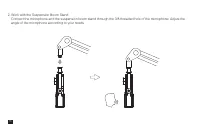
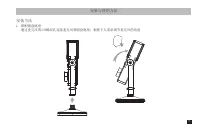
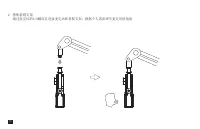
Installation and Usage Installation 1. Work with the Round Base Connect the microphone and the round base through the 3/8 threaded hole of the microphone; Adjust the angle of the microphone according to your needs 5
Page 9 - Usage
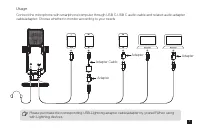
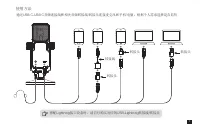
Usage Please purchase the corresponding USB-Lightning adapter cable/adapter by yourself When using with Lightning devices Connect the microphone with smartphone/computer through USB C-USB C audio cable and related audio adapter cable/adapter; Choose whether to monitor according to your needs Adapter...
Page 10 - Specifications
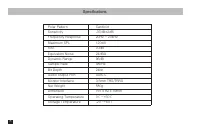
Specifications Polar PatternSensitivityFrequency ResponseMaximum SPLS/NEquivalent NoiseDynamic RangeSample RateBit DepthAudio Output PortMonitor InterfaceNet WeightDimensionOperating TemperatureStorage Temperature Cardioid-37dB±2dB20Hz ~ 20kHz120dB70dB24dBA96dB48kHz24bitUSB-C3.5mm TRS/TRRS580g191 x ...
Page 13 - 感谢您购买科唛
前言 产品主要功能 感谢您购买科唛 STA-U1 . 16mm 心型电容咪头,专业棚级音质 . 48kHz/24bit 录音,智能降噪 . USB-C 数字输出口,即插即用 . 内置防喷罩,有效滤除杂音 . 一键静音、实时监听、无级增益可调等多功能 . 独特 RGB 灯效设计,实时监测音频动态及增益范围 . 360° 可旋转,底座可拆卸 . 全金属材质,优异屏蔽性能 1
Page 14 - 提示; 声音; 注意事项; Lightning
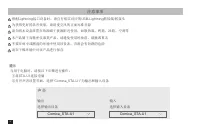
提示 当用于电脑时,请按以下步骤进行操作: ①将 STA-U1 连接电脑 ②打开声音设置界面,选择 “Comica_STA-U1” 为输出和输入设备 声音 输出 选择输出设备 Comica_STA-U1 输入 选择输入设备 Comica_STA-U1 注意事项 搭配 Lightning 接口设备时,请自行购买对应的 USB-Lightning 转接线 / 转接头 为获得更好的录音效果,请将麦克风的正面对准音源 请勿将本设备放置在热源或干扰源附近使用,如散热器、烤箱、冰箱、空调等 本产品属于高精密仪器类产品,请避免使用时掉落、碰撞或重击 不要在雨中或潮湿的环境中使用该设备,否则会有短路的危险 请...
Page 15 - 包装清单; 麦克风; 主体; 音频连接线
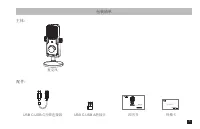
包装清单 麦克风 主体 : 配件 : USB C-USB C 音频连接线 USB C-USB A 转接头 说明书 保修卡 User Manual STA-U1 Cardioid Condenser USB Microphone 3
Page 16 - 部件介绍及说明; 短按切换静音正常录制亮蓝灯静音亮红灯
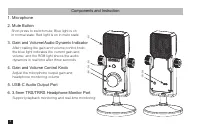
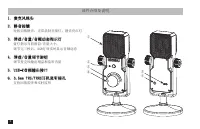
① ②③④ ⑤⑥ 部件介绍及说明 1. 麦克风咪头 2. 静音按键 短按切换静音;正常录制亮蓝灯;静音亮红灯 3. 增益/音量/音频动态指示灯 蓝灯指示当前增益/音量大小;调节完三秒后,RGB灯效实时显示音频动态 4. 增益/音量调节旋钮 调节麦克风输出增益和监听音量 5. USB-C音频输出接口 6. 3.5mm TRS/TRRS耳机监听插孔 支持回放监听和实时监听 4
Page 19 - 使用方法
使用方法 搭配 Lightning 接口设备时,请自行购买对应的 USB-Lightning 转接线 / 转接头 通过 USB C-USB C 音频连接线和相关音频转接线 / 转接头连接麦克风和手机 / 电脑;根据个人需求选择是否监听 转接线 转接头 转接头 转接头 7
Page 20 - 技术规格; 心型指向
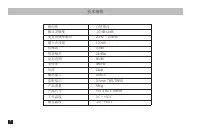
技术规格 指向性 咪头灵敏度 麦克风频率响应 最大声压级 信噪比 等效噪声 动态范围 采样率 位深 输出接口 监听接口 产品重量 产品尺寸 工作温度 储存温度 心型指向 -37dB±2dB20Hz ~ 20kHz120dB70dB24dBA96dB48kHz24bitUSB-C3.5mm TRS/TRRS580g191 x 82 x 39mm0 ℃ ~+50 ℃ -20 ~+60 ℃ 8